
A PyDev debugger client inside GIMP
Old README.md
Getting a minimal setup to develop code
Having an IPython terminal is an advantatge over Python, because we have some extra instructions and access to shell, using !. However, what
we really want is to be able to run code externally from GIMP, to be able to rapidly prototype code, specially in Python. A possible solution
could be use a PyDev server - client scheme. PyDev was originally developed to be used inside Eclipse, but also PyCharm
has a port of its own. Where PyCharm or the IDE will act as a server for debugging and the app will act a client of that debugger.
So, let's do that. In PyCharm go to Edit Configurations ... > + > Python Debug Server, there you will see the instructions to run this scheme
in a Python project. Mines are:
- Install pydevd-pycharm corresponding to a current PyCharm version:
pip install pydevd-pycharm~=203.7148.72
- Run this two lines inside your application (a.k.a GIMP):
import pydevd_pycharm
pydevd_pycharm.settrace('localhost', port=9000, stdoutToServer=True, stderrToServer=True)
If you try this two lines inside the plug-in Python Console you will end with the same problem than IPython, these two solutions rely on
sys.stdout and sys.stderr, but we are not giving up. So the main idea is to execute those two lines. So easy, let's hack into the plug-in
files and put them. However, for the sake of the demo, let's use an even simpler plug-in, there is a bright new plug-ins templates for
several languages in a new location Filters > Development > Goat Exercices > Excercise a goat and a python. Which file is located (from
the sandbox point of view) at /app/lib/gimp/2.99/extensions/org.gimp.extension.goat-exercises/goat-exercise-py3.py and from
the host point of view (and the editable one) at ~/.local/share/flatpak/app/org.gimp.GIMP/lib/gimp/2.99/extensions/org.gimp.extension.goat-exercises/goat-exercise-py3.py
This plug-in is a simple plug-in where the current loaded GIMP image (thus you need one opened), is color inverted. We are going to hook to our server using this plug-in.
We can define a function to wrap the trace:
def set_trace(): return pydevd_pycharm.settrace('localhost', port=9000, stdoutToServer=True, stderrToServer=True)
So the question to ask now is where the hell I put this call. Obviously you want it to run when the plug-in starts, there is a line where the main method is defined:
def run(self, procedure, run_mode, image, drawable, args, run_data):
One can add the set_trace() call just there, however we will not know if it is actually running, and what is worse, we will freeze GIMP! So,
we need one last leap of faith and multiprocessing, more multiprocessing than faith. So, we have to add this import:
import multiprocessing as mp
And just before the while (True) loop begins, we can add:
th = mp.Process(target=set_trace)
th.start()
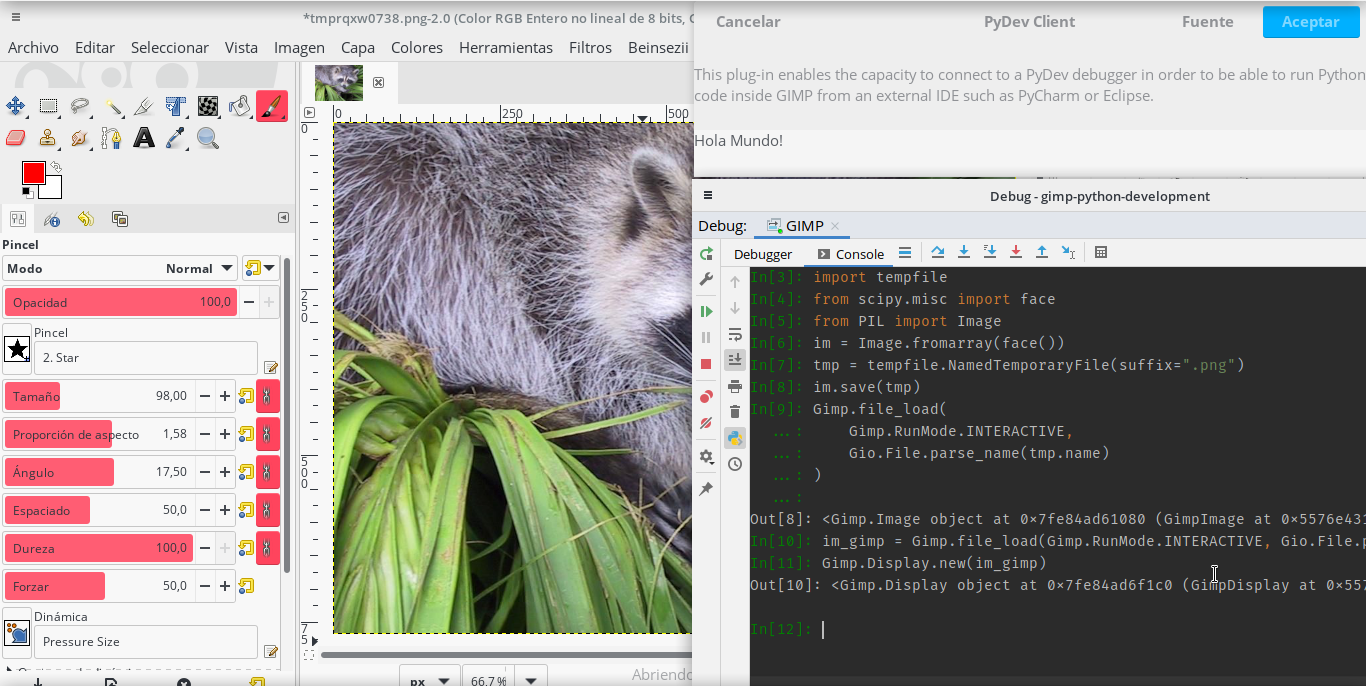
Before any return, this should be called th.terminate() to avoid another freeze. And it works! We are providing an isolated Python terminal
to the debugger, which is running inside GIMP process, so it has access to GIMP bindings. My case:
Modify the file
There is a modified version of the plug-in in the repo, you can use it to copy it to the app folder. However, notice that you need to use you actual environment and not the Sandbox, so, assuming that you are in the repo's root folder:
$ cp plug-ins/pydev/goat-exercise-py3.py ~/.local/share/flatpak/app/org.gimp.GIMP/current/active/files/lib/gimp/2.99/extensions/org.gimp.extension.goat-exercises
Update: first version of PyDev plugin
To enable it, just declare in GIMP plugin paths your path to plug-ins folder of this repo. The
way to do so is in Edit > Preferences > Folders > Scripts. The reboot GIMP and look if there is a
new item under Filers > Development > Python > PyDev Client. Also notice you will need to install
the plugin dependencies in the Python environment GIMP is using, in my case the Sandbox one, check previous
sections of this readme. Before, launching the plug-in you should have started the PyDev server inside PyCharm.
Then you can run Python code directly from PyCharm, happy hacking.
1 maintainer

Release files for gimp-pydev-pycharm 0.2.4
For a detailed explanation of source distributions (sdists) and built distributions (wheels), please see the package formats documentation.
Source distribution (sdist)
| File | Size | Uploaded | |
|---|---|---|---|
| gimp-pydev-pycharm-0.2.4.tar.gz | 6.3 kB | Details |
Release files / gimp-pydev-pycharm-0.2.4.tar.gz
| Download URL | gimp-pydev-pycharm-0.2.4.tar.gz |
|---|---|
| Size | 6.3 kB |
| Tags | Source |
|
SHA-256 checksum How to use checksums |
d3081a1dadc022617ce6928c919141f185f459f99a9327444536c2ba3d436306
|
|
BLAKE2b-256 checksum How to use checksums |
bf1917d10375d285f783c313a113921b431f19e1c41cba283dea0dffb29bc027
|
| Upload date | |
|
Uploaded using Trusted Publishing? What is trusted publishing? |
No |
| Uploaded via |
twine/3.4.1 importlib_metadata/4.3.1 pkginfo/1.7.0 requests/2.25.1 requests-toolbelt/0.9.1 tqdm/4.61.0 CPython/3.8.6
|














