
githubsecrets


Manage your GitHub Actions secrets, with a simple CLI
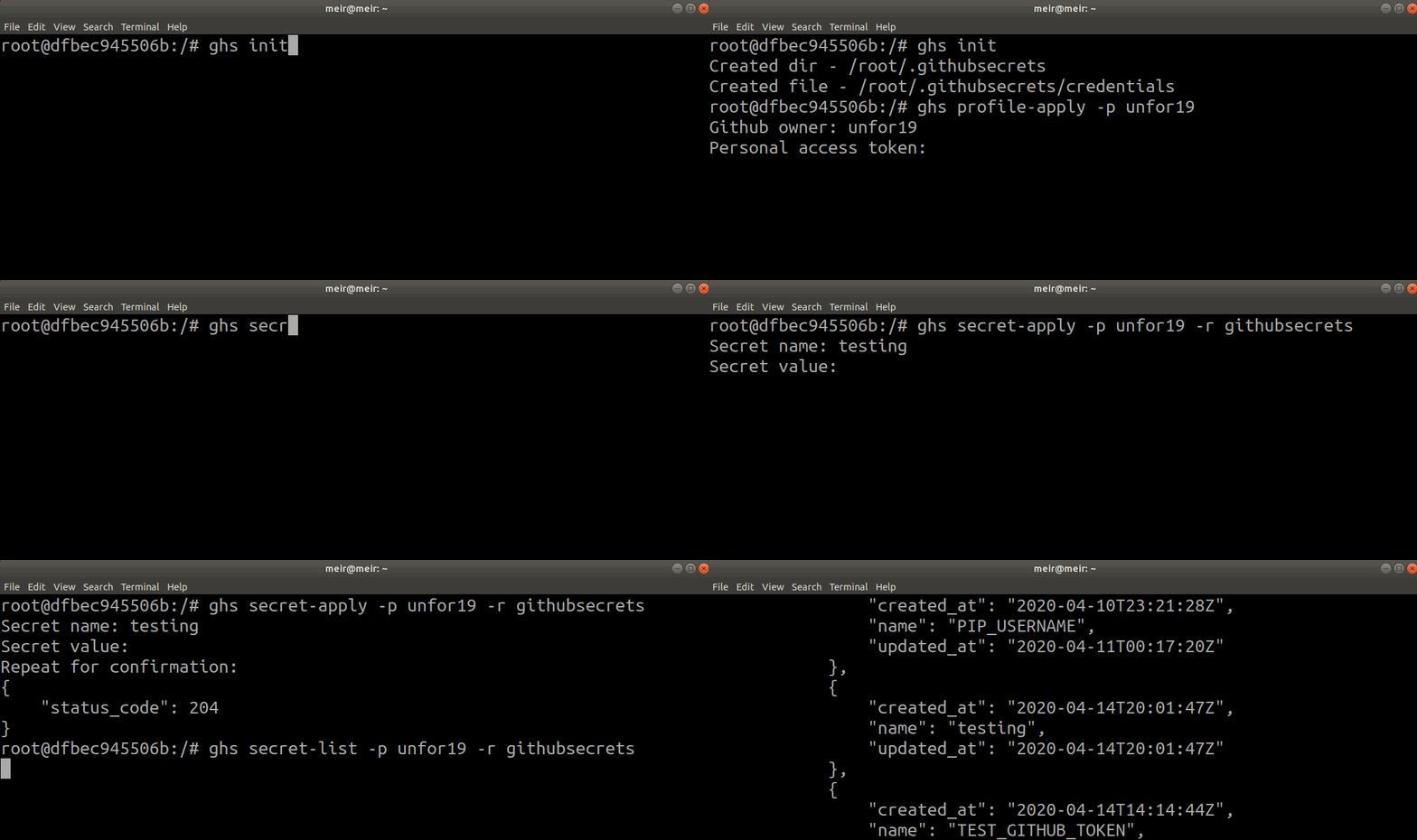
GIF Demo
Installation
pip
Python v3.6.7 and above
Install with pip on your machine; the package is available at PyPi
$ pip install githubsecrets
From source
Python v3.6.7 and above
- Clone this repository
- Run the
githubsecretsmodule (directory)python -m githubsecrets --help
Docker
Expand/Collapse
Mount a local directory to root, the image is available at DockerHub
Linux and macOS
Mount your home directory, or any other directory to save the credentials file
$ docker run --rm -it -v "${HOME}/:/root" unfor19/githubsecrets secret-list -p unfor19 -r githubsecrets
... # Output below
Output
[
  {
    "base_url": "https://api.github.com/repos/unfor19/githubsecrets",
    "body": {
      "secrets": [
        {
          "created_at": "2020-04-11T00:01:12Z",
          "name": "PIP_PASSWORD",
          "updated_at": "2020-04-11T00:17:39Z"
        },
        {
          "created_at": "2020-04-10T23:21:28Z",
          "name": "PIP_USERNAME",
          "updated_at": "2020-04-11T00:17:20Z"
        },
        {
          "created_at": "2020-04-27T20:44:09Z",
          "name": "testing",
          "updated_at": "2020-04-27T20:45:43Z"
        },
        {
          "created_at": "2020-04-27T20:22:37Z",
          "name": "testrepos",
          "updated_at": "2020-04-27T20:22:37Z"
        },
        {
          "created_at": "2020-04-14T14:14:44Z",
          "name": "TEST_GITHUB_TOKEN",
          "updated_at": "2020-04-14T14:14:44Z"
        }
      ],
      "total_count": 5
    },
    "repository": "githubsecrets",
    "status_code": 200
  }
]
Windows
Mount your Temp directory, or any other directory to save the credentials file. Make sure you use / and not \
$ docker run --rm -it -v c:/Temp:/root unfor19/githubsecrets secret-delete -p unfor19 -r githubsecrets -s testrepos
... # Output below
Output
[
  {
    "base_url": "https://api.github.com/repos/unfor19/githubsecrets",
    "repository": "githubsecrets",
    "secret_name": "testrepos",
    "status_code": 204
  }
]
Getting Started
Note: When using Docker, no need to add ghs; supply only a command and its arguments
-
Initialize this application - Creates a credentials file at
~/.githubsecrets/credentials$ ghs init
-
Generate a GitHub Personal-Access-Token with the following permssions:
- repo (all)
- admin:public_key > read:public_key
-
Save the token in a safe place; we'll use it in the next step
-
Create a profile, use the
-pflag and supply a profile name$ ghs profile-apply -p willy_wonka ... SUCCESS: Applied the profile willy_wonka
You'll be prompted to insert:
- Github owner - which is your GitHub Organization or GitHub Account name (not email address)
- Personal access token - that you've created in the previous steps
-
Create a GitHub secret, use the
-rflag and supply the repository's name. You can apply the same secret to multiple repositories at once, for example:-r "githubsecrets, aws-build-badges"ghs secret-apply -p willy_wonka -r githubsecrets
You'll be prompted to insert:
- Secret name
- Secret value
-
Use it in your GitHub Actions Workflows
- Snippet
steps: - uses: actions/checkout@v2 - name: Set up Python uses: actions/setup-python@v1 with: python-version: "3.6" - name: Install dependencies run: | ... - name: Build and publish env: TWINE_USERNAME: ${{ secrets.PIP_USERNAME }} TWINE_PASSWORD: ${{ secrets.PIP_PASSWORD }} ... run: | ... - I'm using secrets in this repository, check out this repository's workflows
- Snippet
Status codes
- 200 - success
- 204 - success
- 404 - secret or repository not found
Available commands
View all available commands with ghs --help
Usage: ghs [OPTIONS] COMMAND [ARGS]...

  All commands can run without providing options, and then you'll be
  prompted to insert values.

  Secrets' values and Personal-Access-Tokens are hidden when prompted

Options:
  -ci, --ci  Use this flag to avoid deletion confirmation prompts
  --help     Show this message and exit.

Commands:
  init            Create a credentials file to store your profiles
  profile-apply   Create or modify multiple profiles providing a string...
  profile-delete  Delete multiple profiles providing a string delimited by...
  profile-list    List all profile - truncates personal access tokens
  secret-apply    Apply to multiple repositories providing a string...
  secret-delete   Delete secrets from multiple repositories providing a...
  secret-get      Get secrets from multiple repositories providing a string...
  secret-list     List secrets of multiple repositories providing a string...
Troubleshooting
Ubuntu and Debian
This project uses the keyring package, in some versions of Ubuntu and Debian, you might need to install the following packages
$ sudo apt-get update && sudo apt-get install -y libdbus-glib-1-dev
$ pip install secretstorage dbus-python keyring
Contributing
Report issues/questions/feature requests on the Issues section.
Pull requests are welcome! Ideally, create a feature branch and issue for every single change you make. These are the steps:
- Fork this repo
- Create your feature branch from master (
git checkout -b my-new-feature) - Install from source
 $ git clone https://github.com/${GITHUB_OWNER}/githubsecrets.git && cd githubsecrets
 ...
 $ pip install --upgrade pip
 ...
 $ python -m venv ./ENV
 $ . ./ENV/bin/activate
 ...
 $ (ENV) pip install --editable .
 ...
 # Done! Now when you run 'ghs' it will get automatically updated when you modify the code
- Add the code of your new feature
- Test - generate a Personal Access Token for testing
$ (ENV) bash test_functionality.sh -p PROFILE_NAME -o GITHUB_OWNER -t TEST_GITHUB_TOKEN -r GITHUB_REPOSITORY
... # All good? Move on to the next step
- Commit your remarkable changes (
git commit -am 'Added new feature') - Push to the branch (
git push --set-up-stream origin my-new-feature) - Create a new Pull Request and tell us about your changes
Authors
Created and maintained by Meir Gabay
Design by facebook.com/KerenOrDesign
License
This project is licensed under the MIT License - see the LICENSE file for details
1 maintainer

Metadata
1 maintainer
Release files for githubsecrets 1.0.8
For a detailed explanation of source distributions (sdists) and built distributions (wheels), please see the package formats documentation.
Source distribution (sdist)
| File | Size | Uploaded | |
|---|---|---|---|
| githubsecrets-1.0.8.tar.gz | 11.0 kB | Details |
Built distribution (wheel)
| File | Interpreter | ABI | Platform | Reset |
|---|---|---|---|---|
| githubsecrets-1.0.8-py3-none-any.whl | Python 3 | none | any | Details |
Total release size: 22.2 kB
Release files / githubsecrets-1.0.8.tar.gz
| Download URL | githubsecrets-1.0.8.tar.gz |
|---|---|
| Size | 11.0 kB |
| Tags | Source |
|
SHA-256 checksum How to use checksums |
a6ceac3a78985c31e483bd12019136477104456f6bf66b710549ef8990528a61
|
|
BLAKE2b-256 checksum How to use checksums |
6f4dc508e5a4a71c178aaa3174b21d65a947ed4b7eae210a5790c9be70d61ffc
|
| Upload date | |
|
Uploaded using Trusted Publishing? What is trusted publishing? |
No |
| Uploaded via |
twine/3.1.1 pkginfo/1.6.1 requests/2.24.0 setuptools/44.1.0 requests-toolbelt/0.9.1 tqdm/4.51.0 CPython/3.6.12
|
Release files / githubsecrets-1.0.8-py3-none-any.whl
| Download URL | githubsecrets-1.0.8-py3-none-any.whl |
|---|---|
| Size | 11.2 kB |
| Tags | Python 3 |
|
SHA-256 checksum How to use checksums |
43bc2468707624bc76d2f6ece9a402b994338651c98d17994924907676867ec4
|
|
BLAKE2b-256 checksum How to use checksums |
90df584c3efa33b98ff398fec28dc54109ffcd1471565bfcbabddd949257c0e8
|
| Upload date | |
|
Uploaded using Trusted Publishing? What is trusted publishing? |
No |
| Uploaded via |
twine/3.1.1 pkginfo/1.6.1 requests/2.24.0 setuptools/44.1.0 requests-toolbelt/0.9.1 tqdm/4.51.0 CPython/3.6.12
|














