


GitLab CI is nice, but I miss build time trends graphs from Jenkins. So here’s a script that can at least compute some summary information:
$ gitlab-jobs --csv jobs.csv
Last 20 successful pipelines of myproject master:
  ...

Summary:
  build_client      min  4.2m, max  7.6m, avg  5.8m, median  5.7m, stdev  1.0m
  build_docker      min  2.7m, max 11.6m, avg  3.5m, median  3.0m, stdev  1.9m
  build_server      min  6.6m, max 12.2m, avg  8.9m, median  8.1m, stdev  1.9m
  test_robot        min 25.4m, max 38.3m, avg 30.0m, median 29.1m, stdev  3.6m
  unittests_client  min  1.1m, max  7.9m, avg  4.1m, median  4.6m, stdev  2.5m
  unittests_server  min  3.5m, max  6.3m, avg  4.9m, median  5.1m, stdev  0.9m
  overall           min 37.4m, max 55.8m, avg 45.6m, median 45.6m, stdev  3.8m

Writing jobs.csv...
You can then import the CSV file into a spreadsheet and produce nice charts like
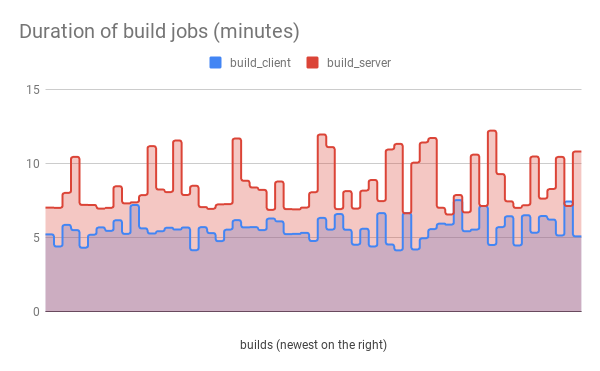
(NB: this chart has the X axis flipped and the Y axis scaled, because that makes more sense to me. The CSV data contains durations in seconds, newest first.)
Installation
pip3 install --user gitlab-jobs should take care of everything, just make sure ~/.local/bin is on your $PATH.
Or you may want to use a script installer like pipx (my favourite).
Configuration
Create a ~/.python-gitlab.cfg like this:
[global]
default = mygitlab

[mygitlab]
url = https://gitlab.example.com/
private_token = ...
You can create a private access token in your GitLab profile settings. It’ll need the “read_api” access scope.
Usage
You’ll need a GitLab project ID. By default gitlab-jobs tries to guess it from the ‘origin’ git remote URL, if you’re running it inside a git checkout. Otherwise you’ll have to specify it (either as a number like 1234, or as “group/project”, with the slash between them)
gitlab-jobs --project GROUP/PROJECT ...
Help is available via
$ gitlab-jobs --help
usage: gitlab_jobs.py [-h] [--version] [-v] [-g GITLAB] [-p ID] [-b REF] [--all-branches]
                      [--all-pipelines] [-l N] [--csv FILENAME] [--debug]

Show GitLab pipeline job durations.

optional arguments:
  -h, --help            show this help message and exit
  --version             show program's version number and exit
  -v, --verbose         print more information
  -g GITLAB, --gitlab GITLAB
                        select configuration section in ~/.python-gitlab.cfg
  -p ID, --project ID   select GitLab project ("group/project" or the numeric ID)
  -b REF, --branch REF, --ref REF
                        select git branch
  --all-branches        do not filter by git branch
  --all-pipelines       include pipelines that were not successful
  -l N, --limit N       limit analysis to last N pipelines
  --csv FILENAME        export raw data to CSV file
  --debug               print even more information, for debugging
1 maintainer

Release files for gitlab-jobs 1.2.1
For a detailed explanation of source distributions (sdists) and built distributions (wheels), please see the package formats documentation.
Source distribution (sdist)
| File | Size | Uploaded | |
|---|---|---|---|
| gitlab_jobs-1.2.1.tar.gz | 44.2 kB | Details |
Built distribution (wheel)
| File | Interpreter | ABI | Platform | Reset |
|---|---|---|---|---|
| gitlab_jobs-1.2.1-py3-none-any.whl | Python 3 | none | any | Details |
Total release size: 62.3 kB
Release files / gitlab_jobs-1.2.1.tar.gz
| Download URL | gitlab_jobs-1.2.1.tar.gz |
|---|---|
| Size | 44.2 kB |
| Tags | Source |
|
SHA-256 checksum How to use checksums |
06bdb8b2602fcf9f321dd4ab28a7c09dd723e4a8edc471a64b983bc2b236af57
|
|
BLAKE2b-256 checksum How to use checksums |
6b62f7533511970aba18fe5934c186e6a85fb22ca423c2423ff5139c417dc945
|
| Upload date | |
|
Uploaded using Trusted Publishing? What is trusted publishing? |
No |
| Uploaded via |
twine/5.1.1 CPython/3.12.3
|
Release files / gitlab_jobs-1.2.1-py3-none-any.whl
| Download URL | gitlab_jobs-1.2.1-py3-none-any.whl |
|---|---|
| Size | 18.1 kB |
| Tags | Python 3 |
|
SHA-256 checksum How to use checksums |
e734a8e6f7765ece8741200fc835554af882ab8cc4cf9d7221de447cf9e1281a
|
|
BLAKE2b-256 checksum How to use checksums |
01d68cb341699a636a02883875cdf3e62856203cc47856c91ad94a4939797dee
|
| Upload date | |
|
Uploaded using Trusted Publishing? What is trusted publishing? |
No |
| Uploaded via |
twine/5.1.1 CPython/3.12.3
|














