
Package for writing and formatting texts and images in Pygame

Project description
Glorious Markup Language
The Glorious Markup Language is a programming language designed for Pygame Surfaces, originally written for a personal project called 'Glorious City'. Its syntax is similar to html and xml. For that reason, it is simple to write and read. The file extension is *.gml for standard. It was designed to implement surfaces that consist of images and text together (also in one line) what is not possible in pure pygame.
Installation
You can install GML from PyPI:
pip install glorious-markup-language
GML is supported on Python 3.5 or higher and Pygame 2.0 or higher. Additionally, you need four font files named "normal.ttf", "italic.ttf", "bold.ttf" and "bold-italic.ttf" in a subfolder of your project to display texts.
Implementation
from GML.gml import PARSER

parser = PARSER(max_width=500, font_path="fonts")

code_lines, width, height = parser.init(data, images)

surface = parser.parse(code_lines, images, background)
The GML-Parser is implemented in a module called TEXT.
The 'txt'-Parameter is the GML-Code as string. 'images' is a dictionary with all image names given in 'src' attributes of img-tags as keys and their corresponding 'pygame.Surface' object. 'background' is a surface that is used to render the code. 'font_path' is the path to the required fonts, named 'italic.ttf', 'bold.ttf', 'bold-italic.ttf' and 'normal.ttf', optional also in ".otf"-format. If font_path is not given the module uses its own fonts.
The init-method returns a list of code-lines that can be parsed. That list can be split (like in the example below) and modified.
NOTE: Parsing bigger files can last more than 50 Milliseconds. To avoid lower framerate, it is recommended to use threads.
Features
Example with multiple code elements
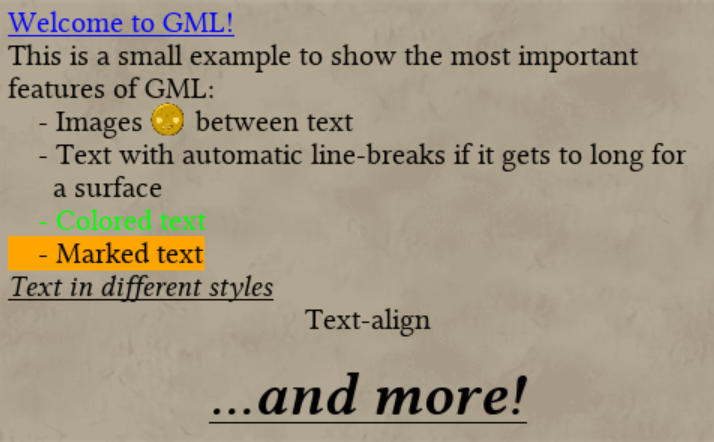
Code:
<h3><style color="blue"/>Welcome to GML!</h3>
<p><style color="black" size="20"/>
This is a small example to show the most important features of GML:
</p>
<li><style color="black" size="20"/>
- Images <img src="power"/>
 between text
 </li>
<li><style color="black" size="20"/>
- Text with automatic line-breaks if it gets to long for a surface
</li>
<li>
<style color="green" size="20"/>- Colored text
</li>
<li><style marked="orange" size="20"/>
- Marked text
</li>
<p><style color="black" size="20" display="underline" type="italic"/>
Text in different styles
</p>
<p><style color="black" size="20" align="center"/>Text-align</p>
<p><style color="black" size="15"/></p>
<p><style color="black" size="40" display="underline" align="center" type="bold-italic"/>
...and more!
</p>
<p><style color="black" size="15"/></p>
Programming GML
GML can parse seven different tag names. Five of them are line-tags, which mean tags that display a line, and two style-tags that can change the style of a given line. The five line-tags are:
-
h3: Tag for headlines, with the biggest size (usually 30 pixels) -
h2: Tag for headlines with the second biggest size (usually 25 pixels) -
h1: Tag for the smallest headline, usually 20 pixels. -
p: Tag for a simple line -
li: Tag for an enumeration
The advantage of headlines is that they are automatically underlined. Of course, all tags can be modified with style-tags, which are:
-
<img>: Tag representing an image -
<style>: Tag containing explicit style attributes for the given line
NOTE: Style-tags are written inside of line-tags.
The Style-Tag can have several attributes:
-
color : Sets the color of a line. This can either be a name (e.g. “whiteâ€) or an RGB-Value (e.g. (0,1,2)).
NOTE: The RGB-Values have to be written without any spaces; else a Syntax Error is raised.
Example: <style color="white"/> -
type : Sets the displayed text to italic, normal, bold or bold-italic.
Example: <style type="bold"/> -
align : Sets align of the displayed text to left, right or center.
Example: <style align="center"/> -
size : Sets the size of the displayed text in pixels.
Example: <style size="50"/> -
antialias : Sets the antialiasing property of the text (Rarely used).
Example: <style antialias="True"/> -
display : Displays the text either 'underline' or 'standard'.
Example: <style display="underline"/> -
marked : Marks the text with the specified color.
Example: <style marked="(0,0,0)"/>
Example:
Example with multiple code elements
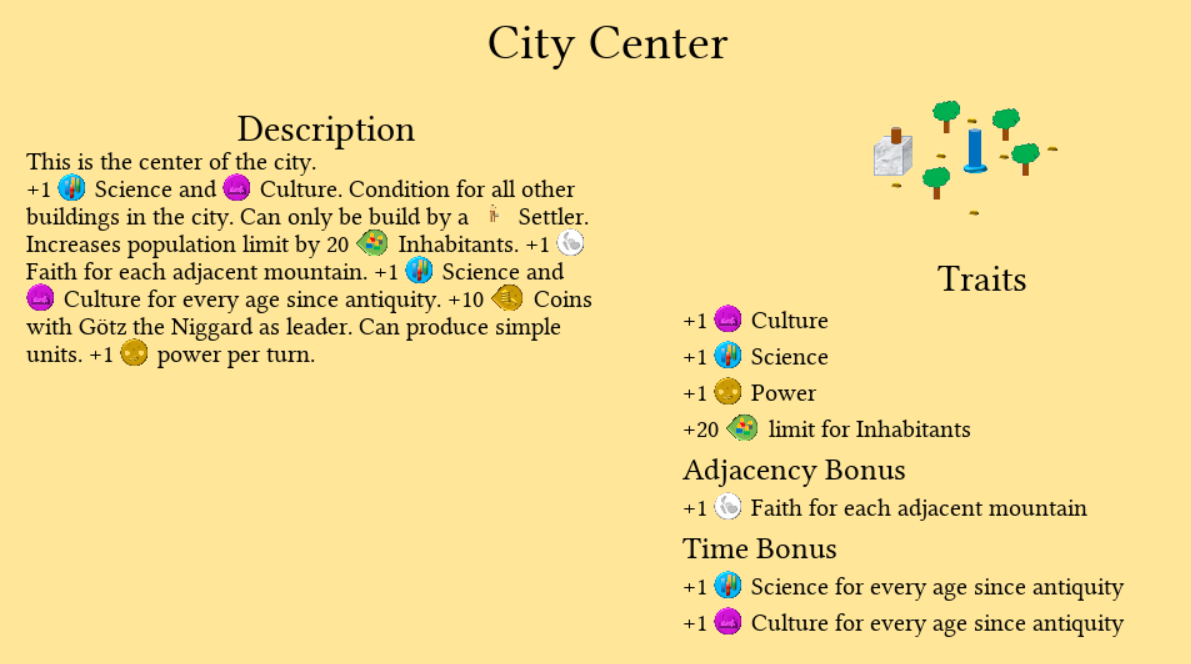
Code:
<p><style size="40" color="black" align="center"/>City Center</p>
<p><style size="30" color="black" align="center"/>Description</p>
<p><style size="20" color="black"/>
    This is the center of the city.
</p>
<p><style size="20" color="black"/>
    +1 <img src="science"/> Science and
    <img src="culture"/> Culture. Condition for all other
    buildings in the city. Can only be build by a
    <img src="settler"/>Settler. Increases population
    limit by 20 <img src="people"/> Inhabitants.
    +1 <img src="faith"/> Faith for each adjacent
    mountain. +1 <img src="science"/> Science and
    <img src="culture"/> Culture for every age since
    antiquity. +10 <img src="economy"/> Coins
    with Goetz the Niggard as leader. Can produce simple
    units. +1 <img src="power"/> power per turn.
</p>
<p><style size="10" color="black"/></p>
<p><style size="30" color="black" align="center"/>Traits</p>
<p><style size="5" color="black"/></p>
<p><style size="20" color="black"/>+1 <img src="culture"/> Culture</p>
<p><style size="5" color="black"/></p>
<p><style size="20" color="black"/>+1 <img src="science"/> Science</p>
<p><style size="5" color="black"/></p>
<p><style size="20" color="black"/>+1 <img src="power"/> Power</p>
<p><style size="5" color="black"/></p>
<p><style size="20" color="black"/>+20 <img src="people"/> limit for Inhabitants</p>
<p><style size="5" color="black"/></p>
<p><style size="25" color="black"/>Adjacency Bonus</p>
<p><style size="5" color="black"/></p>
<p><style size="20" color="black"/>+1 <img src="faith"/> Faith for each adjacent mountain</p>
<p><style size="5" color="black"/></p>
<p><style size="25" color="black"/>Time Bonus</p>
<p><style size="5" color="black"/></p>
<p><style size="20" color="black"/>+1 <img src="science"/>
    Science for every age since antiquity
</p>
<p><style size="5" color="black"/></p>
<p><style size="20" color="black"/>+1 <img src="culture"/>
    Culture for every age since antiquity
</p>
<p><style size="5" color="black"/></p>`
Requirements
- Python 3.5 or higher
- Pygame 2.0.0 or higher
Release Notes
1.0.6
Initial release of GML
1.0.7
- The module has now its own standard font, what makes it easier to start and to work
- Images are rendered correctly in more fonts
- An optional 'img_correction'-value can be used to move all images on the screen in case they aren't rendered correctly
Release history Release notifications | RSS feed


Download files
Download the file for your platform. If you're not sure which to choose, learn more about installing packages.
Source Distribution
Built Distribution
Filter files by name, interpreter, ABI, and platform.
If you're not sure about the file name format, learn more about wheel file names.
Copy a direct link to the current filters
File details
Details for the file glorious-markup-language-1.0.7.tar.gz.
File metadata
- Download URL: glorious-markup-language-1.0.7.tar.gz
- Upload date:
- Size: 240.1 kB
- Tags: Source
- Uploaded using Trusted Publishing? No
- Uploaded via: twine/3.4.2 importlib_metadata/4.8.1 pkginfo/1.7.1 requests/2.24.0 requests-toolbelt/0.9.1 tqdm/4.43.0 CPython/3.8.5
File hashes
| Algorithm | Hash digest | |
|---|---|---|
| SHA256 |
464e3684c8100c049f8bf7cb80fce8d1aee0863378550652a3e082379407deb6
|
|
| MD5 |
d655493a43fd6a4ff4608d5ecf666c21
|
|
| BLAKE2b-256 |
f0a71e3ea1b6235c5fbfefbb92a5d32f028134c09ba6f67264bca95aa6f24e9e
|
File details
Details for the file glorious_markup_language-1.0.7-py3-none-any.whl.
File metadata
- Download URL: glorious_markup_language-1.0.7-py3-none-any.whl
- Upload date:
- Size: 464.3 kB
- Tags: Python 3
- Uploaded using Trusted Publishing? No
- Uploaded via: twine/3.4.2 importlib_metadata/4.8.1 pkginfo/1.7.1 requests/2.24.0 requests-toolbelt/0.9.1 tqdm/4.43.0 CPython/3.8.5
File hashes
| Algorithm | Hash digest | |
|---|---|---|
| SHA256 |
2aca904da37b1c83c279e0543545daa2bca6a95595dc0dbb66ee14421c45e03c
|
|
| MD5 |
5452d84b3ee298b2b239180d48472aaf
|
|
| BLAKE2b-256 |
759f6c2a972abc6e0aabd65ca4f644abb174136ef5ca3a9399ed49ce1e751628
|






