
Goldhand
The ultimate python package to work with stock and crypto data
pip install goldhand
TradingView
from goldhand import *

# tradingView data
tw = Tw()

# data frame of the stocks
tw.stock

# data frame of the top 300 crypto currency
tw.crypto

# data frame of the top 3000 etf
tw.etf
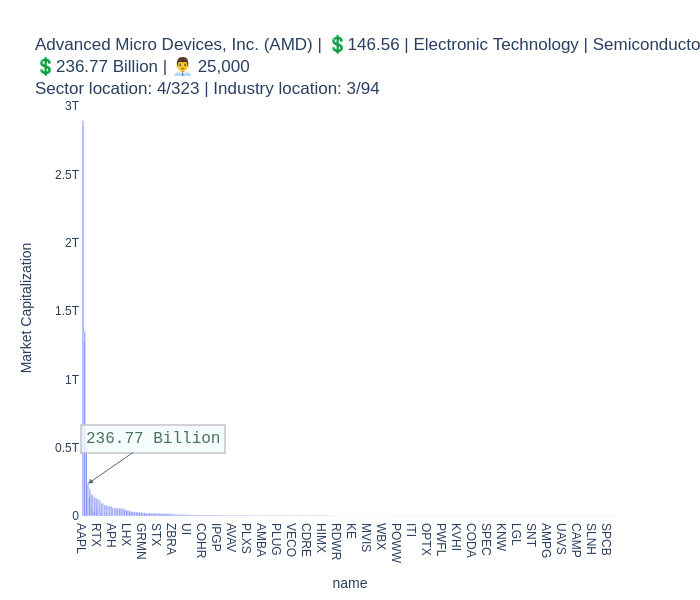
# Get a plot of the stock to see the location in the sector
tw.get_sec_plot('AMD').show()
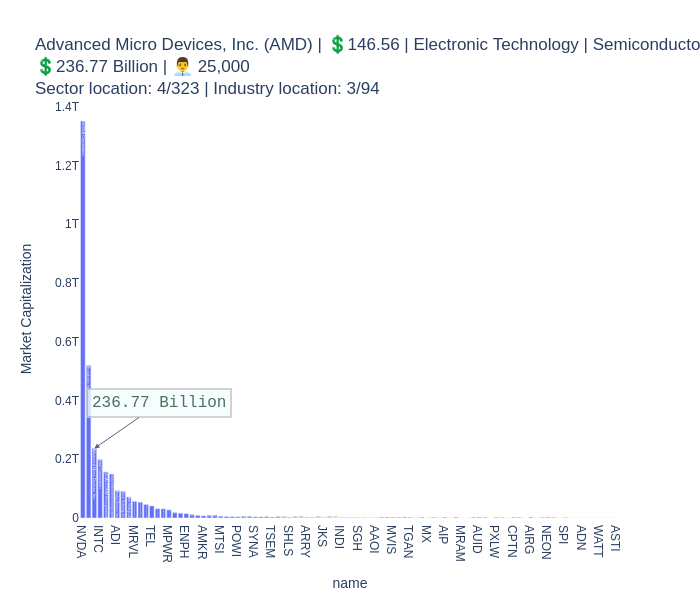
# Get a plot of the stock to see the location in the industry
tw.get_sec_plot('AMD').show()
Goldhand class
The GoldHand class is a part of the goldhand Python package, which provides functionality for working with stock and crypto data. This class allows users to retrieve detailed information and charts for a specific stock.
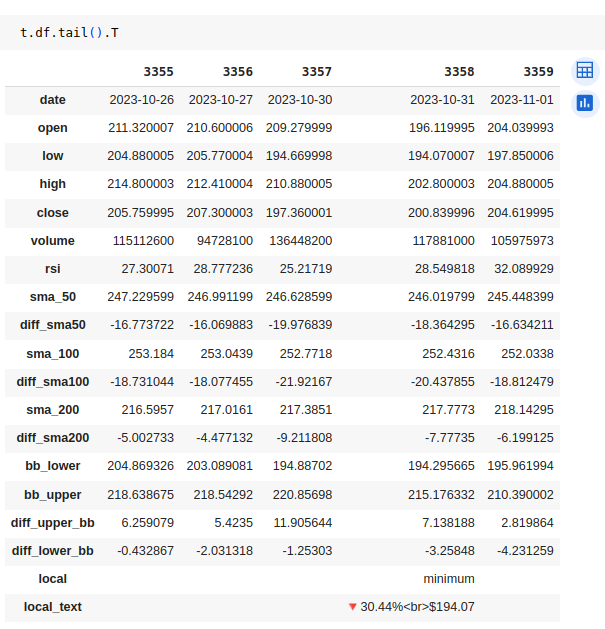
# Get a detailed chart of a stock AMD
ticker = "AMD"
t = GoldHand(ticker)
t.df.tail().T
# Get a detailed chart of a stock AMD
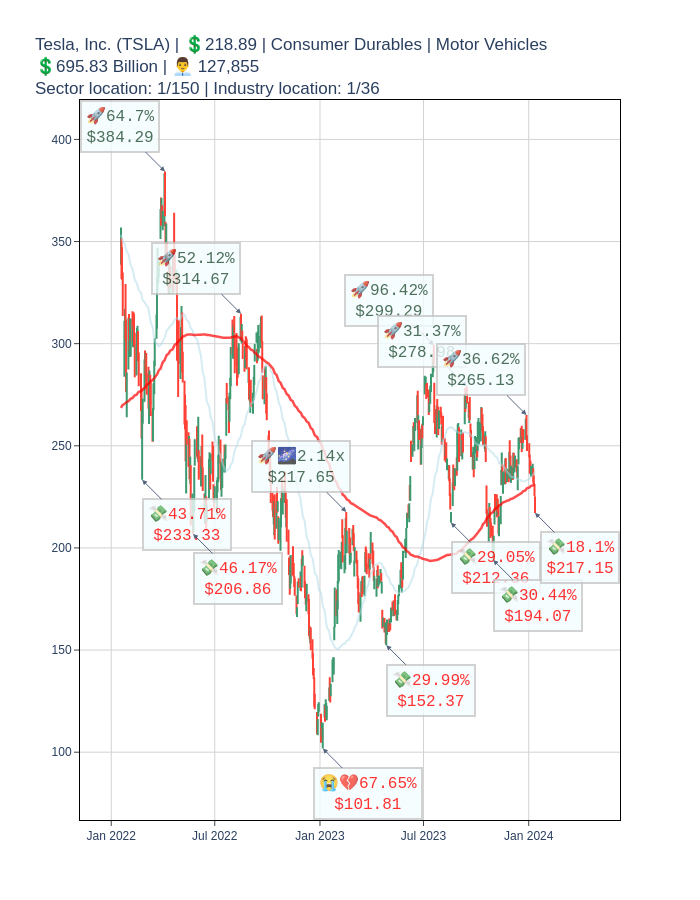
ticker = "TSLA"
t = GoldHand(ticker)
t.plotly_last_year(tw.get_plotly_title(ticker)).show()

## Stock Chart
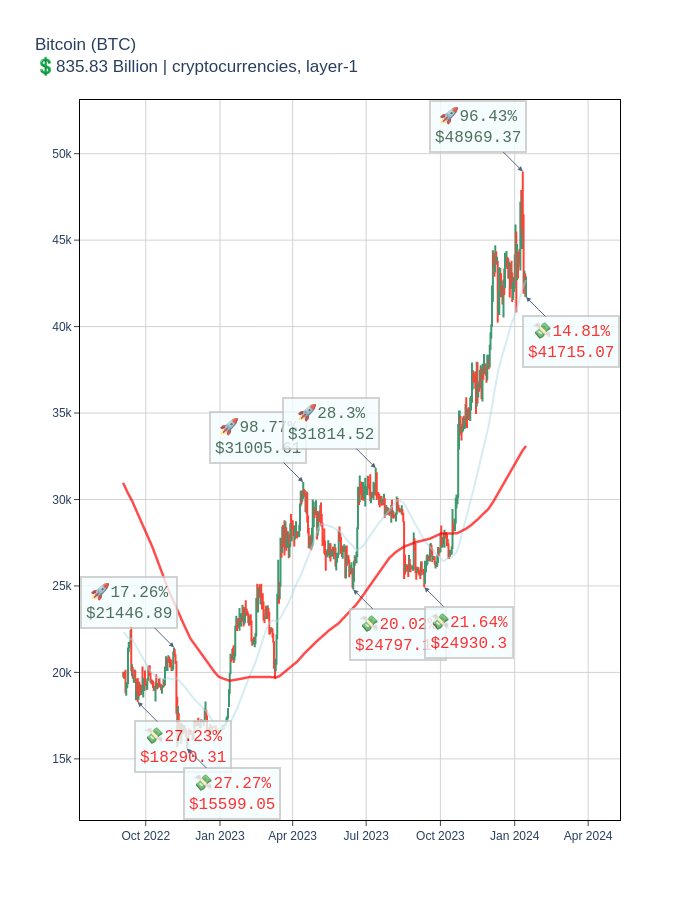
# Get a detailed chart of a crypto
ticker = "BTC-USD"
t = GoldHand(ticker)
t.plotly_last_year(tw.get_plotly_title(ticker)).show()
GoldHand Line indicator
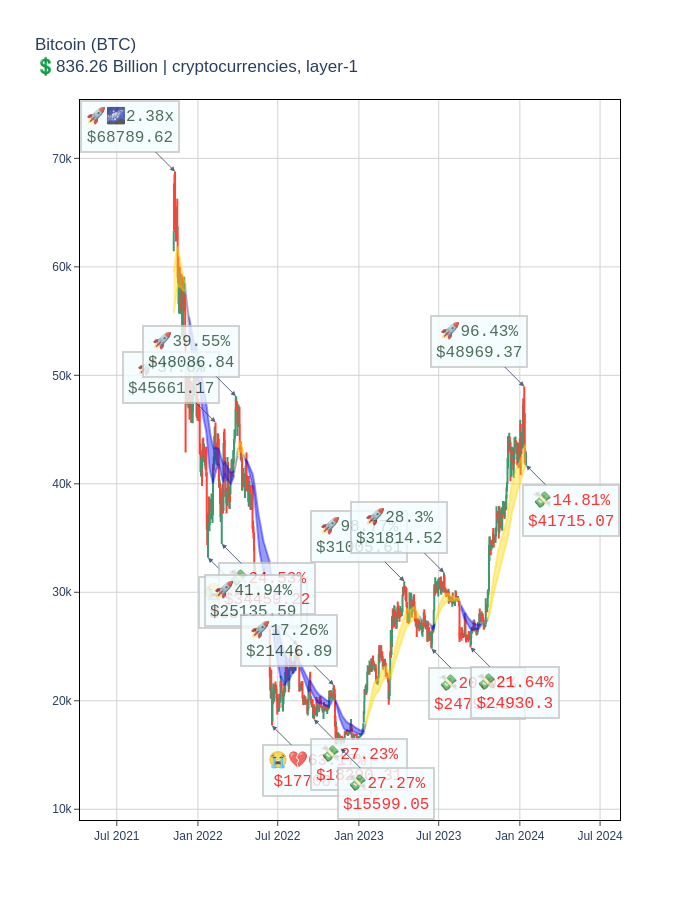
ticker = "TSLA"
t = GoldHand(ticker)
t.plot_goldhand_line(tw.get_plotly_title(ticker)).show()
Backtest
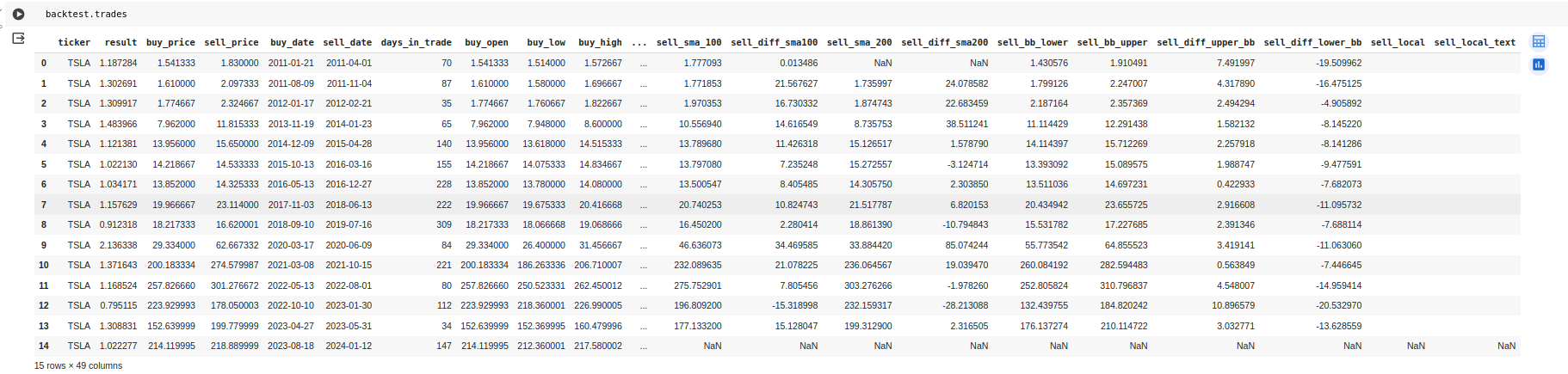
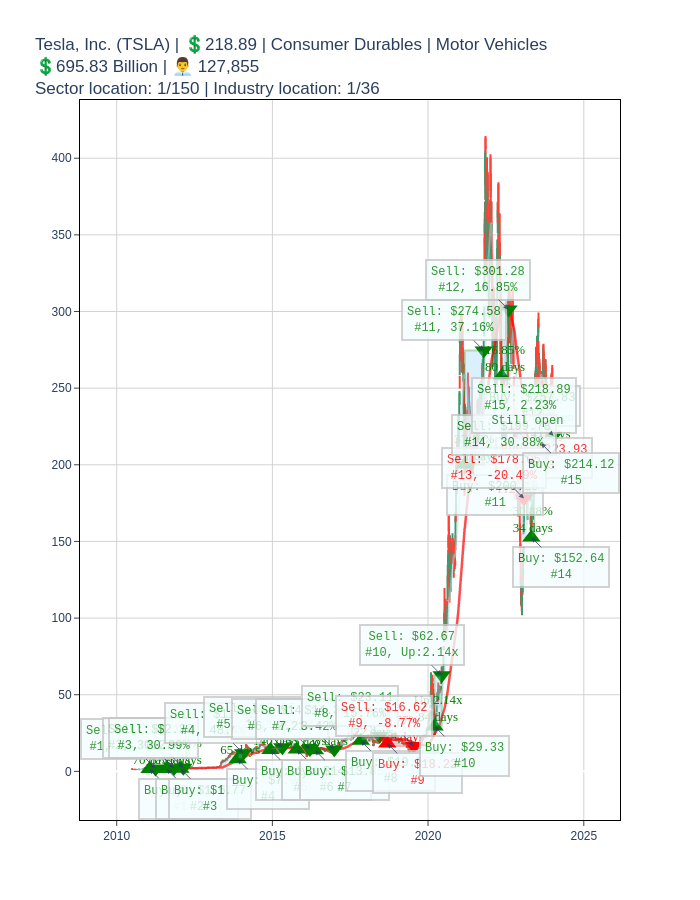
The Backtest class is a powerful tool for evaluating the performance of trading strategies using historical data. It allows you to simulate trades and calculate various performance metrics to assess the profitability and risk of your strategy.
It takes a data and a function and display the trades.
ticker= 'TSLA'
data = GoldHand(ticker).df
backtest = Backtest( data, rsi_strategy, plot_title=tw.get_plotly_title(ticker),  buy_threshold=30, sell_threshold=70)
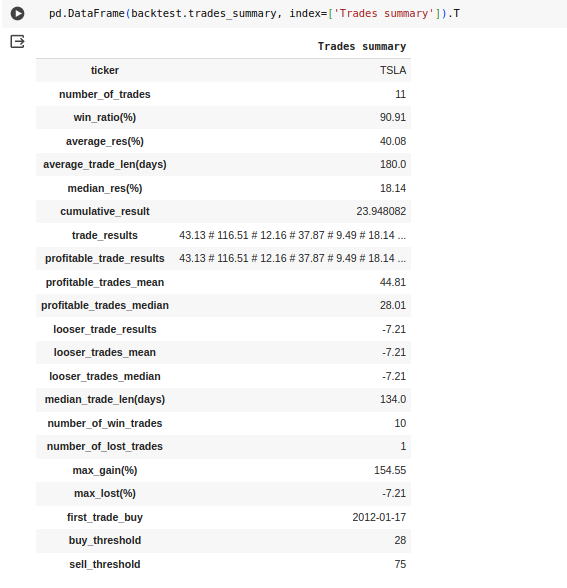
backtest.summarize_strategy()
summarize_strategy will show the trades summary, a plot with trades and the trades in DataFrame.
Strategys
RSI Strategy
    """
    RSI strategy for backtesting with Backtest class

    Parameters:
    - data: pandas DataFrame with columns: date, open, high, low, close, volume and rsi
    - buy_threshold: int, default 30,  buy when RSI is below this value
    - sell_threshold: int, default 70, sell when RSI is above this value
    """
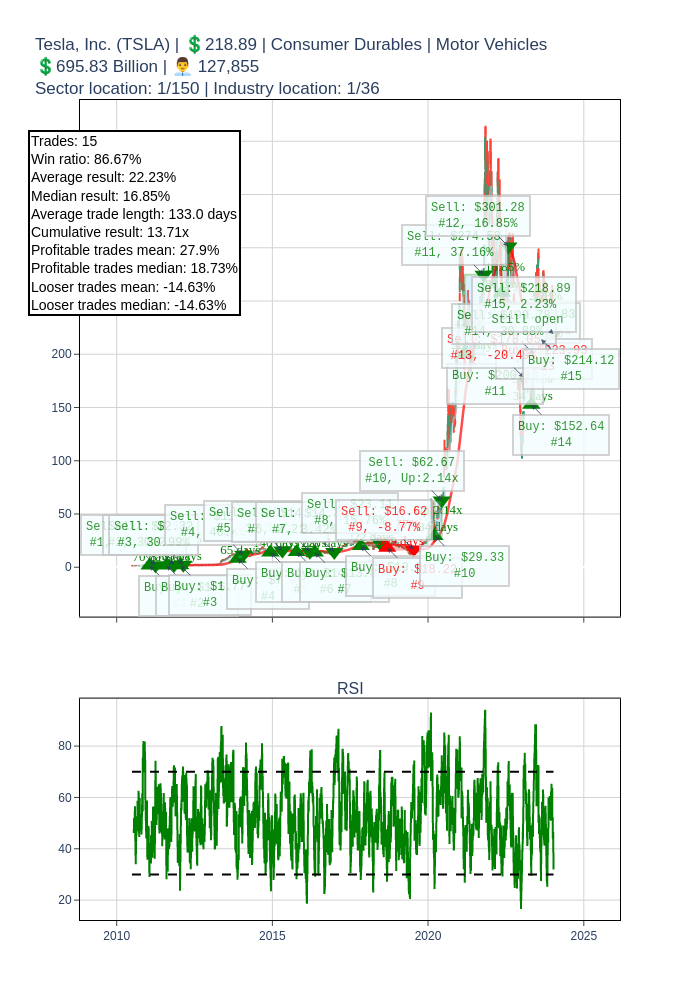
    backtest = Backtest( data, rsi_strategy, plot_title=tw.get_plotly_title(ticker),  buy_threshold=30, sell_threshold=70)
ticker = 'TSLA'
p = show_indicator_rsi_strategy(ticker = ticker, buy_threshold=30, sell_threshold=70, plot_title=tw.get_plotly_title(ticker), add_strategy_summary=True)
GoldHand Line indicator
    """
    This function implements the GoldHandLine strategy.

    Parameters:
    - data (pandas DataFrame) : The DataFrame containing the data.
    - buy_at (str): The color of the line to buy at. Default is 'gold'.
    - sell_at (str): The color of the line to sell at. Default is 'grey'.

    """
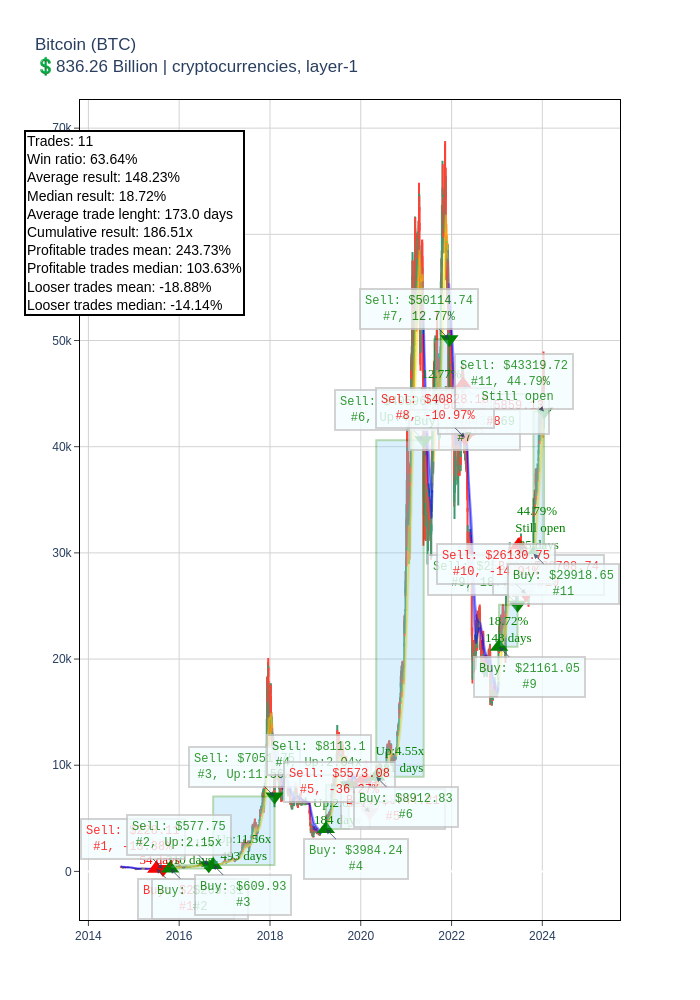
    backtest = Backtest( data, goldhand_line_strategy,)
ticker = 'BTC-USD'
show_indicator_goldhand_line_strategy(ticker = ticker, plot_title=tw.get_plotly_title(ticker), buy_at='gold', sell_at='blue',  add_strategy_summary=True)
1 maintainer

Metadata
1 maintainer
Release files for goldhand 21.0
For a detailed explanation of source distributions (sdists) and built distributions (wheels), please see the package formats documentation.
Source distribution (sdist)
| File | Size | Uploaded | Provenance | |
|---|---|---|---|---|
| goldhand-21.0.tar.gz | 16.6 kB | Without provenance | Details |
Built distribution (wheel)
| File | Interpreter | ABI | Platform | Reset |
|---|---|---|---|---|
| goldhand-21.0-py3-none-any.whl | Python 3 | none | any | Details |
Total release size: 37.9 kB
Release files / goldhand-21.0.tar.gz
| Download URL | goldhand-21.0.tar.gz |
|---|---|
| Size | 16.6 kB |
| Tags | Source |
|
SHA-256 checksum How to use checksums |
03e6b31bca9f180a77f2c61363907801ecf198383a9dcfd0aaeb4dc5fb19edc3
|
|
BLAKE2b-256 checksum How to use checksums |
873e9a2bbdd527cd2efdc306947604022a8641c7da4435c6430ceede1070c382
|
| Upload date | |
|
Uploaded using Trusted Publishing? What is trusted publishing? |
No |
| Uploaded via |
twine/6.2.0 CPython/3.9.25
|
Release files / goldhand-21.0-py3-none-any.whl
| Download URL | goldhand-21.0-py3-none-any.whl |
|---|---|
| Size | 21.3 kB |
| Tags | Python 3 |
|
SHA-256 checksum How to use checksums |
5d76b3462552d2ade51615057d0654b417a9943c56fc25fd9c6afce8ef94b611
|
|
BLAKE2b-256 checksum How to use checksums |
3b4e8a51fa13abc3888f217e30417e08e52d37bfcf10963b8baa83a8dabc371b
|
| Upload date | |
|
Uploaded using Trusted Publishing? What is trusted publishing? |
No |
| Uploaded via |
twine/6.2.0 CPython/3.9.25
|
Security for goldhand 21.0
Provenance
Provenance describes where a file came from. On PyPI, provenance is shared via attestations, which provide a verifiable record of the build or publishing details. View details, limitations and caveats.
No provenance found
None of the files in this release were uploaded with provenance metadata.
A note on package security
PyPI is a repository for distributing packages, not a service for auditing them. While third-party security researchers and our staff do their best to detect and remove malicious packages, PyPI cannot guarantee the quality, security or suitability of any given package.














