
Grad-CAM visualization tool for PyTorch models.


Project description
Grad-CAM, Grad-CAM++ and Score-CAM implementation in Pytorch
What makes the network think the image label is 'pug, pug-dog' and 'tabby, tabby cat':
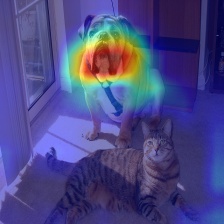
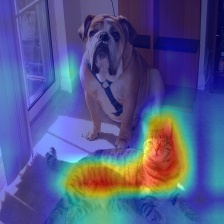
Combining Grad-CAM with Guided Backpropagation for the 'pug, pug-dog' class:
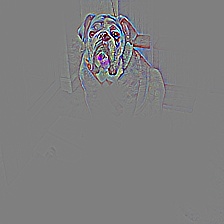
Gradient class activation maps are a visualization technique for deep learning networks.
See the paper: https://arxiv.org/pdf/1610.02391v1.pdf
The paper authors' torch implementation: https://github.com/ramprs/grad-cam
My Keras implementation: https://github.com/jacobgil/keras-grad-cam
Tested with most of the torchvision models. You need to choose the target layer to compute CAM for. Some common choices can be:
- Resnet18 and 50: model.layer4[-1]
- VGG and densenet161: model.features[-1]
- mnasnet1_0: model.layers[-1]
Using from code
pip install pytorch-grad-cam
from pytorch_grad_cam import CAM
from pytorch_grad_cam.utils.image import show_cam_on_image
from torchvision.models import resnet50
model = resnet50(pretrained=True)
target_layer = model.layer4[-1]
method = "gradcam" # Can be gradcam/gradcam++/scorecam
input_tensor = # Create an input tensor image for your model..
cam = CAM(model=model,  target_layer=target_layer, use_cuda=args.use_cuda)
grayscale_cam = cam(input_tensor=input_tensor, target_category=1, method=method)
visualization = show_cam_on_image(rgb_img, grayscale_cam)
Running the example script:
Usage: python gradcam.py --image-path <path_to_image> --method <method>
To use with CUDA:
python gradcam.py --image-path <path_to_image> --use-cuda
Using GradCAM++ or Score-CAM instead of GradCAM:
You can choose between:
method='gradcam'method='gradcam++'method='scorecam'
It seems that GradCAM++ is almost the same as GradCAM, in most networks except VGG where the advantage is larger.
| Network | Image | GradCAM | GradCAM++ | Score-CAM |
|---|---|---|---|---|
| VGG16 |  |
 |
 |
 |
| Resnet50 | |
 |
 |
 |
References
https://arxiv.org/abs/1610.02391
Grad-CAM: Visual Explanations from Deep Networks via Gradient-based Localization Ramprasaath R. Selvaraju, Michael Cogswell, Abhishek Das, Ramakrishna Vedantam, Devi Parikh, Dhruv Batra
https://arxiv.org/abs/1710.11063
Grad-CAM++: Improved Visual Explanations for Deep Convolutional Networks Aditya Chattopadhyay, Anirban Sarkar, Prantik Howlader, Vineeth N Balasubramanian
https://arxiv.org/abs/1910.01279
Score-CAM: Score-Weighted Visual Explanations for Convolutional Neural Networks Haofan Wang, Zifan Wang, Mengnan Du, Fan Yang, Zijian Zhang, Sirui Ding, Piotr Mardziel, Xia Hu
Release history Release notifications | RSS feed


Download files
Download the file for your platform. If you're not sure which to choose, learn more about installing packages.
Source Distribution
Built Distribution
Filter files by name, interpreter, ABI, and platform.
If you're not sure about the file name format, learn more about wheel file names.
Copy a direct link to the current filters
File details
Details for the file grad_cam-1.0.0.tar.gz.
File metadata
- Download URL: grad_cam-1.0.0.tar.gz
- Upload date:
- Size: 5.4 kB
- Tags: Source
- Uploaded using Trusted Publishing? No
- Uploaded via: twine/3.3.0 pkginfo/1.7.0 requests/2.25.1 setuptools/39.0.1 requests-toolbelt/0.9.1 tqdm/4.59.0 CPython/3.6.5
File hashes
| Algorithm | Hash digest | |
|---|---|---|
| SHA256 |
1cfca11c0b2331528c753548def1fa8f70cc883385bfefccf3f2dacf0091857b
|
|
| MD5 |
e6f43ce2a018b02233d839de53d9fc6a
|
|
| BLAKE2b-256 |
26daddd24789dd74555c56e92a5b360676977a72a484dcd1f4624171135e8d62
|
File details
Details for the file grad_cam-1.0.0-py3-none-any.whl.
File metadata
- Download URL: grad_cam-1.0.0-py3-none-any.whl
- Upload date:
- Size: 7.4 kB
- Tags: Python 3
- Uploaded using Trusted Publishing? No
- Uploaded via: twine/3.3.0 pkginfo/1.7.0 requests/2.25.1 setuptools/39.0.1 requests-toolbelt/0.9.1 tqdm/4.59.0 CPython/3.6.5
File hashes
| Algorithm | Hash digest | |
|---|---|---|
| SHA256 |
bd84b6d2f6e136a88e692533332c8c6bda6a1b2389443f9463beb732e61fc2b5
|
|
| MD5 |
6f76d146764156fe4850ba370f151ff2
|
|
| BLAKE2b-256 |
eaea8b61d97a8f05b38d5cd9c3a700ec9a73c4e95ad3810dc3130e0db2b72b9d
|






