
GRBlogtools



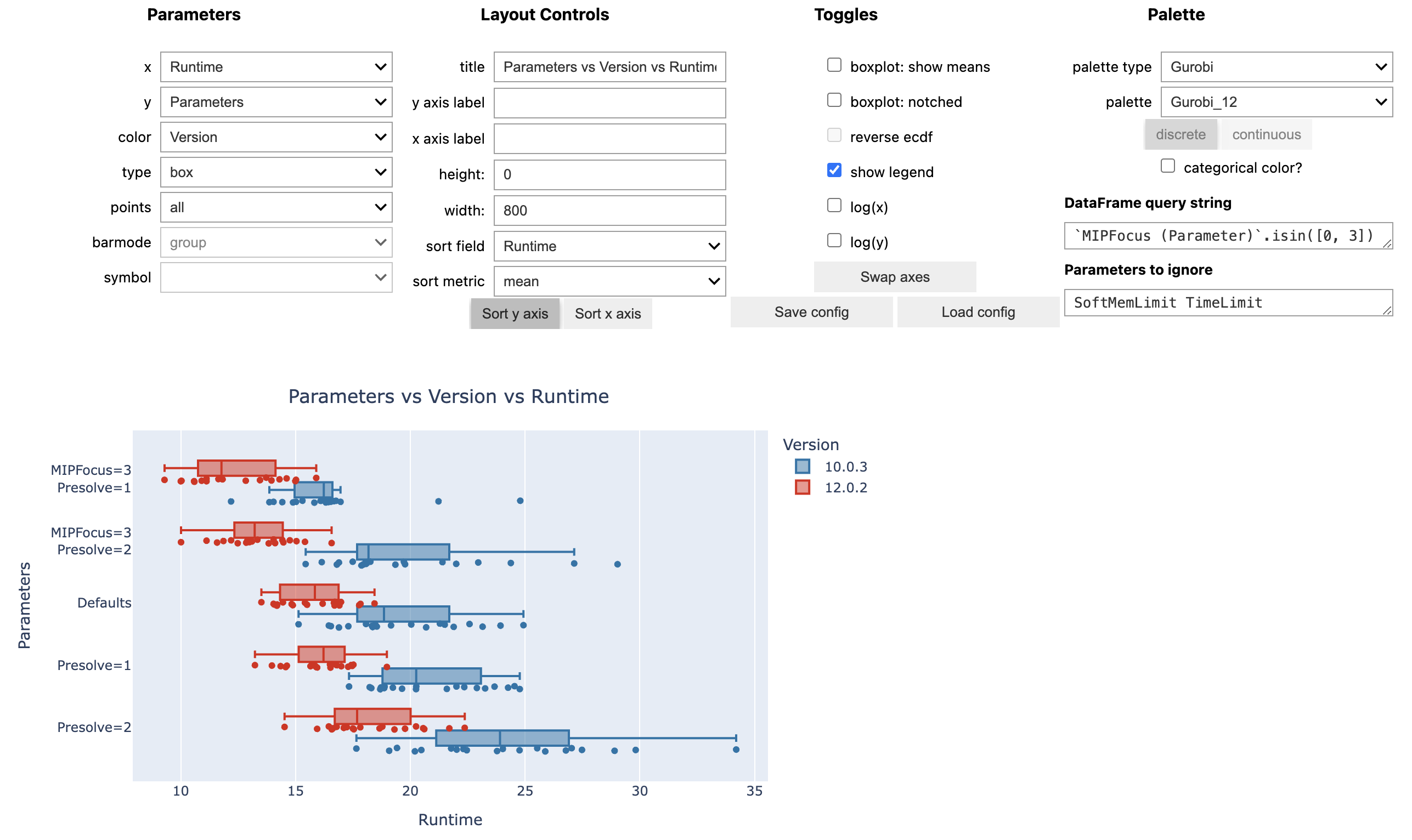
Extract information from Gurobi log files and generate pandas DataFrames or Excel worksheets for further processing. Also includes a wrapper for out-of-the-box interactive visualizations using the plotting library Plotly.
Installation
python -m pip install grblogtools
It is recommended to prepend the pip install command with python -m to ensure that the package is installed using the correct Python version currently active in your environment.
See CHANGELOG for added, removed or fixed functionality.
Usage
First, you need a set of Gurobi log files to compare, e.g.,
- results from several model instances
- comparisons of different parameter settings
- performance variability experiments involving multiple random seed runs
- ...
You may also use the provided grblogtools.ipynb notebook with the example data set to get started. Additionally, there is a Gurobi TechTalk demonstrating how to use grblogtools (YouTube):

Pandas/Plotly
-
parse log files:
import grblogtools as glt

results = glt.parse(["run1/*.log", "run2/*.log"])
summary = results.summary()
nodelog_progress = results.progress("nodelog")
Depending on your requirements, you may need to filter or modify the resulting DataFrames.
-
draw interactive charts, preferably in a Jupyter Notebook:
- final results from the individual runs:
glt.plot(summary, type="box")
- progress charts for the individual runs:
glt.plot(nodelog_progress, y="Gap", color="Log", type="line")
- progress of the norel heuristic (note, the time recorded here is since the start of norel, and does not include presolve + read time):
glt.plot(results.progress("norel"), x="Time", y="Incumbent", color="Log", type="line")
These are just examples using the Plotly Python library - of course, any other plotting library of your choice can be used to work with these DataFrames.
Excel
Convert your log files to Excel worksheets right on the command-line:
python -m grblogtools myrun.xlsx data/*.log
List all available options and how to use the command-line tool:
python -m grblogtools --help
Rename log files
The command line tool can also rename log files according to the parameters set and model solved in a given run. This is useful if your log files do not have a consistent naming scheme, or if multiple runs are logged per file and you want to extract the individual runs.
For example:
python -m grblogtools --write-to-dir nicenames summary.xlsx tests/assets/combined/*.log
separates logs for individual runs in the input files and writes copies to the 'nicenames' folder with a consistent naming scheme:
> ls nicenames
912-MIPFocus1-Presolve1-TimeLimit600-glass4-0.log
912-MIPFocus1-Presolve1-TimeLimit600-glass4-1.log
912-MIPFocus1-Presolve1-TimeLimit600-glass4-2.log
912-MIPFocus2-Presolve1-TimeLimit600-glass4-0.log
912-MIPFocus2-Presolve1-TimeLimit600-glass4-1.log
912-MIPFocus2-Presolve1-TimeLimit600-glass4-2.log
912-Presolve1-TimeLimit600-glass4-0.log
912-Presolve1-TimeLimit600-glass4-1.log
912-Presolve1-TimeLimit600-glass4-2.log
1 maintainer

Metadata
1 maintainer
Release files for grblogtools 2.2.0
For a detailed explanation of source distributions (sdists) and built distributions (wheels), please see the package formats documentation.
Source distribution (sdist)
| File | Size | Uploaded | |
|---|---|---|---|
| grblogtools-2.2.0.tar.gz | 26.8 kB | Details |
Built distribution (wheel)
| File | Interpreter | ABI | Platform | Reset |
|---|---|---|---|---|
| grblogtools-2.2.0-py3-none-any.whl | Python 3 | none | any | Details |
Total release size: 70.8 kB
Release files / grblogtools-2.2.0.tar.gz
| Download URL | grblogtools-2.2.0.tar.gz |
|---|---|
| Size | 26.8 kB |
| Tags | Source |
|
SHA-256 checksum How to use checksums |
1eed848178823f75fb720913aae0e376320ea8eaf846d114db30e31b6aa21d14
|
|
BLAKE2b-256 checksum How to use checksums |
0d2e0a318eea59f9ab6e452ebe19937b5d5e644bba7c5b697f12dd5b6adcc024
|
| Upload date | |
|
Uploaded using Trusted Publishing? What is trusted publishing? |
No |
| Uploaded via |
twine/4.0.2 CPython/3.9.17
|
Release files / grblogtools-2.2.0-py3-none-any.whl
| Download URL | grblogtools-2.2.0-py3-none-any.whl |
|---|---|
| Size | 43.9 kB |
| Tags | Python 3 |
|
SHA-256 checksum How to use checksums |
87496573b34cee87f040243dd2feeed4fc385a30e297bcabfb0136f8cc78b7c8
|
|
BLAKE2b-256 checksum How to use checksums |
ae03a1fec84bd6af9783d24601734d646ce8fd29a957dbe463f44b0930ad9a45
|
| Upload date | |
|
Uploaded using Trusted Publishing? What is trusted publishing? |
No |
| Uploaded via |
twine/4.0.2 CPython/3.9.17
|














