
🦕 Grounding DINO





Official PyTorch implementation of "Grounding DINO: Marrying DINO with Grounded Pre-Training for Open-Set Object Detection": the SoTA open-set object detector.
🌞 Helpful Tutorial
- 🍇 [Read our arXiv Paper]
- 🍎 [Watch our simple introduction video on YouTube]
- 🌹 [Try the Colab Demo]
- 🌻 [Try our Official Huggingface Demo]
- 🍁 [Watch the Step by Step Tutorial about GroundingDINO by Robotflow AI]
- 🍄 [GroundingDINO: Automated Dataset Annotation and Evaluation by Robotflow AI]
- 🌺 [Accelerate Image Annotation with SAM and GroundingDINO by Robotflow AI]
✨ Highlight Projects
- DetGPT: Detect What You Need via Reasoning
- Grounded-SAM: Marrying Grounding DINO with Segment Anything
- Grounding DINO with Stable Diffusion
- Grounding DINO with GLIGEN for Controllable Image Editing
- OpenSeeD: A Simple and Strong Openset Segmentation Model
- SEEM: Segment Everything Everywhere All at Once
- X-GPT: Conversational Visual Agent supported by X-Decoder
- GLIGEN: Open-Set Grounded Text-to-Image Generation
- LLaVA: Large Language and Vision Assistant
💡 Highlight
- Open-Set Detection. Detect everything with language!
- High Performancce. COCO zero-shot 52.5 AP (training without COCO data!). COCO fine-tune 63.0 AP.
- Flexible. Collaboration with Stable Diffusion for Image Editting.
🔥 News
2023/04/15: Refer to CV in the Wild Readings for those who are interested in open-set recognition!2023/04/08: We release demos to combine Grounding DINO with GLIGEN for more controllable image editings.2023/04/08: We release demos to combine Grounding DINO with Stable Diffusion for image editings.2023/04/06: We build a new demo by marrying GroundingDINO with Segment-Anything named Grounded-Segment-Anything aims to support segmentation in GroundingDINO.2023/03/28: A YouTube video about Grounding DINO and basic object detection prompt engineering. [SkalskiP]2023/03/28: Add a demo on Hugging Face Space!2023/03/27: Support CPU-only mode. Now the model can run on machines without GPUs.2023/03/25: A demo for Grounding DINO is available at Colab. [SkalskiP]2023/03/22: Code is available Now!
 Marrying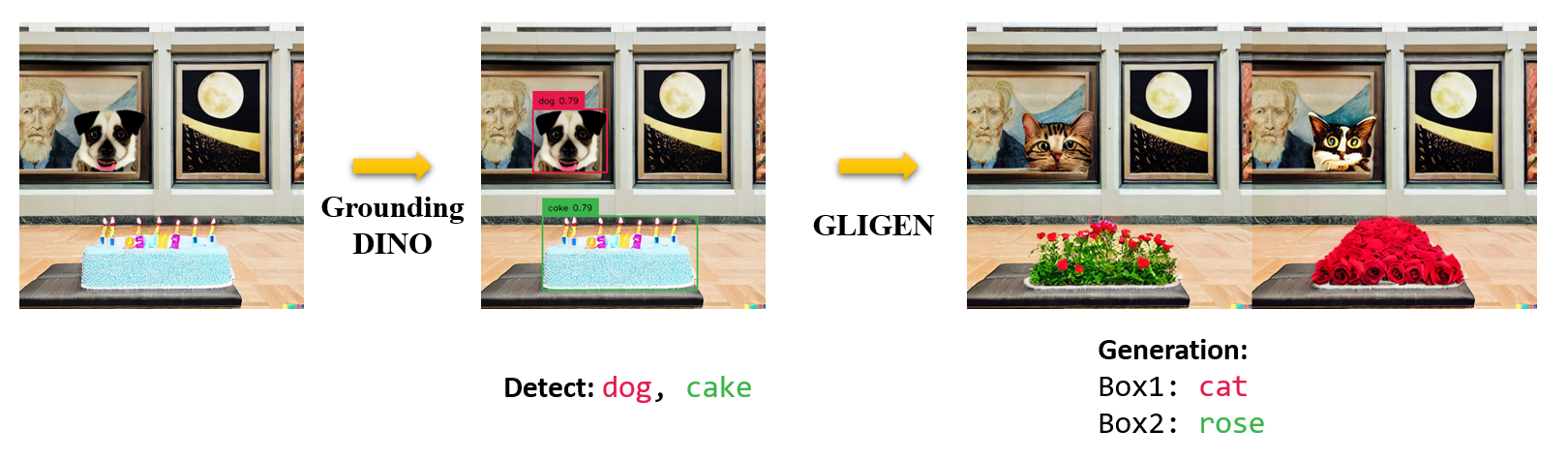
⭐ Explanations/Tips for Grounding DINO Inputs and Outputs
- Grounding DINO accepts an
(image, text)pair as inputs. - It outputs
900(by default) object boxes. Each box has similarity scores across all input words. (as shown in Figures below.) - We defaultly choose the boxes whose highest similarities are higher than a
box_threshold. - We extract the words whose similarities are higher than the
text_thresholdas predicted labels. - If you want to obtain objects of specific phrases, like the
dogsin the sentencetwo dogs with a stick., you can select the boxes with highest text similarities withdogsas final outputs. - Note that each word can be split to more than one tokens with different tokenlizers. The number of words in a sentence may not equal to the number of text tokens.
- We suggest separating different category names with
.for Grounding DINO.


🏷️ TODO
- Release inference code and demo.
- Release checkpoints.
- Grounding DINO with Stable Diffusion and GLIGEN demos.
- Release training codes.
🛠️ Install
Note:
If you have a CUDA environment, please make sure the environment variable CUDA_HOME is set. It will be compiled under CPU-only mode if no CUDA available.
Installation:
Clone the GroundingDINO repository from GitHub.
git clone https://github.com/IDEA-Research/GroundingDINO.git
Change the current directory to the GroundingDINO folder.
cd GroundingDINO/
Install the required dependencies in the current directory.
pip3 install -q -e .
Create a new directory called "weights" to store the model weights.
mkdir weights
Change the current directory to the "weights" folder.
cd weights
Download the model weights file.
wget -q https://github.com/IDEA-Research/GroundingDINO/releases/download/v0.1.0-alpha/groundingdino_swint_ogc.pth
▶️ Demo
Check your GPU ID (only if you're using a GPU)
nvidia-smi
Replace {GPU ID}, image_you_want_to_detect.jpg, and "dir you want to save the output" with appropriate values in the following command
CUDA_VISIBLE_DEVICES={GPU ID} python demo/inference_on_a_image.py \
-c /GroundingDINO/groundingdino/config/GroundingDINO_SwinT_OGC.py \
-p /GroundingDINO/weights/groundingdino_swint_ogc.pth \
-i image_you_want_to_detect.jpg \
-o "dir you want to save the output" \
-t "chair"
 [--cpu-only] # open it for cpu mode
See the demo/inference_on_a_image.py for more details.
Running with Python:
from groundingdino.util.inference import load_model, load_image, predict, annotate
import cv2

model = load_model("groundingdino/config/GroundingDINO_SwinT_OGC.py", "weights/groundingdino_swint_ogc.pth")
IMAGE_PATH = "weights/dog-3.jpeg"
TEXT_PROMPT = "chair . person . dog ."
BOX_TRESHOLD = 0.35
TEXT_TRESHOLD = 0.25

image_source, image = load_image(IMAGE_PATH)

boxes, logits, phrases = predict(
    model=model,
    image=image,
    caption=TEXT_PROMPT,
    box_threshold=BOX_TRESHOLD,
    text_threshold=TEXT_TRESHOLD
)

annotated_frame = annotate(image_source=image_source, boxes=boxes, logits=logits, phrases=phrases)
cv2.imwrite("annotated_image.jpg", annotated_frame)
Web UI
We also provide a demo code to integrate Grounding DINO with Gradio Web UI. See the file demo/gradio_app.py for more details.
Notebooks
- We release demos to combine Grounding DINO with GLIGEN for more controllable image editings.
- We release demos to combine Grounding DINO with Stable Diffusion for image editings.
🧳 Checkpoints
| name | backbone | Data | box AP on COCO | Checkpoint | Config | |
|---|---|---|---|---|---|---|
| 1 | GroundingDINO-T | Swin-T | O365,GoldG,Cap4M | 48.4 (zero-shot) / 57.2 (fine-tune) | GitHub link | HF link | link |
| 2 | GroundingDINO-B | Swin-B | COCO,O365,GoldG,Cap4M,OpenImage,ODinW-35,RefCOCO | 56.7 | GitHub link | HF link | link |
🎖️ Results
COCO Object Detection Results

ODinW Object Detection Results

Marrying Grounding DINO with Stable Diffusion for Image Editing
See our example notebook for more details.
Marrying Grounding DINO with GLIGEN for more Detailed Image Editing.
See our example notebook for more details.
🦕 Model: Grounding DINO
Includes: a text backbone, an image backbone, a feature enhancer, a language-guided query selection, and a cross-modality decoder.

♥️ Acknowledgement
Our model is related to DINO and GLIP. Thanks for their great work!
We also thank great previous work including DETR, Deformable DETR, SMCA, Conditional DETR, Anchor DETR, Dynamic DETR, DAB-DETR, DN-DETR, etc. More related work are available at Awesome Detection Transformer. A new toolbox detrex is available as well.
Thanks Stable Diffusion and GLIGEN for their awesome models.
✒️ Citation
If you find our work helpful for your research, please consider citing the following BibTeX entry.
@article{liu2023grounding,
  title={Grounding dino: Marrying dino with grounded pre-training for open-set object detection},
  author={Liu, Shilong and Zeng, Zhaoyang and Ren, Tianhe and Li, Feng and Zhang, Hao and Yang, Jie and Li, Chunyuan and Yang, Jianwei and Su, Hang and Zhu, Jun and others},
  journal={arXiv preprint arXiv:2303.05499},
  year={2023}
}
1 maintainer

Metadata
1 maintainer
Release files for groundingdino-py 0.4.0
For a detailed explanation of source distributions (sdists) and built distributions (wheels), please see the package formats documentation.
Source distribution (sdist)
| File | Size | Uploaded | Provenance | Actions |
|---|---|---|---|---|
| groundingdino-py-0.4.0.tar.gz | 82.3 kB | Without provenance | Details for groundingdino-py-0.4.0.tar.gz |
Release files / groundingdino-py-0.4.0.tar.gz
| Download URL | groundingdino-py-0.4.0.tar.gz |
|---|---|
| Size | 82.3 kB |
| Tags | Source |
|
SHA-256 checksum How to use checksums |
23de56af498b7cdcc024eb1062fc3179e3cc4dacd92adbfb625097065377700f
|
|
BLAKE2b-256 checksum How to use checksums |
da26af35089119098ecd9d2e174b9cfbeb0c1246d65449c718b4e57328a08c1c
|
| Upload date | |
|
Uploaded using Trusted Publishing? What is trusted publishing? |
No |
| Uploaded via |
twine/4.0.2 CPython/3.11.3
|
Security for groundingdino-py 0.4.0
Provenance
Provenance describes where a file came from. On PyPI, provenance is shared via attestations, which provide a verifiable record of the build or publishing details. View details, limitations and caveats.
No provenance found
None of the files in this release were uploaded with provenance metadata.
A note on package security
PyPI is a repository for distributing packages, not a service for auditing them. While third-party security researchers and our staff do their best to detect and remove malicious packages, PyPI cannot guarantee the quality, security or suitability of any given package.
To learn more about protecting yourself from malicious actors, visit our package security documentation.














