



[!IMPORTANT] This project is in maintenance mode. That means that I will:
- :white_check_mark: continue to apply dependency updates and bug fixes, but will
- :no_entry_sign: not add any new features, and will
- :no_entry_sign: not take time to review pull requests adding features or making bigger changes.
Thanks for your understanding! :pray:
Sebastian Pipping — Berlin, 2026-05-15
About
grub2-theme-preview came into life when I was looking around for available GRUB 2.x themes and wanted a way to quickly see a theme in action without rebooting real hardware.
It takes a theme folder (or just a single picture),
creates a temporary bootable image using grub2-mkrescue and launches
that image in a virtual machine using KVM/QEMU, all without root privileges.
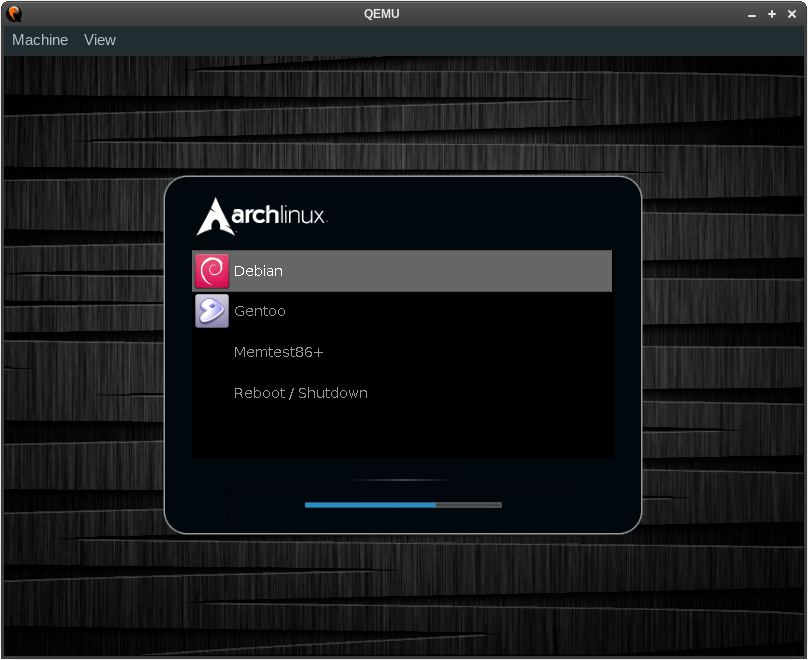
(Showing theme gutsblack-archlinux)
Installation
To install the latest release from PyPI:
# pip3 install --user grub2-theme-preview
To install from a Git clone for development:
# pip3 install --user --editable .
Please make sure to install these non-PyPI dependencies as well:
grub-mkrescueof GRUB 2 (packagegrub-commonon Debian and Ubuntu)- QEMU (with GTK or SDL display support) — hypervisor that performs hardware virtualization
- OVMF — EFI bios image for use with QEMU
- mtools — collection of utilities to access MS-DOS
xorrisoof libisoburn — frontend which enables creation and expansion of the ISO format
Usage
# COLUMNS=80 grub2-theme-preview --help
usage: grub2-theme-preview [-h] [--grub-cfg PATH] [--verbose]
                           [--resolution WxH] [--timeout SECONDS]
                           [--add TARGET=/SOURCE] [--version]
                           [--grub2-mkrescue COMMAND] [--qemu COMMAND]
                           [--xorriso COMMAND] [--display DISPLAY]
                           [--full-screen] [--no-kvm] [--vga CARD] [--debug]
                           [--plain-rescue-image]
                           PATH

Preview a GRUB 2.x theme using KVM/QEMU

positional arguments:
  PATH                  path of theme directory (or PNG/TGA image file) to
                        preview

options:
  -h, --help            show this help message and exit
  --grub-cfg PATH       path of custom grub.cfg file to use (default:
                        /boot/grub{2,}/grub.cfg)
  --verbose             increase verbosity
  --resolution WxH      set a custom resolution, e.g. 800x600
  --timeout SECONDS     set GRUB timeout in whole seconds or -1 to disable
                        (default: 30 seconds)
  --add TARGET=/SOURCE  make grub2-mkrescue add file(s) from /SOURCE to
                        /TARGET in the rescue image (can be passed multiple
                        times)
  --version             show program's version number and exit

command location arguments:
  --grub2-mkrescue COMMAND
                        grub2-mkrescue command (default: auto-detect)
  --qemu COMMAND        KVM/QEMU command (default: qemu-system-<machine>)
  --xorriso COMMAND     xorriso command (default: xorriso)

arguments related to invokation of QEMU/KVM:
  --display DISPLAY     pass "-display DISPLAY" to QEMU, see "man qemu" for
                        details (default: use QEMU's default display,
                        hopefully either GTK or SDL)
  --full-screen         pass "-full-screen" to QEMU
  --no-kvm              do not pass -enable-kvm to QEMU (and hence fall back
                        to acceleration "tcg" which is significantly slower
                        than KVM)
  --vga CARD            pass "-vga CARD" to QEMU, see "man qemu" for details
                        (default: use QEMU's default VGA card)

debugging arguments:
  --debug               enable debugging output
  --plain-rescue-image  use unprocessed GRUB rescue image with no theme
                        patched in; useful for checking if a plain GRUB rescue
                        image shows up a GRUB shell, successfully.

environment variables:
  G2TP_GRUB_LIB         Path of GRUB platform files parent directory
                        (default: "/usr/lib/grub")
  G2TP_OVMF_IMAGE       Path of OVMF image file (default: auto-detect)
                        (e.g. "/usr/share/[..]/OVMF_CODE.fd")

Software libre licensed under GPL v2 or later.
Brought to you by Sebastian Pipping <sebastian@pipping.org>.

Please report bugs at https://github.com/hartwork/grub2-theme-preview -- thank you!
1 maintainer

Metadata
1 maintainer
Release files for grub2-theme-preview 2.10.0
For a detailed explanation of source distributions (sdists) and built distributions (wheels), please see the package formats documentation.
Source distribution (sdist)
| File | Size | Uploaded | Provenance | |
|---|---|---|---|---|
| grub2_theme_preview-2.10.0.tar.gz | 209.6 kB | Without provenance | Details |
Built distribution (wheel)
| File | Interpreter | ABI | Platform | Reset |
|---|---|---|---|---|
| grub2_theme_preview-2.10.0-py3-none-any.whl | Python 3 | none | any | Details |
Total release size: 224.0 kB
Release files / grub2_theme_preview-2.10.0.tar.gz
| Download URL | grub2_theme_preview-2.10.0.tar.gz |
|---|---|
| Size | 209.6 kB |
| Tags | Source |
|
SHA-256 checksum How to use checksums |
0c6b063f390195ab0cb404d3e789de1697d6c734882d68e2dcd3b444dcfd99af
|
|
BLAKE2b-256 checksum How to use checksums |
b6d33afb59c588901e9b979be6be45e6ec2126cc79126aff6d6596f8322155fc
|
| Upload date | |
|
Uploaded using Trusted Publishing? What is trusted publishing? |
No |
| Uploaded via |
twine/6.2.0 CPython/3.14.4
|
Release files / grub2_theme_preview-2.10.0-py3-none-any.whl
| Download URL | grub2_theme_preview-2.10.0-py3-none-any.whl |
|---|---|
| Size | 14.4 kB |
| Tags | Python 3 |
|
SHA-256 checksum How to use checksums |
96167b13f184c1143b74fe821dfeb7a7a3a7106042341c9952839daaa9347560
|
|
BLAKE2b-256 checksum How to use checksums |
f8246df0be0508f2f2502ac3431b32a977925096e13c266daa9c8dcaecafff4e
|
| Upload date | |
|
Uploaded using Trusted Publishing? What is trusted publishing? |
No |
| Uploaded via |
twine/6.2.0 CPython/3.14.4
|
Security for grub2-theme-preview 2.10.0
Provenance
Provenance describes where a file came from. On PyPI, provenance is shared via attestations, which provide a verifiable record of the build or publishing details. View details, limitations and caveats.
No provenance found
None of the files in this release were uploaded with provenance metadata.
A note on package security
PyPI is a repository for distributing packages, not a service for auditing them. While third-party security researchers and our staff do their best to detect and remove malicious packages, PyPI cannot guarantee the quality, security or suitability of any given package.
To learn more about protecting yourself from malicious actors, visit our package security documentation.














