
GTFS segments

Project description





GTFS Segments
A fast and efficient library to generate bus stop spacings
Table of Contents
About The Project
The gtfs-segments is a Python package that represents GTFS data for buses in a concise tabular manner using segments. The distribution of bus stop spacings can be viewed by generating histograms. The stop spacings can be visualized at network, route or segment level. The segments data can be exported to well know formats such as .csv or .geojson for further analysis. Additionally, the package provides commands to download latest data from @mobility data sources.
The package condenses the raw GTFS data by considering the services offered only the busiest day(in the data). More discussion on the interpretation of different weightings for stop spacings, and the process in which the package condenses information can be seen in our arXiv paper. The usage of the package is detailed in documentation. The stop spacings dataset containing over 600 transit providers in the US generated using this package can be found on Harvard Dataverse.
Getting Started
Prerequisites
The major dependencies of this library are the following packages.
|
|
The detailed list of package dependencies can be found in requirements.txt
Installation
Option A
Use pip to install the package. Windows users may have to download and install Microsoft Visual C++ distributions. Follow these instructions.
pip install gtfs-segments
Option B
- Clone the repo
git clone https://github.com/UTEL-UIUC/gtfs_segments.git
- Install geopandas using the following code. Read more here
conda create -n geo_env
conda activate geo_env
conda config --env --add channels conda-forge
conda config --env --set channel_priority strict
conda install python=3 geopandas
- [Optional] Download modified version of
partridgelibrary and install it manually.git clone https://github.com/praneethd7/partridge cd partridge python setup.py install
- Install requirements using
pip install -r requirements.txt
- Install the
gtfs_segmentspackagecd gtfs_segments python setup.py install
Usage
For documentation, please refer to the Documentation
Import the package using
import gtfs_segments
Get GTFS Files
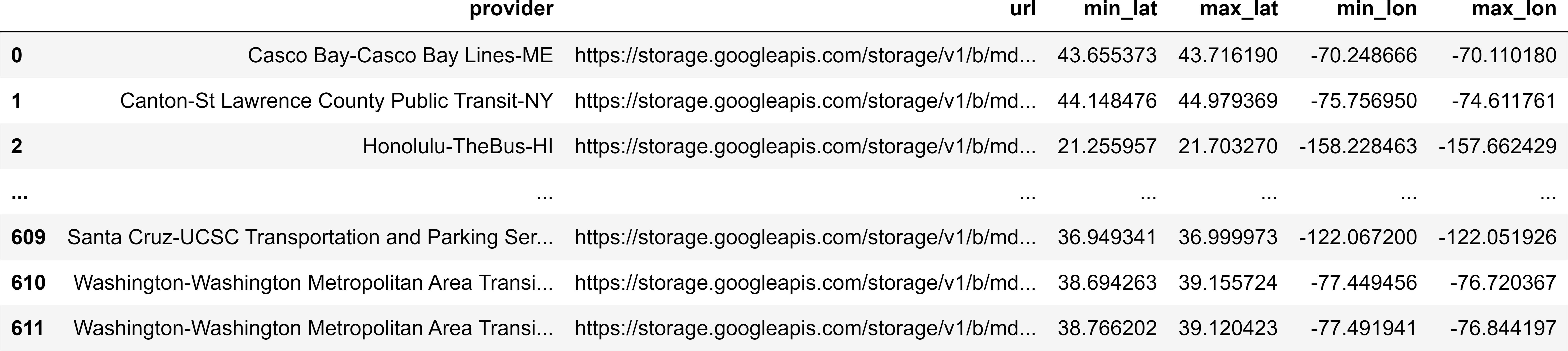
Fetch all sources
from gtfs_segments import fetch_gtfs_source
sources_df = fetch_gtfs_source()
sources_df.head()
Fetch source by name/provider/state
from gtfs_segments import fetch_gtfs_source
sources_df = fetch_gtfs_source(place ='Chicago')
sources_df

Automated Download
from gtfs_segments import download_latest_data
download_latest_data(sources_df,"output_folder")
Manual Download
Download the GTFS .zip files from @transitfeeds or @mobility data.
Get GTFS Segments
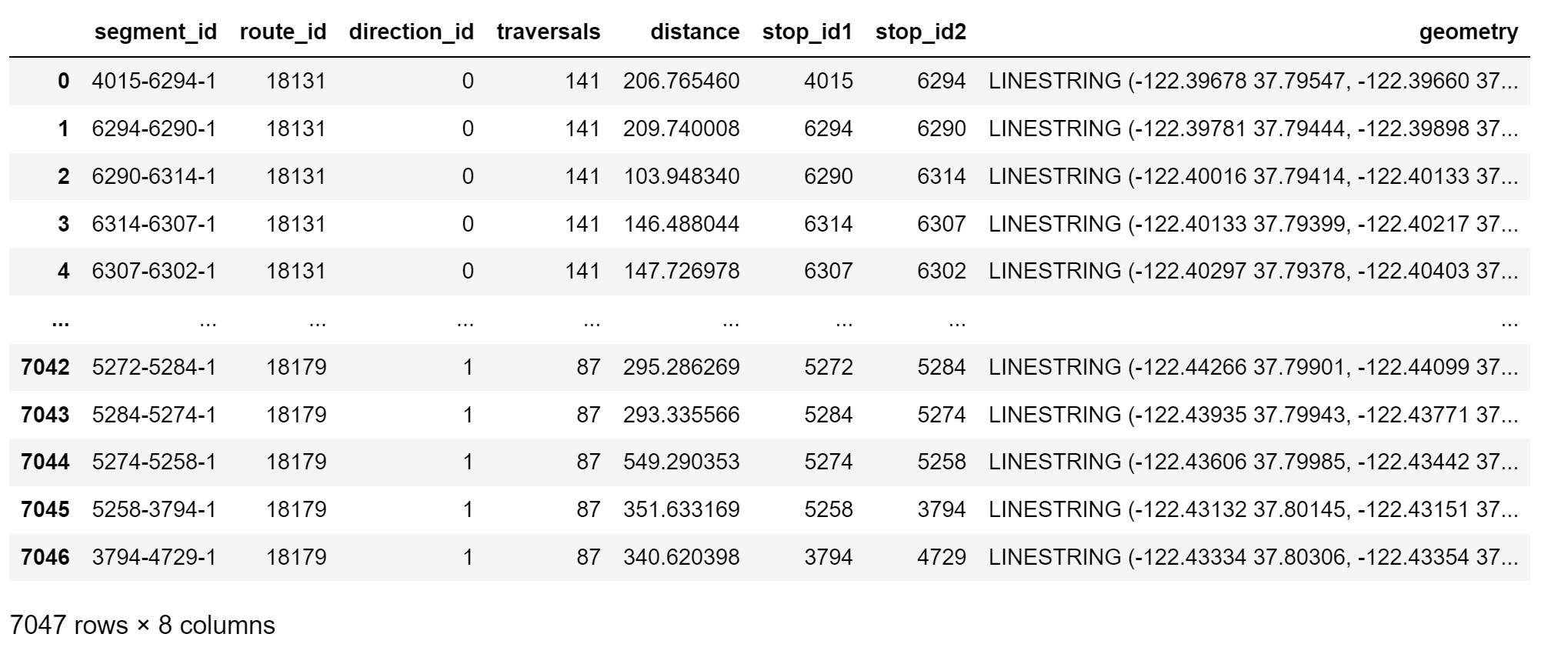
from gtfs_segments import get_gtfs_segments
segments_df = get_gtfs_segments("path_to_gtfs_zip_file")
segments_df
Visualize Spacings
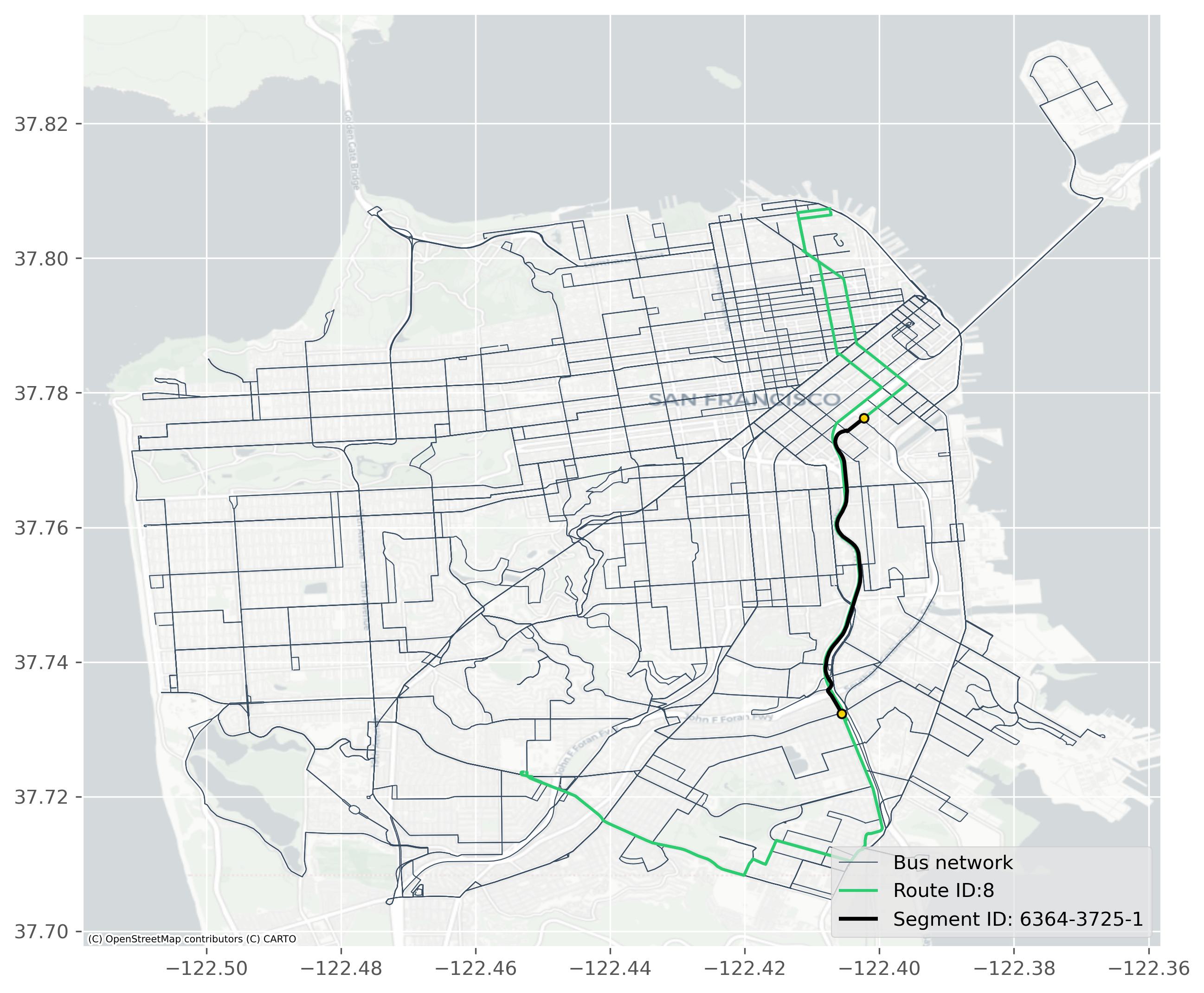
from gtfs_segments import view_spacings
view_spacings(segments_df,route = '18131',segment = '6294-6290-1',basemap=True)
Plot Distributions
from gtfs_segments import plot_hist
plot_hist(segments_df, max_spacing = 1200)
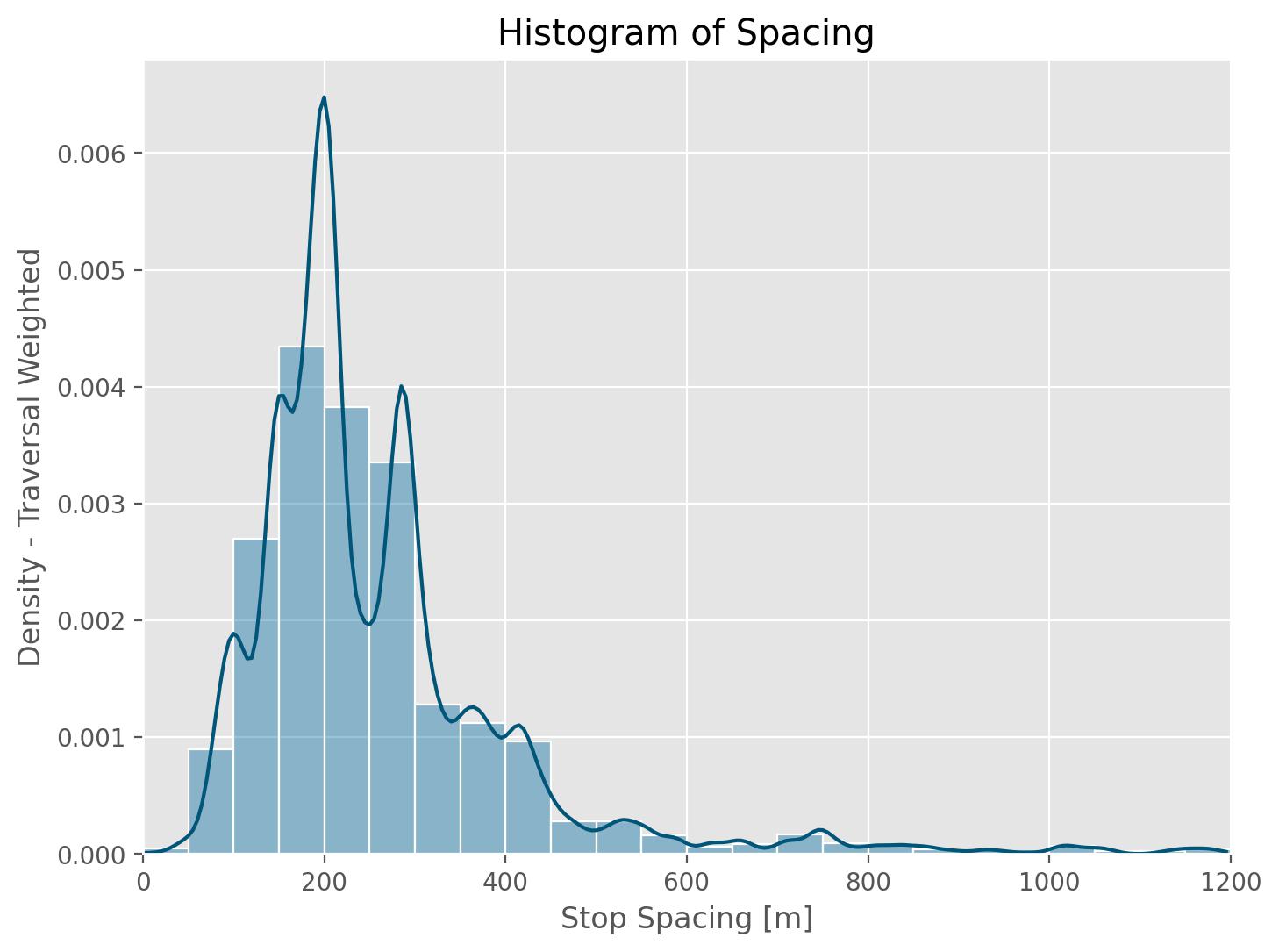
Optionally save figure using
plot_hist(segments_df,file_path = "spacings_hist.png",save_fig = True)
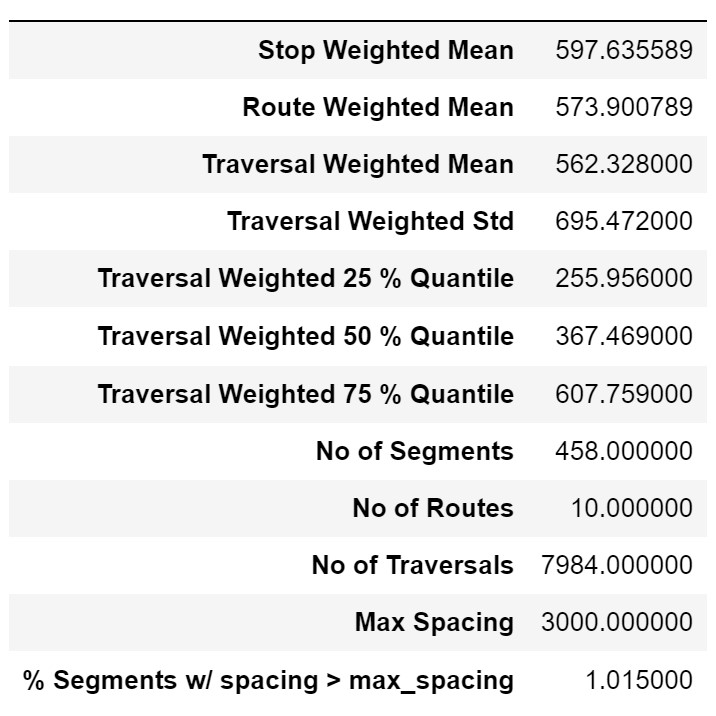
Get Summary Stats
from gtfs_segments import summary_stats
summary_stats(segments_df,max_spacing = 3000,export = True,file_path = "summary.csv")
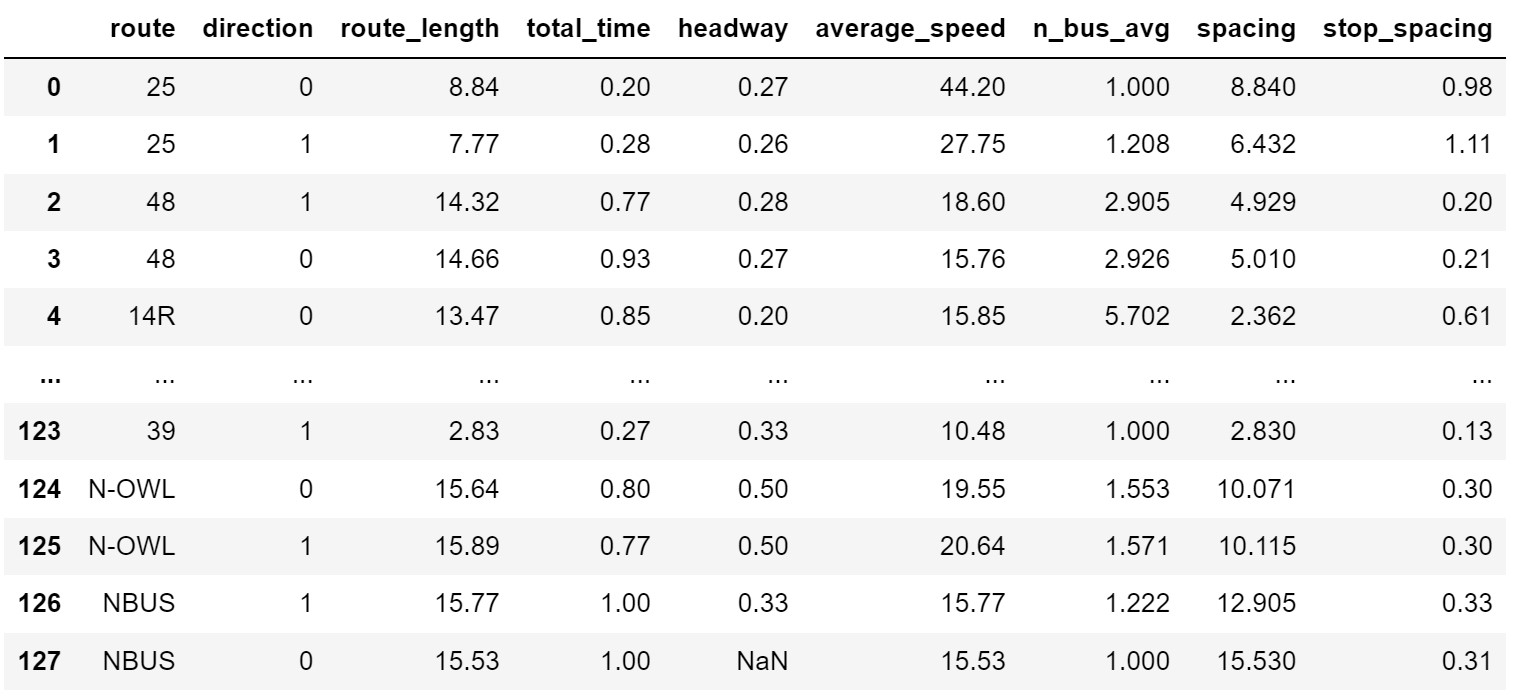
Get Route Summary Stats
from gtfs_segments import get_route_stats,get_bus_feed
_,feed = get_bus_feed('path_to_gtfs.zip')
get_route_stats(feed)
Download Segments Data
Download the data as either .csv or .geojson
from gtfs_segments import export_segments
export_segments(segments_df,'filename', output_format ='geojson')
# Get csv without geometry
export_segments(segments_df,'filename', output_format ='csv',geometry = False)
Roadmap
- Add
.ipynbexamples - Visualize catchment areas for stops
- Add unit tests for package
See the open issues for a full list of proposed features (and known issues).
License
Distributed under the MIT License. See LICENSE.txt for more information.
Citing gtfs-segments
If you use gtfs-segments in your research please use the following BibTeX entry:
@misc{gtfs_segments,
  author =       {Devunuri, Saipraneeth},
  title =        {gtfs-segments - A fast and efficient library to generate bus stop spacings},
  howpublished = {Github},
  year =         {2022},
  url =          {https://github.com/UTEL-UIUC/gtfs_segments}
}
Citing stop spacings paper
If you use stop spacings paper in your research please use the following BibTeX entry:
@misc{devunuri2022bus,
    title={Bus Stop Spacings Statistics: Theory and Evidence},
    author={Saipraneeth Devunuri and Shirin Qiam and Lewis Lehe and Ayush Pandey},
    year={2022},
    eprint={2208.04394},
    archivePrefix={arXiv},
    primaryClass={stat.ME}
}
Contributing
Contributions are what make the open source community such an amazing place to learn, inspire, and create. Any contributions you make are greatly appreciated.
If you have a suggestion that would make this better, please fork the repo and create a pull request. You can also simply open an issue with the tag "enhancement". Don't forget to give the project a star! Thanks again!
- Fork the Project
- Create your Feature Branch (
git checkout -b feature/AmazingFeature) - Commit your Changes (
git commit -m 'Add some AmazingFeature') - Push to the Branch (
git push origin feature/AmazingFeature) - Open a Pull Request
Contact
Saipraneeth Devunuri - @praneethDevunu1 - sd37@illinois.edu
Project Link: https://github.com/UTEL-UIUC/gtfs_segments
Acknowledgments
- Parts of the code use the Partridge library
- Shoutout to Mobility Data for compiling GTFS from around the globe and constantly maintaining them
Release history Release notifications | RSS feed


Download files
Download the file for your platform. If you're not sure which to choose, learn more about installing packages.
Source Distribution
Built Distributions
Filter files by name, interpreter, ABI, and platform.
If you're not sure about the file name format, learn more about wheel file names.
Copy a direct link to the current filters
File details
Details for the file gtfs_segments-0.0.6.tar.gz.
File metadata
- Download URL: gtfs_segments-0.0.6.tar.gz
- Upload date:
- Size: 22.8 kB
- Tags: Source
- Uploaded using Trusted Publishing? No
- Uploaded via: twine/4.0.1 CPython/3.10.2
File hashes
| Algorithm | Hash digest | |
|---|---|---|
| SHA256 |
0cdb17232545595fc85c97f59050f50f2c6fe2269fe9d44b3ddaf26752d5993a
|
|
| MD5 |
53a07283a9337a3c97b1042ad82ce4d6
|
|
| BLAKE2b-256 |
a6bc27f02e71a955217c09753f30ea6c5d3d6993c59a9a713e02a205e16d865f
|
File details
Details for the file gtfs_segments-0.0.6-py3.9.egg.
File metadata
- Download URL: gtfs_segments-0.0.6-py3.9.egg
- Upload date:
- Size: 42.1 kB
- Tags: Egg
- Uploaded using Trusted Publishing? No
- Uploaded via: twine/4.0.2 CPython/3.9.15
File hashes
| Algorithm | Hash digest | |
|---|---|---|
| SHA256 |
358f07d9c84fcccfcf868cd4d886d241224d15d5073a0b5150c50689da2a6034
|
|
| MD5 |
bad499f9472baf972258ea3c232675c6
|
|
| BLAKE2b-256 |
63312a1f529f9b49bc196cd31c95950011569e84f151d0990ee880ca95e1d1ab
|
File details
Details for the file gtfs_segments-0.0.6-py3-none-any.whl.
File metadata
- Download URL: gtfs_segments-0.0.6-py3-none-any.whl
- Upload date:
- Size: 21.7 kB
- Tags: Python 3
- Uploaded using Trusted Publishing? No
- Uploaded via: twine/4.0.1 CPython/3.10.2
File hashes
| Algorithm | Hash digest | |
|---|---|---|
| SHA256 |
bedf06599032555fdbbc90bc5fcba4f9dd421ef36190254ef2e05bf8d076ad5d
|
|
| MD5 |
1c58d794436bb7f88ed64b18efd49357
|
|
| BLAKE2b-256 |
0642274329a89d117dc5df5f7bd1c6d002710b621b9df85aff42d75ed7db8a01
|






