

hadolint-wrapper
What is hadolint?
Hadolint stands for Haskell Dockerfile Linter and is:
A smarter Dockerfile linter that helps you build best practice Docker images.
Example
Dockerfile
FROM debian
RUN export node_version="0.10" \
&& apt-get update && apt-get -y install nodejs="$node_verion"
COPY package.json usr/src/app
RUN cd /usr/src/app \
&& npm install node-static

EXPOSE 80000
CMD "npm start"
With hadolint
$ hadolint Dockerfile
Dockerfile:1 DL3006 Always tag the version of an image explicitly
Dockerfile:2 SC2154 node_verion is referenced but not assigned (did you mean 'node_version'?).
Dockerfile:2 DL3009 Delete the apt-get lists after installing something
Dockerfile:2 DL3015 Avoid additional packages by specifying `--no-install-recommends`
Dockerfile:5 DL3003 Use WORKDIR to switch to a directory
Dockerfile:5 DL3016 Pin versions in npm. Instead of `npm install <package>` use `npm install <package>@<version>`
Dockerfile:8 DL3011 Valid UNIX ports range from 0 to 65535
Dockerfile:9 DL3025 Use arguments JSON notation for CMD and ENTRYPOINT arguments
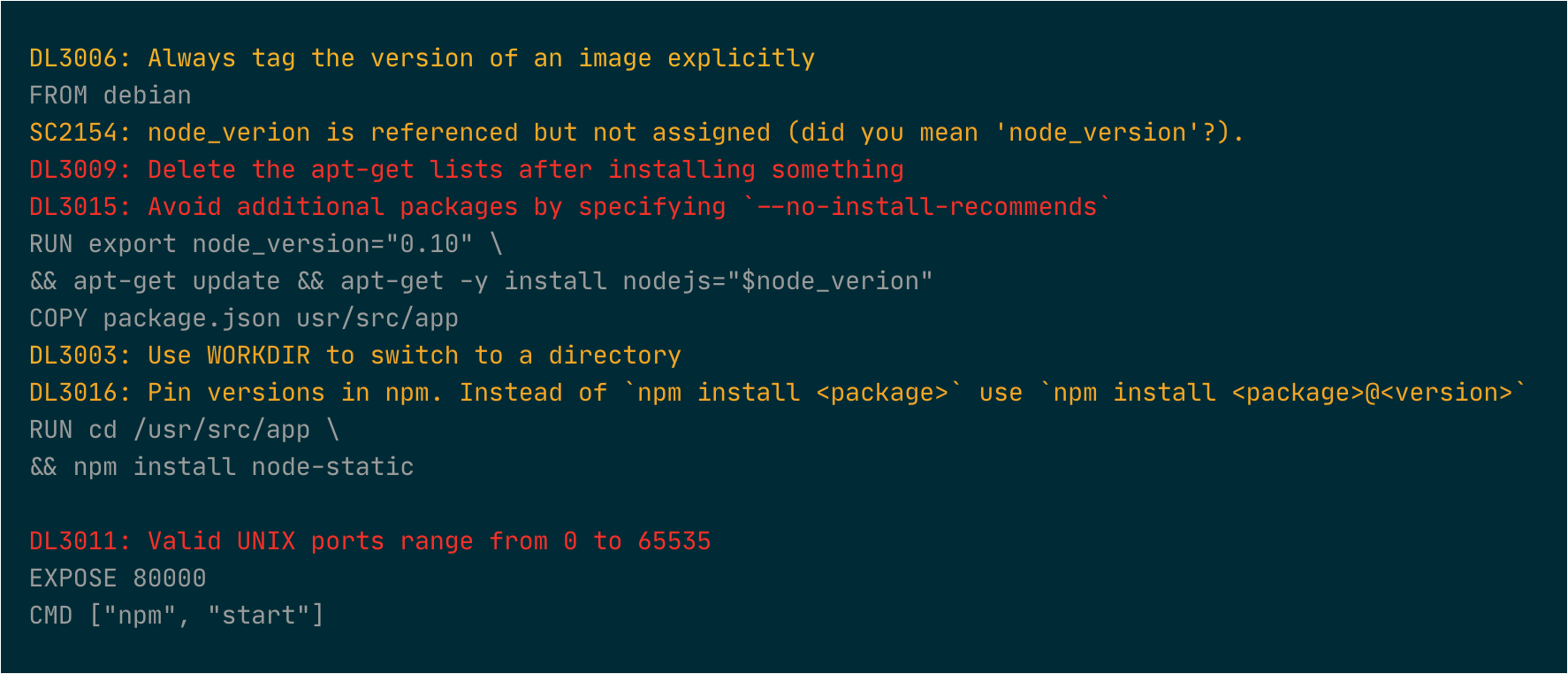
With hadolint wrapper
$ hadolintw Dockerfile
Installation
On OS X, the easiest way to install hadolintw is using Homebrew
$ brew tap mperezi/tools
$ brew install hadolint-wrapper
On other platforms, install hadolintw using pip
$ pip install hadolintw
Usage
$ hadolintw
Usage: hadolintw [OPTIONS] DOCKERFILE [HADOLINT_ARGS]...

  Provides a more clear output for hadolint

Options:
  -d, --use-docker             use the dockerized version of hadolint
  --color [never|auto|always]
  --help                       Show this message and exit.
Set up as a wrapper:
$ alias hadolint=hadolintw
$ hadolint Dockerfile --ignore DL3020
# Please note that all hadolint options must come AFTER the Dockerfile
FAQ
Does the wrapper keep the exit status of hadolint so that I can use it in my CI environment?
No problem.
My CI environment doesn't support colorized output. Can I disable it?
By default the wrapper can detect if the output is being written to a tty or a pipe or a file, enabling or disabling the color codes accordingly (—color auto is the default setting). However you can always turn this feature on or off regardless of the type of output destination:
$ hadolintw --color never Dockerfile
In our team we have a hadolint.yml with some rules defined for our project. Can we still use it with the hadolint wrapper?
Sure.
$ hadolintw Dockerfile --config hadolint.yml
The hadolint program is not available where my build is going to run but at least I have access to a Docker environment. Can I still run hadolint?
$ hadolintw --use-docker Dockerfile
Unable to find image 'hadolint/hadolint:latest' locally
latest: Pulling from hadolint/hadolint
8a8460b25d70: Pulling fs layer
8a8460b25d70: Verifying Checksum
8a8460b25d70: Download complete
8a8460b25d70: Pull complete
Digest: sha256:0cdbd1e0f5fd3135d17617bb510a85c0248eb70b041021fe5431d4d1501d41b9
Status: Downloaded newer image for hadolint/hadolint:latest
...
1 maintainer

Metadata
1 maintainer
Release files for hadolintw 1.2.1
For a detailed explanation of source distributions (sdists) and built distributions (wheels), please see the package formats documentation.
Source distribution (sdist)
| File | Size | Uploaded | Provenance | |
|---|---|---|---|---|
| hadolintw-1.2.1.tar.gz | 5.0 kB | Without provenance | Details |
Built distribution (wheel)
| File | Interpreter | ABI | Platform | Reset |
|---|---|---|---|---|
| hadolintw-1.2.1-py3-none-any.whl | Python 3 | none | any | Details |
Total release size: 10.1 kB
Release files / hadolintw-1.2.1.tar.gz
| Download URL | hadolintw-1.2.1.tar.gz |
|---|---|
| Size | 5.0 kB |
| Tags | Source |
|
SHA-256 checksum How to use checksums |
8566c2664f4c29bff9ce81dd669ebf38e99e2389ce0ac78d72b054d8119b1ea0
|
|
BLAKE2b-256 checksum How to use checksums |
f64b76604cd80a43e3b9e2e9d6b03149fff29485fde62a2a3724e261d316fd0b
|
| Upload date | |
|
Uploaded using Trusted Publishing? What is trusted publishing? |
No |
| Uploaded via |
poetry/1.0.5 CPython/3.6.10 Linux/5.3.0-1020-azure
|
Release files / hadolintw-1.2.1-py3-none-any.whl
| Download URL | hadolintw-1.2.1-py3-none-any.whl |
|---|---|
| Size | 5.2 kB |
| Tags | Python 3 |
|
SHA-256 checksum How to use checksums |
be6d63db331729d37f79975d62cb85add2e336d3600a480171be337f2f7c3ce9
|
|
BLAKE2b-256 checksum How to use checksums |
9ad8698bcfdbe9175ebcfb37172d05e3adde824ef1615797da36e67bc06ae5e4
|
| Upload date | |
|
Uploaded using Trusted Publishing? What is trusted publishing? |
No |
| Uploaded via |
poetry/1.0.5 CPython/3.6.10 Linux/5.3.0-1020-azure
|
Security for hadolintw 1.2.1
Provenance
Provenance describes where a file came from. On PyPI, provenance is shared via attestations, which provide a verifiable record of the build or publishing details. View details, limitations and caveats.
No provenance found
None of the files in this release were uploaded with provenance metadata.
A note on package security
PyPI is a repository for distributing packages, not a service for auditing them. While third-party security researchers and our staff do their best to detect and remove malicious packages, PyPI cannot guarantee the quality, security or suitability of any given package.














