

Hist













Hist is an analyst-friendly front-end for boost-histogram, designed for Python 3.10+ (3.6-3.9 users get older versions). See what's new.
Installation
You can install this library from PyPI with pip:
python3 -m pip install "hist[plot,fit]"
If you do not need the plotting features, you can skip the [plot] and/or
[fit] extras. [fit] is not currently supported in WebAssembly.
Features
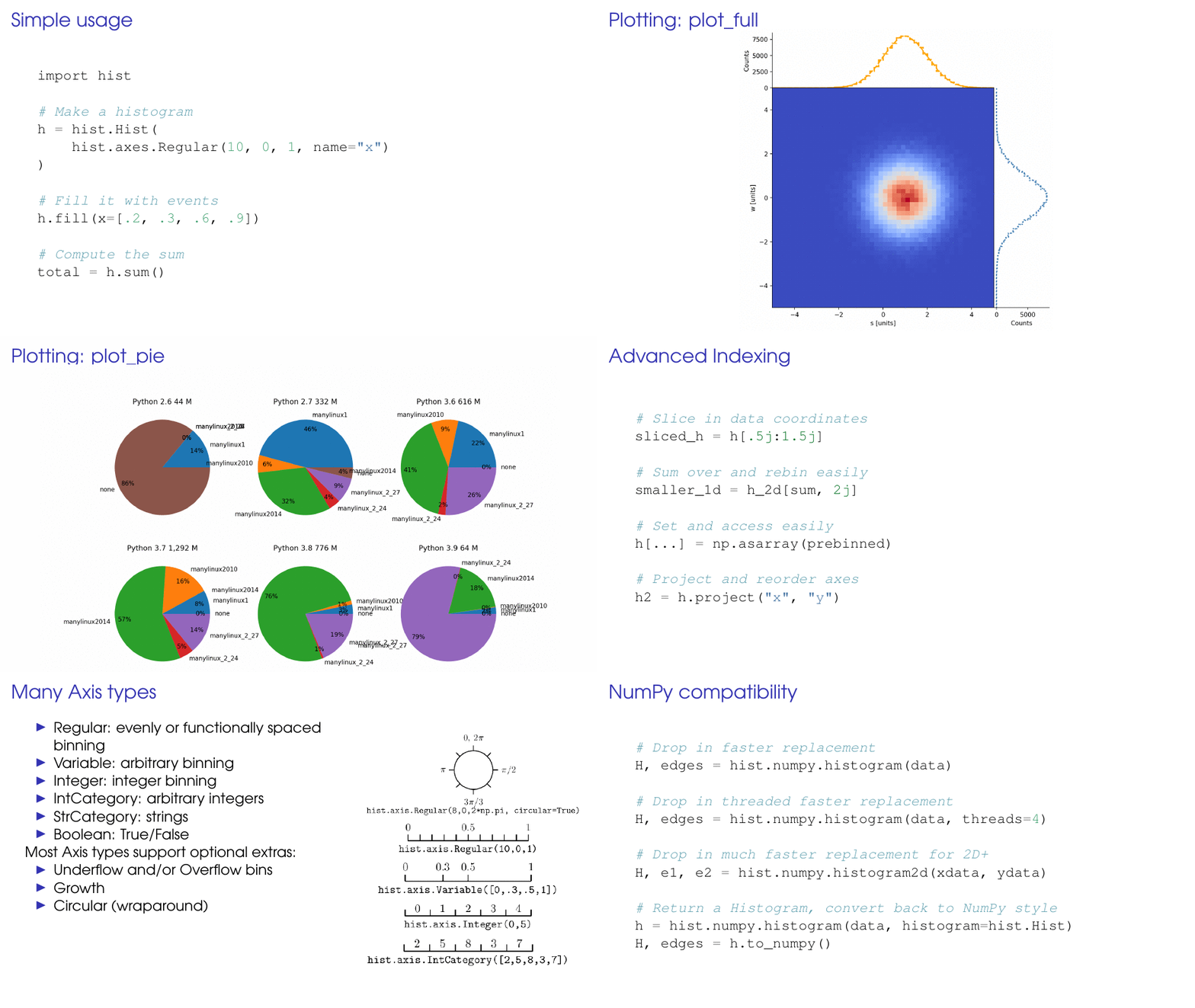
Hist currently provides everything boost-histogram provides, and the following enhancements:
-
Hist augments axes with names:
name=is a unique label describing each axis.label=is an optional string that is used in plotting (defaults tonameif not provided).- Indexing, projection, and more support named axes.
- Experimental
NamedHistis aHistthat disables most forms of positional access, forcing users to use only names.
-
The
Histclass augmentsbh.Histogramwith simpler construction:flow=Falseis a fast way to turn off flow for the axes on construction.storage=can be omitted, strings and storages can be positional.data=can initialize a histogram with existing data.Hist.from_columnscan be used to initialize with a DataFrame or dict.- You can cast back and forth with boost-histogram (or any other extensions).
-
Hist support QuickConstruct, an import-free construction system that does not require extra imports:
- Use
Hist.new.<axis>().<axis>().<storage>(). - Axes names can be full (
Regular) or short (Reg). - Histogram arguments (like
data=) can go in the storage.
- Use
-
Extended Histogram features:
- Direct support for
.nameand.label, like axes. .density()computes the density as an array..profile(remove_ax)can convert a ND COUNT histogram into a (N-1)D MEAN histogram..sort(axis)supports sorting a histogram by a categorical axis. Optionally takes a function to sort by..fill_flattened(...)will flatten and fill, including support for AwkwardArray..integrate(...), which takes the opposite arguments as.project.
- Direct support for
-
Hist implements UHI+; an extension to the UHI (Unified Histogram Indexing) system designed for import-free interactivity:
- Uses
jsuffix to switch to data coordinates in access or slices. - Uses
jsuffix on slices to rebin. - Strings can be used directly to index into string category axes.
- Uses
-
Quick plotting routines encourage exploration:
.plot()provides 1D and 2D plots (or useplot1d(),plot2d()).plot2d_full()shows 1D projects around a 2D plot..plot_ratio(...)make a ratio plot between the histogram and another histogram or callable..plot_pull(...)performs a pull plot..plot_pie()makes a pie plot..show()provides a nice str printout using Histoprint.
-
Stacks: work with groups of histograms with identical axes
- Stacks can be created with
h.stack(axis), using index or name of an axis (StrCategoryaxes ideal). - You can also create with
hist.stacks.Stack(h1, h2, ...), or usefrom_iterorfrom_dict. - You can index a stack, and set an entry with a matching histogram.
- Stacks support
.plot()and.show(), with names (plot labels default to original axes info). - Stacks pass through
.project,*,+, and-.
- Stacks can be created with
-
New modules
intervalssupports frequentist coverage intervals.
-
Notebook ready: Hist has gorgeous in-notebook representation.
- No dependencies required
Usage
from hist import Hist

# Quick construction, no other imports needed:
h = (
    Hist.new.Reg(10, 0, 1, name="x", label="x-axis")
    .Var(range(10), name="y", label="y-axis")
    .Int64()
)

# Filling by names is allowed:
h.fill(y=[1, 4, 6], x=[0.3, 0.5, 0.2])

# Names can be used to manipulate the histogram:
h.project("x")
h[{"y": 0.5j + 3, "x": 5j}]

# You can access data coordinates or rebin with a `j` suffix:
h[0.3j:, ::2j]  # x from .3 to the end, y is rebinned by 2

# Elegant plotting functions:
h.plot()
h.plot2d_full()
h.plot_pull(Callable)
Development
From a git checkout, either use nox, or run:
python -m pip install -e .[dev]
See Contributing guidelines for information on setting up a development environment.
Contributors
We would like to acknowledge the contributors that made this project possible (emoji key):












This project follows the all-contributors specification.
Talks
- 2021-07-07 PyHEP 2021 -- High-Performance Histogramming for HEP Analysis 🎥
- 2020-09-08 IRIS-HEP/GSOC -- Hist: histogramming for analysis powered by boost-histogram 🎥
- 2020-07-07 SciPy Proceedings 🎥
- 2020-07-17 PyHEP 2020 🎥
Acknowledgements
This library was primarily developed by Henry Schreiner and Nino Lau.
Support for this work was provided by the National Science Foundation cooperative agreement OAC-1836650 (IRIS-HEP) and OAC-1450377 (DIANA/HEP). Any opinions, findings, conclusions or recommendations expressed in this material are those of the authors and do not necessarily reflect the views of the National Science Foundation.


Release files for hist 2.12.0
For a detailed explanation of source distributions (sdists) and built distributions (wheels), please see the package formats documentation.
Source distribution (sdist)
| File | Size | Uploaded | |
|---|---|---|---|
| hist-2.12.0.tar.gz | 1.0 MB | Details |
Built distribution (wheel)
| File | Interpreter | ABI | Platform | Reset |
|---|---|---|---|---|
| hist-2.12.0-py3-none-any.whl | Python 3 | none | any | Details |
Total release size: 1.1 MB
Release files / hist-2.12.0.tar.gz
| Download URL | hist-2.12.0.tar.gz |
|---|---|
| Size | 1.0 MB |
| Tags | Source |
|
SHA-256 checksum How to use checksums |
cde1bc60439252f5851f05cbec183529752bf905b3cc28fbe92489d88c3b5596
|
|
BLAKE2b-256 checksum How to use checksums |
f4997ca29fbe7f0073e910ff7b79bf0b77b41fe5ecc7d75f5c8c73a16a7a2799
|
| Upload date | |
|
Uploaded using Trusted Publishing? What is trusted publishing? |
Yes |
| Uploaded via |
twine/7.0.0 CPython/3.13.14
|
Provenance
Provenance describes where a file came from. On PyPI, provenance is shared via attestations, which provide a verifiable record of the build or publishing details. View details, limitations and caveats.


PyPI Publish Attestation
PyPI verified that this artifact, at this checksum, originated from the publisher listed below.
Signed by GitHub Actions, verified by PyPI on Sep 21, 2026.
Transparency logRelease files / hist-2.12.0-py3-none-any.whl
| Download URL | hist-2.12.0-py3-none-any.whl |
|---|---|
| Size | 53.1 kB |
| Tags | Python 3 |
|
SHA-256 checksum How to use checksums |
d4a5a2e8231af3cd4aff711357d8ff547ee6c7630b7ba45cb58f86292c635bde
|
|
BLAKE2b-256 checksum How to use checksums |
90e68290ba050272b0685414ae7e704081f3e7cba32bcd45b332774ecf134312
|
| Upload date | |
|
Uploaded using Trusted Publishing? What is trusted publishing? |
Yes |
| Uploaded via |
twine/7.0.0 CPython/3.13.14
|
Provenance
Provenance describes where a file came from. On PyPI, provenance is shared via attestations, which provide a verifiable record of the build or publishing details. View details, limitations and caveats.
PyPI Publish Attestation
PyPI verified that this artifact, at this checksum, originated from the publisher listed below.
Signed by GitHub Actions, verified by PyPI on Sep 21, 2026.
Transparency log













