
HTTP stress testing tool

Project description
hstt - HTTP stress testing tool



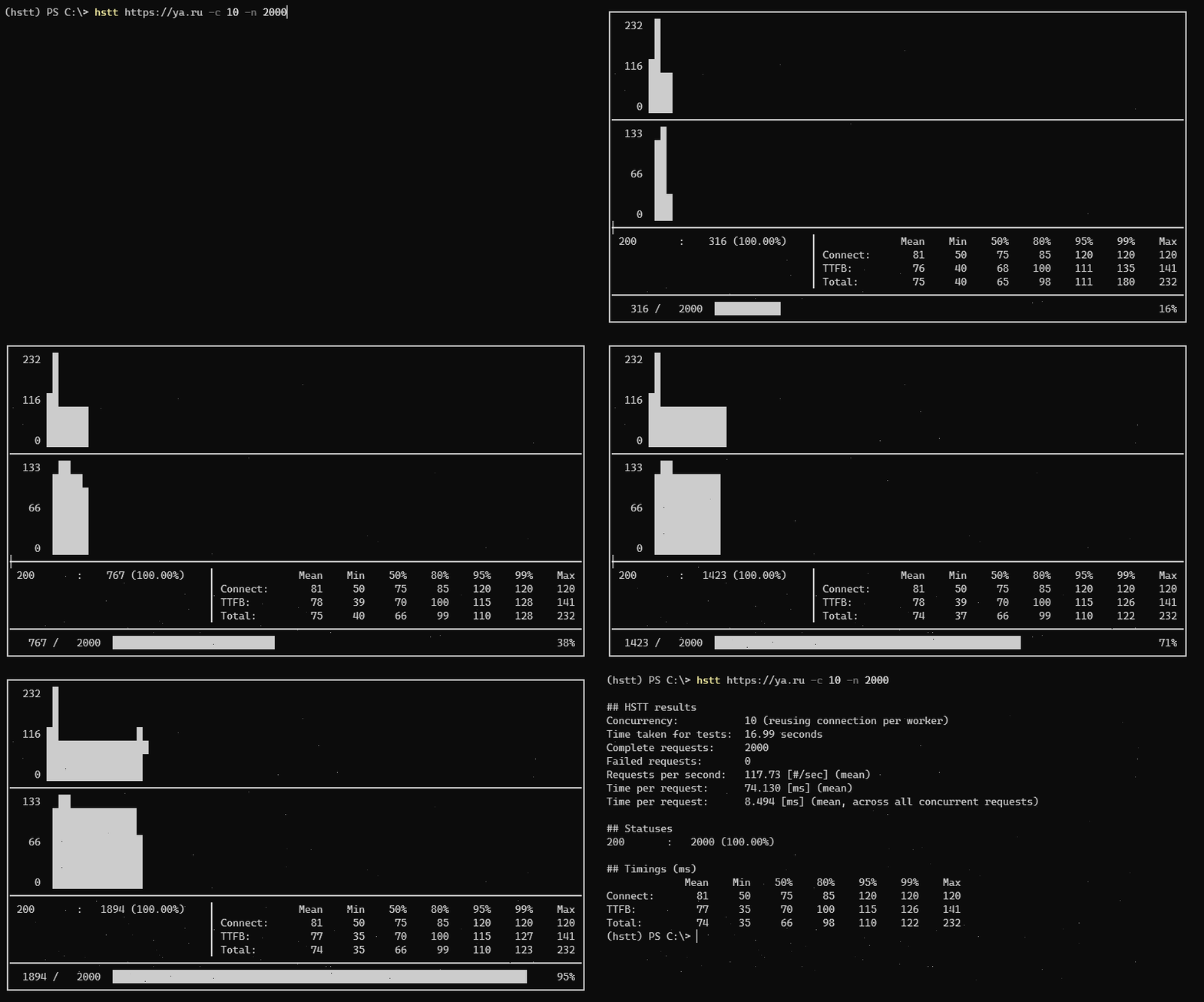
Params
usage: hstt [-h] [-n <num>] [-c <num>] [-d <sec>] [-t <sec>] [-H [<header> ...]] [-b <body>]
            [-m <method>] [--debug] [--insecure] [--chrome] [--no-reuse]
            url

HTTP stress testing tool (hstt)

positional arguments:
  url                target URL

optional arguments:
  -h, --help         show this help message and exit
  -n <num>           Total number of requests to perform (default: 10)
  -c <num>           Number of concurrent requests (default: 1)
  -d <sec>           Total duration limit (default: 30)
  -t <sec>           The timeout for each request (default: 30)
  -H [<header> ...]  A request header to be sent
  -b <body>          A request body to be sent
  -m <method>        An HTTP request method for each request (default: GET)
  --debug            Run in debug mode
  --insecure         Skip TLS verification
  --chrome           Use Chrome User-Agent header
  --no-reuse         New connection for each request
Output
$ hstt https://example.com -n 3000 -c 10 -t 0.3

## HSTT results
Concurrency:           10 (reusing connection per worker)
Time taken for tests:  17.22 seconds
Complete requests:     2997
Failed requests:       3
Requests per second:   174.21 [#/sec] (mean)
Time per request:      51.818 [ms] (mean)
Time per request:      5.746 [ms] (mean, across all concurrent requests)

## Statuses
200       :   2997 ( 99.90%)
timeout   :      3 (  0.10%)

## Timings (ms)
             Mean    Min    50%    80%    95%    99%    Max
Connect:      171    145    167    180    208    211    240
TTFB:          49     20     50     50     60     63     76
Total:         52     35     50     53     60    200    290


Download files
Download the file for your platform. If you're not sure which to choose, learn more about installing packages.
Source Distribution
hstt-0.0.2.tar.gz
(8.1 kB
view details)
Built Distribution
Filter files by name, interpreter, ABI, and platform.
If you're not sure about the file name format, learn more about wheel file names.
Copy a direct link to the current filters
hstt-0.0.2-py3-none-any.whl
(9.0 kB
view details)
File details
Details for the file hstt-0.0.2.tar.gz.
File metadata
- Download URL: hstt-0.0.2.tar.gz
- Upload date:
- Size: 8.1 kB
- Tags: Source
- Uploaded using Trusted Publishing? No
- Uploaded via: twine/3.4.2 importlib_metadata/4.6.4 pkginfo/1.7.1 requests/2.26.0 requests-toolbelt/0.9.1 tqdm/4.62.1 CPython/3.8.10
File hashes
| Algorithm | Hash digest | |
|---|---|---|
| SHA256 |
66c382cf5d04732b4542fe6619485c8ad06877c5639ab74ed09a8c81a8aa5f07
|
|
| MD5 |
f94d2457a23118b64835f93332d2c46f
|
|
| BLAKE2b-256 |
ff5cfdaaadb5419750f143948b5910659fd28aec55fb4c49b1d78164a9294890
|
File details
Details for the file hstt-0.0.2-py3-none-any.whl.
File metadata
- Download URL: hstt-0.0.2-py3-none-any.whl
- Upload date:
- Size: 9.0 kB
- Tags: Python 3
- Uploaded using Trusted Publishing? No
- Uploaded via: twine/3.4.2 importlib_metadata/4.6.4 pkginfo/1.7.1 requests/2.26.0 requests-toolbelt/0.9.1 tqdm/4.62.1 CPython/3.8.10
File hashes
| Algorithm | Hash digest | |
|---|---|---|
| SHA256 |
f390e85c1a9edb7f48dedf86b864e59073d58ae13ae5d917573e1e4fdd756915
|
|
| MD5 |
606cda43e1fd2dfde97fcd64cdda986f
|
|
| BLAKE2b-256 |
15da96f4e085db4d09219b4cdef6eb1aba519b970a2f0c6f12404d5de07ad6ae
|






