
A command line tool to generate html tables with embedded images, videos and audio

Project description
htmltable cli
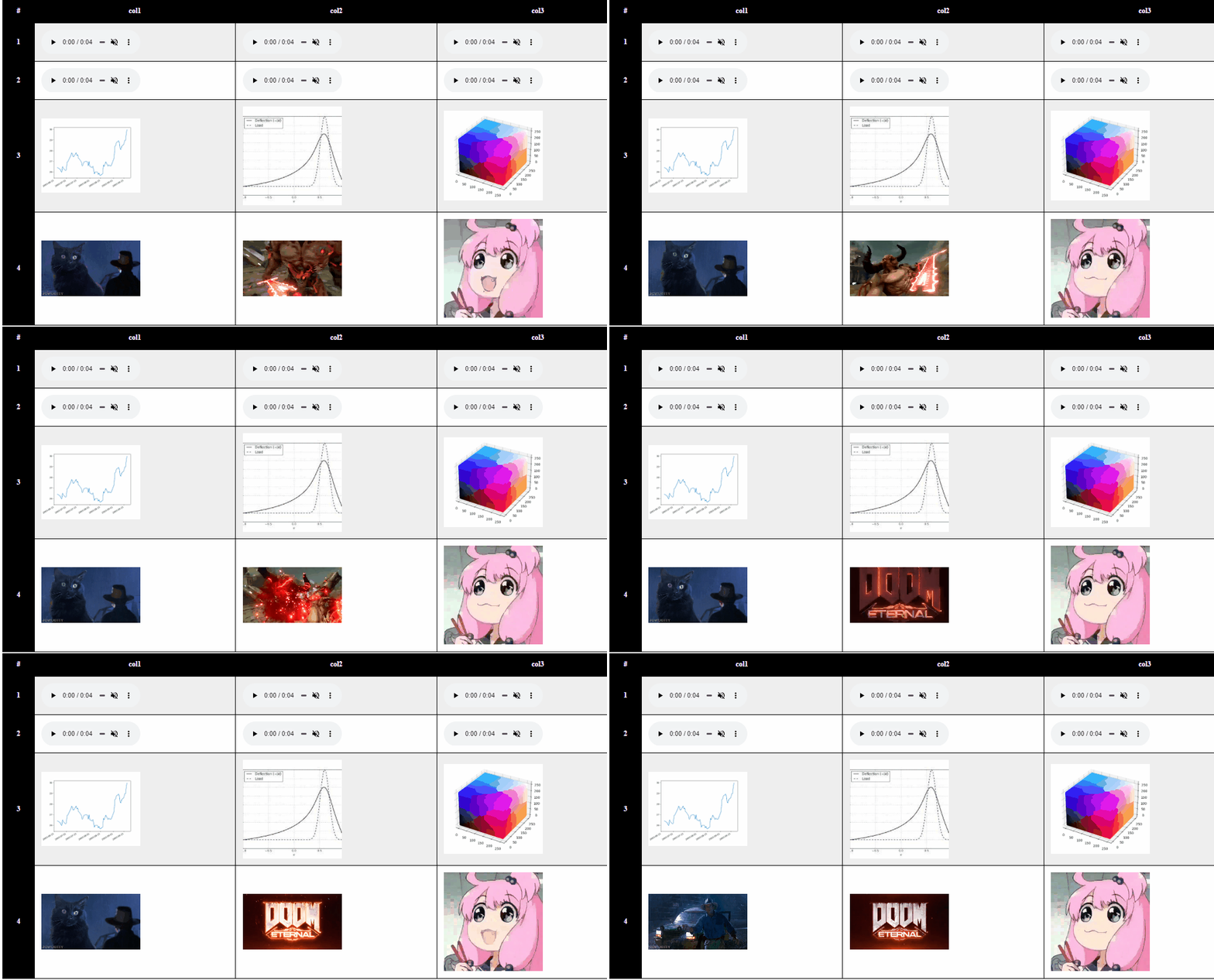
Command line tool to convert lists to portable HTML tables with embedded audios and images.
Installation
From source (latest)
pip install git+https://github.com/FarisHijazi/htmltable-cli
From PyPi (table)
pip install htmltable-cli
Usage
usage:

A command line tool to generate html tables with embedded images, videos and audio

- Separate columns with `,` or pass all files and group by parent using `--groupy_nthparent 1`
- The easiest way to use it is to put each column in a folder and then pass it using a wildcard `*`

Examples:

    htmltable col1/*.* , col2/*.* , col3/*.* --title "my table" --controls controls preload autoplay loop muted --base64 --index > output.html
    htmltable col*/* --groupy_nthparent 1    --title "my table" --controls controls preload autoplay loop muted --base64 --index > output.html

    [-h] [--title TITLE] [-g GROUPY_NTHPARENT] [-c COLNAMES [COLNAMES ...]] [-b] [-x | -fx]
    [--controls [{controls,preload,autoplay,loop,muted} [{controls,preload,autoplay,loop,muted} ...]]] [-t] [--clamp]
    data [data ...]

positional arguments:
data                  input table data. Format: col1_item1 col1_item2 col1_item3 , col2_item1 col2_item2 col2_item3 ...

optional arguments:
-h, --help            show this help message and exit
--title TITLE         title heading for the table
-g GROUPY_NTHPARENT, --groupy_nthparent GROUPY_NTHPARENT
                        choose columns based on the nth parent, instead of separating using "," delimiter to determine
                        columns.This allows to dynamically specify folders instead of passing folders explicitly with "," in
                        between. Set to -g 1 for the direct parent of the files
-c COLNAMES [COLNAMES ...], --colnames COLNAMES [COLNAMES ...]
                        Provide a list of column names (instead of automatically inferring column names from filepaths).
-b, --base64          Encode all the media to a base64 URL, meaning that the html file is now portable and doesn't depend
                        on the location of the images/audios/videos
-x, --index           add numerical index column
-fx, --filename_index
                        Infer index (rowname) based on row filenames, instead of numerical index. All columns must have
                        identical filenames otherwise an error is raised
--controls [{controls,preload,autoplay,loop,muted} [{controls,preload,autoplay,loop,muted} ...]]
                        HTML video and audio controls
-t, --transpose       swap columns and rows
--clamp               clamp number of rows to the shortest row, ensures the table is symmetric.
Assuming filestructure:
.
|-- col1
|   |-- audio1.wav
|   |-- ...
|   |-- image.png
|   `-- video.mp4
|-- col2
|   |-- audio1.wav
|   |-- ...
|   |-- image.png
|   `-- video.mp4
`-- col3
    |-- audio1.wav
    |-- ...
    |-- image.png
    `-- video.mp4
Examples
Minimal example
htmltable col1/audio1.wav , col2/audio1.wav , col3/audio1.wav > output.html
or for dynamically choosing folders using wildcards *.
This will pass all files, and then will group them by parent folder, in this case 1 means the first parent folder.
htmltable col*/* --groupy_nthparent 1 > output.html

More involved example
htmltable col1/*.* , \
          col2/*.* , \
          col3/*.* \
          --controls controls preload autoplay loop muted \
          --base64 --index > output.html
(you don't actually have to organize your arguments in a new lines :p)
Explanation
--base64will encode all the media to a base64 URL, meaning that the html file is now portable and doesn't depend on the location of the images/audios/videoscol1/*.*passes all files incol1/directory--controls controls preload autoplay loop mutedset default video and audio attributes
Column and row headers
- Column headers are inferred automatically, to manually specify column names, use
-c/--colnames - Row headers options:
-
Can be left blank
-
Indexed numerically using
-x/--index -
Use the filenames, if all files have the same name across columns, using
-fx/--filename_index.Example: col1/audio1.wav, col2/audio2.wav.
-
Known issues
- Outputting files is only supported in the
.dir. i.ehtmltable .... > some/other/path/output.htmlhas issues when not using--base64 - setting
--controls autoplaywon't work, you need to addmutedas well
Development
Before committing, run the test script and make sure the output .html files are as expected
sh test.sh; ls testoutput*.html | xargs -I{} xdg-open {}  # for linux debian
sh test.sh; ls testoutput*.html | xargs -I{} start {}     # for windows
For building a release and uploading it to PyPi, make and git commit your changes, then run
sh build.sh
Release history Release notifications | RSS feed


Download files
Download the file for your platform. If you're not sure which to choose, learn more about installing packages.
Source Distribution
Built Distribution
Filter files by name, interpreter, ABI, and platform.
If you're not sure about the file name format, learn more about wheel file names.
Copy a direct link to the current filters
File details
Details for the file htmltable-cli-0.1.11.tar.gz.
File metadata
- Download URL: htmltable-cli-0.1.11.tar.gz
- Upload date:
- Size: 6.8 kB
- Tags: Source
- Uploaded using Trusted Publishing? No
- Uploaded via: twine/4.0.1 CPython/3.9.12
File hashes
| Algorithm | Hash digest | |
|---|---|---|
| SHA256 |
9e0abee4138373f1b51688209552c5234f123707ab9aa65cf6e3fbb1a9669074
|
|
| MD5 |
d59920aa4ce74f41cae4ba8954bc4633
|
|
| BLAKE2b-256 |
b5af5828efc64ed516487683965b0930fa7701150e13f487b48132b3ac25d19d
|
File details
Details for the file htmltable_cli-0.1.11-py3-none-any.whl.
File metadata
- Download URL: htmltable_cli-0.1.11-py3-none-any.whl
- Upload date:
- Size: 7.3 kB
- Tags: Python 3
- Uploaded using Trusted Publishing? No
- Uploaded via: twine/4.0.1 CPython/3.9.12
File hashes
| Algorithm | Hash digest | |
|---|---|---|
| SHA256 |
560418204f41cafb2a8fe86ba04907489e355996f1a6519806bc630b054be528
|
|
| MD5 |
fb3e1e1a0d9543c2e13f0ce2a588ad89
|
|
| BLAKE2b-256 |
46b67e7e69e019449c554c62a371345fbb980ffe82311e116f8b90476785e53f
|






