
Open-source dataset curation with hyperbolic embeddings visualization
Verified details
These details have been verified by PyPIProject links
GitHub Statistics
Maintainers


Project description
HyperView
A scriptable embedding workbench for image dataset curation and model analysis
HyperView turns an image dataset and a model into a live workspace: compute embeddings, project them into Euclidean, hyperbolic, or spherical layouts, inspect clusters and outliers, and keep samples, media, layouts, selections, and panels together across sessions.
It is built for ML/CV researchers, model builders, and coding agents who need a faster loop than notebooks plus screenshots and a more programmable surface than a fixed dashboard. The hyperview CLI controls the running UI, so a human or agent can create workspaces, run embedding/layout jobs, switch views, select samples, and install dataset-specific tools without editing the frontend.
Install it when a scatterplot is no longer enough: you want a local, extensible place to understand what your model grouped together, what it missed, and which samples deserve the next training or evaluation pass.




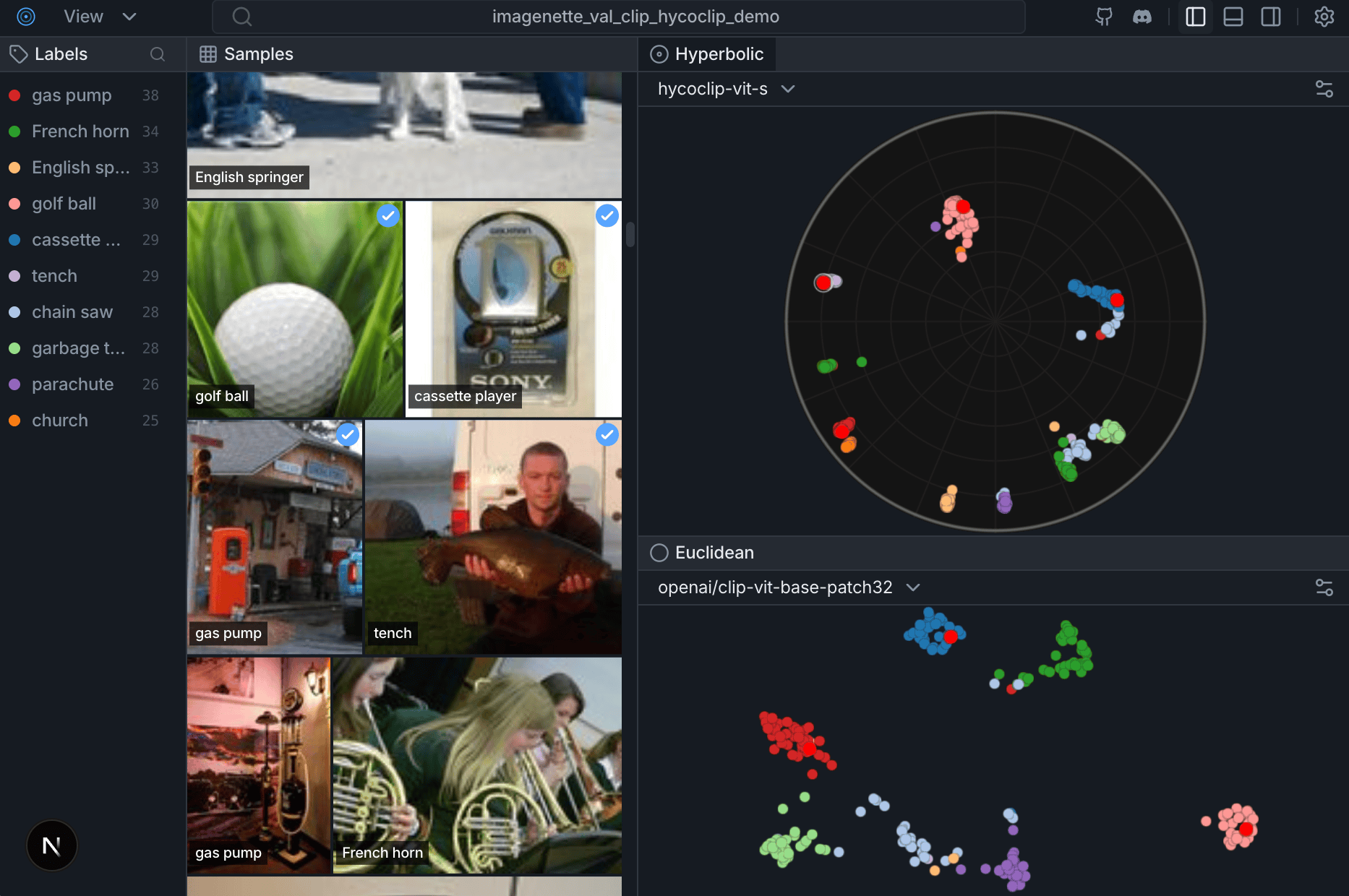
Try the live demo on HuggingFace Spaces
Features
- From image data to an embedding map. Ingest images from Hugging Face or local folders, compute embeddings with built-in or custom providers, and persist samples, media, embedding spaces, and layouts for repeatable analysis.
- Geometry-aware exploration. Inspect the same dataset through Euclidean, Poincare/hyperbolic, and spherical views so hierarchy, clusters, outliers, and boundary cases are easier to see.
- Curation primitives built into the workspace. Browse linked thumbnails and labels, use click or lasso selection, query nearest neighbors, and keep the current working set visible while you reason about the data.
- A CLI control plane for the live app. Use
hyperviewcommands to create workspaces, run jobs, switch layouts, set selections, and add panels while the UI stays open. - Agent-ready by default. Install the HyperView skill and let coding agents operate the same workspace you are inspecting: select samples, call tools, change layouts, and report back with concrete IDs and artifacts.
- Bring your own model or provider. Register custom embedding providers, point HyperView at checkpoints, and compare the resulting spaces without rebuilding the app.
- Dataset-specific tools and panels. Add repo-local extensions with Python backend tools and native frontend panels, so a serious dataset can grow the exact analysis surface it needs.
Updates
- 01-02-26 — The Geometry of Image Embeddings, Hands-on Coding Workshop (Berlin Computer Vision Group)
- 17-01-26 — The Geometry of Image Embeddings, Hands-on Coding Workshop, Part I (Berlin Computer Vision Group)
- 11-12-25 — Hacker Room Demo Day #2 (Merantix AI Campus Berlin) — First version of HyperView presented
Quick Start
Docs: docs/datasets.md · docs/colab.md · CONTRIBUTING.md · TESTS.md
Install CLI and Skill
Install the HyperView CLI and refresh the agent skill in one copy-paste line:
uv tool install --python 3.12 --upgrade hyperview && hyperview skill install
HyperView currently supports Python 3.10 through 3.13; --python 3.12 keeps the tool install on a widely supported runtime while upstream ML wheels catch up with newer Python releases. Re-running hyperview skill install replaces old HyperView skill copies, so the installed agent skill stays in sync with the upgraded CLI. By default this installs into detected agent locations plus the universal ~/.agents/skills/hyperview-cli fallback. For a project-local Copilot install, run:
hyperview skill install --scope project --agent github-copilot --yes
In this repo the source skill lives at .agents/skills/hyperview-cli/, so contributors get the project skill just by opening the checkout. Use that skill before driving workspaces, embeddings, layouts, runtime panels, or plugins from an agent.
Run HyperView
Create a workspace, bind one dataset to it, and drive the running app from the CLI.
hyperview workspace create imagenette-demo \
  --dataset imagenette_clip_20260411 \
  --activate

hyperview serve \
  --workspace imagenette-demo \
  --dataset imagenette_clip_20260411 \
  --no-browser
Then change the live UI from the CLI:
hyperview ui layout set \
  --workspace imagenette-demo \
  --layout-key <layout-key>

hyperview ui panel add \
  --workspace imagenette-demo \
  --panel-id labels \
  --title "Labels" \
  --position right \
  --module-file agent-context/panels/labels/panel.jsx

hyperview ui panel add \
  --workspace imagenette-demo \
  --panel-id model-a-poincare \
  --title "Model A" \
  --kind scatter \
  --layout-key <model-a-poincare-layout-key> \
  --position center

hyperview ui panel add \
  --workspace imagenette-demo \
  --panel-id model-b-poincare \
  --title "Model B" \
  --kind scatter \
  --layout-key <model-b-poincare-layout-key> \
  --position center \
  --reference-panel-id model-a-poincare \
  --direction right
Plugins use the same runtime path, but add Python tools too:
hyperview extension add .hyperview/extensions/selection-profile \
  --workspace imagenette-demo

hyperview tools run selection_profile.summarize \
  --workspace imagenette-demo \
  --param 'sample_ids=["sample-1","sample-8"]'
Python API
import hyperview as hv

# Create dataset
dataset = hv.Dataset("my_dataset")

# Load from HuggingFace
dataset.add_from_huggingface(
    "uoft-cs/cifar100",
    split="train",
    max_samples=1000
)

# Or load from local directory
# dataset.add_images_dir("/path/to/images", label_from_folder=True)

# Compute embeddings and visualization
dataset.compute_embeddings(model="openai/clip-vit-base-patch32")
dataset.compute_visualization()

# Launch the UI
hv.launch(dataset)  # Opens http://127.0.0.1:6262
Google Colab
See docs/colab.md for a fast Colab smoke test and notebook-friendly launch behavior.
Why Hyperbolic?
Traditional Euclidean embeddings struggle with hierarchical data. In Euclidean space, volume grows polynomially ($r^d$), causing Representation Collapse where minority classes get crushed together.
Hyperbolic space (Poincaré disk) has exponential volume growth ($e^r$), naturally preserving hierarchical structure and keeping rare classes distinct.
Try the live demo on HuggingFace Spaces→
Community
Weekly Open Discussion — Every Tuesday at 15:00 UTC on Discord
Join us to see the latest features demoed live, walk through new code, and get help with local setup. Whether you're a core maintainer or looking for your first contribution, everyone is welcome.
Contributing
Development setup, frontend hot-reload, and backend API notes live in CONTRIBUTING.md.
Related projects
- hyper-scatter: High-performance WebGL scatterplot engine (Euclidean + Poincaré) used by the frontend: https://github.com/Hyper3Labs/hyper-scatter
- hyper-models: Non-Euclidean model zoo + ONNX exports : https://github.com/Hyper3Labs/hyper-models
License
MIT License - see LICENSE for details.
Citation
If you use HyperView in your research, please cite:
@software{hyperview2025,
  author  = {Mahmood, Matin and Rueda-Toicen, Antonio and Morozov, Daniil},
  title   = {HyperView: Open-source Dataset Curation and Model Analysis},
  year    = {2025},
  url     = {https://github.com/Hyper3Labs/HyperView/tree/main}
}
Project details
Verified details
These details have been verified by PyPIProject links
GitHub Statistics
Maintainers
Release history Release notifications | RSS feed


Download files
Download the file for your platform. If you're not sure which to choose, learn more about installing packages.
Source Distribution
Built Distribution
Filter files by name, interpreter, ABI, and platform.
If you're not sure about the file name format, learn more about wheel file names.
Copy a direct link to the current filters
File details
Details for the file hyperview-0.4.2.tar.gz.
File metadata
- Download URL: hyperview-0.4.2.tar.gz
- Upload date:
- Size: 674.5 kB
- Tags: Source
- Uploaded using Trusted Publishing? Yes
- Uploaded via: uv/0.11.13 {"installer":{"name":"uv","version":"0.11.13","subcommand":["publish"]},"python":null,"implementation":{"name":null,"version":null},"distro":{"name":"Ubuntu","version":"24.04","id":"noble","libc":null},"system":{"name":null,"release":null},"cpu":null,"openssl_version":null,"setuptools_version":null,"rustc_version":null,"ci":true}
File hashes
| Algorithm | Hash digest | |
|---|---|---|
| SHA256 |
19ea9aa88afc31f3510eeb562c155921c30c52b4c8d1ea176d3a43b2d71bcf1f
|
|
| MD5 |
b1c393e8c627938c85e64909c14d1a77
|
|
| BLAKE2b-256 |
c388879a395abe2d40eea84b5a40dc0f1546b74c04ca39c2e2ce5d4a9cf9344f
|
File details
Details for the file hyperview-0.4.2-py3-none-any.whl.
File metadata
- Download URL: hyperview-0.4.2-py3-none-any.whl
- Upload date:
- Size: 711.7 kB
- Tags: Python 3
- Uploaded using Trusted Publishing? Yes
- Uploaded via: uv/0.11.13 {"installer":{"name":"uv","version":"0.11.13","subcommand":["publish"]},"python":null,"implementation":{"name":null,"version":null},"distro":{"name":"Ubuntu","version":"24.04","id":"noble","libc":null},"system":{"name":null,"release":null},"cpu":null,"openssl_version":null,"setuptools_version":null,"rustc_version":null,"ci":true}
File hashes
| Algorithm | Hash digest | |
|---|---|---|
| SHA256 |
dd84a5be4adb260c4b6a99b776895676387375e5499e9232826ca50ff819cdc1
|
|
| MD5 |
fe6586f7c41eb6745729b35e05cd188a
|
|
| BLAKE2b-256 |
aa7a0cad12db79379c2bacb6a33a7aed41d0c1636a621c9d82d7aa63d561edaa
|






