
Icdiff
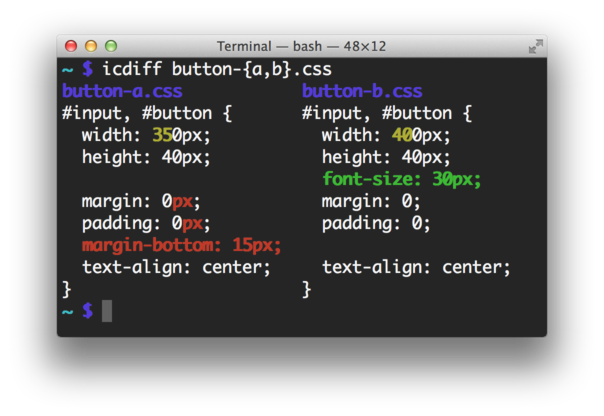
Improved colored diff
Installation
Download the latest icdiff and put it on your PATH.
Alternatively, install with packaging tools:
# pip
pip install icdiff

# apt
sudo apt install icdiff

# homebrew
brew install icdiff

# aur
yay -S icdiff

# nix
nix-env -i icdiff
Usage
icdiff [options] left_file right_file
Show differences between files in a two column view.
Options
  --version             show program's version number and exit
  -h, --help            show this help message and exit
  --cols=COLS           specify the width of the screen. Autodetection is Unix
                        only
  --encoding=ENCODING   specify the file encoding; defaults to utf8
  -E MATCHER, --exclude-lines=MATCHER
                        Do not diff lines that match this regex. Not
                        compatible with the 'line-numbers' option
  --head=HEAD           consider only the first N lines of each file
  -H, --highlight       color by changing the background color instead of the
                        foreground color.  Very fast, ugly, displays all
                        changes
  -L LABELS, --label=LABELS
                        override file labels with arbitrary tags. Use twice,
                        one for each file
  -N, --line-numbers    generate output with line numbers. Not compatible with
                        the 'exclude-lines' option.
  --no-bold             use non-bold colors; recommended for solarized
  --no-headers          don't label the left and right sides with their file
                        names
  --output-encoding=OUTPUT_ENCODING
                        specify the output encoding; defaults to utf8
  -r, --recursive       recursively compare subdirectories
  -s, --report-identical-files
                        report when two files are the same
  --show-all-spaces     color all non-matching whitespace including that which
                        is not needed for drawing the eye to changes.  Slow,
                        ugly, displays all changes
  --tabsize=TABSIZE     tab stop spacing
  -t, --truncate        truncate long lines instead of wrapping them
  -u, --patch           generate patch. This is always true, and only exists
                        for compatibility
  -U NUM, --unified=NUM, --numlines=NUM
                        how many lines of context to print; can't be combined
                        with --whole-file
  -W, --whole-file      show the whole file instead of just changed lines and
                        context
  --strip-trailing-cr   strip any trailing carriage return at the end of an
                        input line
  --color-map=COLOR_MAP
                        choose which colors are used for which items. Default
                        is --color-map='add:green_bold,change:yellow_bold,desc
                        ription:blue,meta:magenta,separator:blue,subtract:red_
                        bold'.  You don't have to override all of them:
                        '--color-map=separator:white,description:cyan
Using with Git
To see what it looks like, try:
git difftool --extcmd icdiff
To install this as a tool you can use with Git, copy
git-icdiff into your PATH and run:
git icdiff
You can configure git-icdiff in Git's config:
git config --global icdiff.options '--highlight --line-numbers'
Using with subversion
To try it out, run:
svn diff --diff-cmd icdiff
Using with Mercurial
Add the following to your ~/.hgrc:
[extensions]
extdiff=

[extdiff]
cmd.icdiff=icdiff
opts.icdiff=--recursive --line-numbers
Or check more in-depth setup instructions.
Setting up a dev environment
Create a virtualenv and install the dev dependencies. This is not needed for normal usage.
virtualenv venv
source venv/bin/activate
pip install -r requirements-dev.txt
Running tests
./test.sh python3
Making a release
- Update ChangeLog with all the changes since the last release
- Update
__version__inicdiff - Run tests, make sure they pass
git commit -a -m "release ${version}"git pushgit tag release-${version}git push origin release-${version}- A GitHub Action should be triggered due to the release tag being pushed, and will upload to PyPI.
License
This file is derived from difflib.HtmlDiff which is under license.
I release my changes here under the same license. This is GPL compatible.


Release files for icdiff 2.0.10
For a detailed explanation of source distributions (sdists) and built distributions (wheels), please see the package formats documentation.
Source distribution (sdist)
| File | Size | Uploaded | Provenance | |
|---|---|---|---|---|
| icdiff-2.0.10.tar.gz | 16.4 kB | With provenance | Details |
Built distribution (wheel)
| File | Interpreter | ABI | Platform | Reset |
|---|---|---|---|---|
| icdiff-2.0.10-py3-none-any.whl | Python 3 | none | any | Details |
Total release size: 33.5 kB
Release files / icdiff-2.0.10.tar.gz
| Download URL | icdiff-2.0.10.tar.gz |
|---|---|
| Size | 16.4 kB |
| Tags | Source |
|
SHA-256 checksum How to use checksums |
75a3de5c9af35ab45fb0504df59770c514a12c0d2b2c99e5f9c5c2429957e133
|
|
BLAKE2b-256 checksum How to use checksums |
5b6d41c8ff13b67c30ceb9325398ff6bb9fc4b77208c6c1d79db8d5913840bc6
|
| Upload date | |
|
Uploaded using Trusted Publishing? What is trusted publishing? |
Yes |
| Uploaded via |
twine/6.1.0 CPython/3.13.7
|
Provenance
Provenance describes where a file came from. On PyPI, provenance is shared via attestations, which provide a verifiable record of the build or publishing details. View details, limitations and caveats.


PyPI Publish Attestation
PyPI verified that this artifact, at this checksum, originated from the publisher listed below.
Signed by GitHub Actions, verified by PyPI on Feb 8, 2026.
Transparency logRelease files / icdiff-2.0.10-py3-none-any.whl
| Download URL | icdiff-2.0.10-py3-none-any.whl |
|---|---|
| Size | 17.1 kB |
| Tags | Python 3 |
|
SHA-256 checksum How to use checksums |
fd8ce592d94261c435e2a410f668a41ec3be4527878f8df01100797021d8edb0
|
|
BLAKE2b-256 checksum How to use checksums |
854bbb94514476624bfff977599e5ef3ac9aea603abb693639ed305b22ed1b35
|
| Upload date | |
|
Uploaded using Trusted Publishing? What is trusted publishing? |
Yes |
| Uploaded via |
twine/6.1.0 CPython/3.13.7
|
Provenance
Provenance describes where a file came from. On PyPI, provenance is shared via attestations, which provide a verifiable record of the build or publishing details. View details, limitations and caveats.
PyPI Publish Attestation
PyPI verified that this artifact, at this checksum, originated from the publisher listed below.
Signed by GitHub Actions, verified by PyPI on Feb 8, 2026.
Transparency logSecurity for icdiff 2.0.10
Provenance
Provenance describes where a file came from. On PyPI, provenance is shared via attestations, which provide a verifiable record of the build or publishing details. View details, limitations and caveats.
Full provenance
All 2 files in this release have been uploaded with provenance metadata.
Attestation for icdiff-2.0.10.tar.gz
PyPI Publish Attestation
PyPI verified that this artifact, at this checksum, originated from the publisher listed below.
Signed by GitHub Actions, verified by PyPI on Feb 8, 2026.
Transparency logA note on package security
PyPI is a repository for distributing packages, not a service for auditing them. While third-party security researchers and our staff do their best to detect and remove malicious packages, PyPI cannot guarantee the quality, security or suitability of any given package.
To learn more about protecting yourself from malicious actors, visit our package security documentation.














