
IceBreaker
Icebreaker provides a Python interface for the JBEI ICE sample manager.
See the full API documentation here
Installation
Icebreaker is written for Python 3+. You can install icebreaker via PIP:
sudo pip install icebreakerAlternatively, you can unzip the sources in a folder and type
sudo python setup.py installExample of use
In this example we assume that we are a lab who wants to find primers from its database to sequence a given construct. We will (1) pull all our primers from ICE, (2) find which primers are adapted to our sequence, using the Primavera package, and (3) we will ask ICE for the location of the selected primers.
Connexion to an ICE instance
You can connecct to your ICE instance using either an API token (see below for how to create a token), or an email/password authentication.
import icebreaker

# CONNECT TO ICE
configuration = dict(
    root="https://my.ice.instance.org",
    token="WMnlYlWHz+BC+7eFV=...",
    client = "icebot"
)
ice = icebreaker.IceClient(configuration)
Or:
# CONNECT TO ICE
configuration = dict(
    root="https://my.ice.instance.org",
    email="michael.swann@genomefoundry.org",
    password = "ic3ic3baby"
)
ice = icebreaker.IceClient(configuration)
The configuration can also be written in a yaml file so you can write IceClient('config.yml') where config.yml reads as follows:
root: https://my.ice.instance.org
email: michael.swann@genomefoundry.org
password: ic3ic3baby
Extracting all records from a folder
Next we pull all primers in the database:
# FIND THE ID OF THE FOLDER WITH ALL PRIMERS
primers_folder = ice.get_folder_id("PRIMERS", collection="SHARED")

# GET INFOS ON ALL ENTRIES IN THE FOLDER (PRIMER NAME, ID, CREATOR...)
primers_entries = ice.get_folder_entries(primers_folder)

# GET A BIOPYTHON RECORD FOR EACH PRIMER
primers_records = {primer["id"]: ice.get_record(primer["id"])
                   for primer in primers_entries}
Primer selection with Primavera
Next provide this information to Primavera and select some primers (see the Primavera docs):
from primavera import PrimerSelector, Primer, load_record

available_primers = [
    Primer(sequence=primers_records[entry['id']].seq.tostring(),
        name=entry['name'],
        metadata=dict(ice_id=entry['id']))
    for entry in primers_entries
]
constructs = [load_record("RTM3_39.gb", linear=False)]
selector = PrimerSelector(read_range=(150, 1000), tm_range=(55, 70),
                        size_range=(16, 25), coverage_resolution=10,
                        primer_reuse_bonus=200)
selected_primers = selector.select_primers(constructs, available_primers)
Finding available samples
Finally we look for available samples for each primer:
selected_primers = set(sum(selected_primers, []))
for primer in selected_primers:
    ice_id = primer.metadata.get("ice_id", None)
    if ice_id is not None:
        samples = ice.get_samples(ice_id)
        if len(samples) > 0:
            location = icebreaker.sample_location_string(samples[0])
            print("Primer %s is in %s." % (primer.name, location))
Result:
Primer PRV_EMMA_IN00042 is in PRIMER_PLATE_1/E06.
Primer PRV_EMMA_IN00043 is in PRIMER_PLATE_1/F06.
Primer PRV_EMMA_IN00028 is in PRIMER_PLATE_1/G04.
Primer PRV_EMMA_IN00060 is in PRIMER_PLATE_1/G08.
Primer PRV_EMMA_IN00064 is in PRIMER_PLATE_1/C09.
Primer PRV_EMMA_IN00038 is in PRIMER_PLATE_1/A06.
Primer PRV_EMMA_IN00068 is in PRIMER_PLATE_1/G09.
Getting an ICE token
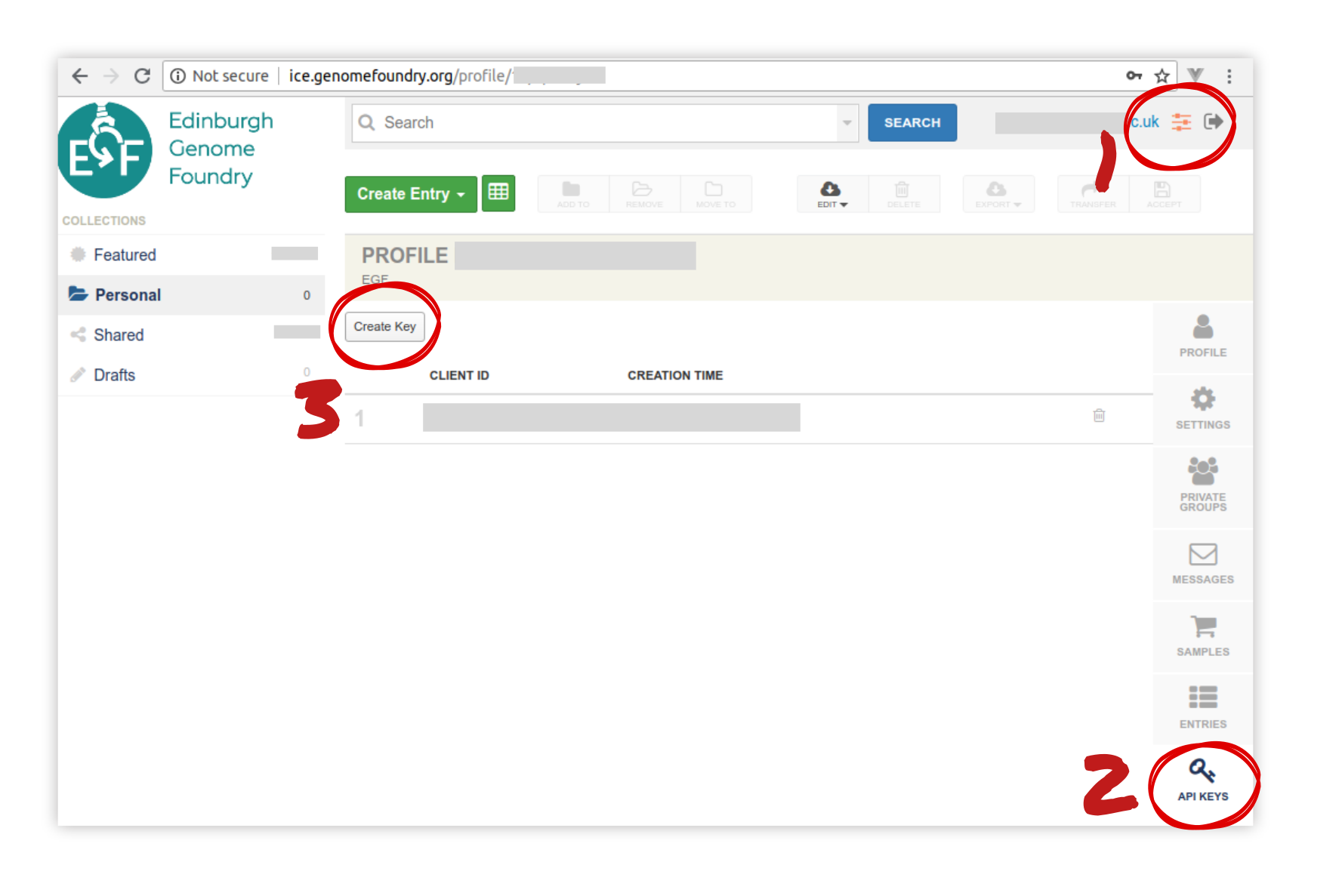
There are several ways to get ICE tokens. We suggest you create one throug the web interface as follows (see screenshot for indications):
Create an account with administrator rights
Go to the administrator panel
Click on “API keys”
Click on “create new”. Note everything down !
License = MIT
Icebreaker is an open-source software originally written at the Edinburgh Genome Foundry by Zulko and released on Github under the MIT licence (Copyright Edinburg Genome Foundry). Everyone is welcome to contribute !
More biology software

Icebreaker is part of the EGF Codons synthetic biology software suite for DNA design, manufacturing and validation.
1 maintainer

Metadata
1 maintainer
Release files for icebreaker 0.2.1
For a detailed explanation of source distributions (sdists) and built distributions (wheels), please see the package formats documentation.
Source distribution (sdist)
| File | Size | Uploaded | Provenance | |
|---|---|---|---|---|
| icebreaker-0.2.1.tar.gz | 20.7 kB | Without provenance | Details |
Release files / icebreaker-0.2.1.tar.gz
| Download URL | icebreaker-0.2.1.tar.gz |
|---|---|
| Size | 20.7 kB |
| Tags | Source |
|
SHA-256 checksum How to use checksums |
1a6deede6041e4bf1a712c75f469f70e2dca0bb5fcae0a2eee81a517245314c0
|
|
BLAKE2b-256 checksum How to use checksums |
329a0e1fe32881049a13130658e5c2356a0f934fa47a22cb12cea38f457c064c
|
| Upload date | |
|
Uploaded using Trusted Publishing? What is trusted publishing? |
No |
| Uploaded via |
Python-urllib/3.6
|
Security for icebreaker 0.2.1
Provenance
Provenance describes where a file came from. On PyPI, provenance is shared via attestations, which provide a verifiable record of the build or publishing details. View details, limitations and caveats.
No provenance found
None of the files in this release were uploaded with provenance metadata.
A note on package security
PyPI is a repository for distributing packages, not a service for auditing them. While third-party security researchers and our staff do their best to detect and remove malicious packages, PyPI cannot guarantee the quality, security or suitability of any given package.
To learn more about protecting yourself from malicious actors, visit our package security documentation.














