
iexfinance




Python SDK for IEX Cloud. Architecture mirrors that of the IEX Cloud API (and its documentation).
An easy-to-use toolkit to obtain data for Stocks, ETFs, Mutual Funds, Forex/Currencies, Options, Commodities, Bonds, and Cryptocurrencies:
Real-time and delayed quotes
Historical data (daily and minutely)
Financial statements (Balance Sheet, Income Statement, Cash Flow)
End of Day Options Prices
Institutional and Fund ownership
Analyst estimates, Price targets
Corporate actions (Dividends, Splits)
Sector performance
Market analysis (gainers, losers, volume, etc.)
IEX market data & statistics (IEX supported/listed symbols, volume, etc)
Social Sentiment and CEO Compensation
Example
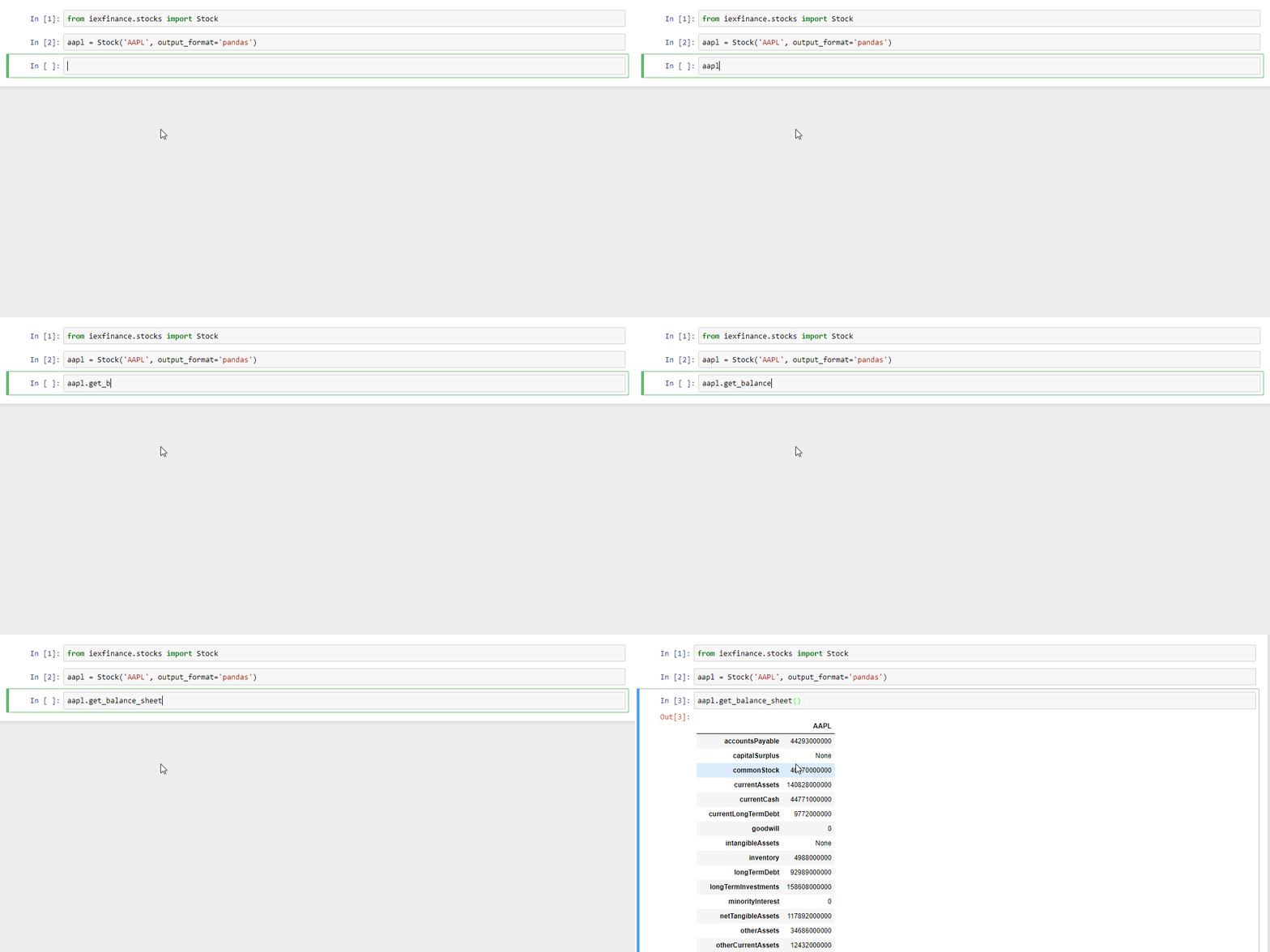
Documentation
Stable documentation is hosted on github.io.
Development documentation is also available for the latest changes in master.
Install
From PyPI with pip (latest stable release):
$ pip3 install iexfinance
From development repository (dev version):
$ git clone https://github.com/addisonlynch/iexfinance.git
$ cd iexfinance
$ python3 setup.py install
What’s Needed to Access IEX Cloud?
An IEX Cloud account is required to acecss the IEX Cloud API. Various plans are availalbe, free, paid, and pay-as-you-go.
Your IEX Cloud (secret) authentication token can be passed to any function or at the instantiation of a Stock object. The easiest way to store a token is in the IEX_TOKEN environment variable.
Passing as an Argument
The authentication token can also be passed to any function call:
from iexfinance.refdata import get_symbols

get_symbols(token="<YOUR-TOKEN>")
or at the instantiation of a Stock object:
from iexfinance.stocks import Stock

a = Stock("AAPL", token="<YOUR-TOKEN>")
a.get_quote()
How This Package is Structured
iexfinance is designed to mirror the structure of the IEX Cloud API. The following IEX Cloud endpoint groups are mapped to their respective iexfinance modules:
The most commonly-used endpoints are the Stocks endpoints, which allow access to various information regarding equities, including quotes, historical prices, dividends, and much more.
The Stock object provides access to most endpoints, and can be instantiated with a symbol or list of symbols:
from iexfinance.stocks import Stock

aapl = Stock("AAPL")
aapl.get_balance_sheet()
The rest of the package is designed as a 1:1 mirror. For example, using the Alternative Data endpoint group, obtain the Social Sentiment endpoint with iexfinance.altdata.get_social_sentiment:
from iexfinance.altdata import get_social_sentiment

get_social_sentiment("AAPL")
Common Usage Examples
The iex-examples repository provides a number of detailed examples of iexfinance usage. Basic examples are also provided below.
Real-time Quotes
To obtain real-time quotes for one or more symbols, use the get_price method of the Stock object:
from iexfinance.stocks import Stock
tsla = Stock('TSLA')
tsla.get_price()
or for multiple symbols, use a list or list-like object (Tuple, Pandas Series, etc.):
batch = Stock(["TSLA", "AAPL"])
batch.get_price()
Historical Data
It’s possible to obtain historical data using get_historical_data and get_historical_intraday.
Daily
To obtain daily historical price data for one or more symbols, use the get_historical_data function. This will return a daily time-series of the ticker requested over the desired date range (start and end passed as datetime.datetime objects):
from datetime import datetime
from iexfinance.stocks import get_historical_data

start = datetime(2017, 1, 1)
end = datetime(2018, 1, 1)

df = get_historical_data("TSLA", start, end)
To obtain daily closing prices only (reduces message count), set close_only=True:
df = get_historical_data("TSLA", "20190617", close_only=True)For Pandas DataFrame output formatting, pass output_format:
df = get_historical_data("TSLA", start, end, output_format='pandas')It’s really simple to plot this data, using matplotlib:
import matplotlib.pyplot as plt

df.plot()
plt.show()
Minutely (Intraday)
To obtain historical intraday data, use get_historical_intraday as follows. Pass an optional date to specify a date within three months prior to the current day (default is current date):
from datetime import datetime
from iexfinance.stocks import get_historical_intraday

date = datetime(2018, 11, 27)

get_historical_intraday("AAPL", date)
or for a Pandas Dataframe indexed by each minute:
get_historical_intraday("AAPL", output_format='pandas')Fundamentals
Financial Statements
from iexfinance.stocks import Stock

aapl = Stock("AAPL")
aapl.get_balance_sheet()aapl.get_income_statement()aapl.get_cash_flow()Modeling/Valuation Tools
from iexfinance.stocks import Stock

aapl = Stock("AAPL")

aapl.get_estimates()aapl.get_price_target()CEO Compensation
from iexfinance.altdata import get_ceo_compensation
get_ceo_compensation("AAPL")
Fund and Institutional Ownership
from iexfinance.stocks import Stock
aapl = Stock("AAPL")

# Fund ownership
aapl.get_fund_ownership()

# Institutional ownership
aapl.get_institutional_ownership()
Reference Data
List of Symbols IEX supports for API calls
from iexfinance.refdata import get_symbols

get_symbols()
List of Symbols IEX supports for trading
from iexfinance.refdata import get_iex_symbols

get_iex_symbols()
Account Usage
from iexfinance.account import get_usage

get_usage(quota_type='messages')
API Status
from iexfinance.account import get_api_status

get_api_status()
Configuration
Output Formatting
By default, iexfinance returns data for most endpoints in a pandas DataFrame.
Selecting json as the output format returns data formatted exactly as received from the IEX Endpoint. Configuring iexfinance’s output format can be done in two ways:
Environment Variable (Recommended)
For persistent configuration of a specified output format, use the environment variable IEX_OUTPUT_FORMAT. This value will be overridden by the output_format argument if it is passed.
macOS/Linux
Type the following command into your terminal:
$ export IEX_OUTPUT_FORMAT=pandasWindows
See here for instructions on setting environment variables in Windows operating systems.
output_format Argument
Pass output_format as an argument to any function call:
from iexfinance.refdata import get_symbols

get_symbols(output_format='pandas').head()
or at the instantiation of a Stock object:
from iexfinance.stocks import Stock

aapl = Stock("AAPL", output_format='pandas')
aapl.get_quote().head()
Contact
Email: ahlshop@gmail.com
Twitter: alynchfc
License
Copyright © 2020 Addison Lynch
See LICENSE for details
1 maintainer

Metadata
1 maintainer
Release files for iexfinance 0.5.0
For a detailed explanation of source distributions (sdists) and built distributions (wheels), please see the package formats documentation.
Source distribution (sdist)
| File | Size | Uploaded | Provenance | Actions |
|---|---|---|---|---|
| iexfinance-0.5.0.tar.gz | 39.1 kB | Without provenance | Details for iexfinance-0.5.0.tar.gz |
Built distribution (wheel)
| File | Interpreter | ABI | Platform | Actions Reset |
|---|---|---|---|---|
| iexfinance-0.5.0-py3-none-any.whl | Python 3 | none | any | Details for iexfinance-0.5.0-py3-none-any.whl |
Total release size: 93.5 kB
Release files / iexfinance-0.5.0.tar.gz
| Download URL | iexfinance-0.5.0.tar.gz |
|---|---|
| Size | 39.1 kB |
| Tags | Source |
|
SHA-256 checksum How to use checksums |
6f958211753bc7c504c36d9eff9708addac7e1a640733a8b4628886dff6f9f1c
|
|
BLAKE2b-256 checksum How to use checksums |
2eb48db4a1fbe854e18e011e27c045574a35b49e943c6ae16b4f23033b3b0a7a
|
| Upload date | |
|
Uploaded using Trusted Publishing? What is trusted publishing? |
No |
| Uploaded via |
twine/3.2.0 pkginfo/1.6.1 requests/2.24.0 setuptools/51.0.0 requests-toolbelt/0.9.1 tqdm/4.54.1 CPython/3.6.8
|
Release files / iexfinance-0.5.0-py3-none-any.whl
| Download URL | iexfinance-0.5.0-py3-none-any.whl |
|---|---|
| Size | 54.3 kB |
| Tags | Python 3 |
|
SHA-256 checksum How to use checksums |
a686dd21c479034795b070de997c6618006a79b55b2d6b066ae7d201368e5e30
|
|
BLAKE2b-256 checksum How to use checksums |
39a6653eb3306789f97f761a7889913923e0e814967a342099d4f11c0604eaa1
|
| Upload date | |
|
Uploaded using Trusted Publishing? What is trusted publishing? |
No |
| Uploaded via |
twine/3.2.0 pkginfo/1.6.1 requests/2.24.0 setuptools/51.0.0 requests-toolbelt/0.9.1 tqdm/4.54.1 CPython/3.6.8
|
Security for iexfinance 0.5.0
Provenance
Provenance describes where a file came from. On PyPI, provenance is shared via attestations, which provide a verifiable record of the build or publishing details. View details, limitations and caveats.
No provenance found
None of the files in this release were uploaded with provenance metadata.
A note on package security
PyPI is a repository for distributing packages, not a service for auditing them. While third-party security researchers and our staff do their best to detect and remove malicious packages, PyPI cannot guarantee the quality, security or suitability of any given package.
To learn more about protecting yourself from malicious actors, visit our package security documentation.














