
imaugtools



imaugtools contains tools used for image augmentation: translate, rotate, crop. This library is for you if you do NOT want to stretch or skew, or pad pixels that would make your images look strange when doing any of these operations.
Installation
To install imaugtools, simply run in your terminal
pip install imaugtools
Usage
Example image
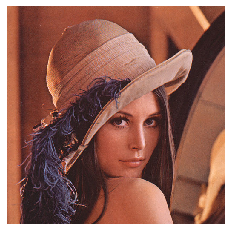
Translation
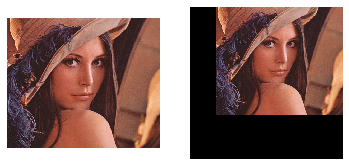
from imaugtools import translate_image
my_image_translated = translate_image(my_image, 0.1, 0.2)
my_image_translated_uncropped = translate_image(my_image, 0.1, 0.2, crop=False)
imshow(my_image_translated, my_image_translated_uncropped, mode='BGR')
imshow function used here is to simply display the images, you can use it from imshowtools library.
With and without crop:
Rotation
from imaugtools import rotate_image
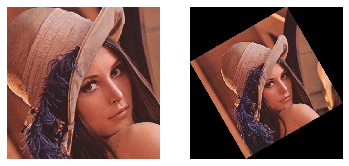
my_image_rotated = rotate_image(my_image, 30) # angle in degrees
my_image_rotated_uncropped = rotate_image(my_image, 30, crop=False)
imshow(my_image_rotated, my_image_rotated_uncropped, mode='BGR')
With and without crop:
Cropping
from imaugtools import center_crop, crop_around_center
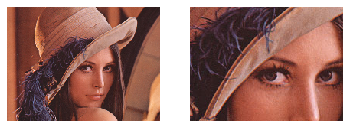
my_image_center_cropped = center_crop(my_image, (150, 200))
my_image_cropped_around_center = crop_around_center(my_image, (150, 200))
imshow(my_image_center_cropped, my_image_cropped_around_center, mode='BGR')
Aspect ratio preserving center crop and crop around center:
print(my_image_center_cropped.shape, my_image_cropped_around_center.shape)
# Output: (150, 200, 3) (150, 200, 3)
Advanced Usage
Strided Translation
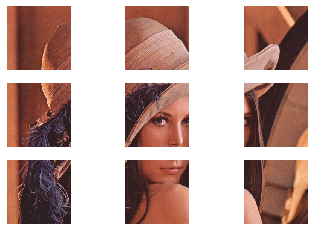
Strided translation is one of the powerful image augmentation techniques used in training neural networks.
tx_max = 1 and ty_max = 1 is equivalent to a stride of 1 in both directions. After you specify tx_max, you can specify tx (translation in x-axis) from -tx_max to +tx_max. The same applies to ty and ty_max.
my_images_translated = []
for j in range(-1, 2):
    for i in range(-1, 2):
        my_images_translated.append(translate_image(my_image, i, j, tx_max=1, ty_max=1))
imshow(*my_images_translated, mode='BGR')
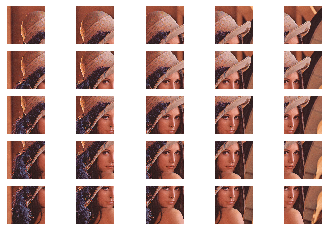
tx_max = 0.5 and ty_max = 0.5 is equivalent to a stride of 0.5 in both directions
my_images_translated = []
for j in range(-2, 3):
    for i in range(-2, 3):
        my_images_translated.append(translate_image(my_image, i/4, j/4, tx_max=0.5, ty_max=0.5))
imshow(*my_images_translated, mode='BGR')
Contributing
Pull requests are very welcome.
- Fork the repo
- Create new branch with feature name as branch name
- Check if things work with a jupyter notebook
- Raise a pull request
Licence
Please see attached Licence
1 maintainer

Metadata
1 maintainer
Release files for imaugtools 0.1.2
For a detailed explanation of source distributions (sdists) and built distributions (wheels), please see the package formats documentation.
Source distribution (sdist)
| File | Size | Uploaded | Provenance | Actions |
|---|---|---|---|---|
| imaugtools-0.1.2.tar.gz | 5.7 kB | Without provenance | Details for imaugtools-0.1.2.tar.gz |
Built distribution (wheel)
| File | Interpreter | ABI | Platform | Actions Reset |
|---|---|---|---|---|
| imaugtools-0.1.2-py3-none-any.whl | Python 3 | none | any | Details for imaugtools-0.1.2-py3-none-any.whl |
Total release size: 13.6 kB
Release files / imaugtools-0.1.2.tar.gz
| Download URL | imaugtools-0.1.2.tar.gz |
|---|---|
| Size | 5.7 kB |
| Tags | Source |
|
SHA-256 checksum How to use checksums |
565a80e4050143288d0ecdb932293532204ae22cb65dd8238e67ea6decb9af5f
|
|
BLAKE2b-256 checksum How to use checksums |
f02200da76867be672384d67c87441cc91b2a99114c06131e48c084672160f82
|
| Upload date | |
|
Uploaded using Trusted Publishing? What is trusted publishing? |
No |
| Uploaded via |
twine/2.0.0 pkginfo/1.5.0.1 requests/2.22.0 setuptools/41.4.0 requests-toolbelt/0.9.1 tqdm/4.36.1 CPython/3.7.4
|
Release files / imaugtools-0.1.2-py3-none-any.whl
| Download URL | imaugtools-0.1.2-py3-none-any.whl |
|---|---|
| Size | 7.9 kB |
| Tags | Python 3 |
|
SHA-256 checksum How to use checksums |
892903a3ac4bb8315ac3628573308325fd2ec3399b5914b3a58db406c2f2a568
|
|
BLAKE2b-256 checksum How to use checksums |
a58dcd6da48e9754f544aba63c00c49db8538d55116261fb0613b9398c8bbdf4
|
| Upload date | |
|
Uploaded using Trusted Publishing? What is trusted publishing? |
No |
| Uploaded via |
twine/2.0.0 pkginfo/1.5.0.1 requests/2.22.0 setuptools/41.4.0 requests-toolbelt/0.9.1 tqdm/4.36.1 CPython/3.7.4
|
Security for imaugtools 0.1.2
Provenance
Provenance describes where a file came from. On PyPI, provenance is shared via attestations, which provide a verifiable record of the build or publishing details. View details, limitations and caveats.
No provenance found
None of the files in this release were uploaded with provenance metadata.
A note on package security
PyPI is a repository for distributing packages, not a service for auditing them. While third-party security researchers and our staff do their best to detect and remove malicious packages, PyPI cannot guarantee the quality, security or suitability of any given package.
To learn more about protecting yourself from malicious actors, visit our package security documentation.














