
imgdiff


A command-line tool that combines two pictures into a single, larger one, and opens a GUI window (provided by the Python Imaging Library) or an external image viewer.
You could use it with a version control tool, e.g.
bzr diff *.png --using=imgdiff
or
bzr diff *.png --using='imgdiff --eog -H'
Installation
pip install imgdiff or download it from PyPI.
Usage
Run imgdiff --help to see this help message:
Usage: imgdiff [options] image1 image2

Compare two images side-by-side

Options:
  -h, --help            show this help message and exit
  -o OUTFILE            write the combined image to a file
  --viewer=COMMAND      use an external image viewer (default: builtin)
  --eog                 use Eye of Gnome (same as --viewer eog)
  --grace=SECONDS       seconds to wait before removing temporary file when
                        using an external viewer (default: 1.0)
  -H, --highlight       highlight differences (EXPERIMENTAL)
  -S, --smart-highlight
                        highlight differences in a smarter way (EXPERIMENTAL)
  --opacity=OPACITY     minimum opacity for highlighting (default 64)
  --timeout=TIMEOUT     skip highlighting if it takes too long (default: 10
                        seconds)
  --auto                pick orientation automatically (default)
  --lr, --left-right    force orientation to left-and-right
  --tb, --top-bottom    force orientation to top-and-bottom
  --bgcolor=RGB         background color (default: fff)
  --sepcolor=RGB        separator line color (default: ccc)
  --spacing=N           spacing between images (default: 3 pixels)
  --border=N            border around images (default: 0 pixels)
Output Examples
First example:
imgdiff set1/42.png set3/
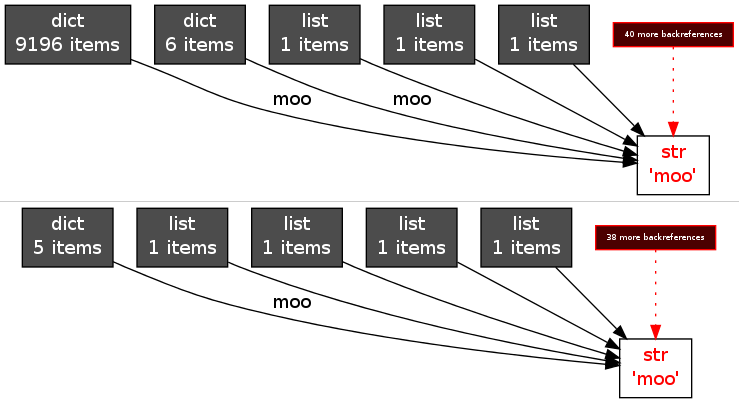
Here the images are wide and short, so imgdiff decided to put them one above the other.
Same example, with highlighting enabled:
imgdiff set1/42.png set3/ -H
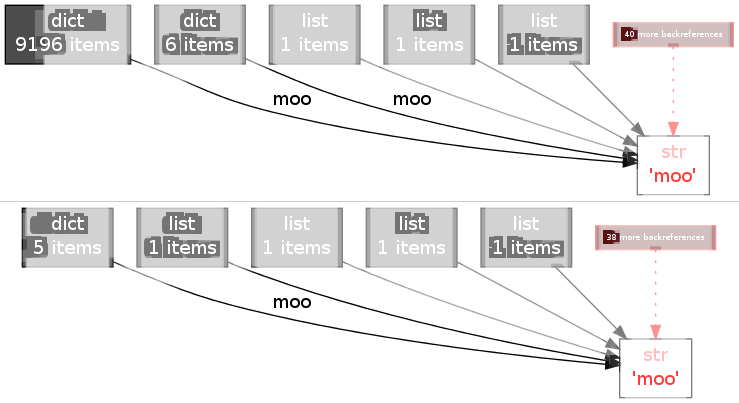
You can see that it doesn’t work very well, although it can produce nice results in simpler cases:
imgdiff set1/42.png set2/ -H
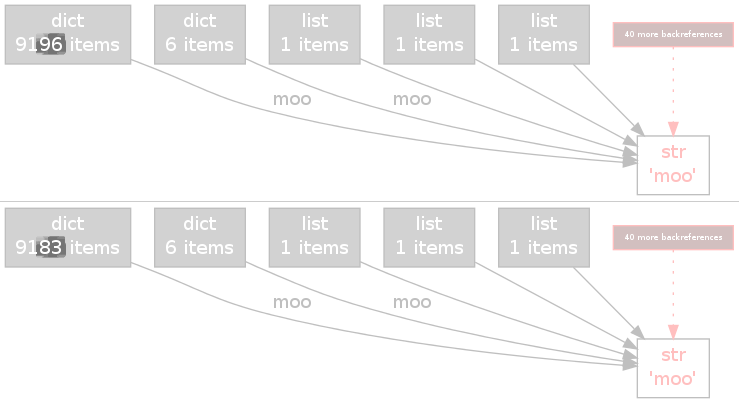
Support and Development
The source code can be found in this Git repository: https://github.com/mgedmin/imgdiff.
To check it out, use git clone https://github.com/mgedmin/imgdiff.
Report bugs at https://github.com/mgedmin/imgdiff/issues.
Changes
1.8.0 (2024-10-09)
Add support for Python 3.8, 3.9, 3.10, 3.11, 3.12, and 3.13.
Drop support for Python 2.7, 3.5 and 3.6.
1.7.1 (2019-04-23)
Claim Python 3.6 and 3.7 support (no code changes required).
Drop Python 3.3 and 3.4 support.
1.7.0 (2016-09-17)
Clarify the help message for the --opacity option.
Add Python 3.5 support.
Drop Python 2.6 and 3.2 support.
1.6.0 (2014-12-01)
Add Python 3 support.
Make the –timeout option actually work.
Drop the –selftest option. Add a real test suite with 100% coverage (which actually means little, since these are smoke tests that don’t inspect the results for correctness.)
1.5.0 (2013-08-11)
Suppress progress output if stderr is not a terminal.
Make it possible to abort –highligh/–smart-highlight logic by pressing ^C.
Abort –highlight/–smart-highlight logic if it takes longer than 10 seconds (timeout changeable with –timeout; use 0 to turn it off).
1.4.1 (2013-08-09)
Depend on Pillow instead of PIL.
Moved to GitHub.
1.4.0 (2010-12-19)
Accepts directory names: imgdiff dir1/img.png dir2/.
Centers images relative to each other if they have different width/height.
Automatic orientation (–auto) uses the golden ratio (1:1.618) as its goal for desired height:width instead of a 1:1 square.
New experimental options: –highlight (-H) and –smart-highlight (-S). These highlight areas that are different and fade out areas that are similar. Or at least they try.
New options for tweaking the output: –bgcolor, –sepcolor, –spacing, –border, –opacity.
New option: –eog as alias for –viewer eog, but shorter. Guess what desktop environment I’m using. ;-)
A puny “test suite”, runnable with imgdiff –selftest.
Better source code documentation via docstrings.
1.3.0 (2010-12-18)
First public release. Options supported: -o, –viewer, –grace, –auto, –lr, –tb, –help.
1 maintainer

Metadata
1 maintainer
Release files for imgdiff 1.8.0
For a detailed explanation of source distributions (sdists) and built distributions (wheels), please see the package formats documentation.
Source distribution (sdist)
| File | Size | Uploaded | Provenance | Actions |
|---|---|---|---|---|
| imgdiff-1.8.0.tar.gz | 1.4 MB | Without provenance | Details for imgdiff-1.8.0.tar.gz |
Built distribution (wheel)
| File | Interpreter | ABI | Platform | Actions Reset |
|---|---|---|---|---|
| imgdiff-1.8.0-py3-none-any.whl | Python 3 | none | any | Details for imgdiff-1.8.0-py3-none-any.whl |
Total release size: 1.4 MB
Release files / imgdiff-1.8.0.tar.gz
| Download URL | imgdiff-1.8.0.tar.gz |
|---|---|
| Size | 1.4 MB |
| Tags | Source |
|
SHA-256 checksum How to use checksums |
ee8d6da71fe74ca27cc1086a133e91028a7dea7690c09d37077dcda0150f4677
|
|
BLAKE2b-256 checksum How to use checksums |
f0a3dafd8c9b51673f520fd4d6288bb167287af494821a5d60503bd6bb09c642
|
| Upload date | |
|
Uploaded using Trusted Publishing? What is trusted publishing? |
No |
| Uploaded via |
twine/5.1.1 CPython/3.12.3
|
Release files / imgdiff-1.8.0-py3-none-any.whl
| Download URL | imgdiff-1.8.0-py3-none-any.whl |
|---|---|
| Size | 10.4 kB |
| Tags | Python 3 |
|
SHA-256 checksum How to use checksums |
10b351e52d6fe2c8ecd586d3cf655445afa2fb0fea3aa40ac84776c8a58310f9
|
|
BLAKE2b-256 checksum How to use checksums |
9f1182887197b4de962726a9fd83832a1ef3190e41c68c42474e72f61d173852
|
| Upload date | |
|
Uploaded using Trusted Publishing? What is trusted publishing? |
No |
| Uploaded via |
twine/5.1.1 CPython/3.12.3
|
Security for imgdiff 1.8.0
Provenance
Provenance describes where a file came from. On PyPI, provenance is shared via attestations, which provide a verifiable record of the build or publishing details. View details, limitations and caveats.
No provenance found
None of the files in this release were uploaded with provenance metadata.
A note on package security
PyPI is a repository for distributing packages, not a service for auditing them. While third-party security researchers and our staff do their best to detect and remove malicious packages, PyPI cannot guarantee the quality, security or suitability of any given package.
To learn more about protecting yourself from malicious actors, visit our package security documentation.














