
imgreg







An image registration library for python including a simple interface for building new models. Currently two image registration models for linear transformations based on scikit have been implemented as part of a toolchain in the context of particle image velocimetry (PIV). Tested for Python 3.7 to Python 3.9.
Installation
imgreg is directly available from pypi:
pip install imgreg
alternatively clone the repository, and install with:
git clone https://gitlab.com/DigonIO/imgreg.git
cd imgreg
python setup.py install
Examples
The following examples give a short introduction into the available models. For further reading the directory doc/tutorial provides a good starting point. The full documentation is available online.
Recover the rotation and translation between two images
First import the model (here based on the logpolar and fourier transformation) and load the image files into the model:
import numpy as np
import imgreg.data as data
from imgreg.models.logpolar import LogPolarSolver

ref_img = np.array(data.ref_img())
mod_img = np.array(data.mod_img())
lps = LogPolarSolver(ref_img, mod_img)
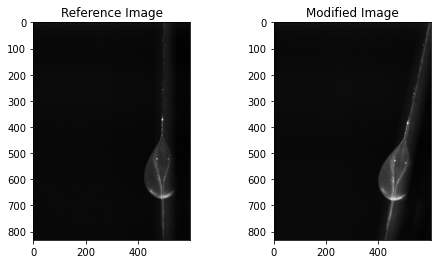
The images can be displayed with:
lps.display([lps.REF_IMG, lps.MOD_IMG])
To access the recovered rotation angle and lower error bound in degrees use:
lps.RECOVERED_ROTATION.value
# array([-13.06730769,   0.11259774])
The recovered x,y translation and lower error bound given in number of pixels is accessed with:
lps.RECOVERED_TRANSLATION.value
# array([-17.98318062,  31.037803  ,   0.42407651])
The recovered scaling factor is available with:
lps.RECOVERED_SCALE.value
# array([1.        , 1.00187429])
A comparision between the recovered and the reference image can be displayed with:
lps.display([lps.RECOVERED_ROT_SCALE_TR_IMG, lps.REF_IMG])

Batch image processing
First import the required modules (here we use the less general domain specific RadonSolver model, if not suitable for your application, repace with the LogPolarSolver as in the previous example):
import os
import pandas as pd

import matplotlib.pyplot as plt
import numpy as np
from PIL import Image

from imgreg.models.radon import RadonSolver
from imgreg.util.helpers import image_save_back_tf, rot_tr_gen, solver_gen
from imgreg.util.io import DirectoryView
Define the location to your reference image according to your usecase by replacing <path/to/reference/image.jpg>, then replace the location of your source <src> and destination <dest> paths. Adjust the file_pattern and step variables to your needs, the latter can be used to skip images for faster computation.
image_path_ref = "<path/to/reference/image.jpg>"
image_path_src = "<src>"
image_path_dest = "<dest>"
file_pattern = "*.jpg"
step = 10
Create a directory view from which the solver generates its input:
d_view = DirectoryView(image_path_src, file_pattern=file_pattern)
fnames = [file for i, file in enumerate(sorted(d_view.files)) if not i % step]
Load the reference image:
ref_img = np.array(Image.open(image_path_ref))
Initialize and configure a suitable solver:
ras = RadonSolver(ref_img=ref_img)
ras.UPSAMPLING.value = 20
Generate an array containing the recovered translation and rotation parameters for the given images:
radg = solver_gen(d_view, ras, step)
rad_rot_tr_arr = np.array(list(rot_tr_gen(radg)))
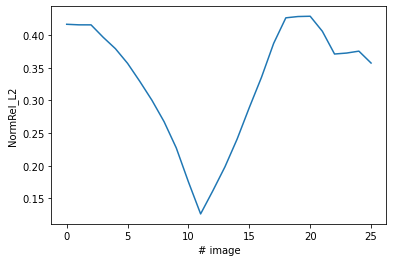
Display the relative norm NormRel_L2 over the image series as an indicator for the goodness of the recovered values:
plt.plot(rad_rot_tr_arr[:, -1])
plt.xlabel("# image")
plt.ylabel("NormRel_L2")
plt.show()
Store recovered values to .csv
df_out = pd.DataFrame(
    rad_rot_tr_arr,
    index=fnames,
    columns=[
        "tr_x",
        "tr_y",
        "tr_err",
        "rot",
        "rot_err",
        "NormRel_L2",
    ],
)
df_out.to_csv(f"radon-{step}.csv")
df_out
| tr_x | tr_y | tr_err | rot | rot_err | NormRel_L2 | |
|---|---|---|---|---|---|---|
| test00001.jpg | -26.4509 | 47.3258 | 0.405569 | -20.5556 | 0.282843 | 0.41641 |
| test00011.jpg | -26.3339 | 47.1561 | 0.405386 | -20.5556 | 0.282843 | 0.415555 |
| test00021.jpg | -26.2344 | 47.0332 | 0.405536 | -20.5556 | 0.282843 | 0.415513 |
| test00031.jpg | -22.8071 | 42.6237 | 0.385188 | -18.4444 | 0.282843 | 0.396469 |
| test00041.jpg | -18.4961 | 36.5684 | 0.366198 | -16 | 0.282843 | 0.379106 |
| test00051.jpg | -14.7056 | 30.9144 | 0.343007 | -13.5556 | 0.282843 | 0.35666 |
| test00061.jpg | -11.768 | 25.8513 | 0.316403 | -11.2469 | 0.282843 | 0.329185 |
| test00071.jpg | -8.66827 | 20.3634 | 0.288842 | -8.80247 | 0.282843 | 0.300223 |
| test00081.jpg | -6.02938 | 15.0685 | 0.258316 | -6.44444 | 0.282843 | 0.267387 |
| test00091.jpg | -3.50923 | 9.32793 | 0.220809 | -4 | 0.282843 | 0.227255 |
| test00101.jpg | -1.19596 | 3.51883 | 0.172761 | -1.55556 | 0.282843 | 0.175223 |
| test00111.jpg | 0.575633 | -1.85773 | 0.129057 | 0.753086 | 0.282843 | 0.126313 |
| test00121.jpg | 2.41049 | -7.94683 | 0.167134 | 3.19753 | 0.282843 | 0.16156 |
| test00131.jpg | 3.81275 | -13.2214 | 0.200897 | 5.44444 | 0.282843 | 0.198397 |
| test00141.jpg | 5.16611 | -19.4011 | 0.234146 | 7.95062 | 0.282843 | 0.240847 |
| test00151.jpg | 6.11063 | -24.7732 | 0.264576 | 10.1975 | 0.282843 | 0.289057 |
| test00161.jpg | 6.97132 | -31.2601 | 0.29121 | 12.7531 | 0.282843 | 0.335311 |
| test00171.jpg | 7.47346 | -36.6325 | 0.317422 | 15 | 0.282843 | 0.387218 |
| test00181.jpg | 7.68796 | -41.7207 | 0.34348 | 17 | 0.282843 | 0.426283 |
| test00191.jpg | 7.70654 | -41.831 | 0.345591 | 17 | 0.282843 | 0.42826 |
| test00201.jpg | 7.69192 | -41.8788 | 0.349477 | 17 | 0.282843 | 0.4287 |
| test00211.jpg | 7.65427 | -39.2652 | 0.338767 | 15.9506 | 0.282843 | 0.405673 |
| test00221.jpg | 7.37055 | -33.822 | 0.325869 | 13.7531 | 0.282843 | 0.370918 |
| test00231.jpg | 7.39534 | -33.931 | 0.327034 | 13.7531 | 0.282843 | 0.372402 |
| test00241.jpg | 7.38345 | -33.9795 | 0.33014 | 13.7531 | 0.282843 | 0.375312 |
| test00251.jpg | 7.11119 | -31.5481 | 0.321188 | 12.7531 | 0.282843 | 0.357117 |
Load the recovered values from .csv
df_in = pd.read_csv(f"radon-{step}.csv", index_col=0, sep=",")
rad_rot_tr_arr = df_in.to_numpy()
fnames = df_in.index
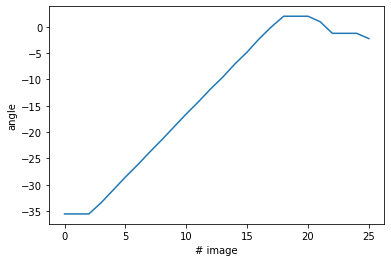
If desired an offset can be applied to a column of the data for plotting:
rad_rot_tr_arr[:, 3] -= 15
plt.plot(rad_rot_tr_arr[:, 3])
plt.xlabel("# image")
plt.ylabel("angle")
plt.show()
Save the reconstructed images
Finally the table of reconstructed parameters can be used to save the backtransformed images.
image_save_back_tf(rad_rot_tr_arr, fnames, image_path_src, image_path_dest)
A word on the models
The implemented models differ in some of the internal parameters. As the construction of a model also defines the dependency tree of its parameters, we can display a representation of the dependency tree as follows for every model (shown for the RadonSolver):
from imgreg.models.radon import RadonSolver

ras=RadonSolver()
ras.dot_graph()

Tutorials
Further interactive examples are available as jupyter-notebooks in doc/tutorial.
Documentation
The API documentation can either be viewed online or be generated using Sphinx with numpydoc formatting. To build, run:
sphinx-build -b html doc/ doc/_build/html
Testing
Testing is done using pytest. With pytest-cov and coverage a report for the tests can be generated with:
pytest --cov=imgreg/ tests/
coverage html
To test the examples in the documentation run:
pytest --doctest-modules imgreg/
License
This software is published under the GPLv3 license.
1 maintainer

Metadata
1 maintainer
Release files for imgreg 1.0.4
For a detailed explanation of source distributions (sdists) and built distributions (wheels), please see the package formats documentation.
Source distribution (sdist)
| File | Size | Uploaded | Provenance | |
|---|---|---|---|---|
| imgreg-1.0.4.tar.gz | 42.6 kB | Without provenance | Details |
Built distribution (wheel)
| File | Interpreter | ABI | Platform | Reset |
|---|---|---|---|---|
| imgreg-1.0.4-py3-none-any.whl | Python 3 | none | any | Details |
Total release size: 401.1 kB
Release files / imgreg-1.0.4.tar.gz
| Download URL | imgreg-1.0.4.tar.gz |
|---|---|
| Size | 42.6 kB |
| Tags | Source |
|
SHA-256 checksum How to use checksums |
114921ad58ded017d7194d6cb2f4da75705c6c4239e4fcf9ad49112db0d9d3d1
|
|
BLAKE2b-256 checksum How to use checksums |
8f6dee3463cc2d19f8ff8a993facfaa374a9bd8291a3c0d06331f5092d158674
|
| Upload date | |
|
Uploaded using Trusted Publishing? What is trusted publishing? |
No |
| Uploaded via |
twine/3.4.1 importlib_metadata/4.4.0 pkginfo/1.7.0 requests/2.25.1 requests-toolbelt/0.9.1 tqdm/4.61.0 CPython/3.9.5
|
Release files / imgreg-1.0.4-py3-none-any.whl
| Download URL | imgreg-1.0.4-py3-none-any.whl |
|---|---|
| Size | 358.4 kB |
| Tags | Python 3 |
|
SHA-256 checksum How to use checksums |
fd6c109f6b237ed77f7f6d642297bf708dd73a9eee7738efd87e455a4b95ec07
|
|
BLAKE2b-256 checksum How to use checksums |
356ac4d5823d1d2ff84ac7d602d8aeb5c0df611a9400b429354a67ef4c0492cb
|
| Upload date | |
|
Uploaded using Trusted Publishing? What is trusted publishing? |
No |
| Uploaded via |
twine/3.4.1 importlib_metadata/4.4.0 pkginfo/1.7.0 requests/2.25.1 requests-toolbelt/0.9.1 tqdm/4.61.0 CPython/3.9.5
|
Security for imgreg 1.0.4
Provenance
Provenance describes where a file came from. On PyPI, provenance is shared via attestations, which provide a verifiable record of the build or publishing details. View details, limitations and caveats.
No provenance found
None of the files in this release were uploaded with provenance metadata.
A note on package security
PyPI is a repository for distributing packages, not a service for auditing them. While third-party security researchers and our staff do their best to detect and remove malicious packages, PyPI cannot guarantee the quality, security or suitability of any given package.














