
indipyclient
You may have Python programs implementing some form of data collection or control and wish to remotely operate such an instrument.
An associated package 'indipydriver' can be used to take your data, organise it into a data structure defined by the INDI protocol, and serve it on a port.
INDI - Instrument Neutral Distributed Interface.
See https://en.wikipedia.org/wiki/Instrument_Neutral_Distributed_Interface
The INDI protocol defines the format of the data sent, such as light, number, text, switch or BLOB (Binary Large Object). The client is general purpose, taking the format of switches, numbers etc., from the protocol.
INDI is often used with astronomical instruments, but is a general purpose protocol which can be used for any instrument control.
This indipyclient package provides a set of classes which can be used to create scripts to control the remote instrument. In particular your script can import and create an instance of the 'IPyClient' class. The IPyClient object has an asyncrun() coroutine method which needs to be awaited, typically gathered with your own tasks, to run your script or client.
In general, a client transmits a 'getProperties' request (this indipyclient package does this for you on connecting).
The server replies with definition packets (defSwitchVector, defLightVector, .. ) that define the format of the instrument data.
The indipyclient package reads these, and its IPyClient instance becomes a mapping of the devices, vectors and members.
For example, if ipyclient is your instance of IPyClient:
ipyclient[devicename][vectorname][membername] will be the value of a particular parameter.
Multiple devices can be served, a 'vector' is a collection of members, so a switch vector may have one or more switches in it.
As the instrument produces changing values, the server sends 'set' packets, such as setSwitchVector, setLightVector ..., these contain new values, which update the ipyclient values. They also cause the ipyclient.rxevent(event) method to be called, which you could overwrite to take any actions you prefer.
To transmit a new value you could call the ipyclient.send_newVector coroutine method.
Indipyclient can be installed from Pypi with:
pip install indipyclient
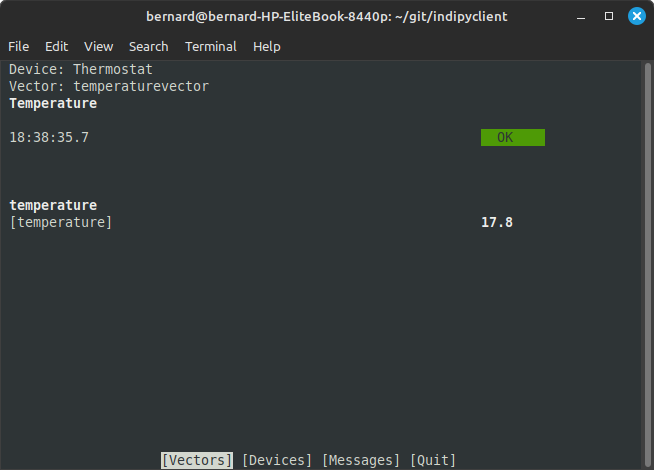
The package also provides a general purpose terminal client (Linux only) developed with the Python standard library Curses package, and no dependencies. When run this connects to the INDI server port, allowing you to view and control your instrument from a terminal session.
The terminal client can be run from a virtual environment with
indipyclient [options]
or with
python3 -m indipyclient [options]
The package help is:
usage: indipyclient [options]

Terminal client to communicate to an INDI service.

options:
  -h, --help                show this help message and exit
  -p PORT, --port PORT      Port of the INDI server (default 7624).
  --host HOST               Hostname/IP of the INDI server (default localhost).
  -b BLOBS, --blobs BLOBS   Optional folder where BLOB's will be saved.
  --loglevel LOGLEVEL       Enables logging, value 1, 2, 3 or 4.
  --logfile LOGFILE         File where logs will be saved
  --version                 show program's version number and exit

The BLOB's folder can also be set from within the session.
Setting loglevel and logfile should only be used for brief
diagnostic purposes, the logfile could grow very big.
loglevel:1 Information and error messages only, no exception trace.
The following levels enable exception traces in the logs
loglevel:2 As 1 plus xml vector tags without members or contents,
loglevel:3 As 1 plus xml vectors and members - but not BLOB contents,
loglevel:4 As 1 plus xml vectors and all contents
A typical session would look like:
Further documentation is available at:
https://indipyclient.readthedocs.io
The package can be installed from:
https://pypi.org/project/indipyclient
and indipydriver is available at:
https://pypi.org/project/indipydriver
https://github.com/bernie-skipole/indipydriver
A further terminal client 'indipyterm' is available, which itself calls on indipyclient to do the heavy lifting, and uses the textual package to present terminal characters, this should also work on Windows and is available at:
1 maintainer

Metadata
1 maintainer
Release files for indipyclient 0.7.2
For a detailed explanation of source distributions (sdists) and built distributions (wheels), please see the package formats documentation.
Source distribution (sdist)
| File | Size | Uploaded | Provenance | Actions |
|---|---|---|---|---|
| indipyclient-0.7.2.tar.gz | 66.7 kB | Without provenance | Details for indipyclient-0.7.2.tar.gz |
Built distribution (wheel)
| File | Interpreter | ABI | Platform | Actions Reset |
|---|---|---|---|---|
| indipyclient-0.7.2-py3-none-any.whl | Python 3 | none | any | Details for indipyclient-0.7.2-py3-none-any.whl |
Total release size: 140.8 kB
Release files / indipyclient-0.7.2.tar.gz
| Download URL | indipyclient-0.7.2.tar.gz |
|---|---|
| Size | 66.7 kB |
| Tags | Source |
|
SHA-256 checksum How to use checksums |
126af6e43e4135b664f2d0662313e8fd55b127ca91753d47d7e4a1f92da6d3e4
|
|
BLAKE2b-256 checksum How to use checksums |
5451021fcd49048832856b3ea76bcc1b58fa8572ad8edd4e56510e7214724246
|
| Upload date | |
|
Uploaded using Trusted Publishing? What is trusted publishing? |
No |
| Uploaded via |
python-requests/2.28.2
|
Release files / indipyclient-0.7.2-py3-none-any.whl
| Download URL | indipyclient-0.7.2-py3-none-any.whl |
|---|---|
| Size | 74.1 kB |
| Tags | Python 3 |
|
SHA-256 checksum How to use checksums |
3fccb9787779800aff3d1d9945947d40f33194a6e0d7ff04c2984ec47877fdbe
|
|
BLAKE2b-256 checksum How to use checksums |
de5871c6de0c7258046abd9c19e60e98462bfd788b8a292d476b6584db47668a
|
| Upload date | |
|
Uploaded using Trusted Publishing? What is trusted publishing? |
No |
| Uploaded via |
python-requests/2.28.2
|
Security for indipyclient 0.7.2
Provenance
Provenance describes where a file came from. On PyPI, provenance is shared via attestations, which provide a verifiable record of the build or publishing details. View details, limitations and caveats.
No provenance found
None of the files in this release were uploaded with provenance metadata.
A note on package security
PyPI is a repository for distributing packages, not a service for auditing them. While third-party security researchers and our staff do their best to detect and remove malicious packages, PyPI cannot guarantee the quality, security or suitability of any given package.
To learn more about protecting yourself from malicious actors, visit our package security documentation.














