

iNNvestigate neural networks!






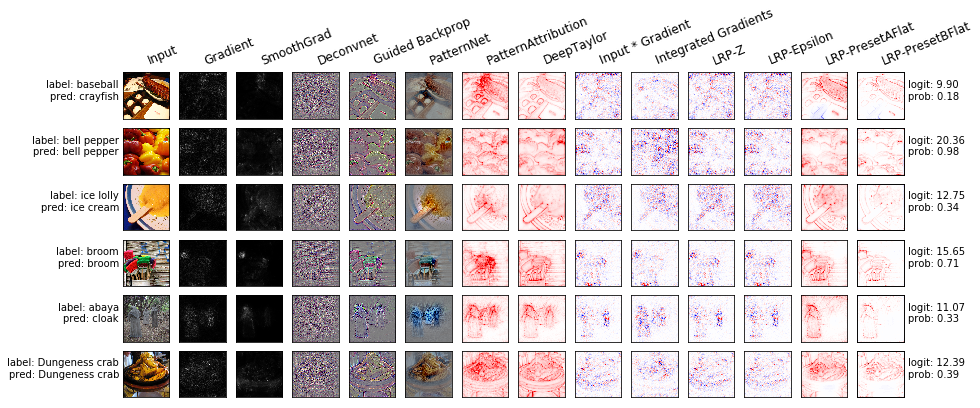
Table of contents
Introduction
In the recent years neural networks furthered the state of the art in many domains like, e.g., object detection and speech recognition. Despite the success neural networks are typically still treated as black boxes. Their internal workings are not fully understood and the basis for their predictions is unclear. In the attempt to understand neural networks better several methods were proposed, e.g., Saliency, Deconvnet, GuidedBackprop, SmoothGrad, IntegratedGradients, LRP, PatternNet and PatternAttribution. Due to the lack of a reference implementations comparing them is a major effort. This library addresses this by providing a common interface and out-of-the-box implementation for many analysis methods. Our goal is to make analyzing neural networks' predictions easy!
If you use this code please star the repository and cite the following paper:
@article{JMLR:v20:18-540,
author  = {Maximilian Alber and Sebastian Lapuschkin and Philipp Seegerer and Miriam H{{\"a}}gele and Kristof T. Sch{{\"u}}tt and Gr{{\'e}}goire Montavon and Wojciech Samek and Klaus-Robert M{{\"u}}ller and Sven D{{\"a}}hne and Pieter-Jan Kindermans},
title   = {iNNvestigate Neural Networks!},
journal = {Journal of Machine Learning Research},
year    = {2019},
volume  = {20},
number  = {93},
pages   = {1-8},
url     = {http://jmlr.org/papers/v20/18-540.html}
}
Installation
iNNvestigate is based on Keras and TensorFlow 2 and can be installed with the following commands:
pip install innvestigate
Please note that iNNvestigate currently requires disabling TF2's eager execution.
To use the example scripts and notebooks one additionally needs to install the package matplotlib:
pip install matplotlib
The library's tests can be executed via pytest. The easiest way to do reproducible development on iNNvestigate is to install all dev dependencies via Poetry:
git clone https://github.com/albermax/innvestigate.git
cd innvestigate

poetry install
poetry run pytest
Usage and Examples
The iNNvestigate library contains implementations for the following methods:
- function:
- gradient: The gradient of the output neuron with respect to the input.
- smoothgrad: SmoothGrad averages the gradient over number of inputs with added noise.
- signal:
- deconvnet: DeConvNet applies a ReLU in the gradient computation instead of the gradient of a ReLU.
- guided: Guided BackProp applies a ReLU in the gradient computation additionally to the gradient of a ReLU.
- pattern.net: PatternNet estimates the input signal of the output neuron. (Note: not available in iNNvestigate 2.0)
- attribution:
- input_t_gradient: Input * Gradient
- deep_taylor[.bounded]: DeepTaylor computes for each neuron a root point, that is close to the input, but which's output value is 0, and uses this difference to estimate the attribution of each neuron recursively.
- lrp.*: LRP attributes recursively to each neuron's input relevance proportional to its contribution of the neuron output.
- integrated_gradients: IntegratedGradients integrates the gradient along a path from the input to a reference.
- miscellaneous:
- input: Returns the input.
- random: Returns random Gaussian noise.
The intention behind iNNvestigate is to make it easy to use analysis methods, but it is not to explain the underlying concepts and assumptions. Please, read the according publication(s) when using a certain method and when publishing please cite the according paper(s) (as well as the iNNvestigate paper). Thank you!
All the available methods have in common that they try to analyze the output of a specific neuron with respect to input to the neural network. Typically one analyses the neuron with the largest activation in the output layer. For example, given a Keras model, one can create a 'gradient' analyzer:
import tensorflow as tf
import innvestigate
tf.compat.v1.disable_eager_execution()

model = create_keras_model()

analyzer = innvestigate.create_analyzer("gradient", model)
and analyze the influence of the neural network's input on the output neuron by:
analysis = analyzer.analyze(inputs)
To analyze a neuron with the index i, one can use the following scheme:
analyzer = innvestigate.create_analyzer("gradient",
                                        model,
					neuron_selection_mode="index")
analysis = analyzer.analyze(inputs, i)
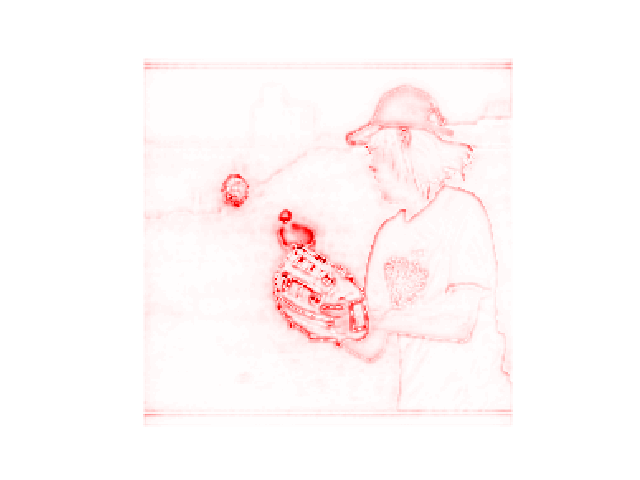
Let's look at an example (code) with VGG16 and this image:

import tensorflow as tf
import tensorflow.keras.applications.vgg16 as vgg16
tf.compat.v1.disable_eager_execution()

import innvestigate

# Get model
model, preprocess = vgg16.VGG16(), vgg16.preprocess_input
# Strip softmax layer
model = innvestigate.model_wo_softmax(model)

# Create analyzer
analyzer = innvestigate.create_analyzer("deep_taylor", model)

# Add batch axis and preprocess
x = preprocess(image[None])
# Apply analyzer w.r.t. maximum activated output-neuron
a = analyzer.analyze(x)

# Aggregate along color channels and normalize to [-1, 1]
a = a.sum(axis=np.argmax(np.asarray(a.shape) == 3))
a /= np.max(np.abs(a))
# Plot
plt.imshow(a[0], cmap="seismic", clim=(-1, 1))
Tutorials
In the directory examples one can find different examples as Python scripts and as Jupyter notebooks:
- Introduction to iNNvestigate: shows how to use iNNvestigate.
- Comparing methods on MNIST: shows how to train and compare analyzers on MNIST.
- Comparing output neurons on MNIST: shows how to analyze the prediction of different classes on MNIST.
- Comparing methods on ImageNet: shows how to compare analyzers on ImageNet.
- Comparing networks on ImageNet: shows how to compare analyzes for different networks on ImageNet.
- Sentiment Analysis.
- Development with iNNvestigate: shows how to develop with iNNvestigate.
- Perturbation Analysis.
To use the ImageNet examples please download the example images first (script).
More documentation
... can be found here:
- Alber, M., Lapuschkin, S., Seegerer, P., Hägele, M., Schütt, K. T., Montavon, G., Samek, W., Müller, K. R., Dähne, S., & Kindermans, P. J. (2019). INNvestigate neural networks! Journal of Machine Learning Research, 20.](https://jmlr.org/papers/v20/18-540.html)
@article{JMLR:v20:18-540, author = {Maximilian Alber and Sebastian Lapuschkin and Philipp Seegerer and Miriam H{{\"a}}gele and Kristof T. Sch{{\"u}}tt and Gr{{\'e}}goire Montavon and Wojciech Samek and Klaus-Robert M{{\"u}}ller and Sven D{{\"a}}hne and Pieter-Jan Kindermans}, title = {iNNvestigate Neural Networks!}, journal = {Journal of Machine Learning Research}, year = {2019}, volume = {20}, number = {93}, pages = {1-8}, url = {http://jmlr.org/papers/v20/18-540.html} } - https://innvestigate.readthedocs.io/en/latest/
Contributing
If you would like to contribute or add your analysis method please open an issue or submit a pull request.
Releases
Acknowledgements
Adrian Hill acknowledges support by the Federal Ministry of Education and Research (BMBF) for the Berlin Institute for the Foundations of Learning and Data (BIFOLD) (01IS18037A).


Release files for innvestigate 2.1.2
For a detailed explanation of source distributions (sdists) and built distributions (wheels), please see the package formats documentation.
Source distribution (sdist)
| File | Size | Uploaded | |
|---|---|---|---|
| innvestigate-2.1.2.tar.gz | 60.4 kB | Details |
Built distribution (wheel)
| File | Interpreter | ABI | Platform | Reset |
|---|---|---|---|---|
| innvestigate-2.1.2-py3-none-any.whl | Python 3 | none | any | Details |
Total release size: 127.2 kB
Release files / innvestigate-2.1.2.tar.gz
| Download URL | innvestigate-2.1.2.tar.gz |
|---|---|
| Size | 60.4 kB |
| Tags | Source |
|
SHA-256 checksum How to use checksums |
23ba139b6114a10fdd21223698612f8473afa2b4a9c4b59880f74d562fc6ebfe
|
|
BLAKE2b-256 checksum How to use checksums |
13317c88780379449a094b8ad7195475c0e09cd1b7d11a081aeb73bbf4ecb173
|
| Upload date | |
|
Uploaded using Trusted Publishing? What is trusted publishing? |
No |
| Uploaded via |
poetry/1.6.1 CPython/3.9.11 Darwin/23.0.0
|
Release files / innvestigate-2.1.2-py3-none-any.whl
| Download URL | innvestigate-2.1.2-py3-none-any.whl |
|---|---|
| Size | 66.8 kB |
| Tags | Python 3 |
|
SHA-256 checksum How to use checksums |
d726520472c10657994053a8489d4dfb17dd06816a63923700bf19fc4d7ce7aa
|
|
BLAKE2b-256 checksum How to use checksums |
03177f5422df077c01b0c8740e91a424267891907328419bf4e3961280dc3095
|
| Upload date | |
|
Uploaded using Trusted Publishing? What is trusted publishing? |
No |
| Uploaded via |
poetry/1.6.1 CPython/3.9.11 Darwin/23.0.0
|














