

| Website | Read the Docs | Contribute |




InstabotAi
Instabotai is an instagram bot with face detection that uses the undocumented Web API. Instabotai can reupload photo to feed, reupload photo to stories, watch stories, comment, like and DM users if a face is detected on image. Unlike other bots, Instabotai does not require Selenium or a WebDriver. Instead, it interacts with the API over simple HTTP Requests. It runs on most systems.
Demo:
https://www.instagram.com/japanheaven
Requirements
- Python 3.6+
- Min 20-30 Profiles to scrape or it will repost same image when no new image is posted in list.
Installation with PIP
Install instabotai with:
pip install -U instabotai
Run instabotai with:
instabotai -u yourusername -p password -l josephineskriver,wolfiecindy -t "#like4like#follow4follow"
Installation with Docker
docker pull reliefs/instabotai

docker run reliefs/instabotai -u username -p password -l josephineskriver,wolfiecindy -t "#tag1#tag2"
Face detection at work on a live webcam
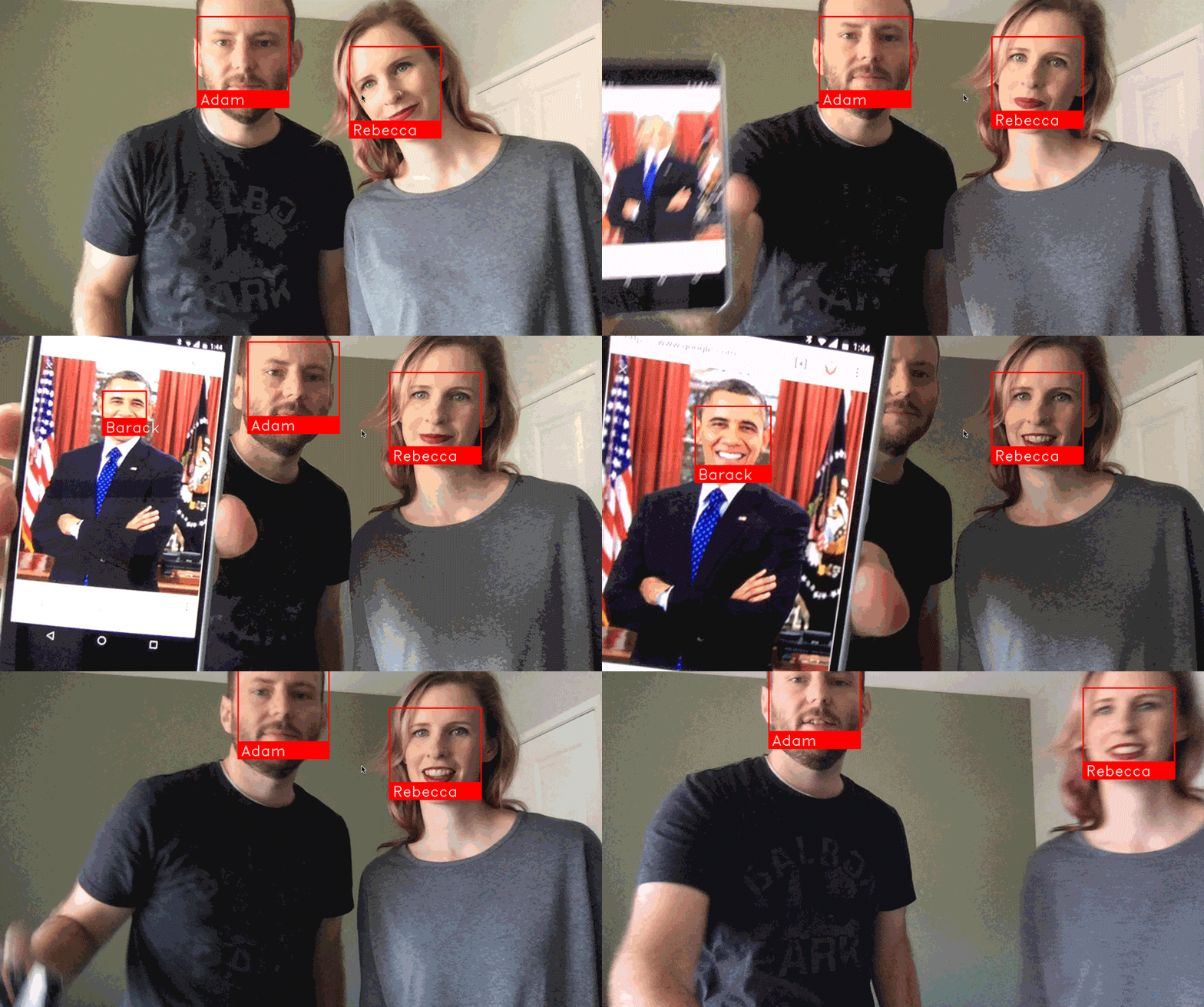
This script scrapes images from users and then repost, like and comment their images if face is detected with your own tags.
To install script on Windows:
Install Cmake
download link : https://github.com/Kitware/CMake/releases/download/v3.14.1/cmake-3.14.1.zip
Install Dblib
Download dlib ‘.wheel’ file as ur system requirnment (use link bellow) download link : https://pypi.python.org/simple/dlib/
Open cmd navigate to dlib wheel file path and hit command
pip install dlib_file_name.wheel
Then run
git clone https://github.com/instagrambot/instabotai.git --recursive
cd instabotai/
pip install -r requirements.txt
python example.py -u yourusername -p password -l josephineskriver,wolfiecindy -t "#like4like#follow4follow"
And press Enter.
To install script on Linux:
Ubuntu:
apt-get install python-dev python3-dev
sudo apt install g++
sudo apt install cmake
sudo apt install python3-pip

Arch Linux:
sudo pacman -S cmake
sudo pacman -S python3-pip
First, make sure you have dlib already installed with Python bindings:
Then do
git clone https://github.com/instagrambot/instabotai.git

cd instabotai

sudo pip install -r requirements.txt

python example.py -u yourusername -p password -l josephineskriver,wolfiecindy -t "#like4like#follow4follow"
Troubleshoot
If you are getting Illegal Instruction with face_recognition follow this guide: https://github.com/ageitgey/face_recognition/issues/11#issuecomment-475482716
AttributeError: 'module' object has no attribute 'face_recognition_model_v1'
Solution: The version of dlib you have installed is too old. You need version 19.7 or newer. Upgrade dlib.
For Dlib install error run
python3 setup.py install --no DLIB_USE_CUDA
1 maintainer

Metadata
1 maintainer
Release files for instabotai 1.0.44
For a detailed explanation of source distributions (sdists) and built distributions (wheels), please see the package formats documentation.
Source distribution (sdist)
| File | Size | Uploaded | Provenance | Actions |
|---|---|---|---|---|
| instabotai-1.0.44.tar.gz | 7.3 kB | Without provenance | Details for instabotai-1.0.44.tar.gz |
Release files / instabotai-1.0.44.tar.gz
| Download URL | instabotai-1.0.44.tar.gz |
|---|---|
| Size | 7.3 kB |
| Tags | Source |
|
SHA-256 checksum How to use checksums |
af43728326d4348f7e9b614e4d0f430c465b58ee207b3f8d97183008b45b76df
|
|
BLAKE2b-256 checksum How to use checksums |
d22c710823f9390aa29d6f41cbee9b39cc7104dbc7e9b5405c5f4f6250210ff4
|
| Upload date | |
|
Uploaded using Trusted Publishing? What is trusted publishing? |
No |
| Uploaded via |
twine/1.13.0 pkginfo/1.5.0.1 requests/2.22.0 setuptools/41.0.1 requests-toolbelt/0.9.1 tqdm/4.32.1 CPython/3.7.3
|
Security for instabotai 1.0.44
Provenance
Provenance describes where a file came from. On PyPI, provenance is shared via attestations, which provide a verifiable record of the build or publishing details. View details, limitations and caveats.
No provenance found
None of the files in this release were uploaded with provenance metadata.
A note on package security
PyPI is a repository for distributing packages, not a service for auditing them. While third-party security researchers and our staff do their best to detect and remove malicious packages, PyPI cannot guarantee the quality, security or suitability of any given package.
To learn more about protecting yourself from malicious actors, visit our package security documentation.














