
interactive-kit
A toolkit for interactive visualization of signal and image processing on Jupyter Notebooks.

interactive-kit was created to simplify visualization in image and signal processing teaching, learning and research. Using Jupyter Notebooks in combination with interactive-kit a user with virtually no programming experience, or without any experience with matplotlib, will be able to display and manipulate one or several signals or images and interactively explore them. It is even possible to extract information and perform operations directly on the signal or image without the need to re-run the cell or to plot again.
The class is designed to run in Jupyter Notebooks or Jupyter Lab, using matplotlib's dynamic widget-based environment (ipympl), which needs to be activated with the magic command %matplotlib widget. All the functionalities are controlled either through matplotlib's native widgets (zoom, pan, and change of figure size) or through additional ipywidgets-based buttons and sliders.
Modules
Image Viewer (imviewer)
Optimized for image visualization and manipulation. See the dedicated tutorial and wiki.
Main features
Once called, from the imviewer and using both widgets and programmatic commands, a user will be able to:
- Plot several images at the same time, and choose different display options (one image at a time, or a customized grid of images),
- Change the brightness and contrast of the images through a slider,
- Explore the histogram of the image,
- Choose different colormaps and visualization options (colorbar, axis),
- Get 1st and 2nd order statistics -updated automatically when zooming into a region- of the image,
- Calculate and visualize differences between two different images,
- Declare functions that perform operations on an image, and through custom widgets, see the effect of the function with different parameters applied on different images, directly inside the
imviewerobject.
Signal Viewer (sigviewer)
Optimized for 1-dimensional signal visualization and manipulation. See the dedicated tutorial and wiki.
Installation and usage
First, make sure you have installed Python 3.6 or higher. Then, interactive-kit can easily be installed through PyPI:
pip install interactive-kit==0.1rc3
To use in a jupyter notebook, you can import the modules in the following way:
from interactive_kit import imviewer, sigviewer
Team
The viewer was developed at the EPFL's Biomedical Imaging Group, mainly by
- Alejandro Noguerón Aramburu (alejandro.nogueronaramburu@epfl.ch, Alejandro-1996)
with contributions from
- Kay Lächler (kay.lachler@epfl.ch, TheUser0571)
- Pol del Aguila Pla, (pol.delaguilapla@epfl.ch, poldap)
- Daniel Sage , (daniel.sage@epfl.ch, dasv74)
The development of the viewer was supported by the Digital Resources for Instruction and Learning (DRIL) Fund at EPFL, which supported the projects IPLAB – Image Processing Laboratories on Noto and FeedbackNow – Automatic grading and formative feedback for image processing laboratories by Pol del Aguila Pla and Daniel Sage in the sprint and fall semesters of 2020, respectively. See the video below for more information.
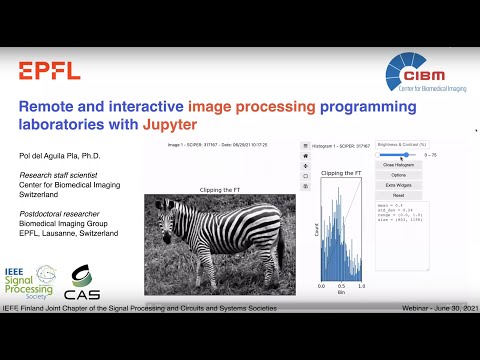
Members of the EPFL community
If you want to start using interactive-kit rightaway, without going through the process of installing Python and Jupyter, you can click here and start using right away from Noto, EPFL's Jupyter centralized platform.
Contributions
We appreciate contributions, feedback and bug reports from the community:
- If you encounter any bug, please open an issue and describe. We will try to fix it or give you a workaround as soon as possible.
- If you wish to contribute, fork the repository and then open a pull request.
1 maintainer

Metadata
1 maintainer
Release files for interactive-kit 0.1.6
For a detailed explanation of source distributions (sdists) and built distributions (wheels), please see the package formats documentation.
Source distribution (sdist)
| File | Size | Uploaded | |
|---|---|---|---|
| interactive-kit-0.1.6.tar.gz | 35.2 kB | Details |
Built distribution (wheel)
| File | Interpreter | ABI | Platform | Reset |
|---|---|---|---|---|
| interactive_kit-0.1.6-py3-none-any.whl | Python 3 | none | any | Details |
Total release size: 132.7 kB
Release files / interactive-kit-0.1.6.tar.gz
| Download URL | interactive-kit-0.1.6.tar.gz |
|---|---|
| Size | 35.2 kB |
| Tags | Source |
|
SHA-256 checksum How to use checksums |
468f3c91b56033c8d3e2ac0d860226c69ff5a22c99c7592b2a120dc15f67f950
|
|
BLAKE2b-256 checksum How to use checksums |
d2341d6985e90edbfe83dec7f9734c243a073ac30da58cb9898bcbf99d3fa309
|
| Upload date | |
|
Uploaded using Trusted Publishing? What is trusted publishing? |
No |
| Uploaded via |
twine/3.4.1 importlib_metadata/3.7.0 pkginfo/1.7.0 requests/2.25.1 requests-toolbelt/0.9.1 tqdm/4.46.1 CPython/3.7.9
|
Release files / interactive_kit-0.1.6-py3-none-any.whl
| Download URL | interactive_kit-0.1.6-py3-none-any.whl |
|---|---|
| Size | 97.5 kB |
| Tags | Python 3 |
|
SHA-256 checksum How to use checksums |
3a70acaade321c315e90f7afb91cf06a18c41154f55fd1edf5824cbdc75c0f90
|
|
BLAKE2b-256 checksum How to use checksums |
c5b4cc006e14d4a6a85eded1fbf2d49c9ffd37268505be19adabca95e41af752
|
| Upload date | |
|
Uploaded using Trusted Publishing? What is trusted publishing? |
No |
| Uploaded via |
twine/3.4.1 importlib_metadata/3.7.0 pkginfo/1.7.0 requests/2.25.1 requests-toolbelt/0.9.1 tqdm/4.46.1 CPython/3.7.9
|














