
Installation
Install (or upgrade) invocation_tree using pip:
pip install --upgrade invocation_tree
Additionally Graphviz needs to be installed.
Invocation Tree
The invocation_tree package is designed to help with program understanding and debugging by visualizing the tree of function invocations that occur during program execution. Here’s a simple example of how it works, we start with a = 1 and compute:
(a - 3 + 9) * 6
import invocation_tree as ivt

def main():
    a = 1
    a = expression(a)
    return multiply(a, 6)

def expression(a):
    a = subtract(a, 3)
    return add(a, 9)

def subtract(a, b):
    return a - b

def add(a, b):
    return a + b

def multiply(a, b):
    return a * b

tree = ivt.blocking()
print( tree(main) ) # show invocation tree starting at main
Running the program and pressing <Enter> a number of times results in:
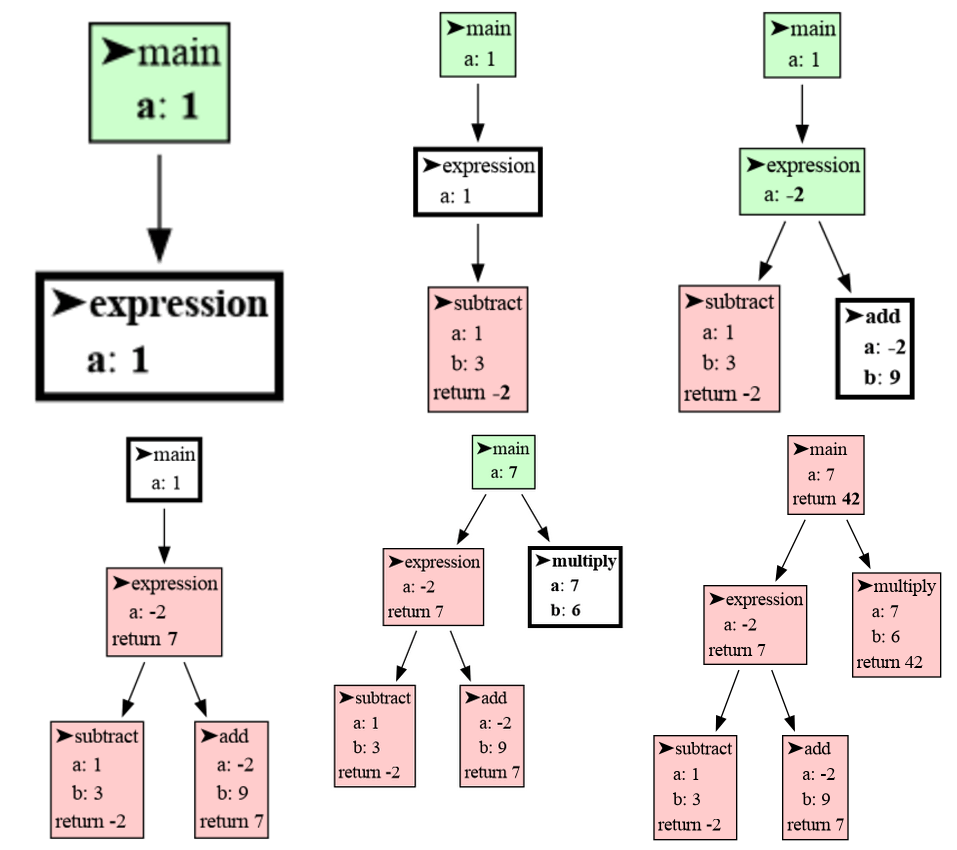
42
Each node in the tree represents a function call, and the node's color indicates its state:
- White: The function is currently being executed (it is at the top of the call stack).
- Green: The function is paused and will resume execution later (it is lower down on the call stack).
- Red: The function has completed execution and returned (it has been removed from the call stack).
For every function, the package displays its local variables and return value. Changes to these values over time are highlighted using bold text and gray shading to make them easy to track.
Chapters
Author
Bas Terwijn
Inspiration
Inspired by rcviz.
Supported by

Comprehensions
In this more interesting example we compute which students pass a course by using list and dictionary comprehensions.
import invocation_tree as ivt
from decimal import Decimal, ROUND_HALF_UP

def main():
    students = {'Ann':[7.5, 8.0],
                'Bob':[4.5, 6.0],
                'Coy':[7.5, 6.0]}
    averages = {student:compute_average(grades)
                for student, grades in students.items()}
    passing = passing_students(averages)
    print(passing)

def compute_average(grades):
    average = sum(grades)/len(grades)
    return half_up_round(average, 1)

def half_up_round(value, digits=0):
    """ High-precision half-up rounding of 'value' to a specified number of 'digits'. """
    return float(Decimal(str(value)).quantize(Decimal(f"1e-{digits}"),
                                              rounding=ROUND_HALF_UP))

def passing_students(averages):
    return [student
        for student, average in averages.items()
        if average >= 5.5]

if __name__ == '__main__':
    tree = ivt.blocking()
    tree(main)
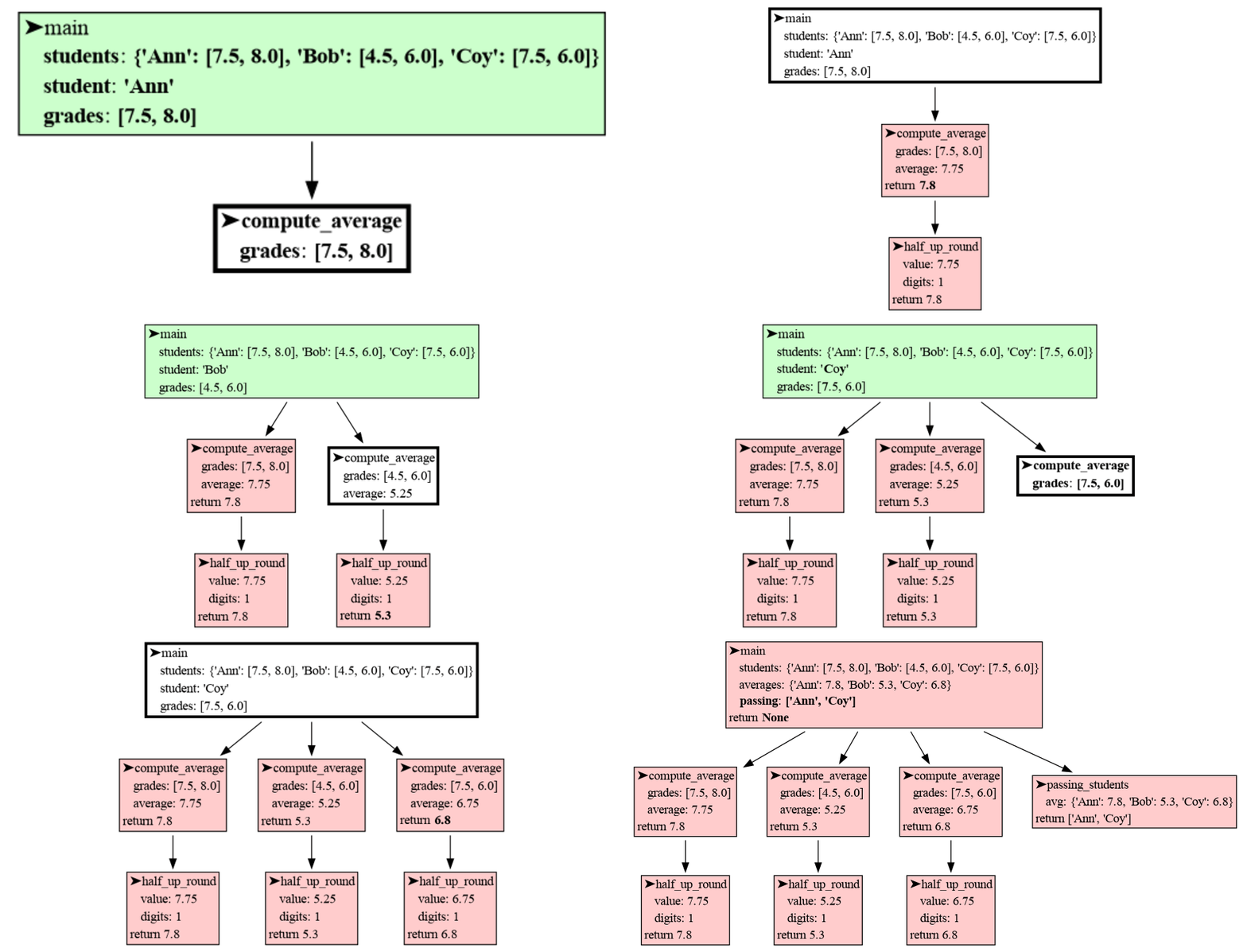
['Ann', 'Coy']
Blocking
The program blocks execution at every function call and return statement, printing the current location in the source code. Press the <Enter> key to continue execution. To block at every line of the program (like in a debugger tool) and only where a change of value occured, use instead:
tree = ivt.blocking_each_change()
Debugger
To visualize the invocation tree in a debugger tool, such as the integrated debugger in Visual Studio Code, use instead:
tree = ivt.debugger()
and open the 'tree.pdf' file manually.

Recursion
An invocation tree is particularly helpful to better understand recursion. A simple factorial() example:
import invocation_tree as ivt

def factorial(n):
    if n <= 1:
        return 1
    prev_result = factorial(n - 1)
    return n * prev_result

tree = ivt.blocking()
print( tree(factorial, 4) ) # show invocation tree of calling factorial(4)
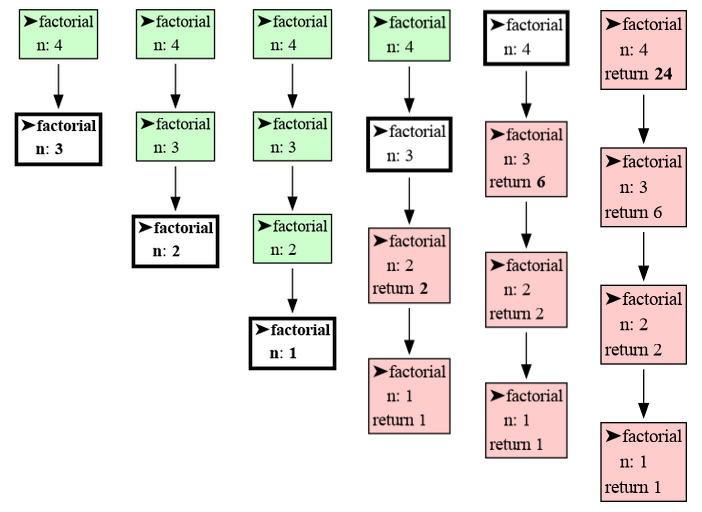
24
Permutations
This permutations() example shows the depth-first nature of recursive execution:
import invocation_tree as ivt

def permutations(elements, perm, n):
    if n==0:
        return [perm]
    all_perms = []
    for element in elements:
        all_perms.extend(permutations(elements, perm + element, n-1))
    return all_perms

tree = ivt.blocking()
result = tree(permutations, ['L','R'], '', 2)
print(result) # all permutations of going Left or Right of length 2
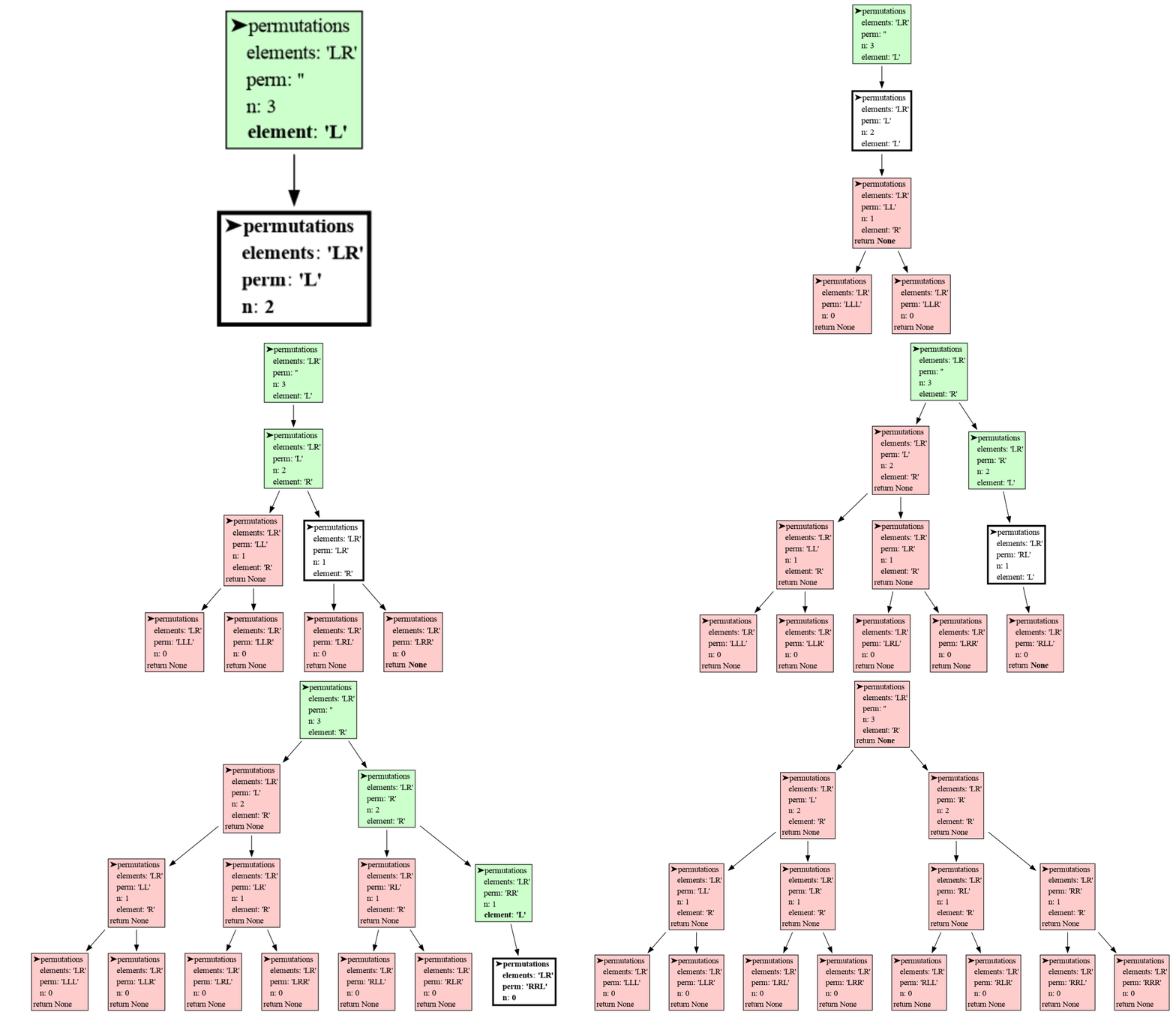
['LL', 'LR', 'RL', 'RR']
Hide Variables
In an educational context it can be useful to hide certian variables to avoid unnecessary complexity. This can for example be done with:
tree = ivt.blocking()
tree.hide.add('permutations.elements')
tree.hide.add('permutations.element')
tree.hide.add('permutations.all_perms')
Configuration
These invocation_tree configurations are available for an Invocation_Tree objects:
tree = ivt.Invocation_Tree()
- tree.filename : str
- filename to save the tree to, defaults to 'tree.pdf'
- tree.show : bool
- if
Truethe default application is open to view 'tree.filename'
- if
- tree.block : bool
- if
Trueprogram execution is blocked after the tree is saved
- if
- tree.src_loc : bool
- if
Truethe source location is printed when blocking
- if
- tree.each_line : bool
- if
Trueeach line of the program is stepped through
- if
- tree.max_string_len : int
- the maximum string length, only the end is shown of longer strings
- tree.gifcount : int
- if
>=0the out filename is numbered for animated gif making
- if
- tree.indent : string
- the string used for identing the local variables
- tree.color_active : string
- HTML color for active function
- tree.color_paused* : string
- HTML color for paused functions
- tree.color_returned*: string
- HTML color for returned functions
- tree.hide : set()
- set of all variables names that are not shown in the tree
- tree.to_string : dict[str, fun]
- mapping from type/name to a to_string() function for custom printing of values
For convenience we provide these functions to set common configurations:
- ivt.blocking(filename), blocks on function call and return
- ivt.blocking_each_change(filename), blocks on each change of value
- ivt.debugger(filename), non-blocking for use in debugger tool (open <filename> manually)
- ivt.gif(filename), generates many output files on function call and return for gif creation
- ivt.gif_each_change(filename), generates many output files on each change of value for gif creation
- ivt.non_blocking(filename), non-blocking on each function call and return
Troubleshooting
- Adobe Acrobat Reader doesn't refresh a PDF file when it changes on disk and blocks updates which results in an
Could not open 'somefile.pdf' for writing : Permission deniederror. One solution is to install a PDF reader that does refresh (SumatraPDF, Okular, ...) and set it as the default PDF reader. Another solution is torender()the graph to a different output format and to open it manually.
Memory_Graph Package
The invocation_tree package visualizes function calls at different moments in time. If instead you want a detailed visualization of your data at the current time, check out the memory_graph package.
1 maintainer

Metadata
1 maintainer
Release files for invocation-tree 0.0.18
For a detailed explanation of source distributions (sdists) and built distributions (wheels), please see the package formats documentation.
Source distribution (sdist)
| File | Size | Uploaded | Provenance | Actions |
|---|---|---|---|---|
| invocation_tree-0.0.18.tar.gz | 1.5 MB | Without provenance | Details for invocation_tree-0.0.18.tar.gz |
Built distribution (wheel)
| File | Interpreter | ABI | Platform | Actions Reset |
|---|---|---|---|---|
| invocation_tree-0.0.18-py3-none-any.whl | Python 3 | none | any | Details for invocation_tree-0.0.18-py3-none-any.whl |
Total release size: 1.5 MB
Release files / invocation_tree-0.0.18.tar.gz
| Download URL | invocation_tree-0.0.18.tar.gz |
|---|---|
| Size | 1.5 MB |
| Tags | Source |
|
SHA-256 checksum How to use checksums |
a91eef4c2fc0d1eaec20c5a51f5ac09205be01b5ccb0ca2d094227c7fed7a1fa
|
|
BLAKE2b-256 checksum How to use checksums |
3137dc9ed079caf472c6535e6540313a9c12291053e9fd59614d0167dcabfdb0
|
| Upload date | |
|
Uploaded using Trusted Publishing? What is trusted publishing? |
No |
| Uploaded via |
twine/6.1.0 CPython/3.13.7
|
Release files / invocation_tree-0.0.18-py3-none-any.whl
| Download URL | invocation_tree-0.0.18-py3-none-any.whl |
|---|---|
| Size | 9.5 kB |
| Tags | Python 3 |
|
SHA-256 checksum How to use checksums |
9f11776460c648c4b13f4cc4e6ed1691f67d839316bf031104f72c085f3d74cd
|
|
BLAKE2b-256 checksum How to use checksums |
05ca28bd6b20b5c8a9a4ac52be65fec41a9bd02194442e52632a9b99cfb7d1bc
|
| Upload date | |
|
Uploaded using Trusted Publishing? What is trusted publishing? |
No |
| Uploaded via |
twine/6.1.0 CPython/3.13.7
|
Security for invocation-tree 0.0.18
Provenance
Provenance describes where a file came from. On PyPI, provenance is shared via attestations, which provide a verifiable record of the build or publishing details. View details, limitations and caveats.
No provenance found
None of the files in this release were uploaded with provenance metadata.
A note on package security
PyPI is a repository for distributing packages, not a service for auditing them. While third-party security researchers and our staff do their best to detect and remove malicious packages, PyPI cannot guarantee the quality, security or suitability of any given package.
To learn more about protecting yourself from malicious actors, visit our package security documentation.














