
A radiocarbon calibration software



IOSACal is the open source radiocarbon calibration software of the IOSA project. IOSACal includes a simple command-line program but it's best used as a toolkit in interactive and literate programming.
IOSACal is written in the Python programming language and it can run natively on any platform where the Python interpreter is available, including all Linux distributions, MacOS X and other UNIX operating systems, and Microsoft Windows.
Source code is made available under the terms of the GNU General Public License.
The documentation is online at http://c14.iosa.it/ thanks to Read the Docs.
Why another 14C calibration software ?
Most available programs for radiocarbon calibration, like OxCal, CALIB and others, are freeware. You don't have to pay for them, but on the other side you're not free to modify them as you need, nor to access and study the source code.
This is the main motivation behind IOSACal: creating a free-as-in-freedom radiocarbon calibration software, with a clean programming library, that enables experiments and integration in existing archaeological information systems.
Furthermore, writing this software from scratch is an alternative way of learning how 14C calibration works, not only in strict mathematical terms, but also from a practical point of view.
Features
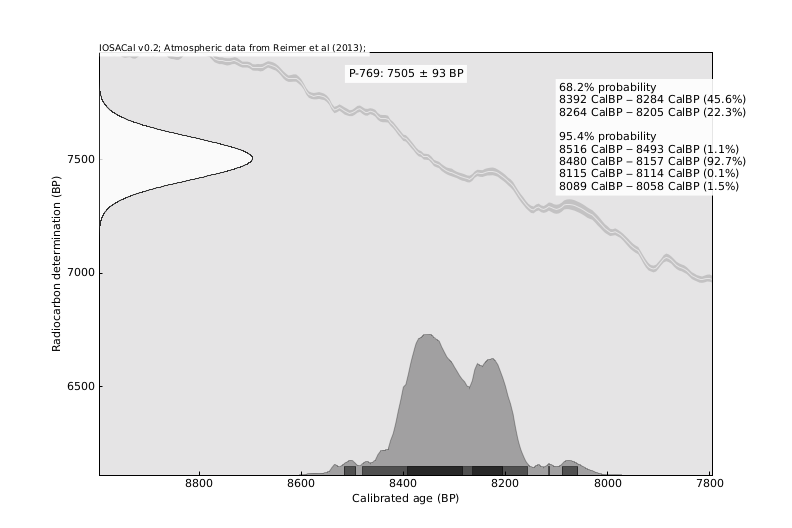
IOSACal takes a radiocarbon determination and outputs a calibrated age as a set of probability intervals. A radiocarbon date is represented by a date in years BP (before present, that is before 1950 AD) and a standard deviation, like 2430±170. The combination of these two values is a numerical representation of a laboratory measure performed on the original organic material.
The main task of the calibration process is to convert this measure into a set of calendar dates by means of a calibration curve. Users can choose whether they want results as a plot, a short textual summary or both (the plot includes the summary).
IOSACal reads calibration curves in the common .14c format used also
by other programs. Should you have calibration data in another format,
it would be easy to either convert them to that format or modify the
source code of IOSACal to adapt it to your needs.
IOSACal is based on current calibration methods, like those described in the 2008 paper by C. Bronk Ramsey, Radiocarbon dating: revolutions in understanding, Archaeometry 50,2 (2008) pp. 249–275 http://dx.doi.org/10.1111/j.1475-4754.2008.00394.x.
Can I use IOSACal for my research?
Yes, IOSACal has been used in research projects with large numbers of radiocarbon dates like Antarctica Marine Radiocarbon and the IPHES PALEODEM project.
Using IOSACal with Jupyter Notebooks is ideal for reproducible research that can be easily shared.
Furthermore, it takes little effort to customize and adapt the existing code to your specific needs.
IOSACal is reasonably fast, especially for batch processing.
If you make use of IOSACal in your work, please cite it with the IOSACal Zenodo DOI record: https://doi.org/10.5281/zenodo.630455.
This helps us get some recognition for creating and maintaining this software free for everyone.
1 maintainer

Release files for iosacal 0.7.0
For a detailed explanation of source distributions (sdists) and built distributions (wheels), please see the package formats documentation.
Source distribution (sdist)
| File | Size | Uploaded | |
|---|---|---|---|
| iosacal-0.7.0.tar.gz | 544.5 kB | Details |
Built distribution (wheel)
| File | Interpreter | ABI | Platform | Reset |
|---|---|---|---|---|
| iosacal-0.7.0-py3-none-any.whl | Python 3 | none | any | Details |
Total release size: 1.1 MB
Release files / iosacal-0.7.0.tar.gz
| Download URL | iosacal-0.7.0.tar.gz |
|---|---|
| Size | 544.5 kB |
| Tags | Source |
|
SHA-256 checksum How to use checksums |
be4a9523f3a498cfc69deef9e0d921bdc0fda1cdf990995b9a392623718c13d0
|
|
BLAKE2b-256 checksum How to use checksums |
1ccbc2d1eb7e837c921f3d6eae720ced7e2116382a8feb2f3ce14da95df38349
|
| Upload date | |
|
Uploaded using Trusted Publishing? What is trusted publishing? |
No |
| Uploaded via |
uv/0.9.30 {"installer":{"name":"uv","version":"0.9.30","subcommand":["publish"]},"python":null,"implementation":{"name":null,"version":null},"distro":{"name":"Fedora Linux","version":"43","id":"","libc":null},"system":{"name":null,"release":null},"cpu":null,"openssl_version":null,"setuptools_version":null,"rustc_version":null,"ci":null}
|
Release files / iosacal-0.7.0-py3-none-any.whl
| Download URL | iosacal-0.7.0-py3-none-any.whl |
|---|---|
| Size | 535.8 kB |
| Tags | Python 3 |
|
SHA-256 checksum How to use checksums |
c2c03f1ef0d9c8b662e189ade7d07daac71540887a7623e615b203b07471c78e
|
|
BLAKE2b-256 checksum How to use checksums |
18d964b86a6f452db8f97ed65d15db03967a7791a2708a9a46915b0d27e46f8f
|
| Upload date | |
|
Uploaded using Trusted Publishing? What is trusted publishing? |
No |
| Uploaded via |
uv/0.9.30 {"installer":{"name":"uv","version":"0.9.30","subcommand":["publish"]},"python":null,"implementation":{"name":null,"version":null},"distro":{"name":"Fedora Linux","version":"43","id":"","libc":null},"system":{"name":null,"release":null},"cpu":null,"openssl_version":null,"setuptools_version":null,"rustc_version":null,"ci":null}
|














