
Azure IoT Central device client for Python


Project description
Microsoft Azure IoTCentral SDK for Python



An Azure IoT Central device client library written in Python.
This repository contains code for the Azure IoT Central SDK for Python. This enables python developers to easily create device solutions that semealessly connect to Azure IoT Central applications. It hides some of the complexities of the official Azure IoT SDK and uses IoT Central naming conventions.
Disclaimer
This library is experimental and has the purpose of providing an easy to use solution for prototyping and small projects. Its use in production is discouraged. The library is going to be archived soon so we suggest new developments to start using official Azure IoT SDK.
Please refer to Azure IoT Python SDK when building production products.
If you're looking for the v0.x.x client library, it is now preserved here. Latest version on pypi is 0.3.9
Prerequisites
- Python 2.7+ or Python 3.7+ (recommended)
Installing iotc
pip install iotc
These clients are available with an asynchronous API, as well as a blocking synchronous API for compatibility scenarios. We recommend you use Python 3.7+ and the asynchronous API.
| Python Version | Asynchronous API | Synchronous API |
|---|---|---|
| Python 3.5.3+ | YES | YES |
| Python 2.7 | NO | YES |
Samples
Check out the sample repository for example code showing how the SDK can be used in the various scenarios:
- async_device_key - Sending telemetry and receiving properties and commands with device connected through symmetric key (Python 3.7+)
- async_x509 - Sending telemetry and receiving properties and commands with device connected through x509 certificates (Python 3.7+)
- async_file_logger - Print logs on file with rotation (Python 3.7+)
- async_eventhub_logger - Redirect logs to Azure Event Hub (Python 3.7+)
The following samples are legacy samples, they work with the sycnhronous API intended for use with Python 2.7, or in compatibility scenarios with later versions. We recommend you use the asynchronous API and Python3 samples above instead.
- sync_device_key - Sending telemetry and receiving properties and commands with device connected through symmetric key (Python 2.7+)
- sync_x509 - Sending telemetry and receiving properties and commands with device connected through x509 certificates (Python 2.7+)
Samples by default parse a configuration file including required credentials. Just create a file called samples.ini inside the samples folder with a content like this:
[DEVICE_A]
ScopeId = scopeid
DeviceId = deviceid
; either one or the other or nothing if running with certificates
DeviceKey = device_key
GroupKey = group_key
; none if running with keys
CertFilePath = path_to_cert_file
KeyFilePath = path_to_key_file
CertPassphrase = optional password
The configuration file can include one or more sections representing device connection details. Section names must match references in the sample file.
Run samples with local changes
It is possible to run samples against the local copy of the device client. This is particularly useful when testing patches not yet published upstream. Just add an entry to samples.ini in the DEFAULT section:
[DEFAULT]
Local = yes
Importing the module
Sync client (Python 2.7+ and 3.7+) can be imported in this way:
from iotc import IoTCClient
Async client (with asyncio for Python 3.7+ only) can be imported like this:
from iotc.aio import IoTCClient
Connecting
X509
scope_id = 'scope_id';
device_id = 'device_id';
key = {'certFile':'<CERT_CHAIN_FILE_PATH>','keyFile':'<CERT_KEY_FILE_PATH>','certPhrase':'<CERT_PASSWORD>'}

iotc = IoTCClient(device_id, scope_id,
                  IOTCConnectType.IOTC_CONNECT_X509_CERT, key)
IOTCConnectType enum can be imported from the same module of IoTCClient
'certPhrase' is optional and represents the password for the certificate if any
A handy tool to generate self-signed certificates in order to test x509 authentication can be found in the IoTCentral Node.JS SDK here.
SAS
scopeId = 'scopeID'
device_id = 'device_id'
sasKey = 'masterKey' # or use device key directly

iotc = IoTCClient(device_id, scopeId,
                  IOTCConnectType.IOTC_CONNECT_SYMM_KEY, sas_key)
IOTCConnectType enum can be imported from the same module of IoTCClient
Connect
Sync
iotc.connect()
Async
await iotc.connect()
After successfull connection, IOTC context is available for further commands.
Reconnection
The device client automatically handle reconnection in case of network failures or disconnections. However if process runs for long time (e.g. unmonitored devices) a reconnection might fail because of credentials expiration.
To control reconnection and reset credentials the function is_connected() is available and can be used to test connection status inside a loop or before running operations.
e.g.
retry = 0 # stop reconnection attempts
while true:
    if iotc.is_connected():
        # do something
    else
        if retry == 10:
            sys.exit("error")
        retry += 1
        iotc.connect()
Cache Credentials
The IoT Central device client accepts a storage manager to cache connection credentials. This allows to skip unnecessary device re-provisioning and requests to provisioning service. When valid credentials are present, device connects directly to IoT Central, otherwise it asks provisioning service for new credentials and eventually cache them.
Provided class must extend Storage abstract class.
class FileStorage(Storage):
    def __init__(self):
        # initialize file read
        ...
    def retrieve(self):
        # read from file
        ...
        return CredentialsCache(
            hub_name,
            device_id,
            key,
        )
    def persist(self, credentials):
        # write to file
        ...
Operations
Send telemetry
e.g. Send telemetry every 3 seconds
while iotc.is_connected():
        await iotc.send_telemetry({
            'accelerometerX': str(randint(20, 45)),
            'accelerometerY': str(randint(20, 45)),
            "accelerometerZ": str(randint(20, 45))
        })
        time.sleep(3)
An optional properties object can be included in the send methods, to specify additional properties for the message (e.g. timestamp,etc... ). Properties can be custom or part of the reserved ones (see list here).
Payload content type and encoding are set by default to 'application/json' and 'utf-8'. Alternative values can be set using these functions:
iotc.set_content_type(content_type) # .e.g 'text/plain' iotc.set_content_encoding(content_encoding) # .e.g 'ascii'
Send property update
iotc.send_property({'fieldName':'fieldValue'})
Listen to properties update
iotc.on(IOTCEvents.IOTC_PROPERTIES, callback)
To provide setting sync aknowledgement, the callback must reply True if the new value has been applied or False otherwise
async def on_props(prop_name, prop_value):
    print(prop_value)
    return True

iotc.on(IOTCEvents.IOTC_PROPERTIES, on_props)
Listen to commands
iotc.on(IOTCEvents.IOTC_COMMAND, callback)
To provide feedbacks for the command like execution result or progress, the client can call the ack function available in the callback.
The function accepts 3 arguments: command name, a custom response message and the request id for which the ack applies.
async def on_commands(command, ack):
    print(command.name)
    await ack(command.name, 'Command received', command.request_id)
Logging
The default log prints to console operations status and errors. This is the IOTC_LOGGING_API_ONLY logging level. The function set_log_level() can be used to change options or disable logs. It accepts a IOTCLogLevel value among the following:
- IOTC_LOGGING_DISABLED (log disabled)
- IOTC_LOGGING_API_ONLY (information and errors, default)
- IOTC_LOGGING_ALL (all messages, debug and underlying errors)
The device client also accepts an optional Logger instance to redirect logs to other targets than console. The custom class must implement three methods:
- info(message)
- debug(message)
- set_log_level(message);
One-touch device provisioning and approval
A device can send custom data during provision process: if a device is aware of its IoT Central template Id, then it can be automatically provisioned.
How to set IoTC template ID in your device
Template Id can be found in the device explorer page of IoTCentral
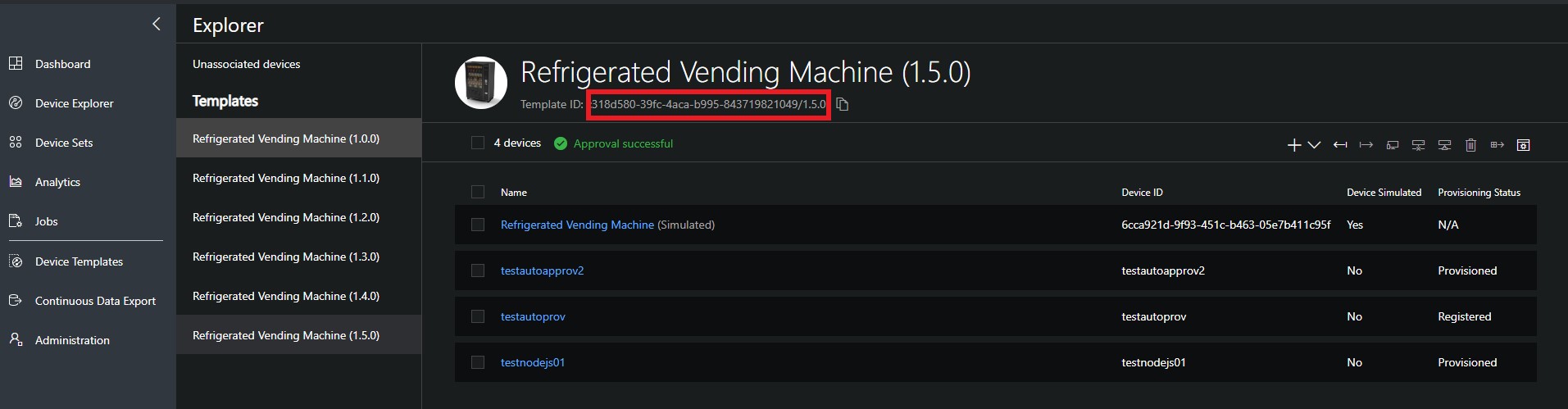
Then call this method before connect():
iotc.set_model_id('<modelId>')
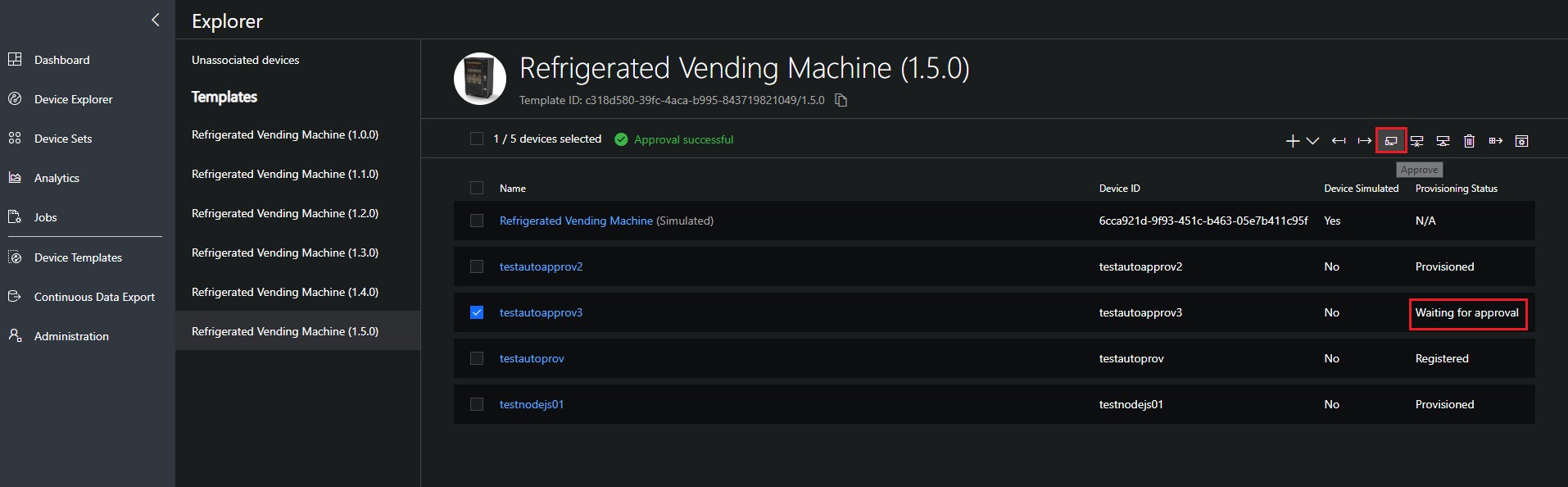
Manual approval (default)
By default device auto-approval in IoT Central is disabled, which means that administrator needs to approve the device registration to complete the provisioning process.
This can be done from explorer page after selecting the device
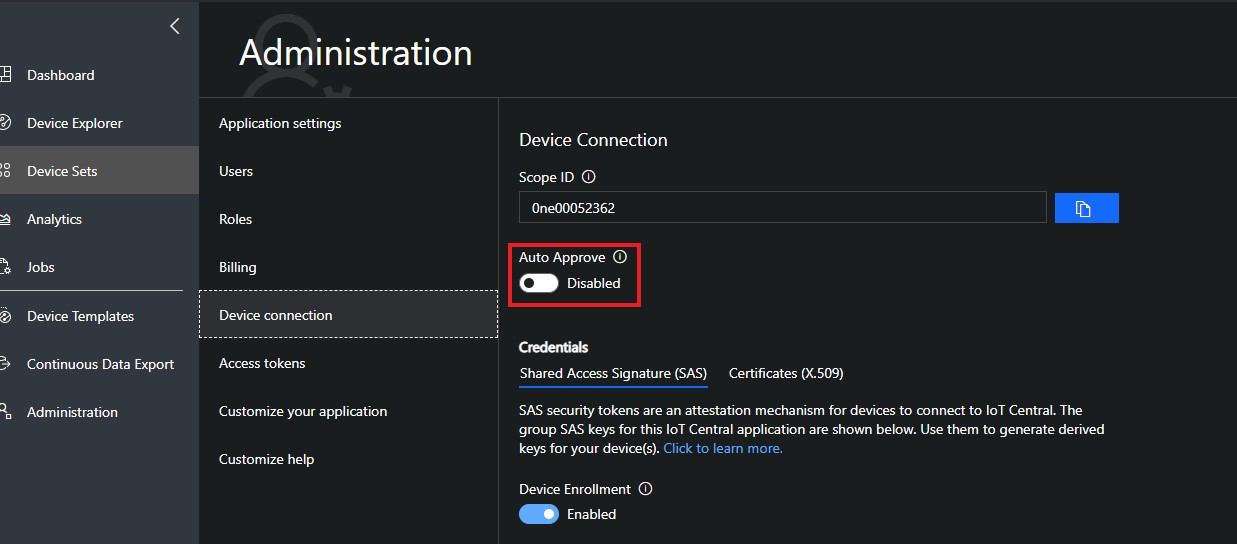
Automatic approval
To change default behavior, administrator can enable device auto-approval from Device Connection page under the Administration section. With automatic approval a device can be provisioned without any manual action and can start sending/receiving data after status changes to "Provisioned"
License
This samples is licensed with the MIT license. For more information, see LICENSE
Release history Release notifications | RSS feed


Download files
Download the file for your platform. If you're not sure which to choose, learn more about installing packages.
Source Distribution
Built Distribution
Filter files by name, interpreter, ABI, and platform.
If you're not sure about the file name format, learn more about wheel file names.
Copy a direct link to the current filters
File details
Details for the file iotc-1.1.3.tar.gz.
File metadata
- Download URL: iotc-1.1.3.tar.gz
- Upload date:
- Size: 277.2 kB
- Tags: Source
- Uploaded using Trusted Publishing? No
- Uploaded via: twine/4.0.1 CPython/3.9.5
File hashes
| Algorithm | Hash digest | |
|---|---|---|
| SHA256 |
d60a02feb86df8308041c6794e60ec8a32108c2f08e15ee661ad7942635f1e88
|
|
| MD5 |
6784371bdfe8aeea5f52100e6be862ae
|
|
| BLAKE2b-256 |
c618de5bffcae04f5a7e2d4e58cb9fb9c0bda97347c55e75f2b0a466747f1dc8
|
File details
Details for the file iotc-1.1.3-py3-none-any.whl.
File metadata
- Download URL: iotc-1.1.3-py3-none-any.whl
- Upload date:
- Size: 24.3 kB
- Tags: Python 3
- Uploaded using Trusted Publishing? No
- Uploaded via: twine/4.0.1 CPython/3.9.5
File hashes
| Algorithm | Hash digest | |
|---|---|---|
| SHA256 |
aede2b6a4069e908047e378b7163548f942118f3b164b37cfbe5ce96df1e9c18
|
|
| MD5 |
31487728c64dbc02f212446e07d9c0a6
|
|
| BLAKE2b-256 |
7b18471d5e54551d7816f60fd4c312c40046b501b70d1ab500ea2b7ea995742b
|






