
ipy-compare
ipy-compare is an interactive tool designed for use in Jupyter notebooks and Google Colab, enabling users to visually compare rows and columns of a DataFrame.
Ideally used for tagging or for labeling data in a pandas DataFrame.
Features
- Row and Column Comparison: Supports both overall row-level measures and column-specific measures.
- Pagination: Navigate through rows using custom indices or iterators.
- Repeatable Sampling: Use a fixed random seed for consistent sampling.
- Branding: Add customizable branding to the footer, including a linkable logo and text.
- Interactive Radio Buttons: Visual indicators for selected measures.
- Colab Compatible: Works seamlessly in Google Colab notebooks.
Example:
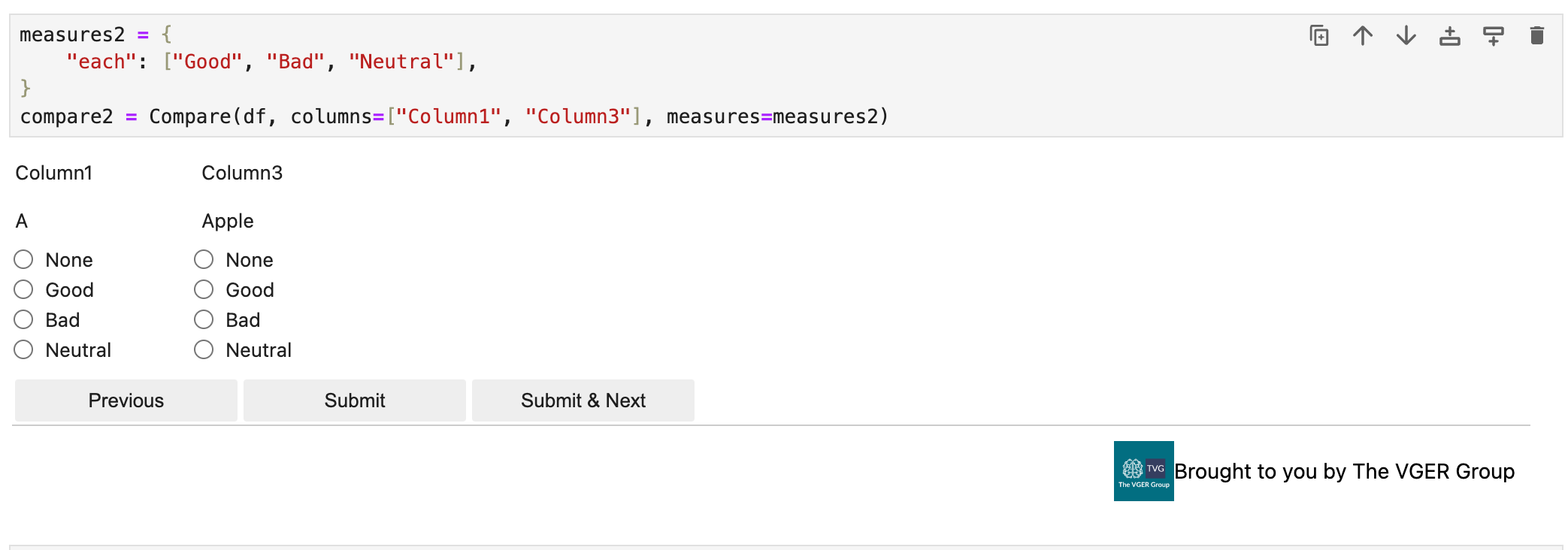
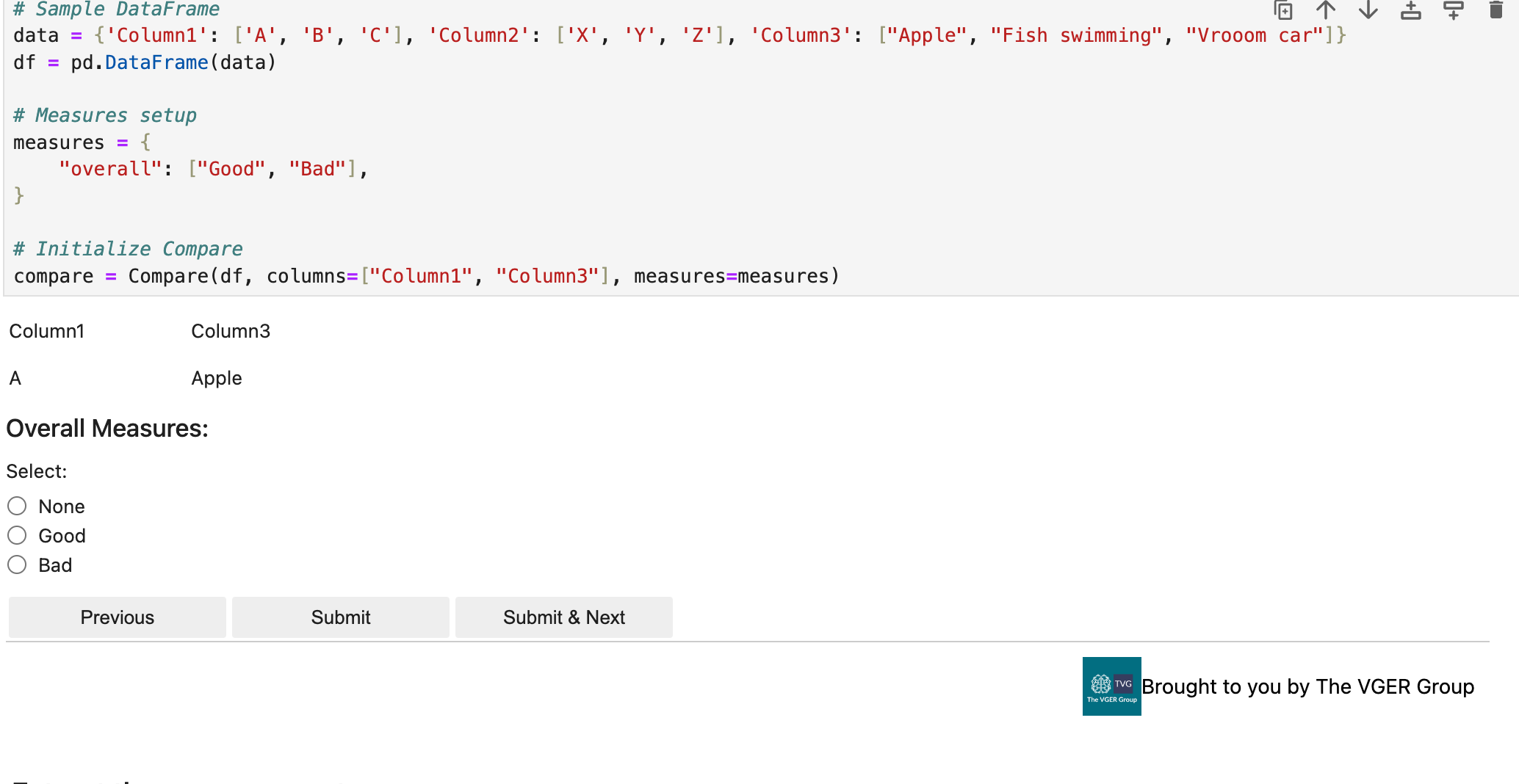
We support two different ways to use ipy-compare.
- Each Column: Use a measure for each column.
- Overall Row: Use a measure for the entire row.
Where you can specify the questions you want to ask for each column or for the entire row.
Each Column
Overall Row
Installation
pip install ipy-compare
Usage
Import and Initialize
from ipy_compare import Compare
import pandas as pd
import panel as pn  # Required for notebook/colab display

# Sample DataFrame
data = {
    'Column1': ['A', 'B', 'C'],
    'Column2': ['X', 'Y', 'Z'],
    'Column3': ['Apple', 'Fish swimming', 'Vrooom car']
}
df = pd.DataFrame(data)

# Define measures
measures = {
    "overall": ["Good", "Bad"],
    "each": ["Better", "Worse", "Neutral"]
}

# Initialize Compare
tool = Compare(df, columns=["Column1", "Column3"], measures=measures)

# Display the tool
tool.servable()
Navigation and Interaction
- Navigate between rows using the
PreviousandSubmit & Nextbuttons. - Use the radio buttons to select measures for each column or for the overall row.
- Submit measurements using either the
Submitbutton orSubmit & Nextto move to the next row. - All measurements are captured and can be retrieved programmatically.
Custom Pagination
To specify a subset of rows or custom order:
# Custom row order
custom_order = [2, 0, 1]

# Initialize Compare with custom pagination
tool = Compare(df, columns=["Column1", "Column3"], measures=measures, pagination=custom_order)
tool.servable()
Repeatable Sampling
To use random sampling with a fixed seed:
# Get a random sample of rows
sampled_indices = Compare.sample_indices(df, n=2, seed=42)

# Initialize Compare with sampled indices
tool = Compare(df, columns=["Column1", "Column3"], measures=measures, pagination=sampled_indices)
tool.servable()
Retrieve Measurements
Once interactions are complete, retrieve the captured measurements:
# Get measurements as a DataFrame
measurements = tool.get_measurements()
print(measurements)
Example Output:
| row_index | column | value | measure | type |
|---|---|---|---|---|
| 0 | None | None | Good | overall |
| 0 | Column1 | A | Better | column |
| 0 | Column3 | Apple | Neutral | column |
| 1 | None | None | Bad | overall |
| 1 | Column1 | B | Worse | column |
| 1 | Column3 | Fish swimming | Neutral | column |
Google Colab Usage
When using in Google Colab, make sure to run these commands first:
!pip install ipy-compare panel
The tool is fully compatible with Google Colab and will work the same way as in Jupyter notebooks.
Advanced Options
Custom Measures
Define your own measure categories:
measures = {
    "overall": ["Excellent", "Poor"],
    "each": ["Correct", "Incorrect", "Not Sure"]
}
Contributing
Contributions are welcome! Please fork the repository and submit a pull request with your changes.
License
This project is licensed under the MIT License.
1 maintainer

Metadata
1 maintainer
Release files for ipy-compare 0.4.1
For a detailed explanation of source distributions (sdists) and built distributions (wheels), please see the package formats documentation.
Source distribution (sdist)
| File | Size | Uploaded | |
|---|---|---|---|
| ipy_compare-0.4.1.tar.gz | 91.1 kB | Details |
Built distribution (wheel)
| File | Interpreter | ABI | Platform | Reset |
|---|---|---|---|---|
| ipy_compare-0.4.1-py3-none-any.whl | Python 3 | none | any | Details |
Total release size: 181.0 kB
Release files / ipy_compare-0.4.1.tar.gz
| Download URL | ipy_compare-0.4.1.tar.gz |
|---|---|
| Size | 91.1 kB |
| Tags | Source |
|
SHA-256 checksum How to use checksums |
88934bd8a7b523d650b316658f35ecb6ff5d693f94be0e86edac0575392c8f6a
|
|
BLAKE2b-256 checksum How to use checksums |
f06870a33b96df7c6039e4f59b023e6d0ff4a465e2089321ca9b7abe35b1a0af
|
| Upload date | |
|
Uploaded using Trusted Publishing? What is trusted publishing? |
Yes |
| Uploaded via |
twine/6.1.0 CPython/3.13.7
|
Provenance
Provenance describes where a file came from. On PyPI, provenance is shared via attestations, which provide a verifiable record of the build or publishing details. View details, limitations and caveats.


PyPI Publish Attestation
PyPI verified that this artifact, at this checksum, originated from the publisher listed below.
Signed by GitHub Actions, verified by PyPI on Jan 18, 2026.
Transparency logRelease files / ipy_compare-0.4.1-py3-none-any.whl
| Download URL | ipy_compare-0.4.1-py3-none-any.whl |
|---|---|
| Size | 89.9 kB |
| Tags | Python 3 |
|
SHA-256 checksum How to use checksums |
b72bead242a435927e1dbef954b1f71262c09b8bf369060f7321f60650ff7e55
|
|
BLAKE2b-256 checksum How to use checksums |
f6972448077add6998665ff0e051f44198dfffa22cda7989e6517d836ac6df91
|
| Upload date | |
|
Uploaded using Trusted Publishing? What is trusted publishing? |
Yes |
| Uploaded via |
twine/6.1.0 CPython/3.13.7
|
Provenance
Provenance describes where a file came from. On PyPI, provenance is shared via attestations, which provide a verifiable record of the build or publishing details. View details, limitations and caveats.
PyPI Publish Attestation
PyPI verified that this artifact, at this checksum, originated from the publisher listed below.
Signed by GitHub Actions, verified by PyPI on Jan 18, 2026.
Transparency log













