
ipyvizzu is the Jupyter Notebook integration of Vizzu.


Project description

ipyvizzu - Jupyter notebook integration of Vizzu.
Tutorial · Examples · Repository

About The Project
ipyvizzu is the Jupyter Notebook integration of Vizzu. ipyvizzu enables data scientists and analysts to utilize animation for storytelling with data using Python.
Similar to Vizzu, which is a free, open-source Javascript/C++ library, ipyvizzu also utilizes a generic dataviz engine that generates many types of charts and seamlessly animates between them. It is designed for building animated data stories as it enables showing different perspectives of the data that the viewers can easily follow.
Main features:
- Designed with animation in focus;
- Defaults based on data visualization guidelines;
- Works with Pandas dataframe, also JSON and inline data input is available;
- Auto scrolling to keep the actual chart in position while executing multiple cells.
Installation
ipyvizzu requires IPython, NumPy and pandas packages.
However you can use it only in Jupyter Notebook therefore notebook project has to be installed.
pip install ipyvizzu
pip install notebook
You can also use ipyvizzu by locally installing Vizzu, you can find more info about this in the documentation
Usage
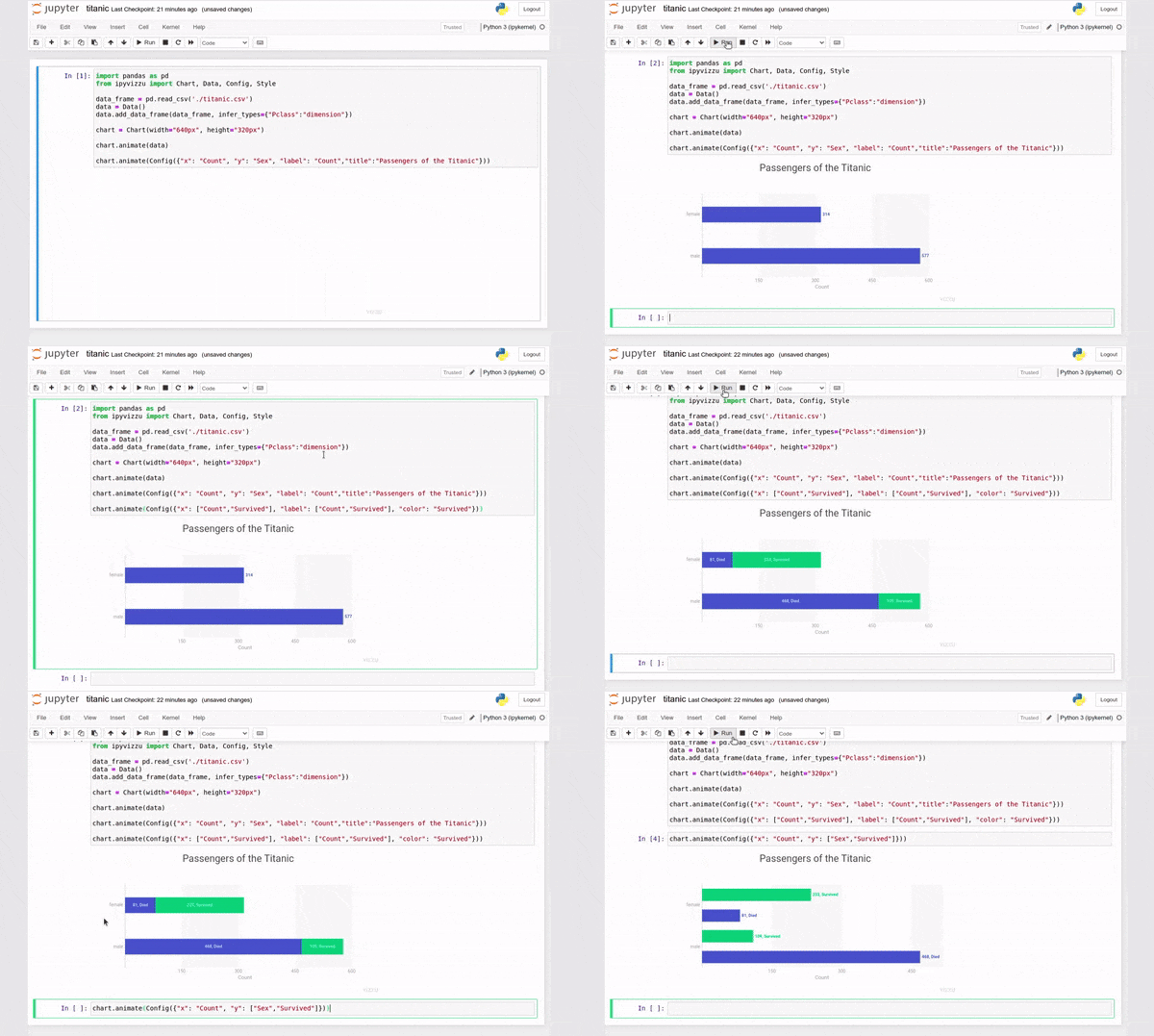
ipyvizzu only works in Jupiter Notebook environment. A notebook cell may contain the following code snippet resulting in the animation below.
import pandas as pd
from ipyvizzu import Chart, Data, Config

data_frame = pd.read_csv('./titanic.csv')
data = Data()
data.add_data_frame(data_frame)

chart = Chart(width="640px", height="360px")

chart.animate(data)

chart.animate(Config({"x": "Count", "y": "Sex", "label": "Count","title":"Passengers of the Titanic"}))
chart.animate(Config({"x": ["Count","Survived"], "label": ["Count","Survived"], "color": "Survived"}))
chart.animate(Config({"x": "Count", "y": ["Sex","Survived"]}))
Visit our documentation site for more details and a step-by-step tutorial into ipyvizzu, or check out the example gallery.
Contributing
We welcome contributions to the project, visit our contributing guide for further info.
Contact
- Join our Slack if you have any questions or comments: vizzu-community.slack.com
- Drop us a line at hello@vizzuhq.com
- Follow us on twitter: https://twitter.com/VizzuHQ
License
Copyright © 2022 Vizzu Kft..
Released under the Apache 2.0 License.
Release history Release notifications | RSS feed


Download files
Download the file for your platform. If you're not sure which to choose, learn more about installing packages.
Source Distribution
Built Distribution
Filter files by name, interpreter, ABI, and platform.
If you're not sure about the file name format, learn more about wheel file names.
Copy a direct link to the current filters
File details
Details for the file ipyvizzu-0.8.0.tar.gz.
File metadata
- Download URL: ipyvizzu-0.8.0.tar.gz
- Upload date:
- Size: 11.5 kB
- Tags: Source
- Uploaded using Trusted Publishing? No
- Uploaded via: twine/4.0.0 CPython/3.10.4
File hashes
| Algorithm | Hash digest | |
|---|---|---|
| SHA256 |
6af3d30661e652e66da8e5ca188e741e4b8ffd803a48b1cc31c758f803b43963
|
|
| MD5 |
df81cbb11b041e1b55bdbd27a309d1ea
|
|
| BLAKE2b-256 |
8284267a8cb105b64442932ca87d3cc16687cb5622aa3e79760c1a56f72e7c2d
|
File details
Details for the file ipyvizzu-0.8.0-py3-none-any.whl.
File metadata
- Download URL: ipyvizzu-0.8.0-py3-none-any.whl
- Upload date:
- Size: 12.7 kB
- Tags: Python 3
- Uploaded using Trusted Publishing? No
- Uploaded via: twine/4.0.0 CPython/3.10.4
File hashes
| Algorithm | Hash digest | |
|---|---|---|
| SHA256 |
3760607c181475bc3b750fa5fe24a482a021fc0d90a3006e5703e66976cc356b
|
|
| MD5 |
63530142d803099dae8a515b71495a88
|
|
| BLAKE2b-256 |
90a96106eebcdbd716c4f1add51d60d468bf6cdac77fd0768d7f7a9d2480594e
|






