
Beautify your command line interfaces

Project description

Basics
Install:
pip install iridi
Usage:
import iridi

# Print gradient text
# iridi.print(message, colors, options)

# Ask for input with gradient text:
# iridi.input(message, colors, options)

# Get output of gradient text:
# beautiful_message = iridi.beautify(message, colors, options)

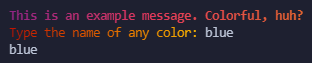
iridi.print("This is an example message. Colorful, huh?", ["#8A2387", "#E94057", "#F27121"], bold=True)
response = iridi.input("What's your favorite color?", ["#8A2387", "#E94057", "#F27121"])
print(response)
The above should result in this:
Presets
There are included presets when importing the module, access them by doing iridi.presets.[name]. Example:
import iridi

iridi.presets.wiretap.print("Nice preset!")

If you'd like to contribute or add official preset gradients to this project, feel free to fork this and make a PR!
Make your own presets:
Iridi comes with the ability to create your own gradients and reuse them.
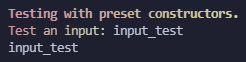
gradient = iridi.preset(["#D3959B", "#BFE6BA"])

gradient.print("Testing with preset constructors.", bold=True)
response = gradient.input("Test an input: ")
print(response)
Output:
Options:
The array can be an array of hex strings, or objects with r, g, and b values. This...
# This works:
iridi.print("Try it with RGB objects next!", ["#7350b3", "#2ebf91"])

# So does this:
iridi.print("Try it with hex values if you haven't!", [{"r": 250, "g": 0, "b": 100}, {"r": 60, "g": 255, "b": 0}])
...results in the following:

Want the output in bold? No problem, just add bold=True as the third argument to the function (shown in examples above).
Same goes for italic, just add italic=True as the another argument to the function.
If you end up using this, or just think it's cool, feel free to :star: this repo, it means a lot :)


Download files
Download the file for your platform. If you're not sure which to choose, learn more about installing packages.
Source Distribution
Built Distribution
Filter files by name, interpreter, ABI, and platform.
If you're not sure about the file name format, learn more about wheel file names.
Copy a direct link to the current filters
File details
Details for the file iridi-1.3.0.tar.gz.
File metadata
- Download URL: iridi-1.3.0.tar.gz
- Upload date:
- Size: 16.1 kB
- Tags: Source
- Uploaded using Trusted Publishing? No
- Uploaded via: twine/3.4.2 importlib_metadata/4.8.1 pkginfo/1.7.1 requests/2.25.1 requests-toolbelt/0.9.1 tqdm/4.62.2 CPython/3.9.5
File hashes
| Algorithm | Hash digest | |
|---|---|---|
| SHA256 |
e76f91bcd5ef63118e97d06b1172a8d10d9ad982608a400bb0a83c4b4c7a0f4f
|
|
| MD5 |
25539ab60a45546b5508c535abe054a6
|
|
| BLAKE2b-256 |
b1ab7457049abcdd56e01f3be9527cdd418ccc2a861f8429a8b19b24ce59f34f
|
File details
Details for the file iridi-1.3.0-py3-none-any.whl.
File metadata
- Download URL: iridi-1.3.0-py3-none-any.whl
- Upload date:
- Size: 16.3 kB
- Tags: Python 3
- Uploaded using Trusted Publishing? No
- Uploaded via: twine/3.4.2 importlib_metadata/4.8.1 pkginfo/1.7.1 requests/2.25.1 requests-toolbelt/0.9.1 tqdm/4.62.2 CPython/3.9.5
File hashes
| Algorithm | Hash digest | |
|---|---|---|
| SHA256 |
a50a7dd5b2ebe3ed4919411443a481b41b9535daece16400419a6f34dabd35be
|
|
| MD5 |
6306f224b5a0d6787f59962aaa842e1e
|
|
| BLAKE2b-256 |
475f1792a7f7550cf876fc5dd952306f9b1c025a62b8b5ac20948f15f8199818
|






