
ISCC Software Development Kit (iscc-sdk)







A comprehensive Python toolkit for creating and managing ISCC (International Standard Content Code) identifiers for digital media assets.
Overview
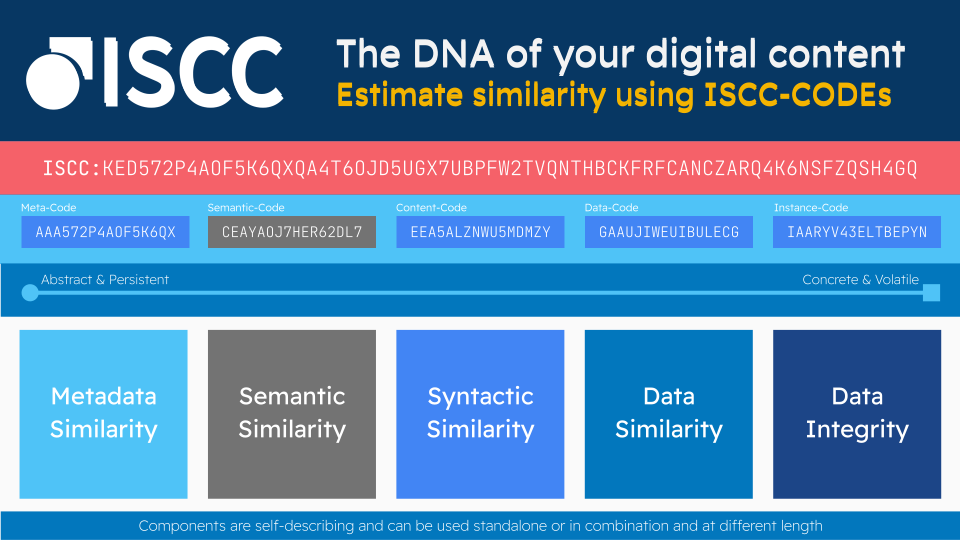
What is an ISCC?
The International Standard Content Code (ISCC) is a content-dependent, similarity-preserving identifier and fingerprint system for digital content, standardized as ISO 24138:2024.
ISCCs are neither manually nor automatically assigned but are derived from the digital content itself. Generated algorithmically using various hash algorithms, ISCCs create composite identifiers with similarity-preserving properties (soft hashes) that can be independently derived by unrelated parties from the same media asset.
Digital content is dynamic - continuously re-encoded, resized, and re-compressed as it travels through complex networks. The ISCC remains robust across these transformations while preserving estimates of data, content, and metadata similarity.
The component-based structure of ISCC identifies content at multiple levels of abstraction, creating a multi-layered fingerprint. These components work together to create a robust, similarity-preserving identifier that remains stable despite modifications to the underlying digital asset. With this multi-layered approach, the ISCC can track content throughout its lifecycle, even as it's re-encoded, resized, or re-compressed.
Each component is self-describing, modular, and can be used separately or together, enabling ISCCs to support numerous digital asset management use-cases across all domains concerned with producing, processing, and distributing digital information (science, journalism, books, music, film, etc.):
- Content deduplication and discovery
- Database synchronization and indexing
- Integrity verification and timestamping
- Versioning and data provenance tracking
- Similarity clustering and matching
- Anomaly detection in content collections
- Usage tracking and royalty allocation
- Fact-checking and content verification
- Interoperability between different systems and actors
- Association with higher-level identifiers (work/product identifiers)
What is iscc-sdk?
iscc-sdk builds on top of iscc-core to provide high-level features for generating and handling
ISCC codes across different media types. It serves as a complete toolkit for implementing ISCC-based
workflows in Python applications.
Features
- Comprehensive Media Support: Process text, image, audio, and video files
- Mediatype Detection: Automatically identify file formats
- Metadata Management: Extract and embed metadata across different file formats
- Content Processing: Handle mediatype-specific content extraction and normalization
- Rich CLI: Command-line interface for easy integration into workflows
- Cross-Platform: Works on Windows, macOS, and Linux
- Built-in Tools: Includes necessary binaries for media processing
- Standards Compliant: Build on top of the ISO 24138:2024 reference implementation
Requirements
- Python 3.11 to 3.14 on 64-bit systems
- Supported platforms: Windows, macOS, Linux
Installation
Using pip
pip install iscc-sdk
Using uv
uv add iscc-sdk
Usage
Python API
Create an ISCC-CODE for a media file:
import iscc_sdk as idk

# Generate a complete ISCC code
iscc_meta = idk.code_iscc("/path/to/mediafile.jpg")
print(iscc_meta.iscc)  # Full ISCC code
print(iscc_meta.json(indent=2))  # All metadata as JSON

# Generate specific ISCC components
meta_code = idk.code_meta("/path/to/mediafile.jpg")
content_code = idk.code_content("/path/to/mediafile.jpg")
data_code = idk.code_data("/path/to/mediafile.jpg")
instance_code = idk.code_instance("/path/to/mediafile.jpg")

# Process specific media types
text_code = idk.code_text("/path/to/document.pdf")
image_code = idk.code_image("/path/to/image.png")
audio_code = idk.code_audio("/path/to/audio.mp3")
video_code = idk.code_video("/path/to/video.mp4")
Extract and embed metadata:
import iscc_sdk as idk
from iscc_schema import IsccMeta

# Extract metadata
metadata = idk.extract_metadata("/path/to/mediafile.jpg")

# Create custom metadata
custom_meta = IsccMeta(
    name="My Asset Title",
    description="Description of the asset",
    creator="Creator Name",
    license="https://creativecommons.org/licenses/by/4.0/",
)

# Embed metadata into a copy of the file
new_file = idk.embed_metadata("/path/to/mediafile.jpg", custom_meta)
Command Line Interface
The SDK includes a command-line interface called iscc-sdk.
Create an ISCC code for a single file:
iscc-sdk create /path/to/mediafile.jpg
Process multiple files in a directory:
iscc-sdk batch /folder_with_media_files
Install required binaries:
iscc-sdk install
Run self-tests:
iscc-sdk selftest
Documentation
For complete documentation, visit https://sdk.iscc.codes
Project Status
The ISCC is an official standard published as ISO 24138:2024 - International Standard Content Code within ISO/TC 46/SC 9/WG 18.
Note: The
iscc-sdklibrary and the accompanying documentation are under active development. API changes and other backward incompatible changes are to be expected until a v1.0 stable release.
Development
Setup
# Install dependencies
uv sync

# Install pre-commit hooks (using prek, a fast Rust-based drop-in replacement)
uv tool install prek
prek install
prek install --hook-type pre-push
Quality Gates
Pre-commit hooks run automatically via prek:
On commit (fast, auto-fix):
- File hygiene (line endings, trailing whitespace, EOF)
- Config validation (YAML, JSON, TOML)
- Markdown formatting (mdformat)
- Ruff linting with auto-fix
- Ruff formatting
On push (thorough):
- Type checking (zuban)
- Security scan (Ruff S rules)
- Complexity check (Ruff C901)
- Tests with 100% coverage
Run all hooks manually:
prek run --all-files                # pre-commit hooks
prek run --all-files --hook-stage pre-push  # pre-push hooks
Testing
uv run pytest --cov=iscc_sdk --cov-fail-under=100 -p no:warnings
Contributing
Contributions are welcome! Here's how you can help:
- Issues: Report bugs or suggest features via the issue tracker
- Pull Requests: Submit PRs for bug fixes or new features
- Discussion: For significant changes, please open an issue first to discuss your plans
- Testing: Please make sure to update tests as appropriate
Join our developer chat on Telegram at https://t.me/iscc_dev.
License
This project is licensed under the Apache 2.0 License - see the LICENSE file for details.
1 maintainer

Metadata
1 maintainer
Release files for iscc-sdk 0.9.6
For a detailed explanation of source distributions (sdists) and built distributions (wheels), please see the package formats documentation.
Source distribution (sdist)
| File | Size | Uploaded | Provenance | |
|---|---|---|---|---|
| iscc_sdk-0.9.6.tar.gz | 51.0 kB | With provenance | Details |
Built distribution (wheel)
| File | Interpreter | ABI | Platform | Reset |
|---|---|---|---|---|
| iscc_sdk-0.9.6-py3-none-any.whl | Python 3 | none | any | Details |
Total release size: 109.2 kB
Release files / iscc_sdk-0.9.6.tar.gz
| Download URL | iscc_sdk-0.9.6.tar.gz |
|---|---|
| Size | 51.0 kB |
| Tags | Source |
|
SHA-256 checksum How to use checksums |
7fda3087f98c7efb936caeb0448794424cd59dcdd9561e439193efa688e1d059
|
|
BLAKE2b-256 checksum How to use checksums |
cdd423b6fd77f8fa41fa6cb0adc76a44fa8ffdf15f4dddd1300b7c20fc82ab06
|
| Upload date | |
|
Uploaded using Trusted Publishing? What is trusted publishing? |
Yes |
| Uploaded via |
twine/7.0.0 CPython/3.13.14
|
Provenance
Provenance describes where a file came from. On PyPI, provenance is shared via attestations, which provide a verifiable record of the build or publishing details. View details, limitations and caveats.


PyPI Publish Attestation
PyPI verified that this artifact, at this checksum, originated from the publisher listed below.
Signed by GitHub Actions, verified by PyPI on Oct 17, 2026.
Transparency logRelease files / iscc_sdk-0.9.6-py3-none-any.whl
| Download URL | iscc_sdk-0.9.6-py3-none-any.whl |
|---|---|
| Size | 58.2 kB |
| Tags | Python 3 |
|
SHA-256 checksum How to use checksums |
63efcc184759c331ff4600969b97c0837f858795b6ef38935196de01347987a3
|
|
BLAKE2b-256 checksum How to use checksums |
358e5f8bbc572e6fca06b4713a6b3a7f1429316520e834ee24a85784b095d586
|
| Upload date | |
|
Uploaded using Trusted Publishing? What is trusted publishing? |
Yes |
| Uploaded via |
twine/7.0.0 CPython/3.13.14
|
Provenance
Provenance describes where a file came from. On PyPI, provenance is shared via attestations, which provide a verifiable record of the build or publishing details. View details, limitations and caveats.
PyPI Publish Attestation
PyPI verified that this artifact, at this checksum, originated from the publisher listed below.
Signed by GitHub Actions, verified by PyPI on Oct 17, 2026.
Transparency logSecurity for iscc-sdk 0.9.6
Provenance
Provenance describes where a file came from. On PyPI, provenance is shared via attestations, which provide a verifiable record of the build or publishing details. View details, limitations and caveats.
Full provenance
All 2 files in this release have been uploaded with provenance metadata.
Attestation for iscc_sdk-0.9.6.tar.gz
PyPI Publish Attestation
PyPI verified that this artifact, at this checksum, originated from the publisher listed below.
Signed by GitHub Actions, verified by PyPI on Oct 17, 2026.
Transparency logA note on package security
PyPI is a repository for distributing packages, not a service for auditing them. While third-party security researchers and our staff do their best to detect and remove malicious packages, PyPI cannot guarantee the quality, security or suitability of any given package.














