
joulehunter


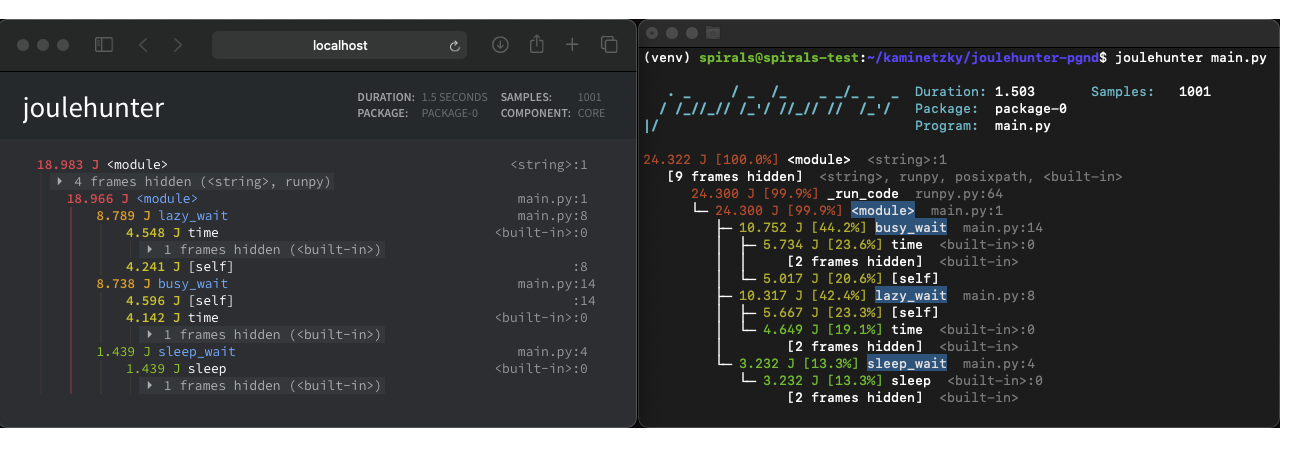
Joulehunter helps you find what part of your code is consuming considerable amounts of energy.
This repo is still a work in progress. 😄
Compatibility
Joulehunter runs on Linux machines with Intel RAPL support. This technology has been available since the Sandy Bridge generation.
Installation
You can install joulehunter with pip: pip install joulehunter.
You can also clone the repo and install it directly:
 git clone https://github.com/powerapi-ng/joulehunter.git
 cd joulehunter
 python setup.py install
Usage
Joulehunter works similarly to pyinstrument, as we forked the repo and replaced time measuring with energy measuring. Here's pyinstrument's documentation. Whenever pyinstrument is present in a variable name, it should be replaced with joulehunter (for example, PYINSTRUMENT_PROFILE_DIR turns into JOULEHUNTER_PROFILE_DIR).
Command line
joulehunter -l will list the available domains on this machine. These include the packages and their components, such as the DRAM and core.
The command joulehunter main.py will execute main.py and measure the energy consumption of the first package (CPU).
To select the package to analyze use the option -p or --package followed by the package number or the package name. The default value is 0.
The options -c and --component allow you to measure the energy of an individual component by specifying their name or ID. If not specified, the entire package will be selected.
Example
Executing joulehunter -l could output this:
[0] package-0
  [0] core
  [1] uncore
  [2] dram
[1] package-1
  [0] core
  [1] uncore
  [2] dram
If we run joulehunter -p package-1 -c 2 my_file.py, joulehunter will execute my_file.py and measure the energy consumption of package-1's DRAM.
Profiling chunks of code
As pyinstrument's documentation shows, it's also possible to profile specific chunks of code.
Joulehunter's Profiler class can receive two additional arguments: package and component. They receive the ID (as a string or integer) or name of the desired package/component. If package is not specified, package-0 will be used. If component is None, the entire package will be analyzed.
Profiling web requests in Flask
Please refer to pyinstrument's documentation for instructions on how to profile web requests in Flask. As in the previous case, joulehunter's Profiler() accepts two additional arguments.
Profiling web requests in Django
Profiling web requests in Django as explained in pyinstrument's documentation selects package 0 as the default domain (don't forget to rename the pyinstrument in variable names with joulehunter).
The user can choose a particular package and component as follows:
Query component: The query strings package and component are used to select the desired package and component. For example, including ?profiler&package=0&component=dram at the end of a request URL will select the first package and the DRAM. If the component query component is present but empty, the package will be analyzed.
Variable in settings.py: The user's selection can also be defined in settings.py with the JOULEHUNTER_PACKAGE and JOULEHUNTER_COMPONENT variables. These are later passed to Package().
If the package or component is defined both as a query component and in settings.py, the one defined as a query component will be selected.
Read permission
Due to a security vulnerability, only root has read permission for the energy files. In order to circumvent this, run the script as root or grant read permissions for the following files:
/sys/devices/virtual/powercap/intel-rapl/intel-rapl:*/energy_uj
/sys/devices/virtual/powercap/intel-rapl/intel-rapl:*/intel-rapl:*:*/energy_uj
More info here.
Acknowledgments
Thanks to Joe Rickerby and all of pyinstrument's contributors.
This fork is being developed by Chakib Belgaid and Alex Kaminetzky. Feel free to ask us any questions!
1 maintainer

Metadata
1 maintainer
Release files for joulehunter 1.0.2
For a detailed explanation of source distributions (sdists) and built distributions (wheels), please see the package formats documentation.
Source distribution (sdist)
| File | Size | Uploaded | Provenance | |
|---|---|---|---|---|
| joulehunter-1.0.2.tar.gz | 357.2 kB | Without provenance | Details |
Release files / joulehunter-1.0.2.tar.gz
| Download URL | joulehunter-1.0.2.tar.gz |
|---|---|
| Size | 357.2 kB |
| Tags | Source |
|
SHA-256 checksum How to use checksums |
5dc3ec4dc8a9fa90030b23254ef5ea8987c424cca2d1e3988202c2682d27ad67
|
|
BLAKE2b-256 checksum How to use checksums |
9d99072046ec515a9850dfa935b096ad1f11282ccf50e66f9ea6464c2e463701
|
| Upload date | |
|
Uploaded using Trusted Publishing? What is trusted publishing? |
No |
| Uploaded via |
twine/4.0.1 CPython/3.9.15
|
Security for joulehunter 1.0.2
Provenance
Provenance describes where a file came from. On PyPI, provenance is shared via attestations, which provide a verifiable record of the build or publishing details. View details, limitations and caveats.
No provenance found
None of the files in this release were uploaded with provenance metadata.
A note on package security
PyPI is a repository for distributing packages, not a service for auditing them. While third-party security researchers and our staff do their best to detect and remove malicious packages, PyPI cannot guarantee the quality, security or suitability of any given package.














