
Jupylet
Jupylet is a Python library for programming 2D and 3D games, graphics, music and sound synthesizers, interactively in a Jupyter notebook. It is intended for three types of audiences:
- Computer scientists, researchers, and students of deep reinforcement learning.
- Musicians interested in sound synthesis and live music coding.
- Kids and their parents interested in learning to program.


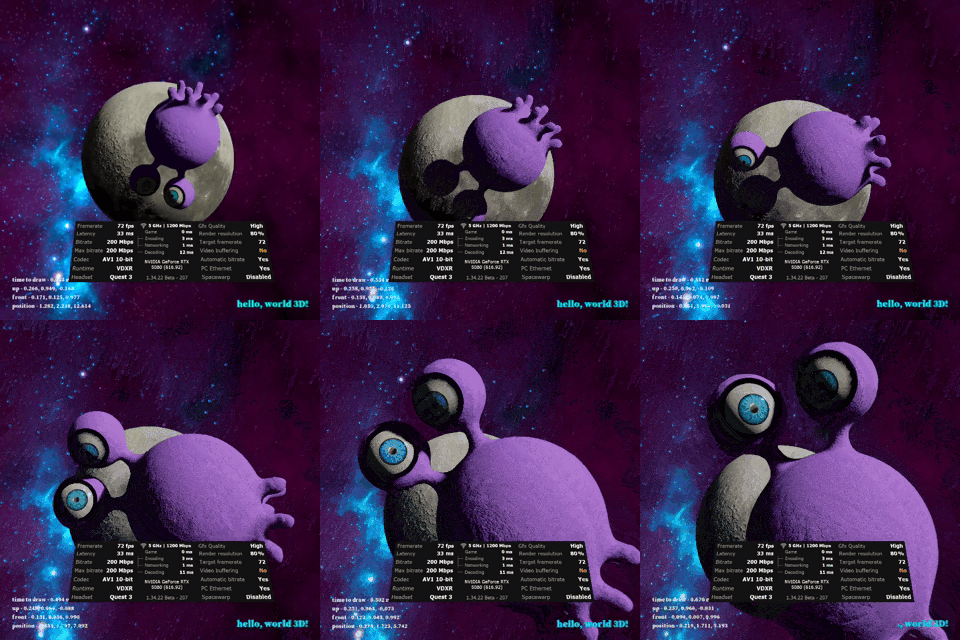
Jupylet can be used to create games in 2d, 3d and VR!
Jupylet for Kids
A Jupyter notebook is in essence a laboratory for programming. It is the ideal environment for playing around with code, experimenting, and exploring ideas. It is used by professional machine learning scientists who come every day to play at work, so why not by kids?
Jupylet is wonderfully easy to use for creating simple 2D and 3D games and music interactively and experimentally. Change a variable or a function and see how the game is affected immediately while running.
Jupylet for Deep Reinforcement Learning
Jupylet makes it is super easy to create and modify environments in which to experiment with deep reinforcement learning algorithms and it includes the API to programmatically control multiple simultaneous games and render thousands of frames per second.
Consider for example the pong game included in this code base. With a few lines of code you can modify the colors of the game to experiment with transfer learning, or turn the game into 4-way pong with agents on all four sides of the game court to experiment with cooperation between multiple agents. And since you can modify the game interactively in Jupyter this process is not only easy but also fun.
Check out the Programming Graphics and the Reinforcement Learning chapters in the Jupylet Programmer's Reference Guide.
Jupylet for Musicians
Jupylet imports ideas and methods from machine learning into the domain of sound synthesis to easily let you create sound synthesizers as wild as you can dream up - it includes impulse response reverb effects, colored noise generators, resonant filters with cutoff frequency sweeping, oscillators with LFO modulation, multi sampled instruments, and much more... And all of it in pure Python for you to modify and experiment with.
In addition Jupylet draws inspiration from the wonderful Sonic Pi and brings live loops and live music coding to Jupyter and Python. Hook up your MIDI keyboard and take off.
Check out the Programming Sound and Music and the Programming Synthesizers chapters in the Jupylet Programmer's Reference Guide.
Requirements
Jupylet should run on Python 3.11 and up on Windows 11, Mac with Apple Silicon, and Ubuntu Linux.
How to Install and Run Jupylet
Let Claude Code do it
You can let Claude Code install Jupylet for you. Open the Claude Code Desktop app, start a new session and paste the following request: Hi Claude please install Jupylet on my computer by following the instructions in https://github.com/nir/jupylet/blob/master/CLAUDE_SETUP.md
No way, I want to do it myself!
Install and use the Miniforge Python distribution, following the instructions below for your operating system.
On Windows 11 – download and execute the Miniforge Windows installer.
Once Miniforge is installed press the ⊞ Winkey and then type Miniforge and
press the Enter key. This should open a small window that programmers call
console or shell in which you can enter commands and run programs.
On macOS with Apple Silicon – download and execute the Miniforge PKG installer for Apple Silicon.
Once installed click the Spotlight icon 🔍 and in the search field type terminal
and press the Enter key to open the console.
On Ubuntu 26.04 – download "Miniforge3-Linux-x86_64.sh". Install it by running the following command in a bash shell (once installed start a new bash shell):
bash Miniforge3-Linux-x86_64.sh
On Ubuntu Linux Jupylet also needs a few system packages: libportaudio2 for sound, and
libgl1-mesa-dev/libegl1-mesa-dev to run scripts directly with python foo.py (as opposed to from a notebook):
sudo apt update
sudo apt install libportaudio2 libgl1-mesa-dev libegl1-mesa-dev
Once Miniforge is installed, first install precompiled versions of two of jupylet's dependencies (this avoids possibly needing a C++ compiler, depending on your Python version):
conda install moderngl glcontext
Now it's time to install jupylet itself by typing the following command in the console:
pip install jupylet
Already have jupylet installed and want to update to the latest version? Use this command instead - it makes sure everything jupylet depends on gets updated together, rather than ending up with an inconsistent mix of old and new:
pip install --upgrade --upgrade-strategy eager "jupylet>=0.10.0"
(If you're comfortable managing separate Python environments, creating a new one and installing jupylet fresh into it works too.)
Next, to run the example notebooks, download the jupylet source code. If you have Git installed type the following command:
git clone https://github.com/nir/jupylet.git
Alternatively, you can download the source code with the following command:
python -m jupylet download
Next, enter the jupylet/examples/ directory with the change directory command:
cd jupylet/examples/
The example notebooks need to be trusted once on your computer, or the game canvas might not show up. Make sure to run the following command from inside the examples/ folder:
python -m jupylet trust_notebooks
And start a jupyter notebook with:
jupyter lab 11-spaceship.ipynb
Run the notebook by following the instructions in the notebook and a game canvas should appear with the spaceship example:
Alternatively, you can run the same game as a Python script from the console with:
python spaceship.py
Documentation
To get started with Jupylet head over to the Jupylet Programmer's Reference Guide which you can find at jupylet.readthedocs.io.
To complement the online guide check out the growing collection of example notebooks that you can download and run on your computer as explained above.
Contact
For questions and feedback send an email to Nir Aides or join the discussion.
Spread the Word
Jupylet is a new library and you can help it grow with a few clicks - if you like it let your friends know about it!
Acknowledgements
- Einar Forselv - The programmer behind ModernGL for his endless help in the trenches of OpenGL programming.
- Alban Fichet - For kindly licensing his sound visualizer Shadertoy as CC BY 4.0 license.
What's New in Version 0.10.0
- Support for VR in Windows 11! Check out examples/12-spaceship-3d.ipynb for an example.
- A replica of the historical Atari 1978 Breakout, created entirely by AI. Check out examples/31-breakout.ipynb.
- The default tempo is now 120 beats per minute, the common default of music software, instead of 240. Music that relied on the old default plays at half speed; call
set_bpm(240)to restore it. - A new example notebook, examples/18-filters.ipynb, builds the classic Moog ladder filter from scratch, one small step at a time.
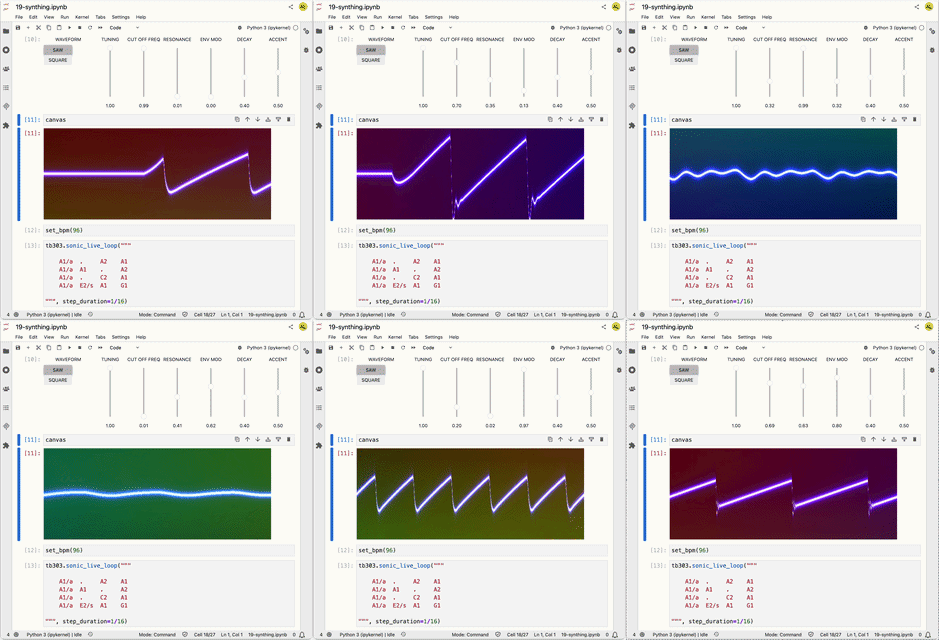
- A replica of the Roland TB-303 Bass Line synthesizer, modeled from its schematic and other sources, with a front panel of knobs that code can sweep in time with the music. Check out the demo, examples/19-synthing.ipynb.

What's New in Version 0.9.4
- Support for Python 3.13 and Python 3.14.
- MIDI keyboard support on Windows and macOS no longer needs a compiler.
- Fixed a security alert (Jinja2 CVE-2025-27516) in the docs build.
- Improved docs and example notebooks.
- Bug fixes for newer versions of Python and its dependencies.
What's New in Version 0.9.1
- Support for Python 3.10 and Python 3.11 with MIDI functionality.
- Seamlessly track changes to audio devices on macOS.
- Workaround PIL api change - thanks to @misolietavec.
- Bug fixes.
What's New in Version 0.8.9
- Support for Python 3.10 and Python 3.11 - except for MIDI functionality.
- Support for macOS M1.
- Spectrum analyzer.
- Bug fixes.

What's New in Version 0.8.8
- Support for Python 3.9.
What's New in Version 0.8.7
- Workaround auto-completion bug in Jupyter notebooks.
What's New in Version 0.8.6
- Support for rendering Shadertoy OpenGL shaders.
Shadertoy is an awesome online platform for
programming and sharing OpenGL shaders online, and now you can use and render shadertoy shaders in Jupylet!
1 maintainer

Metadata
1 maintainer
Release files for jupylet 0.10.0
For a detailed explanation of source distributions (sdists) and built distributions (wheels), please see the package formats documentation.
Source distribution (sdist)
| File | Size | Uploaded | Provenance | Actions |
|---|---|---|---|---|
| jupylet-0.10.0.tar.gz | 418.9 kB | Without provenance | Details for jupylet-0.10.0.tar.gz |
Built distribution (wheel)
| File | Interpreter | ABI | Platform | Actions Reset |
|---|---|---|---|---|
| jupylet-0.10.0-py3-none-any.whl | Python 3 | none | any | Details for jupylet-0.10.0-py3-none-any.whl |
Total release size: 863.2 kB
Release files / jupylet-0.10.0.tar.gz
| Download URL | jupylet-0.10.0.tar.gz |
|---|---|
| Size | 418.9 kB |
| Tags | Source |
|
SHA-256 checksum How to use checksums |
fccc9a83a929c3f3e5d1aadbf83638671e2fdc283ea56d7c6acef8be2f55ec40
|
|
BLAKE2b-256 checksum How to use checksums |
cd87805a832024ad8a1d07fb8fcf0af2a8bec46bf00d20644617ad45ce34948f
|
| Upload date | |
|
Uploaded using Trusted Publishing? What is trusted publishing? |
No |
| Uploaded via |
twine/7.0.0 CPython/3.13.18
|
Release files / jupylet-0.10.0-py3-none-any.whl
| Download URL | jupylet-0.10.0-py3-none-any.whl |
|---|---|
| Size | 444.3 kB |
| Tags | Python 3 |
|
SHA-256 checksum How to use checksums |
cc34e29b7aaf78b835e2dac98737b5cf57bb9a96c79ab707bbc902aa6744e9a9
|
|
BLAKE2b-256 checksum How to use checksums |
59ef5fcec16848149bd243df3e573f5ac1e9d3f2f0d6f30b438d646a10fbd411
|
| Upload date | |
|
Uploaded using Trusted Publishing? What is trusted publishing? |
No |
| Uploaded via |
twine/7.0.0 CPython/3.13.18
|
Security for jupylet 0.10.0
Provenance
Provenance describes where a file came from. On PyPI, provenance is shared via attestations, which provide a verifiable record of the build or publishing details. View details, limitations and caveats.
No provenance found
None of the files in this release were uploaded with provenance metadata.
A note on package security
PyPI is a repository for distributing packages, not a service for auditing them. While third-party security researchers and our staff do their best to detect and remove malicious packages, PyPI cannot guarantee the quality, security or suitability of any given package.
To learn more about protecting yourself from malicious actors, visit our package security documentation.














