
Apache Zeppelin Integration for Jupyter
The Apache Zeppelin Integration for Jupyter enables you to access Apache Zeppelin in a web browser from your Jupyter environment.
jupyter-apache-zeppelin-proxy is a Python® package based on the following packages.
| Package | Description |
|---|---|
| jupyter-server-proxy | Extends Jupyter environments to launch Apache Zeppelin as an external process alongside the notebook server. For more information see GUI Launchers. |
NOTE: This package currently, does not provide a kernel level integration with Jupyter.
To report any issues or suggestions, see the Feedback section.
Requirements
This package has the same requirements as its dependencies:
- See Requirements from
jupyter-server-proxy - See Requirements from
Apache Zeppelin
After downloading Apache Zeppelin, make sure to create a symbolic link in PATH that points to the Apache Zeppelin daemon.
# if the downloaded Apache Zeppelin package resides at /opt/apache-zeppelin
# As root or superuser
ln -s /opt/apache-zeppelin/bin/zeppelin-daemon.sh /usr/bin/zeppelin-daemon
Installation
PyPI
This repository can be installed directly from the Python Package Index.
python -m pip install jupyter-apache-zeppelin-proxy
If you want to use this integration with JupyterLab®, ensure that you have JupyterLab installed on your machine by running the following command:
python -m pip install jupyterlab
You should then install jupyterlab-server-proxy JupyterLab extension. To install the extension, use the following command:
jupyter labextension install @jupyterlab/server-proxy
Building From Sources
git clone https://github.com/tiaden/jupyter-apache-zeppelin-proxy.git

cd jupyter-apache-zeppelin-proxy

python -m pip install .
Usage
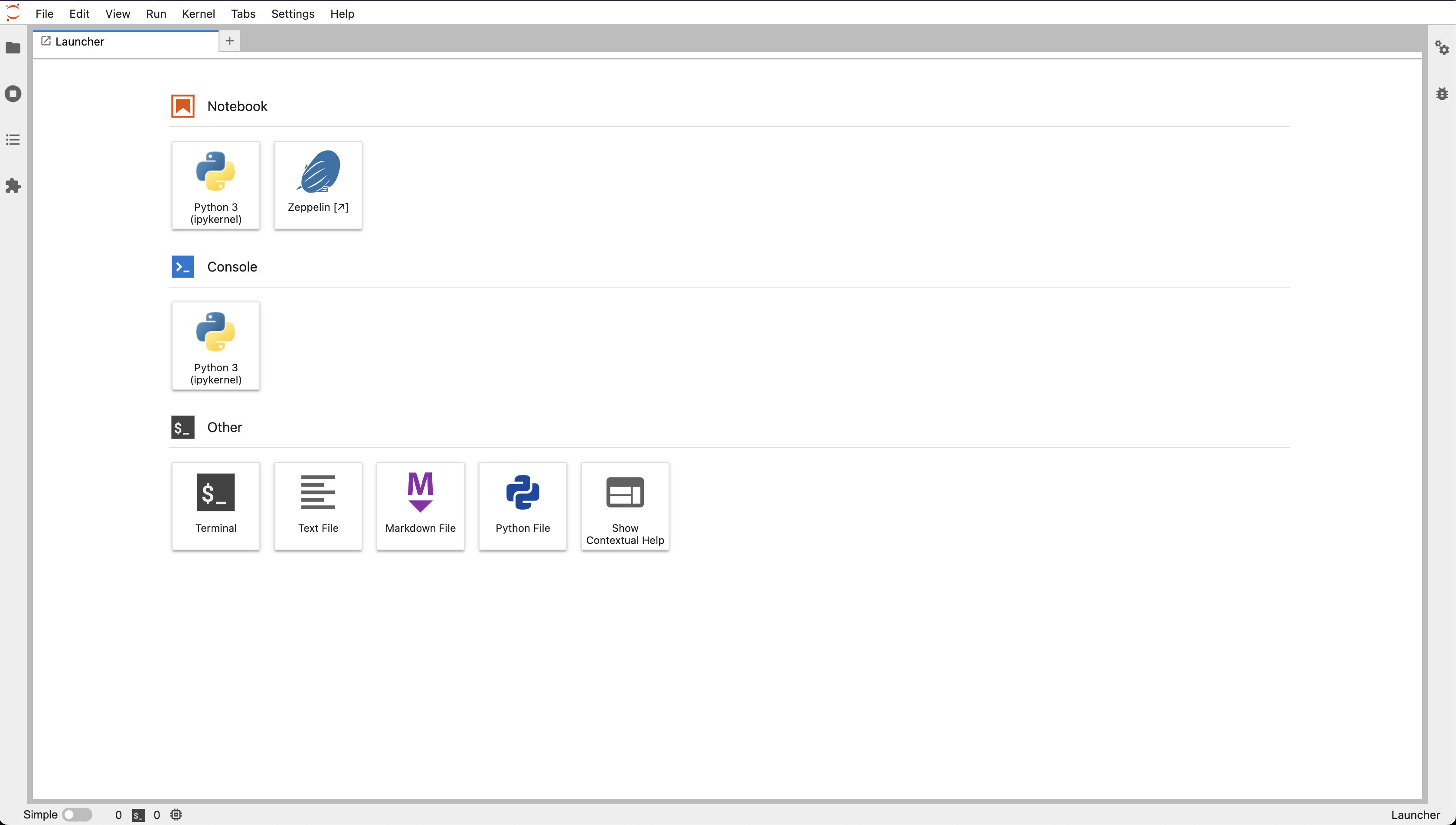
Upon successful installation of jupyter-apache-zeppelin-proxy, your Jupyter environment should present options to launch Apache Zeppelin.
-
Open your Jupyter environment by starting jupyter notebook or lab
# For Jupyter Notebook
jupyter notebook

# For Jupyter Lab
jupyter lab
-
If you are using Jupyter Notebook, on the
Newmenu, selectZeppelin. If you are using JupyterLab, select the Zeppelin icon on the launcher.
Integration with JupyterHub
To use this integration with JupyterHub®, you must install the jupyter-apache-zeppelin-proxy python package in the Jupyter environment launched by your JupyterHub platform.
For example, if your JupyterHub platform launches Docker containers, then install this package in the Docker image used to launch them.
Troubleshooting
In the environment that you have installed the package:
-
Verify if java in installed (i.e. if it is in the PATH). Java (version 8 or later ) installation is required by apache zeppelin
$ which java
/usr/bin/java
-
Verify if the Apache Zeppelin daemon is discoverable (i.e. if it is in the PATH)
$ which zeppelin-daemon
/usr/bin/zeppelin-daemon
-
Check if their Python version is 3.8 or higher
$ python --version
Python 3.8.10
-
Ensure that
jupyter-apache-zeppelin-proxyand thejupyterexecutables are in the same environment as the python executable. For example if you are using VENV to manage your python environments:$ which python /home/user/my-project/packages/.venv/bin/python $ which jupyter-apache-zeppelin-proxy /home/user/my-project/packages/.venv/bin/jupyter-apache-zeppelin-proxy $ which jupyter /home/user/my-project/packages/.venv/bin/jupyter
Notice that
jupyter-apache-zeppelin-proxy,jupyterand thepythonexecutable are in the same parent directory, in this case it is:/home/user/my-project/packages/.venv/bin -
Ensure that you are launching
jupyter notebookusing the same executable as listed above. -
Ensure that all three packages are installed in the same python environment
# Pipe the output of pip freeze and grep for jupyter and jupyter-apache-zeppelin-proxy.
# All two packages should be highlighted in the output.
# If you don't see anyone of them, then either the packages missing in the output have been installed
# in a different python environment or not installed at all.
$ pip freeze | grep -E "jupyter|jupyter-apache-zeppelin-proxy"
-
If the integration is not showing up as an option to the dropdown box in the Jupyter notebook:
#Run the following commands and verify that you are able to see similar output:

$ jupyter serverextension list
config dir: /home/user/anaconda3/etc/jupyter
    jupyter_server_proxy  enabled
    - Validating...
    jupyter_server_proxy  OK
    jupyterlab  enabled
    - Validating...
    jupyterlab 2.2.6 OK

$ jupyter nbextension list
Known nbextensions:
config dir: /home/user/anaconda3/etc/jupyter/nbconfig
    notebook section
    jupyter-js-widgets/extension  enabled
    - Validating: OK
    tree section
    jupyter_server_proxy/tree  enabled
    - Validating: OK  $ pip freeze | grep -E "jupyter|jupyter-apache-zeppelin-proxy"

# IF the server does not show up in the commands above, install:
$ pip install jupyter_contrib_nbextensions
Feedback
We encourage you to try this repository with your environment and provide feedback. If you encounter a technical issue or have an enhancement request, create an issue here
1 maintainer

Metadata
1 maintainer
Release files for jupyter-apache-zeppelin-proxy 1.0.5
For a detailed explanation of source distributions (sdists) and built distributions (wheels), please see the package formats documentation.
Source distribution (sdist)
| File | Size | Uploaded | Provenance | Actions |
|---|---|---|---|---|
| jupyter-apache-zeppelin-proxy-1.0.5.tar.gz | 104.5 kB | Without provenance | Details for jupyter-apache-zeppelin-proxy-1.0.5.tar.gz |
Built distribution (wheel)
| File | Interpreter | ABI | Platform | Actions Reset |
|---|---|---|---|---|
| jupyter_apache_zeppelin_proxy-1.0.5-py3-none-any.whl | Python 3 | none | any | Details for jupyter_apache_zeppelin_proxy-1.0.5-py3-none-any.whl |
Total release size: 206.5 kB
Release files / jupyter-apache-zeppelin-proxy-1.0.5.tar.gz
| Download URL | jupyter-apache-zeppelin-proxy-1.0.5.tar.gz |
|---|---|
| Size | 104.5 kB |
| Tags | Source |
|
SHA-256 checksum How to use checksums |
754dfbd78011c68ddac4a309dc185a2ffff6a69e8a9cd1d24de49dca4e090fb3
|
|
BLAKE2b-256 checksum How to use checksums |
bbc09a56c717e608e0b49aa9515619deada4bc8ca1f905773a8a1114de1c0ef6
|
| Upload date | |
|
Uploaded using Trusted Publishing? What is trusted publishing? |
No |
| Uploaded via |
twine/4.0.0 CPython/3.9.12
|
Release files / jupyter_apache_zeppelin_proxy-1.0.5-py3-none-any.whl
| Download URL | jupyter_apache_zeppelin_proxy-1.0.5-py3-none-any.whl |
|---|---|
| Size | 102.0 kB |
| Tags | Python 3 |
|
SHA-256 checksum How to use checksums |
5d1ca2fbebf996db90b0012c481506b3007e4b366259cdad7b68b448b14d5dd6
|
|
BLAKE2b-256 checksum How to use checksums |
d98015bcb7ad7f88a43219693d27263377264002e60d92f01e57781d66dd161f
|
| Upload date | |
|
Uploaded using Trusted Publishing? What is trusted publishing? |
No |
| Uploaded via |
twine/4.0.0 CPython/3.9.12
|
Security for jupyter-apache-zeppelin-proxy 1.0.5
Provenance
Provenance describes where a file came from. On PyPI, provenance is shared via attestations, which provide a verifiable record of the build or publishing details. View details, limitations and caveats.
No provenance found
None of the files in this release were uploaded with provenance metadata.
A note on package security
PyPI is a repository for distributing packages, not a service for auditing them. While third-party security researchers and our staff do their best to detect and remove malicious packages, PyPI cannot guarantee the quality, security or suitability of any given package.
To learn more about protecting yourself from malicious actors, visit our package security documentation.














