
Simple asynchronous RPC framework for Jupyter Notebooks. Facilitates calling JavaScript frontend code from Python kernel code and vice-versa.
Verified details
These details have been verified by PyPIProject links
GitHub Statistics
Maintainers

Project description
jupyter-jchannel




Simple asynchronous RPC framework for Jupyter Notebooks. Facilitates calling JavaScript frontend code from Python kernel code and vice-versa.
What?
Suppose a Jupyter Notebook client (for example, a tab in Google Chrome or Visual Studio Code) provides a JavaScript object whose methods you want to call from its corresponding Python kernel. For example, an object that wraps the padStart and padEnd string methods to provide indentation utilities (this is admittedly useless, but indulge me for the sake of the example).
example = {
    indentLeft(line, count) {
        return line.padStart(line.length + count);
    },
    indentRight(line, count) {
        return line.padEnd(line.length + count);
    },
};
The jupyter-jchannel framework allows you to create channel objects that make
these calls as simple as
-
channel.call('indentLeft', 'hello', 4); -
channel.call('indentRight', 'world', 4).
These objects perform asynchronous non-blocking communication based on
aiohttp. The call method returns a
task that
can be awaited to retrieve the result whenever you want.
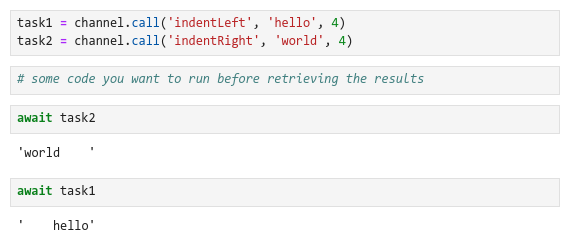
In particular, awaiting immediately ensures synchronous execution, without the need for sleeping and/or polling.

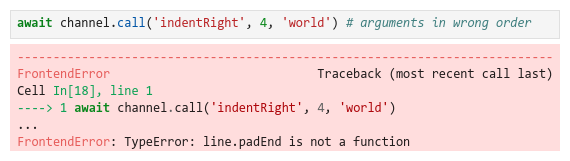
Furthermore, if the frontend throws a JavaScript exception, the task wraps it into a Python exception.
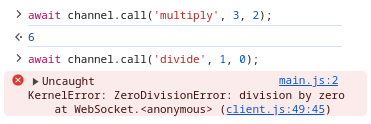
Likewise, suppose the kernel provides an object whose methods you want to call from the client.
class Example:
    def multiply(self, a, b):
        return a * b

    def divide(self, a, b):
        return a / b
The channel objects have client representations that make these calls equally
as simple.
Main features
-
Robustness to client refreshes and crashes: as long as the kernel is not restarted, the channels reconnect automatically.
-
Support for sending anything JSON-serializable as an argument and receiving anything JSON-serializable as the return value.
-
Support for sending a binary stream as an argument and receiving a binary stream as the return value.
-
Compatibility with NbClassic, Notebook 7+, and JupyterLab without extensions.
-
Compatibility with multiple browsers and Visual Studio Code.
-
Compatibility with Binder and Google Colab.
Getting started
The tutorial for local notebooks should be enough to introduce the basic usage.
Remote notebooks require tunneling. Tutorials for Binder and Colab are available below.


Why?
This framework has been developed to overcome limitations of current alternatives.
-
The
IPython.displaymodule can call JavaScript frontend code from Python kernel code, but cannot retrieve the result or ensure synchronous execution. -
The
Jupyterfrontend object can call Python kernel code and register a callback, but is not exposed in newer platforms like Notebook 7+ and JupyterLab. -
The Jupyter messaging system can send custom messages from kernels to frontends and vice-versa, but its API changed between older platforms like NbClassic and newer platforms. Furthermore, this system assumes that a kernel can be connected to multiple clients. This causes ambiguity for RPCs:
-
if a kernel makes a call, should it be handled by all the clients or only one client?
-
if it is all clients, should the kernel receive multiple return values?
-
if it is one client, which should be chosen?
-
-
The ipywidgets framework abstracts the Jupyter messaging system across different platforms and avoids ambiguity by synchronizing all clients with a single model, but this introduces an unnecessary overhead for kernels that are not connected to multiple clients. Furthermore, changing and watching model states to simulate arguments and return values feels like an abuse of the concept.
It should be noted that jupyter-jchannel does not remove these limitations, since they have good reasons to exist. It merely circumvents them, while introducing limitations of its own. It is not a solution, but another alternative that might be adequate for some users.
How?
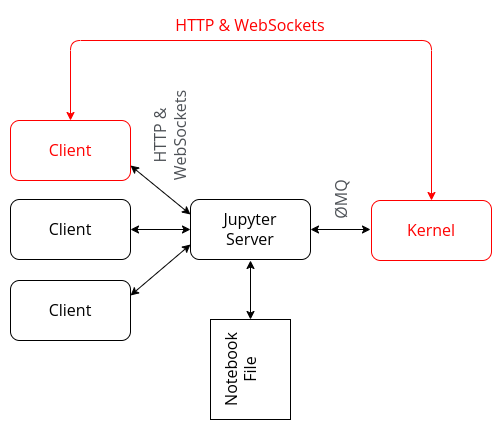
As mentioned above, the Jupyter messaging system assumes that a kernel can be connected to multiple clients. The kernel connects to a server via ØMQ and the server connects to the clients via HTTP and WebSockets. This decoupling is what makes extensions like Jupyter Real-Time Collaboration possible.
Source: adapted from The Jupyter Notebook Interface
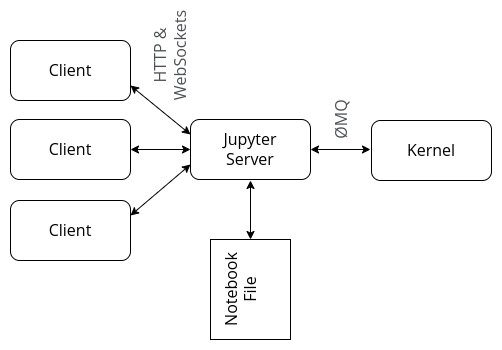
The jupyter-jchannel framework deliberately breaks this architecture by establishing a direct connection between the kernel and a single client, on a "first come, only served" basis. In other words, it explicitly assumes that the user is not interested in synchronizing multiple clients.
Why not?
Since this framework deliberately breaks the Jupyter architecture, it is not adequate for all users:
-
connecting multiple clients is not possible, unless you establish that one of them is more important than the others;
-
real-time collaboration is completely impossible;
-
the jupyter-jchannel connection requires an additional port, which is a security issue in non-containerized remote notebooks;
-
remote notebooks require tunneling, which is not always allowed.
Project details
Verified details
These details have been verified by PyPIProject links
GitHub Statistics
Maintainers
Release history Release notifications | RSS feed


Download files
Download the file for your platform. If you're not sure which to choose, learn more about installing packages.
Source Distribution
Built Distribution
Filter files by name, interpreter, ABI, and platform.
If you're not sure about the file name format, learn more about wheel file names.
Copy a direct link to the current filters
File details
Details for the file jupyter_jchannel-0.3.9.tar.gz.
File metadata
- Download URL: jupyter_jchannel-0.3.9.tar.gz
- Upload date:
- Size: 19.9 kB
- Tags: Source
- Uploaded using Trusted Publishing? Yes
- Uploaded via: twine/6.1.0 CPython/3.13.7
File hashes
| Algorithm | Hash digest | |
|---|---|---|
| SHA256 |
ed3d67fefa25a130367ce061e99970eb6b971f8a624ff8de764afbb8e3464307
|
|
| MD5 |
82dc9cc9f678ec58421f8f55ad9ea420
|
|
| BLAKE2b-256 |
0de3770e5882e3d5b950c6b887cc4ce1b4875ab24612a993e54de997bf6e5436
|
Provenance
The following attestation bundles were made for jupyter_jchannel-0.3.9.tar.gz:
Publisher:
pypi.yml on hashiprobr/jupyter-jchannel
-
Statement:
-
Statement type:
https://in-toto.io/Statement/v1 -
Predicate type:
https://docs.pypi.org/attestations/publish/v1 -
Subject name:
jupyter_jchannel-0.3.9.tar.gz -
Subject digest:
ed3d67fefa25a130367ce061e99970eb6b971f8a624ff8de764afbb8e3464307 - Sigstore transparency entry: 821143009
- Sigstore integration time:
-
Permalink:
hashiprobr/jupyter-jchannel@f00f3dac4e31481463df5d6bf423ef7fb5a3c34a -
Branch / Tag:
refs/tags/0.3.9 - Owner: https://github.com/hashiprobr
-
Access:
public
-
Token Issuer:
https://token.actions.githubusercontent.com -
Runner Environment:
github-hosted -
Publication workflow:
pypi.yml@f00f3dac4e31481463df5d6bf423ef7fb5a3c34a -
Trigger Event:
release
-
Statement type:
File details
Details for the file jupyter_jchannel-0.3.9-py3-none-any.whl.
File metadata
- Download URL: jupyter_jchannel-0.3.9-py3-none-any.whl
- Upload date:
- Size: 21.9 kB
- Tags: Python 3
- Uploaded using Trusted Publishing? Yes
- Uploaded via: twine/6.1.0 CPython/3.13.7
File hashes
| Algorithm | Hash digest | |
|---|---|---|
| SHA256 |
e1952a80c116b4c16844015f22ae3ce689690c70c7240acb41b615f6f0079868
|
|
| MD5 |
88be34c93cd4c5364e268b3761e94ecd
|
|
| BLAKE2b-256 |
13a9cb625db2d0df685868c7cbbfb6ef71eb67e3bcf24fe7a58a67e5e7f66ce8
|
Provenance
The following attestation bundles were made for jupyter_jchannel-0.3.9-py3-none-any.whl:
Publisher:
pypi.yml on hashiprobr/jupyter-jchannel
-
Statement:
-
Statement type:
https://in-toto.io/Statement/v1 -
Predicate type:
https://docs.pypi.org/attestations/publish/v1 -
Subject name:
jupyter_jchannel-0.3.9-py3-none-any.whl -
Subject digest:
e1952a80c116b4c16844015f22ae3ce689690c70c7240acb41b615f6f0079868 - Sigstore transparency entry: 821143026
- Sigstore integration time:
-
Permalink:
hashiprobr/jupyter-jchannel@f00f3dac4e31481463df5d6bf423ef7fb5a3c34a -
Branch / Tag:
refs/tags/0.3.9 - Owner: https://github.com/hashiprobr
-
Access:
public
-
Token Issuer:
https://token.actions.githubusercontent.com -
Runner Environment:
github-hosted -
Publication workflow:
pypi.yml@f00f3dac4e31481463df5d6bf423ef7fb5a3c34a -
Trigger Event:
release
-
Statement type:






