
jupyter-videochat
Video Chat with JupyterHub peers inside JupyterLab and RetroLab, powered by Jitsi.








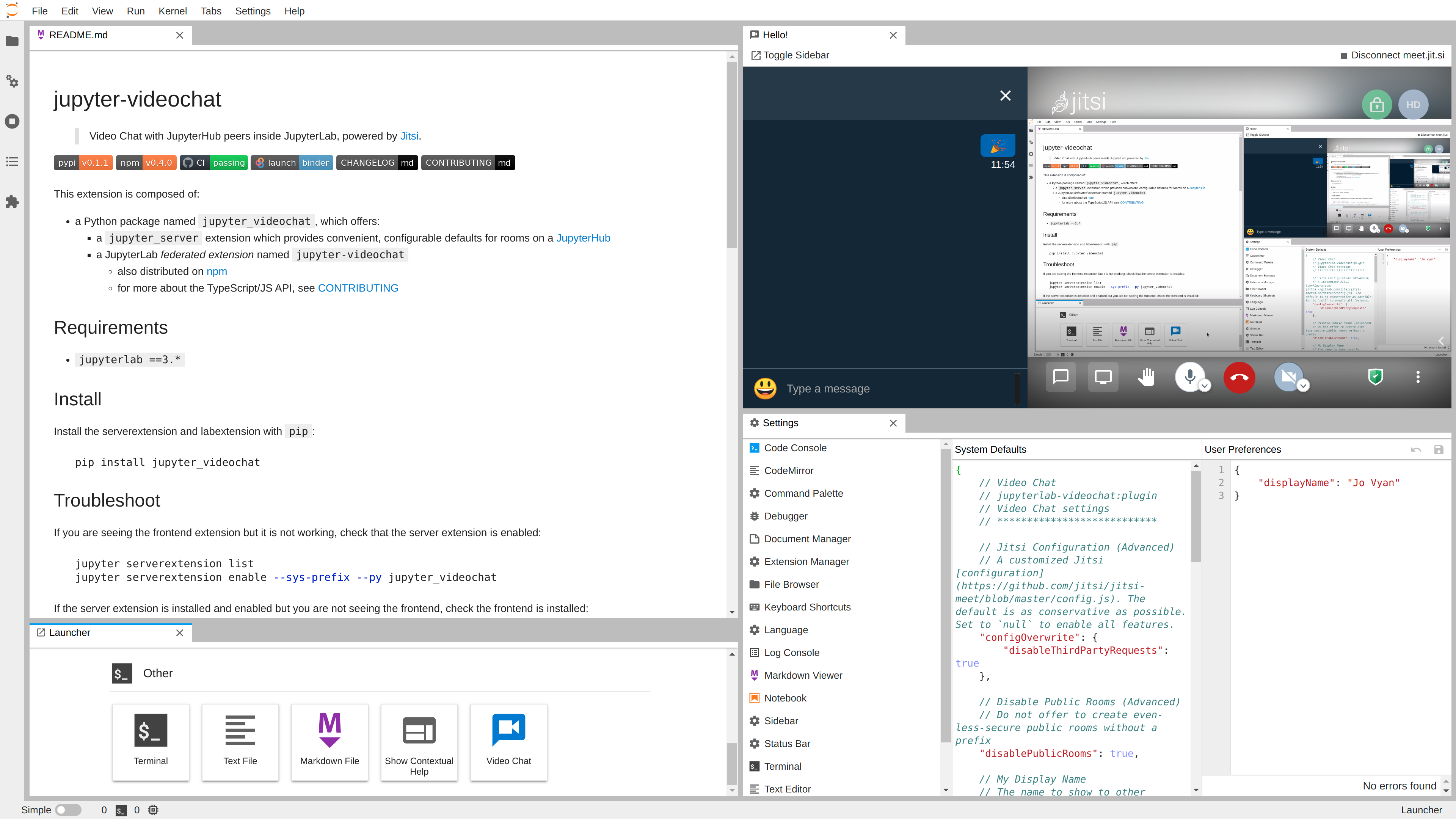
Requirements
python >=3.7jupyterlab ==3.*
Install
Install the server extension and JupyterLab extension with pip:
pip install -U jupyter-videochat
...or conda/mamba:
conda install -c conda-forge jupyter-videochat
Usage
See the [Jitsi Handbook] for more about using the actual chat once launched.
View the Room List
JupyterLab
- From the Main Menu...
- Click File ▶ New ▶ Video Chat
- From the Launcher...
- Open a new JupyterLab Launcher
- Scroll down to Other
- Click the Video Chat launcher card
RetroLab
- From the Main Menu...
- Click File ▶ New ▶ Video Chat
- From the RetroLab File Tree...
- Click the New Video Chat button
Start a Chat
- Provide your name and email (optional)
- these will be saved in JupyterLab user settings for future usage
- your email will be used to provide Gravatar icon
- From one of the room providers, choose a room.
- You may need to provide a room name
Stop a Chat
- From the the Jitsi IFrame:
- Click the red "hang up" button, or
- From the Video Chat toolbar
- Click the Disconnect Video Chat button
Troubleshoot
If the Jitsi frame actually loads, the [Jitsi Handbook] is the best source for more help.
I see the Lab UI, but the video chat IFrame doesn't load
Sometimes the Jitsi IFrame runs into issues, and just shows a white frame.
Try reloading the browser.
I see the UI but I'm missing rooms
If you are seeing the frontend extension but it is not working, check that the server extension is enabled:
jupyter server extension list
jupyter server extension enable --sys-prefix --py jupyter_videochat
... and restart the server.
If you launch your Jupyter server with
jupyter notebook, as Binder does, the equivalent commands are:jupyter serverextension list jupyter serverextension enable --sys-prefix --py jupyter_videochat
If the server extension is installed and enabled but you are not seeing the frontend, check the frontend is installed:
jupyter labextension list
If you do not see jupyterlab-videochat, the best course of action is to
uninstall and reinstall, and carefully watch the log output.
Architecture
This extension is composed of:
- a Python package named
jupyter_videochat, which offers:- a
jupyter_serverextension which provides convenient, configurable defaults for rooms on a JupyterHub - a JupyterLab pre-built or federated extension named
jupyter-videochat- also distributed on npm
- for more about the TypeScript/JS API, see CONTRIBUTING
- at JupyterLab runtime, some Plugins which can be independently disabled
jupyterlab-videochat:pluginwhich is required by:jupyterlab-videochat:rooms-serverjupyterlab-videochat:rooms-publicjupyterlab-videochat:toggle-area
- also distributed on npm
- a
Configuration
Server Configuration
In your jupyter_server_config.json (or equivalent .py or conf.d/*.json), you can
configure the VideoChat:
room_prefix, a prefix used for your group, by default a URL-frieldy version of your JupyterHub's hostname- can be overriden with the
JUPYTER_VIDEOCHAT_ROOM_PREFIXenvironment variable
- can be overriden with the
jitsi_server, an HTTPS host that serves the Jitsi web application, by defaultmeet.jit.sirooms, a list of Room descriptions that everyone on your Hub will be able to join
Example
{
  "VideoChat": {
    "room_prefix": "our-spiffy-room-prefix",
    "rooms": [
      {
        "id": "stand-up",
        "displayName": "Stand-Up",
        "description": "Daily room for meeting with the team"
      },
      {
        "id": "all-hands",
        "displayName": "All-Hands",
        "description": "A weekly room for the whole team"
      }
    ],
    "jitsi_server": "jitsi.example.com"
  }
}
Client Configuration
In the JupyterLab Advanced Settings panel, the Video Chat settings can be further
configured, as can a user's default displayName and email. The defaults provided are
generally pretty conservative, and disable as many third-party services as possible.
Additionally, access to globally-accessible public rooms may be enabled.
Binder Client Example
For example, to enable all third-party features, public rooms, and open in the main
area by default:
-
create an
overrides.json{ "jupyter-videochat:plugin": { "interfaceConfigOverwrite": null, "configOverwrite": null, "disablePublicRooms": false, "area": "main" } }
-
Copy it to the JupyterLab settings directory
# postBuild
mkdir -p ${NB_PYTHON_PREFIX}/share/jupyter/lab/settings
cp overrides.json ${NB_PYTHON_PREFIX}/share/jupyter/lab/settings
JupyterLite Client Example
Note: JupyterLite is still alpha software, and the API is likely to change.
jupyter lite build
jupyter_lite_config_.json
{
  "LabBuildConfig": {
    "federated_extensions": ["https://pypi.io/.../jupyterlab-videochat-0.6.0.whl"]
  }
}
Add a runtime jupyter-lite.json (or a build time overrides.json) to disable server
rooms.
{
  "jupyter-lite-schema-version": 0,
  "jupyter-config-data": {
    "disabledExtensions": ["jupyterlab-videochat:rooms-server"],
    "settingsOverrides": {
      "jupyterlab-videochat:plugin": {
        "disablePublicRooms": false
      }
    }
  }
}
This can then be tested with:
jupyter lite serve
Start a Meet by URL
Appending ?jvc=room-name to a JupyterLab URL will automatically open the Meet (but not
fully start it, as browsers require a user gesture to start audio/video).
Binder URL Example
On Binder, use the urlpath to append the argument, ensuring
the arguments get properly URL-encoded.
https://mybinder.org/v2/gh/jupyterlab-contrib/jupyter-videochat/demo?urlpath=tree%3Fjvc%3DStand-Up
                                                         # URL-encoded  [? ] [=  ]
nbgitpuller
If you have two repos (or branches) that contain:
- content that changes frequently
- a stable environment
...you can use nbgitpuller to have fast-building, (almost) single-click URLs that launch right into JupyterLab showing your meeting and content. For example, to use...
- the [Python Data Science Handbook] as
master - this project's repo, at
demo(not recommended, as it's pretty minimal)
...and launch directly into JupyterLab showing
- the Preface notebook
- the Office Hours room
...the doubly-escaped URL would be something like:
https://mybinder.org/v2/gh/jupyterlab-contrib/jupyter-videochat/demo?
urlpath=git-pull
  %3Frepo%3Dhttps%253A%252F%252Fgithub.com%252Fjakevdp%252FPythonDataScienceHandbook
  %26branch%3Dmaster
  %26urlpath%3Dlab%252Ftree%252FPythonDataScienceHandbook%252Fnotebooks%252F00.00-Preface.ipynb
  %253Fjvc%253DOffice%2BHours
JupyterLite Example
Additionally, ?JVC-PUBLIC=a-very-long-and-well-thought-key can be enabled, providing a
similar experience, but for unobfuscated, publicly-visible rooms. Use with care, and
as a moderator take additional whatever steps you can from within the Jitsi security UI,
including:
- lobbies
- passwords
- end-to-end encryption
Once properly configured above, a JupyterLite site can be git pushed to GitHub Pages,
where a URL is far less obfuscated.
https://example.github.io/my-repo/lab?JVC-PUBLIC=a-very-long-and-well-thought-key
- probably don't click on links shorter than about ten characters
Uninstall
pip uninstall jupyter-videochat
or
conda uninstall jupyter-videochat
3 maintainers


Metadata
3 maintainers
Release files for jupyter-videochat 0.6.0
For a detailed explanation of source distributions (sdists) and built distributions (wheels), please see the package formats documentation.
Source distribution (sdist)
| File | Size | Uploaded | Provenance | |
|---|---|---|---|---|
| jupyter-videochat-0.6.0.tar.gz | 46.5 kB | Without provenance | Details |
Built distribution (wheel)
| File | Interpreter | ABI | Platform | Reset |
|---|---|---|---|---|
| jupyter_videochat-0.6.0-py3-none-any.whl | Python 3 | none | any | Details |
Total release size: 98.7 kB
Release files / jupyter-videochat-0.6.0.tar.gz
| Download URL | jupyter-videochat-0.6.0.tar.gz |
|---|---|
| Size | 46.5 kB |
| Tags | Source |
|
SHA-256 checksum How to use checksums |
8f555f1cf8a0f314964d54ad445fd2d303a2d9b9d17d8a4bcc870f3107ec94cd
|
|
BLAKE2b-256 checksum How to use checksums |
76e12a22b0a17750362e3a5e6d2bc20203cdc60a844721cff2c61a696703acae
|
| Upload date | |
|
Uploaded using Trusted Publishing? What is trusted publishing? |
No |
| Uploaded via |
twine/0.0.0 pkginfo/1.8.2 readme-renderer/27.0 requests/2.27.1 requests-toolbelt/0.9.1 urllib3/1.26.9 tqdm/4.63.1 importlib-metadata/4.11.3 keyring/23.4.0 rfc3986/2.0.0 colorama/0.4.4 CPython/3.9.12
|
Release files / jupyter_videochat-0.6.0-py3-none-any.whl
| Download URL | jupyter_videochat-0.6.0-py3-none-any.whl |
|---|---|
| Size | 52.1 kB |
| Tags | Python 3 |
|
SHA-256 checksum How to use checksums |
1083eab5d94c29c820e35457dd93a3345617db4aed1efc6386321b4be8c11469
|
|
BLAKE2b-256 checksum How to use checksums |
1d79093d902d8bbbbaa734170441a88afda18aa85ad427105d79320f0446bdc1
|
| Upload date | |
|
Uploaded using Trusted Publishing? What is trusted publishing? |
No |
| Uploaded via |
twine/0.0.0 pkginfo/1.8.2 readme-renderer/27.0 requests/2.27.1 requests-toolbelt/0.9.1 urllib3/1.26.9 tqdm/4.63.1 importlib-metadata/4.11.3 keyring/23.4.0 rfc3986/2.0.0 colorama/0.4.4 CPython/3.9.12
|
Security for jupyter-videochat 0.6.0
Provenance
Provenance describes where a file came from. On PyPI, provenance is shared via attestations, which provide a verifiable record of the build or publishing details. View details, limitations and caveats.
No provenance found
None of the files in this release were uploaded with provenance metadata.
A note on package security
PyPI is a repository for distributing packages, not a service for auditing them. While third-party security researchers and our staff do their best to detect and remove malicious packages, PyPI cannot guarantee the quality, security or suitability of any given package.
To learn more about protecting yourself from malicious actors, visit our package security documentation.














