
This release has been yanked by its maintainers, and will be ignored by installers, except when explicitly specified.
jupyterlab_celltests
Cell-by-cell testing for production Jupyter notebooks in JupyterLab






Overview
Celltests is designed for writing tests for linearly executed notebooks. Its primary use is for unit testing reports.
"Linearly executed notebooks?"
When converting notebooks into html/pdf/email reports, they are executed top-to-bottom one time, and are expected to contain as little code as reasonably possible, focusing primarily on the plotting and markdown bits. Libraries for this type of thing include Papermill, JupyterLab Emails, etc.
Doesn't this already exist?
Nbval is a great product and I recommend using it for notebook regression tests. But it only allows for testing for unexpected failures or simple output equality tests.
So why do I want this again?
This doesn't necessarily help you if your data sources go down, but its likely you'll notice this anyway. Where this comes in handy is:
- when the environment (e.g. package versions) are changing in your system
- when you play around in the notebook (e.g. nonlinear execution) but aren't sure if your reports will still generate
- when your software lifecycle systems have a hard time dealing with notebooks (can't lint/audit them as code unless integrated nbdime/nbconvert to script, tough to test, tough to ensure what works today works tomorrow)
So what does this do?
Given a notebook, you can write mocks and assertions for individual cells. You can then generate a testing script for this notebook, allowing you to hook it into your testing system and thereby provide unittests of your report.
Writing tests
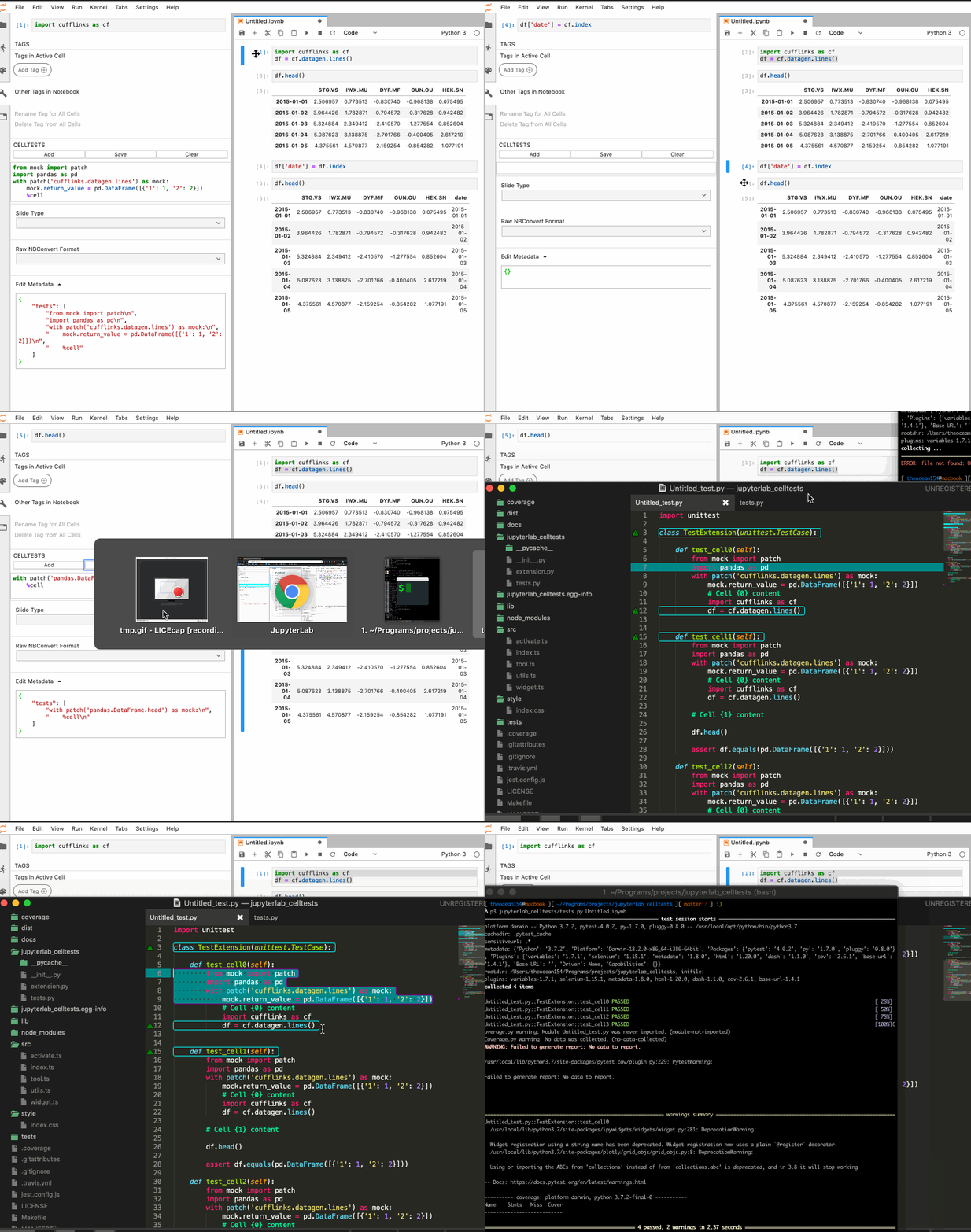
When you write tests for a cell, we create a new method on a unittest class corresponding to the index of your cell, and including the cumulative tests for all previous cells (to mimic what has happened so far in the notebook's linear execution). You can write whatever mocking and asserts you like, and can call %cell to inject the contents of the cell into your test.
Running tests
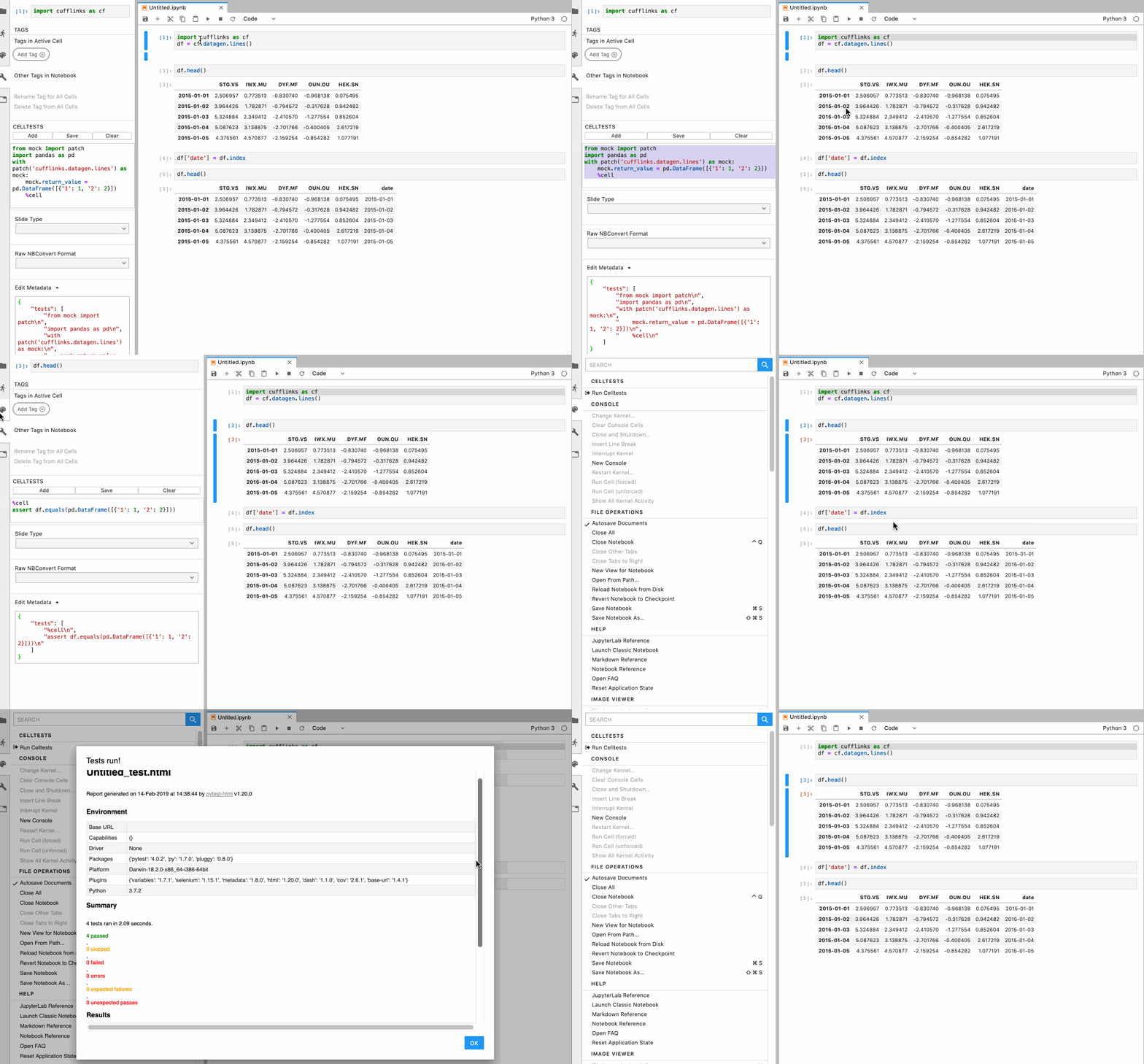
You can run the tests offline from an .ipynb file, or you can execute them from the browser and view the results of pytest-html's html plugin.
Extra Tests
- Max number of lines per cell
- Max number of cells per notebook
- Max number of function definitions per notebook
- Max number of class definitions per notebook
- Percentage of cells tested
Example
In the committed Untitled.ipynb notebook, but modified so that cell 0 has its import statement copied 10 times (to trigger test and lint failures):
Tests
Untitled_test.py::TestExtension::test_cell0 PASSED                                                                                     [  8%]
Untitled_test.py::TestExtension::test_cell1 PASSED                                                                                     [ 16%]
Untitled_test.py::TestExtension::test_cell2 PASSED                                                                                     [ 25%]
Untitled_test.py::TestExtension::test_cell3 PASSED                                                                                     [ 33%]
Untitled_test.py::TestExtension::test_cell_coverage PASSED                                                                             [ 41%]
Untitled_test.py::TestExtension::test_cells_per_notebook PASSED                                                                        [ 50%]
Untitled_test.py::TestExtension::test_class_definition_count PASSED                                                                    [ 58%]
Untitled_test.py::TestExtension::test_function_definition_count PASSED                                                                 [ 66%]
Untitled_test.py::TestExtension::test_lines_per_cell_0 FAILED                                                                          [ 75%]
Untitled_test.py::TestExtension::test_lines_per_cell_1 PASSED                                                                          [ 83%]
Untitled_test.py::TestExtension::test_lines_per_cell_2 PASSED                                                                          [ 91%]
Untitled_test.py::TestExtension::test_lines_per_cell_3 PASSED                                                                          [100%]
Lint
Checking lines in cell 0:   FAILED
Checking lines in cell 1:   PASSED
Checking lines in cell 2:   PASSED
Checking lines in cell 3:   PASSED
Checking cells per notebook <= 10:  PASSED
Checking functions per notebook <= 10:  PASSED
Checking classes per notebook <= 10:    PASSED
Checking cell test coverage >= 50:  PASSED
NB: In jupyterlab, notebooks will be lint checked using the version of python that is running jupyter lab itself. A notebook intended to be run with a Python 2 kernel could therefore generate syntax errors during lint checking.


Release files for jupyterlab-celltests 0.1.3
For a detailed explanation of source distributions (sdists) and built distributions (wheels), please see the package formats documentation.
Source distribution (sdist)
| File | Size | Uploaded | |
|---|---|---|---|
| jupyterlab_celltests-0.1.3.tar.gz | 2.9 MB | Details |
Built distribution (wheel)
| File | Interpreter | ABI | Platform | Reset |
|---|---|---|---|---|
| jupyterlab_celltests-0.1.3-py2.py3-none-any.whl | Python 2, Python 3 | none | any | Details |
Total release size: 3.0 MB
Release files / jupyterlab_celltests-0.1.3.tar.gz
| Download URL | jupyterlab_celltests-0.1.3.tar.gz |
|---|---|
| Size | 2.9 MB |
| Tags | Source |
|
SHA-256 checksum How to use checksums |
295db4fec59c8c88a84525ffd47fb7b463397751af33cba8d408c4a0eb61b788
|
|
BLAKE2b-256 checksum How to use checksums |
da55460ded1a2296e171ac84801878c310f0c013fd2f805718fd0002ae74a8a8
|
| Upload date | |
|
Uploaded using Trusted Publishing? What is trusted publishing? |
No |
| Uploaded via |
twine/2.0.0 pkginfo/1.5.0.1 requests/2.22.0 setuptools/45.1.0.post20200119 requests-toolbelt/0.9.1 tqdm/4.38.0 CPython/3.7.3
|
Release files / jupyterlab_celltests-0.1.3-py2.py3-none-any.whl
| Download URL | jupyterlab_celltests-0.1.3-py2.py3-none-any.whl |
|---|---|
| Size | 39.2 kB |
| Tags | Python 2 Python 3 |
|
SHA-256 checksum How to use checksums |
c3c409f7b66d4d2fb5e74f0633e05eecb76dca2773b3f2a8efe820bf0802e3da
|
|
BLAKE2b-256 checksum How to use checksums |
ae25c9f728a816320339313c439486d0470470087b2be9960fdaf94f3f0dd3c1
|
| Upload date | |
|
Uploaded using Trusted Publishing? What is trusted publishing? |
No |
| Uploaded via |
twine/2.0.0 pkginfo/1.5.0.1 requests/2.22.0 setuptools/45.1.0.post20200119 requests-toolbelt/0.9.1 tqdm/4.38.0 CPython/3.7.3
|














