


jupyterlab-hdf5
Open and explore HDF5 files in JupyterLab. Can handle very large (TB) sized files. New in release v0.5.0, jlab-hdf5 can now open datasets of any dimensionality, from 0 to 32. Any 0D, 1D, or 2D slab of any dataset can easily be selected and displayed using numpy-style index syntax.
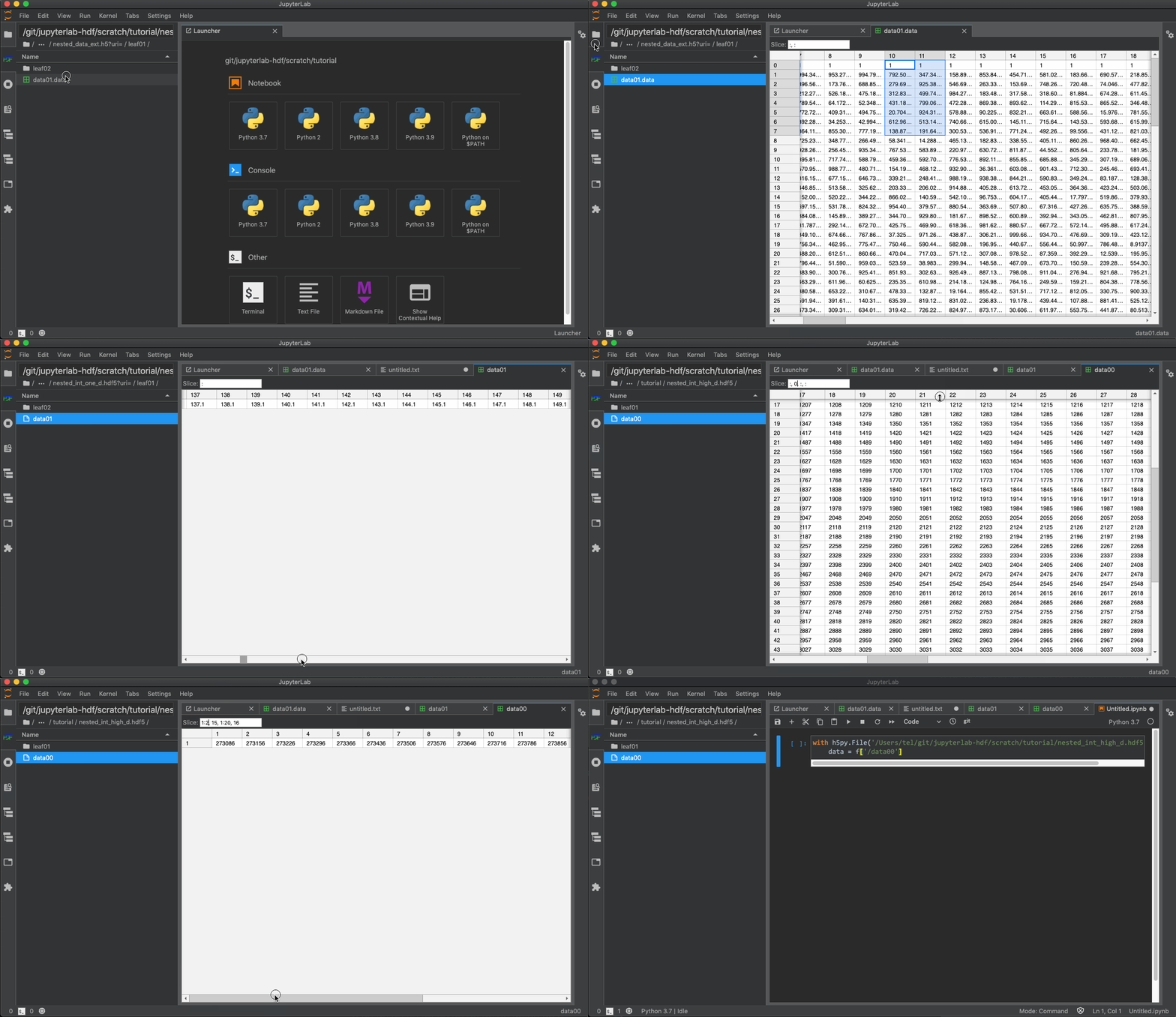
Double clicking on an .hdf5 file in the file browser will open it in a special HDF browser. You can then browse through the groups and open the datasets in the .hdf5 file. All datasets will open read only.
For the moment, the browser context menu does not work with .hdf5 files/groups/datasets. Only double clicking is currently supported.
Designed from the ground up to be as efficient as possible. Data will only be fetched as needed to create the visible display. This allows the extension to work with very large files (tested working up to the TB range).
Installation
pip install jupyterlab_hdf
jupyter labextension install @jupyterlab/hdf5
This will install both the server extension and the labextension needed by this plugin.
You can also install the labextension via Jupyterlab's extension manager GUI. Keep in mind that if you use the lab extension GUI, you'll still need to install the jupyterlab_hdf server extension via pip.
Compression filters
The extension supports all compression filters supported by h5py: https://docs.h5py.org/en/stable/high/dataset.html#filter-pipeline.
To enable support for additional filters such as blosc or bitshuffle, you need to install hdf5plugin in addition to the extension:
pip install hdf5plugin
Development
For a development install, clone the repository and then run the following in the repo dir:
pip install -e .[dev]
jlpm build:dev
To watch for/rebuild on changes to this extension's source code, run:
jlpm run build:watch
What's in this extension
This extension has two main parts: an hdf5 filebrowser plugin, and an hdf5 dataset file type plugin.
HDF5 Filebrowser
Allows you to navigate an .hdf5 file's groups as though they were directories in a filesystem. Any .hdf5 file on a user's system can be opened by entering its path (relative to the Jupyterlab home directory) in the box at the top of the browser.
Note on link resolution
HDF5 files can contain links that point to entities in the same file (soft links) or to entities in a different files (external links). By default, the extension does not resolve such links.
Link resolution must be enabled explicitly by setting the config field HdfConfig.resolve_links to True. For this, there are two possibilities:
- Set the config field when launching JupyterLab:
jupyter lab --HdfConfig.resolve_links=True
- Add the following line to your notebook configuration file
c.HdfConfig.resolve_links = True
Note that this will only resolve valid links. Broken links (e.g. links to a non-existent entity) will still appear as links.
HDF5 dataset file type
When you open a dataset using the hdf5 filebrowser, a document will open that displays the contents of the dataset via a grid.
1 maintainer

Metadata
1 maintainer
Release files for jupyterlab-hdf 1.3.0
For a detailed explanation of source distributions (sdists) and built distributions (wheels), please see the package formats documentation.
Source distribution (sdist)
| File | Size | Uploaded | |
|---|---|---|---|
| jupyterlab_hdf-1.3.0.tar.gz | 19.5 kB | Details |
Built distribution (wheel)
| File | Interpreter | ABI | Platform | Reset |
|---|---|---|---|---|
| jupyterlab_hdf-1.3.0-py2.py3-none-any.whl | Python 2, Python 3 | none | any | Details |
Total release size: 35.3 kB
Release files / jupyterlab_hdf-1.3.0.tar.gz
| Download URL | jupyterlab_hdf-1.3.0.tar.gz |
|---|---|
| Size | 19.5 kB |
| Tags | Source |
|
SHA-256 checksum How to use checksums |
d15c80c25be26bf4f95e9cad58dd28839ef3924b6eddaf336166aac121dd4819
|
|
BLAKE2b-256 checksum How to use checksums |
a088e9c7eb0851e03ec98a18399410aa4f18ca1cab5a19eb6b68b1705c50f646
|
| Upload date | |
|
Uploaded using Trusted Publishing? What is trusted publishing? |
No |
| Uploaded via |
twine/4.0.2 CPython/3.10.6
|
Release files / jupyterlab_hdf-1.3.0-py2.py3-none-any.whl
| Download URL | jupyterlab_hdf-1.3.0-py2.py3-none-any.whl |
|---|---|
| Size | 15.8 kB |
| Tags | Python 2 Python 3 |
|
SHA-256 checksum How to use checksums |
77591e36d4b6e224e08e534d405dd61f39d038b8e53fa5f8405fae4366de5da7
|
|
BLAKE2b-256 checksum How to use checksums |
1f84e40a63302209632b83137a3002faf1ee2aa82d8fa4c6b5b1cc0f4fe7bbc5
|
| Upload date | |
|
Uploaded using Trusted Publishing? What is trusted publishing? |
No |
| Uploaded via |
twine/4.0.2 CPython/3.10.6
|














