

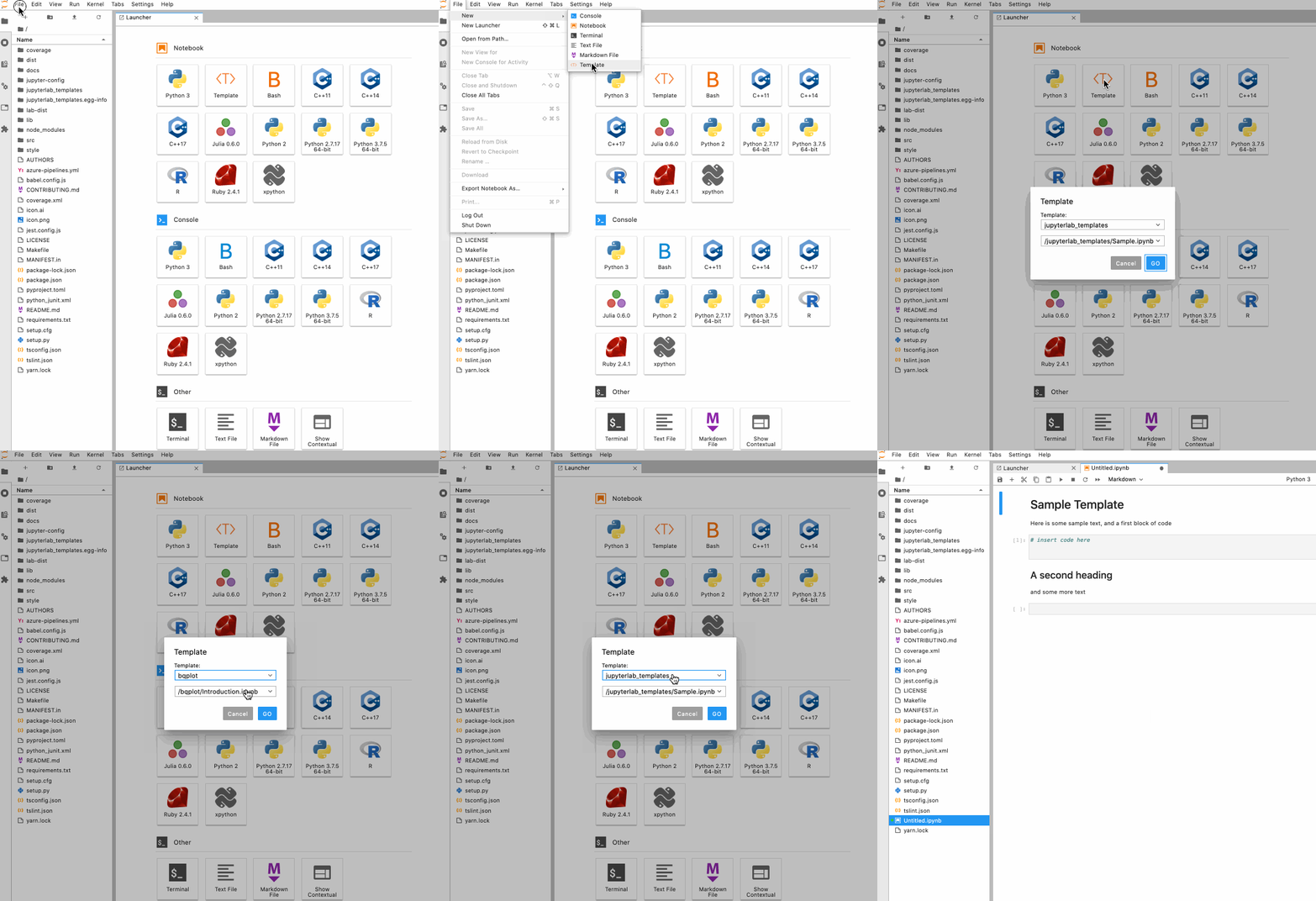
Support for jupyter notebook templates in jupyterlab







Install
PyPI
jupyterlab_templates is available on PyPI:
pip install jupyterlab_templates
Conda
jupyterlab_templates is also available on conda-forge:
conda install -c conda-forge jupyterlab_templates
Jupyter Server/JupyterLab Extension
jupyter labextension install jupyterlab_templates
jupyter server extension enable --py jupyterlab_templates
Adding templates
install the server extension, and add the following to jupyter_notebook_config.py
c.JupyterLabTemplates.allowed_extensions = ["*.ipynb"]
c.JupyterLabTemplates.template_dirs = ['list', 'of', 'template', 'directories']
c.JupyterLabTemplates.include_default = True
c.JupyterLabTemplates.include_core_paths = True
c.JupyterLabTemplates.template_label = "Template"
Templates for libraries
The extension will search subdirectories of each parent directory specified in template_dirs for templates.
Note! Templates in the parent directories will be ignored. You must put the templates in subdirectories, in order to keep everything organized.
If include_default = True the notebook_templates directory under the jupyter data folder is one of the default parent directories. Thus, if you have tutorials or guides you'd like to install for users, simply copy them into your jupyter data folder inside the notebook_templates directory, e.g. /usr/local/share/jupyter/notebook_templates/bqplot for bqplot.
If you want to exclude templates from a specific directory, please add a file .jupyterlab_templates_ignore to to this location.
All notebooks in this directory will be ignored (but has no effect on subdirectories).
Flags
allowed_extensions: a list of extensions to allow templates for. (optional, default["*.ipynb"])template_dirs: a list of absolute directory paths. All files matchingallowed_extensionsin any subdirectories of these paths will be listed as templatesinclude_default: include the default Sample template (default True)include_core_paths: include jupyter core paths (see: jupyter --paths) (default True)template_label: set label for template UI icon (default "Template")
Development
See CONTRIBUTING.md for guidelines.
License
This software is licensed under the Apache 2.0 license. See the LICENSE and AUTHORS files for details.
1 maintainer

Metadata
1 maintainer
Release files for jupyterlab-templates 0.5.3
For a detailed explanation of source distributions (sdists) and built distributions (wheels), please see the package formats documentation.
Source distribution (sdist)
| File | Size | Uploaded | Provenance | |
|---|---|---|---|---|
| jupyterlab_templates-0.5.3.tar.gz | 316.4 kB | Without provenance | Details |
Built distribution (wheel)
| File | Interpreter | ABI | Platform | Reset |
|---|---|---|---|---|
| jupyterlab_templates-0.5.3-py3-none-any.whl | Python 3 | none | any | Details |
Total release size: 465.2 kB
Release files / jupyterlab_templates-0.5.3.tar.gz
| Download URL | jupyterlab_templates-0.5.3.tar.gz |
|---|---|
| Size | 316.4 kB |
| Tags | Source |
|
SHA-256 checksum How to use checksums |
c7c68e61f8eaa6f0d69a9117e9945a3bdbf01ab425c51386c0027f85a8f6eae4
|
|
BLAKE2b-256 checksum How to use checksums |
0ed1b161ce8befec5d20d4fde3500cc4931969bc72667e7e02d13c1bd303d903
|
| Upload date | |
|
Uploaded using Trusted Publishing? What is trusted publishing? |
No |
| Uploaded via |
twine/6.1.0 CPython/3.12.11
|
Release files / jupyterlab_templates-0.5.3-py3-none-any.whl
| Download URL | jupyterlab_templates-0.5.3-py3-none-any.whl |
|---|---|
| Size | 148.8 kB |
| Tags | Python 3 |
|
SHA-256 checksum How to use checksums |
c1d14d3824697aa59dc8e8cd1264aaf5b8b1d08cfd72d7ab2a17b0f92d7efabb
|
|
BLAKE2b-256 checksum How to use checksums |
5835face3845f608b560c5aada304dcb3b70a58252b6255b09bc1da41cd79175
|
| Upload date | |
|
Uploaded using Trusted Publishing? What is trusted publishing? |
No |
| Uploaded via |
twine/6.1.0 CPython/3.12.11
|
Security for jupyterlab-templates 0.5.3
Provenance
Provenance describes where a file came from. On PyPI, provenance is shared via attestations, which provide a verifiable record of the build or publishing details. View details, limitations and caveats.
No provenance found
None of the files in this release were uploaded with provenance metadata.
A note on package security
PyPI is a repository for distributing packages, not a service for auditing them. While third-party security researchers and our staff do their best to detect and remove malicious packages, PyPI cannot guarantee the quality, security or suitability of any given package.
To learn more about protecting yourself from malicious actors, visit our package security documentation.














