



Python server-side components
From chaos to clarity: The power of components in your server-side-rendered Python web app.
How It Works
Jx is a Python library for creating reusable template components with Jinja2. It works by pre-parsing the template source and replacing TitleCased HTML tags with Jinja calls that render the component.
Component Definition
Components are defined as regular Jinja2 templates (.jx files) with special metadata comments:
{# def parameter1 parameter2=default_value #}- Defines required and optional parameters{# import "path/to/component.jx" as ComponentName #}- Imports other components{# css "/path/to/style.css" #}- Includes CSS files{# js "/path/to/script.js" #}- Includes JavaScript files
Example component:
{# def message #}
{# import "button.jx" as Button #}

<div class="greeting">{{ message }}</div>
<Button text="OK" />
Usage Example
from jx import Catalog

# Create a catalog and add a components folder
catalog = Catalog("templates/components")

# Render a component with parameters
html = catalog.render("card.jx", title="Hello", content="This is a card")
VisualStudio Code extension
If you are using VisualStudio Code, install the Jinja-Jx extension.
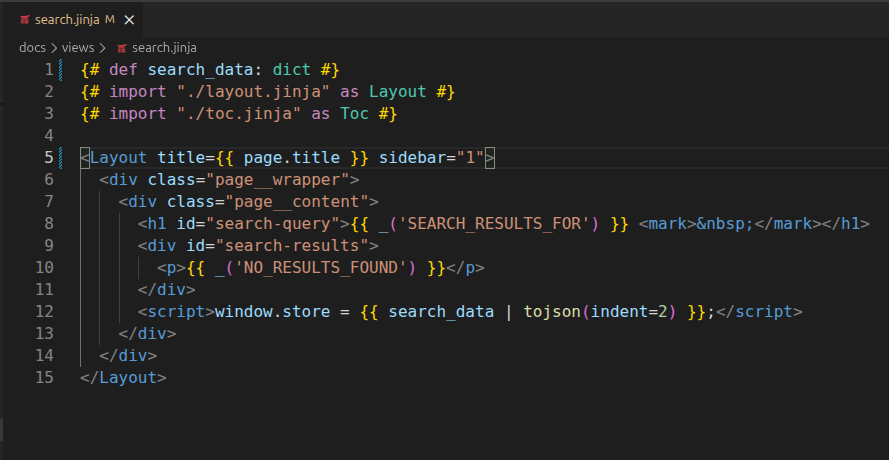
This extension offers:
- Syntax highlighting of Jx-specific constructs like
import,def,css,js, etc. and PascalCase component tags (e.g.,<MyComponent>) - Add go-to-definition from import paths and component tags to jump to the component file
- Check for syntax errors and validate import paths on save
1 maintainer

Metadata
1 maintainer
Release files for jx 0.16.0
For a detailed explanation of source distributions (sdists) and built distributions (wheels), please see the package formats documentation.
Source distribution (sdist)
| File | Size | Uploaded | Provenance | Actions |
|---|---|---|---|---|
| jx-0.16.0.tar.gz | 72.2 kB | Without provenance | Details for jx-0.16.0.tar.gz |
Built distribution (wheel)
| File | Interpreter | ABI | Platform | Actions Reset |
|---|---|---|---|---|
| jx-0.16.0-py3-none-any.whl | Python 3 | none | any | Details for jx-0.16.0-py3-none-any.whl |
Total release size: 115.8 kB
Release files / jx-0.16.0.tar.gz
| Download URL | jx-0.16.0.tar.gz |
|---|---|
| Size | 72.2 kB |
| Tags | Source |
|
SHA-256 checksum How to use checksums |
7dcf987e9af2e6db6f88b82113f5a89857b2e6195fdd474e2ee6d1cb3481f3d7
|
|
BLAKE2b-256 checksum How to use checksums |
4f8aa2e8b691ee0642d2ad6686ee791eb04b83efe62cf58e3c0722872af3becb
|
| Upload date | |
|
Uploaded using Trusted Publishing? What is trusted publishing? |
No |
| Uploaded via |
uv/0.12.13 {"installer":{"name":"uv","version":"0.12.13","subcommand":["publish"]},"python":null,"implementation":{"name":null,"version":null},"distro":{"name":"Ubuntu","version":"24.04","id":"noble","libc":null},"system":{"name":null,"release":null},"cpu":null,"openssl_version":null,"setuptools_version":null,"rustc_version":null,"ci":true}
|
Release files / jx-0.16.0-py3-none-any.whl
| Download URL | jx-0.16.0-py3-none-any.whl |
|---|---|
| Size | 43.6 kB |
| Tags | Python 3 |
|
SHA-256 checksum How to use checksums |
bfea3966602878fd4af68a336b09d2b85b64f5b1183312ca35630679b77be059
|
|
BLAKE2b-256 checksum How to use checksums |
ea2fb7124df2db1b07c8e67a46d4832fd11744f25d4c7c17a97160eeec81e094
|
| Upload date | |
|
Uploaded using Trusted Publishing? What is trusted publishing? |
No |
| Uploaded via |
uv/0.12.13 {"installer":{"name":"uv","version":"0.12.13","subcommand":["publish"]},"python":null,"implementation":{"name":null,"version":null},"distro":{"name":"Ubuntu","version":"24.04","id":"noble","libc":null},"system":{"name":null,"release":null},"cpu":null,"openssl_version":null,"setuptools_version":null,"rustc_version":null,"ci":true}
|
Security for jx 0.16.0
Provenance
Provenance describes where a file came from. On PyPI, provenance is shared via attestations, which provide a verifiable record of the build or publishing details. View details, limitations and caveats.
No provenance found
None of the files in this release were uploaded with provenance metadata.
A note on package security
PyPI is a repository for distributing packages, not a service for auditing them. While third-party security researchers and our staff do their best to detect and remove malicious packages, PyPI cannot guarantee the quality, security or suitability of any given package.
To learn more about protecting yourself from malicious actors, visit our package security documentation.














