











kenchi
This is a scikit-learn compatible library for anomaly detection.
Dependencies
- Required dependencies
numpy>=1.13.3 (BSD 3-Clause License)
scikit-learn>=0.20.0 (BSD 3-Clause License)
scipy>=0.19.1 (BSD 3-Clause License)
- Optional dependencies
matplotlib>=2.1.2 (PSF-based License)
networkx>=2.2 (BSD 3-Clause License)
Installation
You can install via pip
pip install kenchi
or conda.
conda install -c y_ohr_n kenchi
Algorithms
Examples
import matplotlib.pyplot as plt
import numpy as np
from kenchi.datasets import load_pima
from kenchi.outlier_detection import *
from kenchi.pipeline import make_pipeline
from sklearn.model_selection import train_test_split
from sklearn.preprocessing import StandardScaler

np.random.seed(0)

scaler = StandardScaler()

detectors = [
    FastABOD(novelty=True, n_jobs=-1), OCSVM(),
    MiniBatchKMeans(), LOF(novelty=True, n_jobs=-1),
    KNN(novelty=True, n_jobs=-1), IForest(n_jobs=-1),
    PCA(), KDE()
]

# Load the Pima Indians diabetes dataset.
X, y = load_pima(return_X_y=True)
X_train, X_test, _, y_test = train_test_split(X, y)

# Get the current Axes instance
ax = plt.gca()

for det in detectors:
    # Fit the model according to the given training data
    pipeline = make_pipeline(scaler, det).fit(X_train)

    # Plot the Receiver Operating Characteristic (ROC) curve
    pipeline.plot_roc_curve(X_test, y_test, ax=ax)

# Display the figure
plt.show()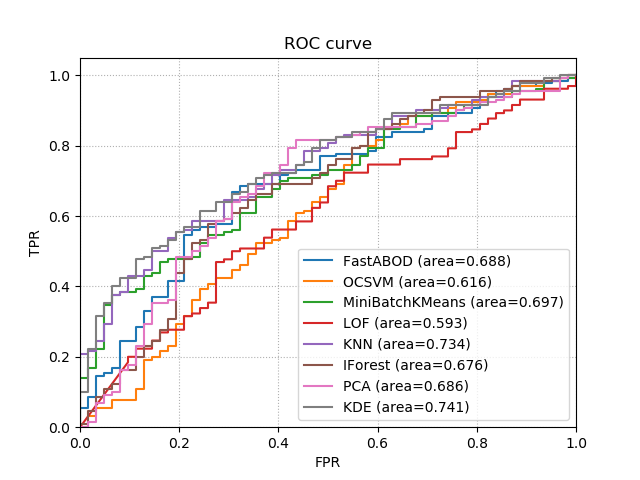
References
1 maintainer

Release files for kenchi 0.10.0
For a detailed explanation of source distributions (sdists) and built distributions (wheels), please see the package formats documentation.
Built distribution (wheel)
| File | Interpreter | ABI | Platform | Reset |
|---|---|---|---|---|
| kenchi-0.10.0-py3-none-any.whl | Python 3 | none | any | Details |
Release files / kenchi-0.10.0-py3-none-any.whl
| Download URL | kenchi-0.10.0-py3-none-any.whl |
|---|---|
| Size | 384.9 kB |
| Tags | Python 3 |
|
SHA-256 checksum How to use checksums |
1bab6781e9987bfb64c1ed50991c70cd289af9932f9bcc079455f0c62e8a6aa7
|
|
BLAKE2b-256 checksum How to use checksums |
da00f791c807f778521ee8206994a5fa9b6d4e683f032afc1be1b6a44d4745f7
|
| Upload date | |
|
Uploaded using Trusted Publishing? What is trusted publishing? |
No |
| Uploaded via |
twine/1.12.1 pkginfo/1.4.2 requests/2.18.4 setuptools/39.1.0 requests-toolbelt/0.8.0 tqdm/4.26.0 CPython/3.6.5
|














