
Keras AdamW









Keras/TF implementation of AdamW, SGDW, NadamW, and Warm Restarts, based on paper Decoupled Weight Decay Regularization - plus Learning Rate Multipliers
Features
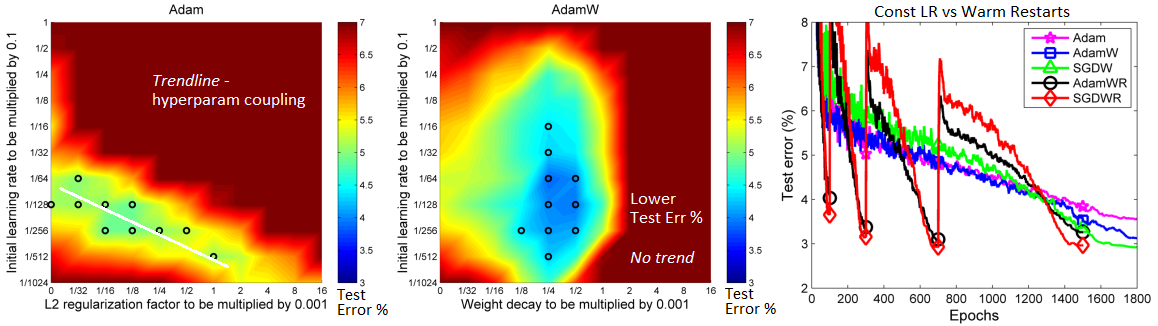
- Weight decay fix: decoupling L2 penalty from gradient. Why use?
- Weight decay via L2 penalty yields worse generalization, due to decay not working properly
- Weight decay via L2 penalty leads to a hyperparameter coupling with
lr, complicating search
- Warm restarts (WR): cosine annealing learning rate schedule. Why use?
- Better generalization and faster convergence was shown by authors for various data and model sizes
- LR multipliers: per-layer learning rate multipliers. Why use?
- Pretraining; if adding new layers to pretrained layers, using a global
lris prone to overfitting
- Pretraining; if adding new layers to pretrained layers, using a global
Installation
pip install keras-adamw or clone repository
Usage
If using tensorflow.keras imports, set import os; os.environ["TF_KERAS"]='1'.
Weight decay
AdamW(model=model)
Three methods to set weight_decays = {<weight matrix name>:<weight decay value>,}:
# 1. Automatically
Just pass in `model` (`AdamW(model=model)`), and decays will be automatically extracted.
Loss-based penalties (l1, l2, l1_l2) will be zeroed by default, but can be kept via
`zero_penalties=False` (NOT recommended, see Use guidelines).
# 2. Use keras_adamw.utils.py
Dense(.., kernel_regularizer=l2(0)) # set weight decays in layers as usual, but to ZERO
wd_dict = get_weight_decays(model)
# print(wd_dict) to see returned matrix names, note their order
# specify values as (l1, l2) tuples, both for l1_l2 decay
ordered_values = [(0, 1e-3), (1e-4, 2e-4), ..]
weight_decays = fill_dict_in_order(wd_dict, ordered_values)
# 3. Fill manually
model.layers[1].kernel.name # get name of kernel weight matrix of layer indexed 1
weight_decays.update({'conv1d_0/kernel:0': (1e-4, 0)}) # example
Warm restarts
AdamW(.., use_cosine_annealing=True, total_iterations=200) - refer to Use guidelines below
LR multipliers
AdamW(.., lr_multipliers=lr_multipliers) - to get, {<layer name>:<multiplier value>,}:
- (a) Name every layer to be modified (recommended), e.g.
Dense(.., name='dense_1')- OR
(b) Get every layer name, note which to modify:[print(idx,layer.name) for idx,layer in enumerate(model.layers)] - (a)
lr_multipliers = {'conv1d_0':0.1} # target layer by full name- OR
(b)lr_multipliers = {'conv1d':0.1} # target all layers w/ name substring 'conv1d'
Example
import numpy as np
from keras.layers import Input, Dense, LSTM
from keras.models import Model
from keras.regularizers import l1, l2, l1_l2
from keras_adamw import AdamW

ipt   = Input(shape=(120, 4))
x     = LSTM(60, activation='relu', name='lstm_1',
             kernel_regularizer=l1(1e-4), recurrent_regularizer=l2(2e-4))(ipt)
out   = Dense(1, activation='sigmoid', kernel_regularizer=l1_l2(1e-4, 2e-4))(x)
model = Model(ipt, out)
lr_multipliers = {'lstm_1': 0.5}

optimizer = AdamW(lr=1e-4, model=model, lr_multipliers=lr_multipliers,
                  use_cosine_annealing=True, total_iterations=24)
model.compile(optimizer, loss='binary_crossentropy')
for epoch in range(3):
    for iteration in range(24):
        x = np.random.rand(10, 120, 4) # dummy data
        y = np.random.randint(0, 2, (10, 1)) # dummy labels
        loss = model.train_on_batch(x, y)
        print("Iter {} loss: {}".format(iteration + 1, "%.3f" % loss))
    print("EPOCH {} COMPLETED\n".format(epoch + 1))
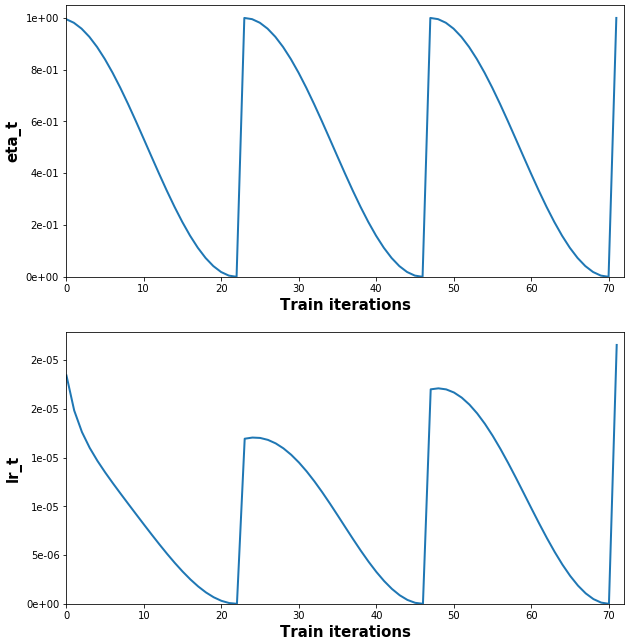
(Full example + plot code, and explanation of lr_t vs. lr: example.py)
Use guidelines
Weight decay
- Set L2 penalty to ZERO if regularizing a weight via
weight_decays- else the purpose of the 'fix' is largely defeated, and weights will be over-decayed --My recommendation lambda = lambda_norm * sqrt(1/total_iterations)--> can be changed; the intent is to scale λ to decouple it from other hyperparams - including (but not limited to), # of epochs & batch size. --Authors (Appendix, pg.1) (A-1)total_iterations_wd--> set to normalize over all epochs (or other interval!= total_iterations) instead of per-WR when using WR; may sometimes yield better results --My note
Warm restarts
- Done automatically with
autorestart=True, which is the default ifuse_cosine_annealing=True; internally setst_cur=0aftertotal_iterationsiterations. - Manually: set
t_cur = -1to restart schedule multiplier (see Example). Can be done at compilation or during training. Non--1is also valid, and will starteta_tat another point on the cosine curve. Details in A-2,3 t_curshould be set atiter == total_iterations - 2; explanation here- Set
total_iterationsto the # of expected weight updates for the given restart --Authors (A-1,2) eta_min=0, eta_max=1are tunable hyperparameters; e.g., an exponential schedule can be used foreta_max. If unsure, the defaults were shown to work well in the paper. --Authors- Save/load optimizer state; WR relies on using the optimizer's update history for effective transitions --Authors (A-2)
# 'total_iterations' general purpose example
def get_total_iterations(restart_idx, num_epochs, iterations_per_epoch):
    return num_epochs[restart_idx] * iterations_per_epoch[restart_idx]
get_total_iterations(0, num_epochs=[1,3,5,8], iterations_per_epoch=[240,120,60,30])
Learning rate multipliers
- Best used for pretrained layers - e.g. greedy layer-wise pretraining, or pretraining a feature extractor to a classifier network. Can be a better alternative to freezing layer weights. --My recommendation
- It's often best not to pretrain layers fully (till convergence, or even best obtainable validation score) - as it may inhibit their ability to adapt to newly-added layers. --My recommendation
- The more the layers are pretrained, the lower their fraction of new layers'
lrshould be. --My recommendation
1 maintainer

Release files for keras-adamw 1.38
For a detailed explanation of source distributions (sdists) and built distributions (wheels), please see the package formats documentation.
Source distribution (sdist)
| File | Size | Uploaded | |
|---|---|---|---|
| keras-adamw-1.38.tar.gz | 23.5 kB | Details |
Built distribution (wheel)
| File | Interpreter | ABI | Platform | Reset |
|---|---|---|---|---|
| keras_adamw-1.38-py3-none-any.whl | Python 3 | none | any | Details |
Total release size: 53.0 kB
Release files / keras-adamw-1.38.tar.gz
| Download URL | keras-adamw-1.38.tar.gz |
|---|---|
| Size | 23.5 kB |
| Tags | Source |
|
SHA-256 checksum How to use checksums |
d7d66dd47ec08fb8d5e80e958fde11209f29da9f2dc8953c3cccd679cc15d5ad
|
|
BLAKE2b-256 checksum How to use checksums |
d9d37514c0aeb7f0a19aae1b21b431d89a6eb4de7fc4842c7d0531703a2955b0
|
| Upload date | |
|
Uploaded using Trusted Publishing? What is trusted publishing? |
No |
| Uploaded via |
twine/2.0.0 pkginfo/1.5.0.1 requests/2.24.0 setuptools/49.2.0.post20200714 requests-toolbelt/0.9.1 tqdm/4.47.0 CPython/3.7.7
|
Release files / keras_adamw-1.38-py3-none-any.whl
| Download URL | keras_adamw-1.38-py3-none-any.whl |
|---|---|
| Size | 29.5 kB |
| Tags | Python 3 |
|
SHA-256 checksum How to use checksums |
cdf0603ed39daaec3695b6f8c3ae1016e7ef4b1782238bbb623a1dd1019fad4c
|
|
BLAKE2b-256 checksum How to use checksums |
c77724f7f2897b6d176ed81409c6dae24901cc2b2fa50c433c85a9280732516d
|
| Upload date | |
|
Uploaded using Trusted Publishing? What is trusted publishing? |
No |
| Uploaded via |
twine/2.0.0 pkginfo/1.5.0.1 requests/2.24.0 setuptools/49.2.0.post20200714 requests-toolbelt/0.9.1 tqdm/4.47.0 CPython/3.7.7
|














