
kernel-run 🔥🚀
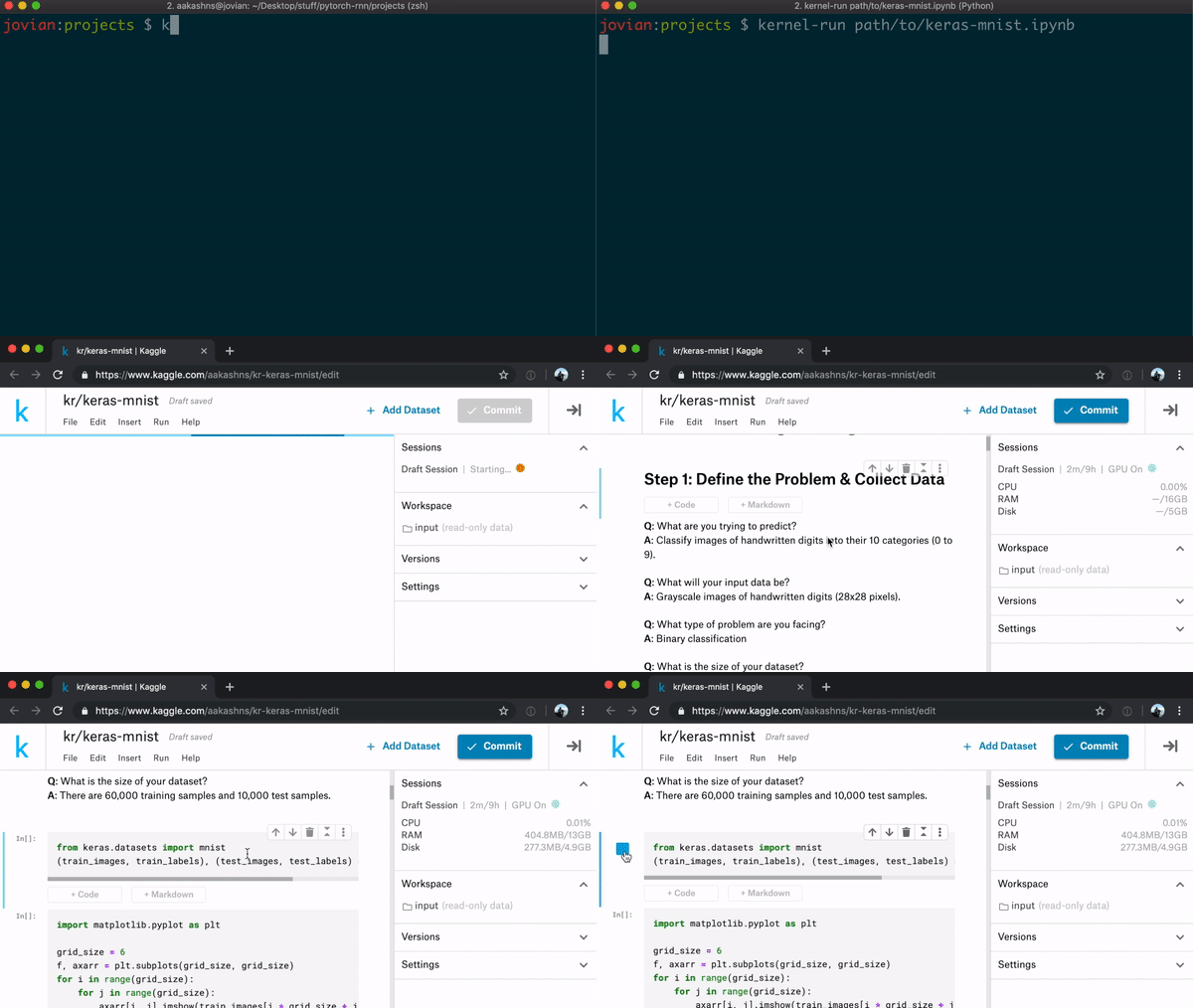
Instantly create and run a Kaggle kernel from any Jupyter notebook (local file or URL).
$ pip install kernel-run --upgrade

$ kernel-run path/to/notebook.ipynb
Kernel created successfully: https://www.kaggle.com/aakashns/kr-notebook/edit

$ kernel-run http://cs231n.stanford.edu/notebooks/pytorch_tutorial.ipynb
Kernel created successfully: https://www.kaggle.com/aakashns/kr-pytorch-tutorial/edit
kernel-run uploads the Jupyter notebook to a private kernel in your Kaggle account, and launches a browser window so you can start editing/executing the code immediately.
Installation
pip install kernel-run --upgrade
The above command install a command-line tool called kernel-run which can be invoked from the terminal/command prompt.
Note: To allow kaggle-run to upload the notebook to your Kaggle account, you need to download the Kaggle API credentials file kaggle.json. To download the kaggle.json file:
- Go to https://kaggle.com
- Log in and go to your account page
- Click the "Create New API Token" button in the "API" section
- Move the downloaded
kaggle.jsonfile to the folder~/.kaggle/
CLI Usage & Options
Run the kernel-run command on your terminal/command prompt with a Jupyter notebook's path (or URL) as the argument:
$ kernel-run path/to/notebook.ipynb
Kernel created successfully: https://www.kaggle.com/aakashns/kr-notebook/edit

$ kernel-run http://cs231n.stanford.edu/notebooks/pytorch_tutorial.ipynb
Kernel created successfully: https://www.kaggle.com/aakashns/kr-pytorch-tutorial/edit
There are various options you can configure. Run kernel-run -h to see the options:
usage: kernel-run notebook_path_or_url [-h] [--public] [--new] [--no-browser] [--strip-output] [--prefix PREFIX]

positional arguments:
  notebook_path_or_url  Path/URL of the Jupyter notebook

optional arguments:
  -h, --help            show this help message and exit
  --public              Create a public kernel
  --new                 Create a new kernel, if a kernel with the same name exists
  --no-browser          Don't open a browser window automatically
  --strip-output        Clear output cells before uploading notebook (useful for large files)
  --prefix PREFIX       Prefix added to kernel title to easy identification (defaults to 'kr/')
Python API
You can also use the library form a Python script or Jupyter notebook. It can be imported as kernel_run.
from kernel_run import create_kernel

create_kernel('path/to/notebook.ipynb', public=True, no_browser=True)
# Kernel created successfully: https://www.kaggle.com/aakashns/kr-notebook/edit
The arguments to create_kernel are identical to the CLI options:
def create_kernel(path_or_url, public=False, no_browser=False, new=False,
                  strip_output=False, prefix='kr/', creds_path=None):
    """Instantly create and run a Kaggle kernel from a Jupyter notebook (local file or URL)

    Arguments:
        path_or_url (string): Path/URL to the Jupyter notebook
        public (bool, optional): If true, creates a public kernel. A private kernel
            is created by default.
        no_browser (bool, optional): If true, does not attempt to automatically open
            a browser tab to edit the created Kernel
        new (bool, optional): If true, creates a new Kernel by adding a random
            5-letter string at the end of the title
        prefix (string, optional): A prefix added to the Kernel title, to indicate that
            the Kernel was created using kernel-run
        creds_path (string, optional): Path to the 'kaggle.json' credentials file
            (defaults to '~/.kaggle/kaggle.json')
        strip_output (bool, optional): Clear output cells before uploading notebook.
    """
Credits
Developed with love by the Jovian team ( https://www.jvn.io )! Contributions welcome.
1 maintainer

Metadata
1 maintainer
Release files for kernel-run 0.0.13
For a detailed explanation of source distributions (sdists) and built distributions (wheels), please see the package formats documentation.
Source distribution (sdist)
| File | Size | Uploaded | Provenance | |
|---|---|---|---|---|
| kernel-run-0.0.13.tar.gz | 6.1 kB | Without provenance | Details |
Built distribution (wheel)
| File | Interpreter | ABI | Platform | Reset |
|---|---|---|---|---|
| kernel_run-0.0.13-py3-none-any.whl | Python 3 | none | any | Details |
Total release size: 14.6 kB
Release files / kernel-run-0.0.13.tar.gz
| Download URL | kernel-run-0.0.13.tar.gz |
|---|---|
| Size | 6.1 kB |
| Tags | Source |
|
SHA-256 checksum How to use checksums |
5941e79c6babddd9f61de09c27a6f371444e62926c7a96cd86e32229d3214119
|
|
BLAKE2b-256 checksum How to use checksums |
1c0991dad91c1e66c2490502bddd84c9700145db02e55da0c3deb147b7d567ca
|
| Upload date | |
|
Uploaded using Trusted Publishing? What is trusted publishing? |
No |
| Uploaded via |
twine/1.15.0 pkginfo/1.5.0.1 requests/2.22.0 setuptools/45.2.0.post20200210 requests-toolbelt/0.9.1 tqdm/4.36.1 CPython/3.6.10
|
Release files / kernel_run-0.0.13-py3-none-any.whl
| Download URL | kernel_run-0.0.13-py3-none-any.whl |
|---|---|
| Size | 8.5 kB |
| Tags | Python 3 |
|
SHA-256 checksum How to use checksums |
fdd98415351047575c1d7e1339428408a48aad11096f7ce411515ebcbb783680
|
|
BLAKE2b-256 checksum How to use checksums |
d0b0e871fcc8d4d3736ef3fbb5106970542f7d8f4af33b8e18a647cfae27d559
|
| Upload date | |
|
Uploaded using Trusted Publishing? What is trusted publishing? |
No |
| Uploaded via |
twine/1.15.0 pkginfo/1.5.0.1 requests/2.22.0 setuptools/45.2.0.post20200210 requests-toolbelt/0.9.1 tqdm/4.36.1 CPython/3.6.10
|
Security for kernel-run 0.0.13
Provenance
Provenance describes where a file came from. On PyPI, provenance is shared via attestations, which provide a verifiable record of the build or publishing details. View details, limitations and caveats.
No provenance found
None of the files in this release were uploaded with provenance metadata.
A note on package security
PyPI is a repository for distributing packages, not a service for auditing them. While third-party security researchers and our staff do their best to detect and remove malicious packages, PyPI cannot guarantee the quality, security or suitability of any given package.














