
KeyHint
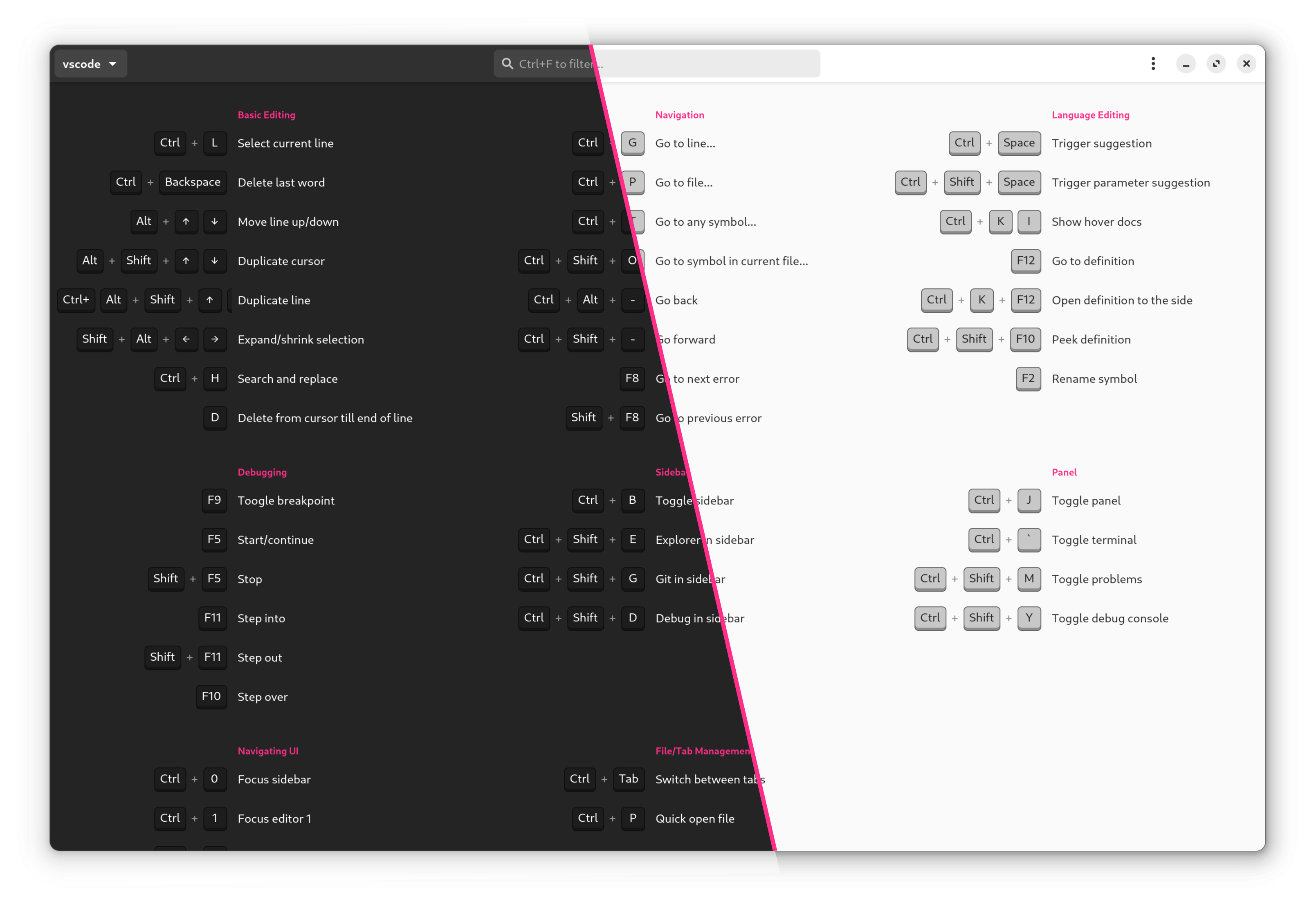
Utility to display keyboard shortcuts or other hints based on the active window on Linux.




Prerequisites
- Python 3.11+
- GTK 4.12+ (shipped since Ubuntu 23.10) + related dev packages:
sudo apt-get install \
   libgirepository1.0-dev \
   libcairo2-dev \
   python3-gi \
   gobject-introspection \
   libgtk-4-dev
- Wayland & Gnome: The Gnome Extension "Window-Calls" is required to auto-select the cheatsheet based on the current active application.
Installation
uv tool install keyhint(recommended, requires uv)pipx install keyhint(requires pipx)- or
pip install keyhint
Usage
- Configure a global hotkey (e.g.
Ctrl + F1) via your system settings to launchkeyhint. - If KeyHint is launched via hotkey, it detects the current active application and shows the appropriate hints. (This feature won't work reliably when KeyHint ist started via Menu or Launcher.)
CLI Options
Application Options:
  -c, --cheatsheet=SHEET-ID                 Show cheatsheet with this ID on startup
  -v, --verbose                             Verbose log output for debugging
Cheatsheet Configuration
The content which KeyHint displays is configured using toml
configuration files.
KeyHint reads those files from two locations:
- The built-in directory
- The user directory, usually located in
~/.config/keyhint
How Keyhint selects the cheatsheet to show
- The cheatsheet to be displayed on startup are selected by comparing the value of
regex_wmclasswith the wm_class of the active window and the value ofregex_titlewith the title of the active window. - The potential cheatsheets are processed alphabetically by filename, the first file that matches both wm_class and title are getting displayed.
- Both of
regex_values are interpreted as case in-sensitive regular expressions. - Check "Debug Info" in the application menu to get insights about the active window and the selected cheatsheet file.
Customize or add cheatsheets
- To change built-in cheatsheets, copy
the corresponding .toml-file
into the config directory. Make your changes in a text editor. As long as you don't
change the
idit will overwrite the defaults. - To create new cheatsheets, I suggest you start with
one of the existing .toml-file:
- Place it in the config directory and give it a good file name.
- Change the value
idto something unique. - Adjust
regex_wmclassandregex_titleso it will be selected based on the active window. (See Tips) - Add the
shortcuts&labelto asection. - If you think your cheatsheet might be useful for others, please consider opening a pull request or an issue!
- You can always reset cheatsheets to the shipped version by deleting the
corresponding
.tomlfiles from the config folder. - You can include shortcuts from other cheatsheets by adding
include = ["<Cheatsheet ID>"]
Examples
Hide existing cheatsheets
To hide a cheatsheet, e.g. the
built-in one
with the ID tilix, create a new file ~/.config/keyhint/tilix.toml with the content:
id = "tilix"
hidden = true
Extend existing cheatsheets
To add keybindings to an existing cheatsheet, e.g. the
built-in one
with the ID firefox, create a new file ~/.config/keyhint/firefox.toml which only
contains the ID and the additional bindings:
id = "firefox"

[section]
[section."My Personal Favorites"]  # New section
"Ctrl + Shift + Tab" = "Show all Tabs"
# ...
Add new cheatsheet which never gets auto-selected
To add a new cheatsheet, which never gets automatically selected and displayed by
KeyHint, but remains accessible through KeyHint's cheatsheet dropdown, create a file
~/.config/keyhint/my-app.toml:
id = "my-app"
url = "url-to-my-apps-keybindings"

[match]
regex_wmclass = "a^"  # Patter which never matches
regex_title = "a^"

[section]
[section.General]
"Ctrl + C" = "Copy"
# ...
Different cheatsheets for different Websites
For showing different browser-cheatsheets depending on the current website, you might
want to use a browser extension like
"Add URL To Window Title"
and configure the [match] section to look for the url in the title. E.g.
~/.config/keyhint/github.toml
id = "github.com"

[match]
regex_wmclass = "Firefox"
regex_title = ".*github\\.com.*"  # URL added by browser extensions to window title

[section]
[section.Repositories]
gc = "Goto code tab"
# ...
Contribute
I'm happy about any contribution! Especially I would appreciate submissions to improve the shipped cheatsheets. (The current set are the cheatsheets I personally use).
Design Principles
- Don't run as service
It shouldn't consume resources in the background, even if this leads to slightly slower start-up time. - No network connection
Everything should run locally without any network communication. - Dependencies
The fewer dependencies, the better.
Certification

1 maintainer

Metadata
1 maintainer
Release files for keyhint 0.6.0
For a detailed explanation of source distributions (sdists) and built distributions (wheels), please see the package formats documentation.
Source distribution (sdist)
| File | Size | Uploaded | |
|---|---|---|---|
| keyhint-0.6.0.tar.gz | 708.8 kB | Details |
Built distribution (wheel)
| File | Interpreter | ABI | Platform | Reset |
|---|---|---|---|---|
| keyhint-0.6.0-py3-none-any.whl | Python 3 | none | any | Details |
Total release size: 1.4 MB
Release files / keyhint-0.6.0.tar.gz
| Download URL | keyhint-0.6.0.tar.gz |
|---|---|
| Size | 708.8 kB |
| Tags | Source |
|
SHA-256 checksum How to use checksums |
98ea732cdea97efbfade80cf6641628bc584b8682dbd4e15996e843fddc3a066
|
|
BLAKE2b-256 checksum How to use checksums |
da56df63dcf19d46d92d6d70639e9c723fc40c23ce2bf602aaf72a8dbb56e772
|
| Upload date | |
|
Uploaded using Trusted Publishing? What is trusted publishing? |
Yes |
| Uploaded via |
uv/0.9.6
|
Release files / keyhint-0.6.0-py3-none-any.whl
| Download URL | keyhint-0.6.0-py3-none-any.whl |
|---|---|
| Size | 666.5 kB |
| Tags | Python 3 |
|
SHA-256 checksum How to use checksums |
3aafe7d73624765279557c333314ad3999f7ccb117349d2aaa76c0c175a63c57
|
|
BLAKE2b-256 checksum How to use checksums |
f2a448e394189f689ff95f12e24c690b3cbe4aed9d67c70633e82ca42cf448ce
|
| Upload date | |
|
Uploaded using Trusted Publishing? What is trusted publishing? |
Yes |
| Uploaded via |
uv/0.9.6
|














