
Kines




Friendly Command Line Interface for Amazon Kinesis Data Streams
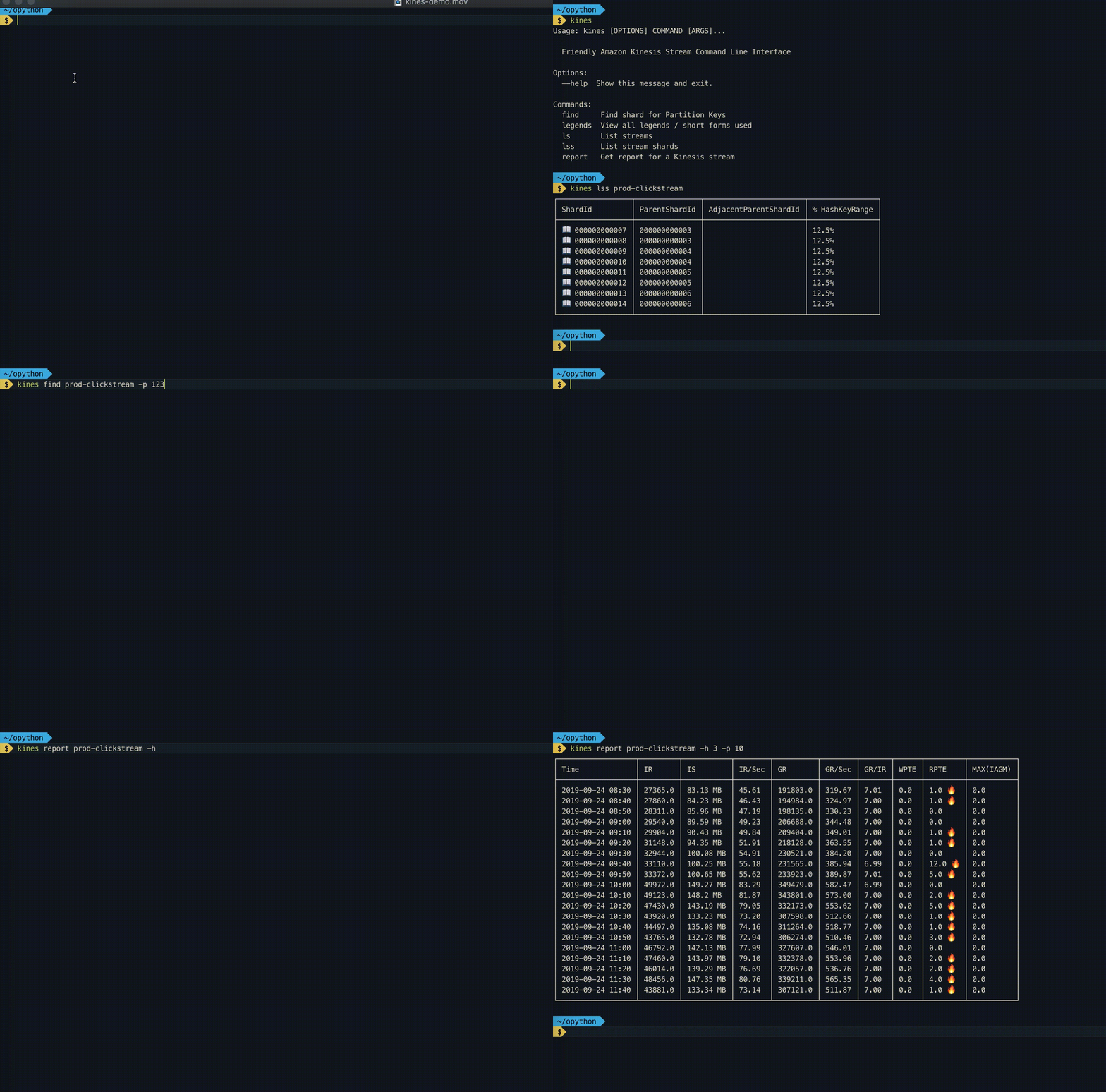
Install
pip install kines
Setup
aws configure
Commands
List all Kinesis Stream
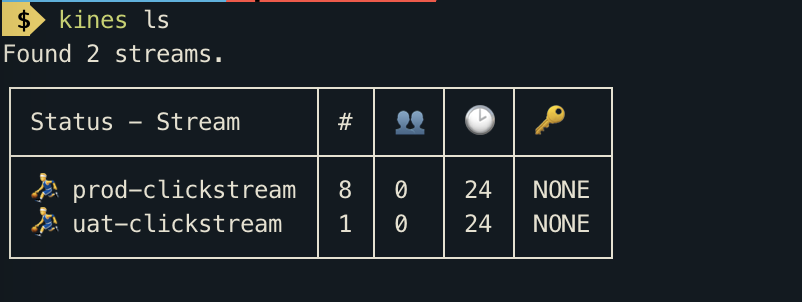
kines ls
This command lists streams with their open shard count, enhanced consumers count, retention period and encryption type. Internally this command calls list-streams and describe_stream_summary methods of Boto3 Kinesis client.
List Kinesis Stream Shards
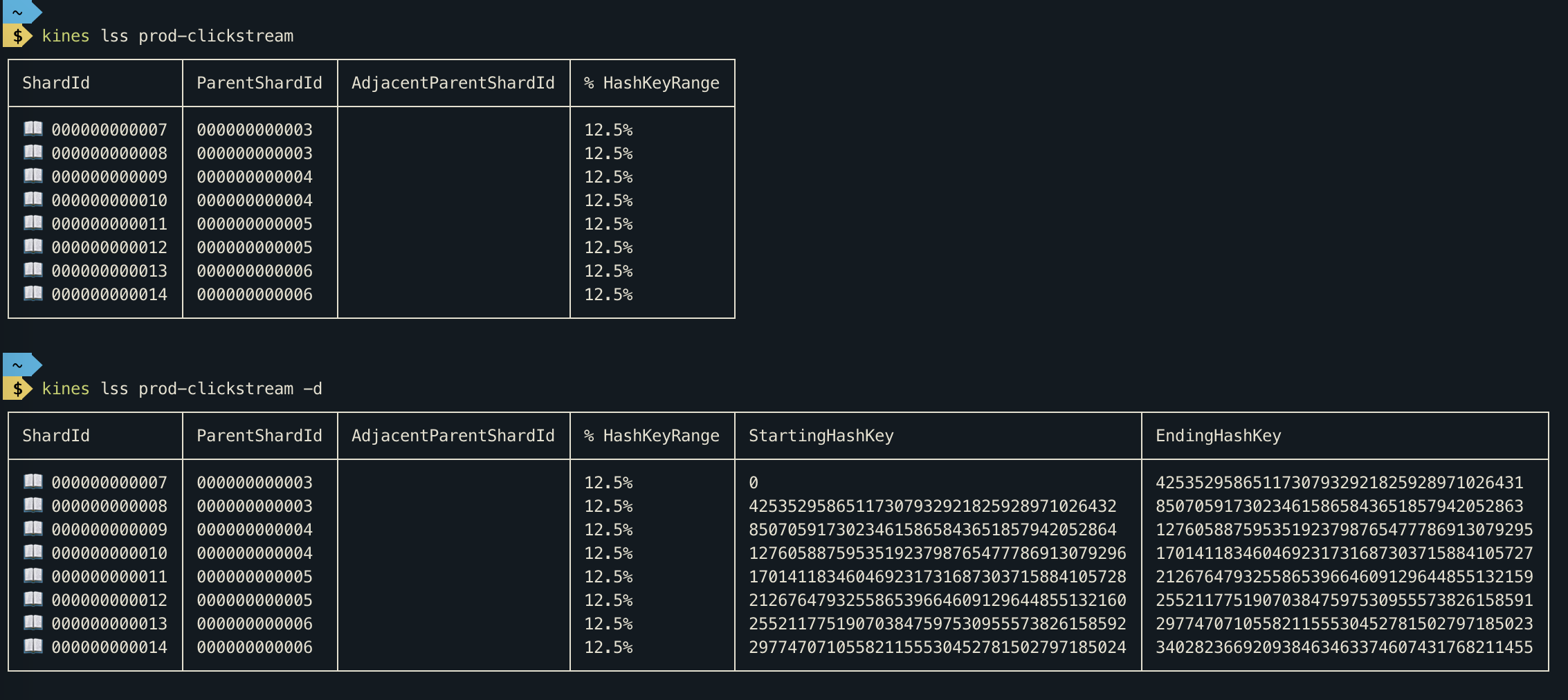
kines lss <stream-name>
This command will show you open as well as closed shards of a Kinesis stream.
- For detailed output Run
kines lss <stream-name> -d
Find shard for partition key
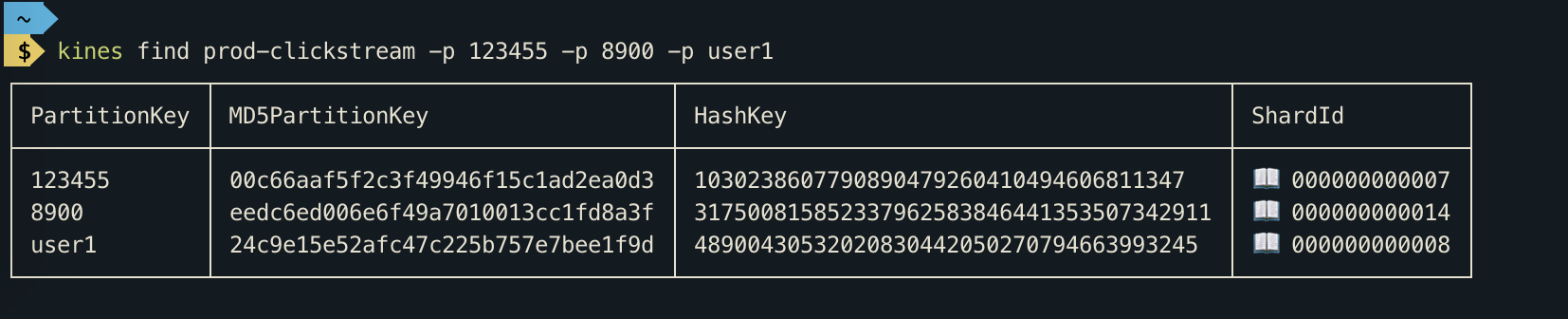
kines find prod-clickstream -p 123455 -p 8900
From Kinesis Docs
A partition key is used to group data by shard within a stream. Kinesis Data Streams segregates the data records belonging to a stream into multiple shards. It uses the partition key that is associated with each data record to determine which shard a given data record belongs to. Partition keys are Unicode strings with a maximum length limit of 256 bytes. An MD5 hash function is used to map partition keys to 128-bit integer values and to map associated data records to shards. When an application puts data into a stream, it must specify a partition key.
This command comes handy when you want to determine shard for a partition key. This Command can accept multiple partition keys.
Walk through kinesis records
kines walk <stream-name> <shard-id> -s <sequence-number> -n <number-of-records-per-call>
You can use this command to debug kinesis records. This command internally creates a Shard Iterator. If you don't specify sequence-number then a ShardIterator is created with type TRIM_HORIZON, which allows you to fetch from oldest Kinesis records in shard. When you specify sequence-number a ShardIterator is created with AT_SEQUENCE_NUMBER type, which fetches data from the specified sequence number.
The Kinesis record's data is decoded using base64 decoder. You can press ⏎ to fetch more records or type n to abort.
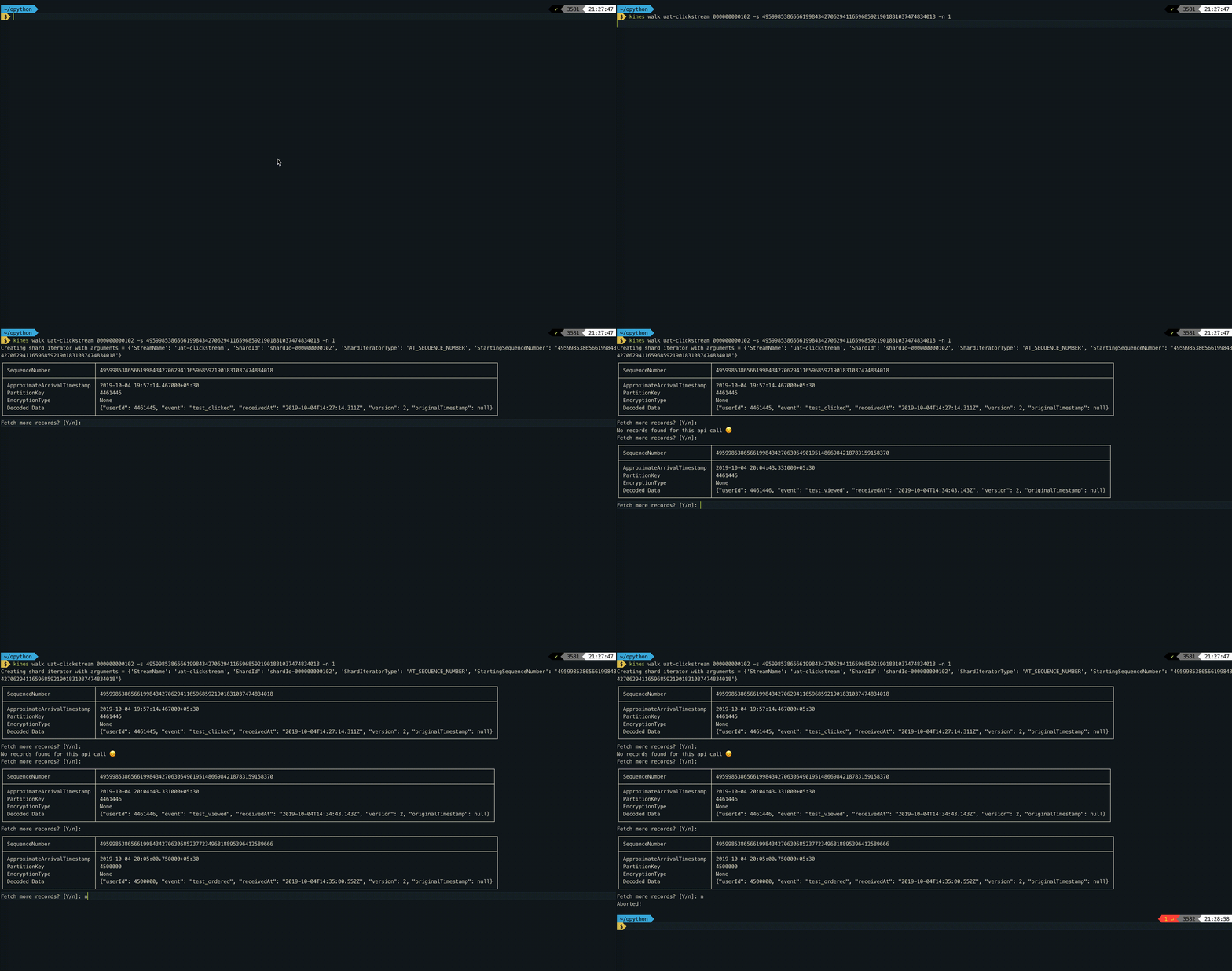
-
Use
-toption to get records from 1 hour 10 minutes ago. Example:kines walk click-stream 000000000000 -t '1h10m' -
Use
-loption to start from latest records. Example:kines walk click-stream 000000000000 -l -
Use
-foption to poll records repeatedly. Example:kines walk click-stream 000000000000 -l -f
Get report for Kinesis Stream
The report command gives you statistics about your Kinesis Stream. Internally, this command calls get_metric_data of Boto3 Cloudwatch client.
Please take a look at legends command for shortforms used in this report.
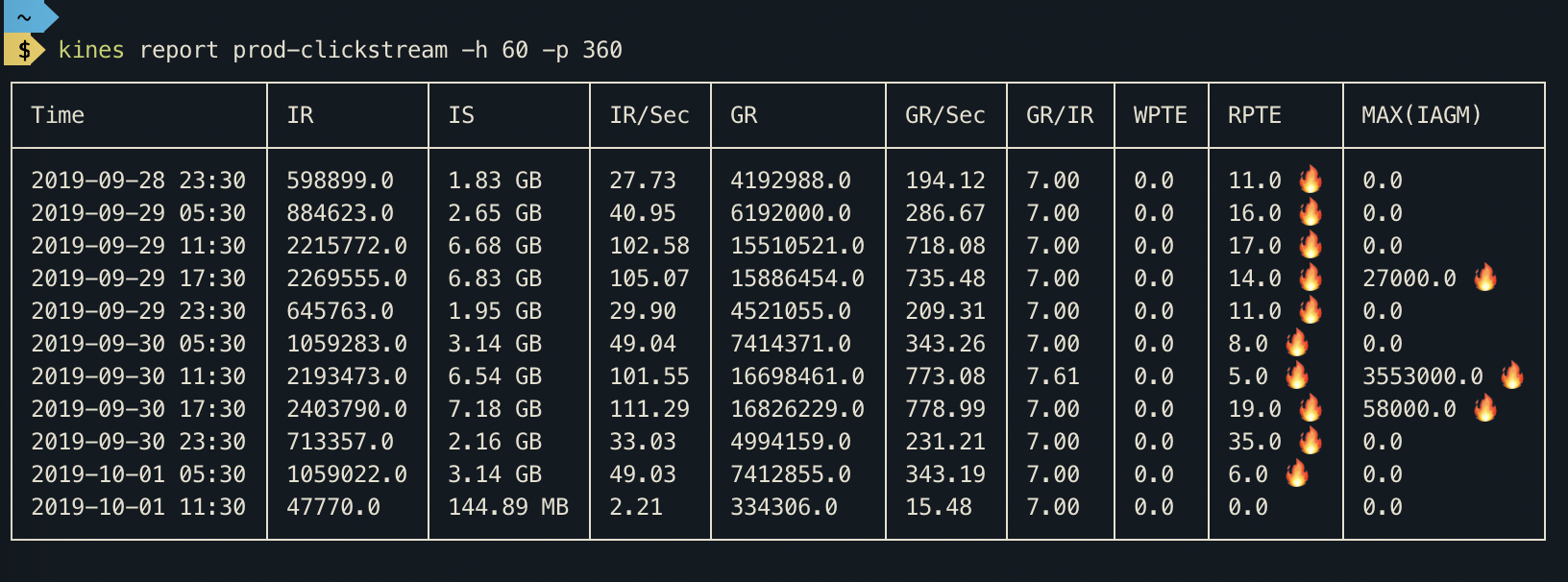
View all short forms and legends
kines legends
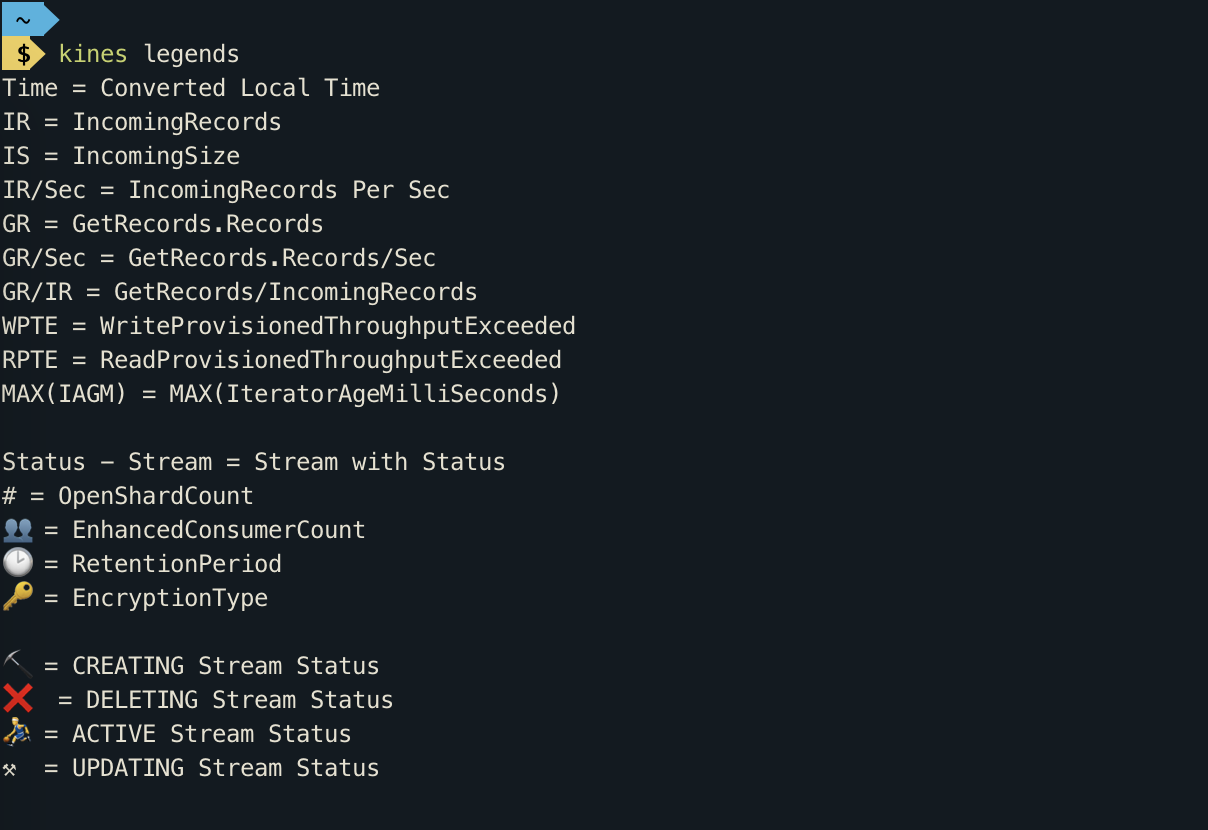
How to build in Dev?
pip install --editable .
How to publish to pypi?
python3 setup.py sdist bdist_wheeltwine upload --skip-existing dist/*
1 maintainer

Metadata
1 maintainer
Release files for kines 1.1.0
For a detailed explanation of source distributions (sdists) and built distributions (wheels), please see the package formats documentation.
Source distribution (sdist)
| File | Size | Uploaded | Provenance | |
|---|---|---|---|---|
| kines-1.1.0.tar.gz | 16.9 kB | Without provenance | Details |
Built distribution (wheel)
| File | Interpreter | ABI | Platform | Reset |
|---|---|---|---|---|
| kines-1.1.0-py3-none-any.whl | Python 3 | none | any | Details |
Total release size: 37.6 kB
Release files / kines-1.1.0.tar.gz
| Download URL | kines-1.1.0.tar.gz |
|---|---|
| Size | 16.9 kB |
| Tags | Source |
|
SHA-256 checksum How to use checksums |
1f05edd0844e033cc03debaf25761d5f00515c05de637123700dab9267d4f570
|
|
BLAKE2b-256 checksum How to use checksums |
7c667f25a9880c6f7ec98727d8ba84e5753667c0f1a549ab54aedc8a8f35a8f9
|
| Upload date | |
|
Uploaded using Trusted Publishing? What is trusted publishing? |
No |
| Uploaded via |
twine/3.2.0 pkginfo/1.6.1 requests/2.25.0 setuptools/49.2.1 requests-toolbelt/0.9.1 tqdm/4.54.0 CPython/3.9.0
|
Release files / kines-1.1.0-py3-none-any.whl
| Download URL | kines-1.1.0-py3-none-any.whl |
|---|---|
| Size | 20.7 kB |
| Tags | Python 3 |
|
SHA-256 checksum How to use checksums |
8df1964f90f1abb6ce82a8ee148fc8424c4b4854be3dc7644a0244e15c32eb89
|
|
BLAKE2b-256 checksum How to use checksums |
dd8c19604abde8c9d3c0b43b3d2ad4944d19e5b7a9b7e9fac4ab664a5a14569a
|
| Upload date | |
|
Uploaded using Trusted Publishing? What is trusted publishing? |
No |
| Uploaded via |
twine/3.2.0 pkginfo/1.6.1 requests/2.25.0 setuptools/49.2.1 requests-toolbelt/0.9.1 tqdm/4.54.0 CPython/3.9.0
|
Security for kines 1.1.0
Provenance
Provenance describes where a file came from. On PyPI, provenance is shared via attestations, which provide a verifiable record of the build or publishing details. View details, limitations and caveats.
No provenance found
None of the files in this release were uploaded with provenance metadata.
A note on package security
PyPI is a repository for distributing packages, not a service for auditing them. While third-party security researchers and our staff do their best to detect and remove malicious packages, PyPI cannot guarantee the quality, security or suitability of any given package.














