
HTTP Headers, the Complete Toolkit 🧰 
Object-oriented headers. Kind of structured headers.



❓ Why
No matter if you are currently dealing with code using HTTP or IMAP (message, email), you should not worry about easily accessing and exploiting headers.
I have seen so many chunks of code trying to deal with these headers; often I saw this implementation:
# No more of that!
charset = headers['Content-Type'].split(';')[-1].split('=')[-1].replace('"', '')
# That too..
response = get(
    "https://httpbin.org/headers",
    headers={
        "user-agent": "custom/2.22",
        "referer": "https://www.google.com",
        "accept": "text/html",
        "accept-language": "en-US",
        "custom-header-xyz": "hello; charset=utf-8"
    }
)
Scroll down and see how you could do it from now on.
🔪 Features
kiss-headers is a basic library that allow you to handle headers as objects.
- A backwards-compatible syntax using bracket style.
- Capability to alter headers using simple, human-readable operator notation
+and-. - Flexibility if headers are from an email or HTTP, use as you need with one library.
- Ability to parse any object and extract recognized headers from it, it also supports UTF-8 encoded headers.
- Offer an opinionated way to un/serialize headers.
- Fully type-annotated.
- Provide great auto-completion in Python interpreter or any capable IDE.
- No dependencies. Never will be.
- Support JSON in header value.
- 90% test coverage.
Plus all the features that you would expect from handling headers...
- Properties syntax for headers and attribute in a header.
- Supports headers and attributes OneToOne, OneToMany and ManySquashedIntoOne.
- Capable of parsing
bytes,fp,str,dict,email.Message,requests.Response,niquests.Response,httpx._models.Responseandurllib3.HTTPResponse. - Automatically unquote and unfold the value of an attribute when retrieving it.
- Keep headers and attributes ordering.
- Case-insensitive with header name and attribute key.
- Character
-equal_in addition of above feature. - Any syntax you like, we like.
✨ Installation
Whatever you like, use pipenv or pip, it simply works. Requires Python 3.7+ installed.
pip install kiss-headers --upgrade
This project is included in Niquests! Your awesome drop-in replacement for Requests!
🍰 Usage
Quick start
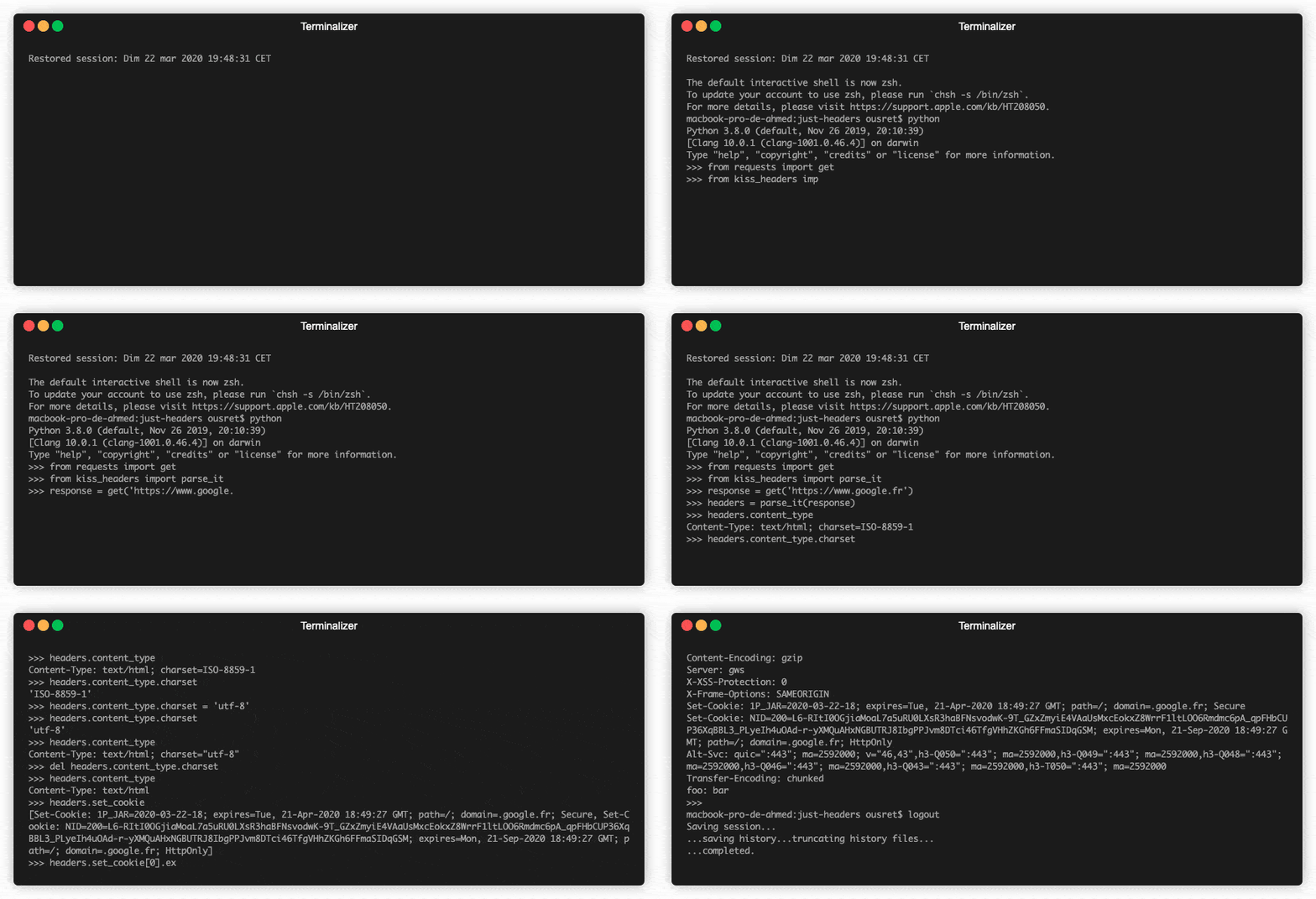
parse_it() method takes bytes, str, fp, dict, email.Message or even a requests.Response or httpx._models.Response itself and returns a Headers object.
from requests import get
from kiss_headers import parse_it

response = get('https://www.google.fr')
headers = parse_it(response)

headers.content_type.charset  # output: ISO-8859-1
# Its the same as
headers["content-type"]["charset"]  # output: ISO-8859-1
and also, the other way around:
from requests import get
from kiss_headers import Headers, UserAgent, Referer, UpgradeInsecureRequests, Accept, AcceptLanguage, CustomHeader

class CustomHeaderXyz(CustomHeader):

    __squash__ = False

    def __init__(self, charset: str = "utf-8"):
        super().__init__("hello", charset=charset)

# Officially supported with requests
response = get(
    "https://httpbin.org/headers",
    headers=Headers(
        UserAgent("custom/2.22"),
        Referer("https://www.google.com"),
        UpgradeInsecureRequests(),
        Accept("text/html"),
        AcceptLanguage("en-US"),
        CustomHeaderXyz()
    )
)
httpbin should get back with:
{
    "headers": {
        "Accept": "text/html",
        "Accept-Encoding": "identity",
        "Accept-Language": "en-US",
        "Custom-Header-Xyz": "hello; charset=\"utf-8\"",
        "Host": "httpbin.org",
        "Referer": "https://www.google.com",
        "Upgrade-Insecure-Requests": "1",
        "User-Agent": "custom/2.22",
        "X-Amzn-Trace-Id": "Root=1-622sz46b-973c5671113f58d611972de"
    }
}
Do not forget that headers are not OneToOne. One header can be repeated multiple times and attributes can have multiple values within the same header.
from kiss_headers import parse_it

my_cookies = """set-cookie: 1P_JAR=2020-03-16-21; expires=Wed, 15-Apr-2020 21:27:31 GMT; path=/; domain=.google.fr; Secure; SameSite=none
set-cookie: CONSENT=WP.284b10; expires=Fri, 01-Jan-2038 00:00:00 GMT; path=/; domain=.google.fr"""

headers = parse_it(my_cookies)

type(headers.set_cookie)  # output: list
headers.set_cookie[0].expires # output: Wed, 15-Apr-2020 21:27:31 GMT
headers.set_cookie[0]._1p_jar # output: 2020-03-16-21
headers.set_cookie[0]["1P_JAR"] # output: 2020-03-16-21
Since v2.1 you can transform an Header object to its target CustomHeader subclass to access more methods.
from kiss_headers import parse_it, get_polymorphic, SetCookie

my_cookies = """set-cookie: 1P_JAR=2020-03-16-21; expires=Wed, 15-Apr-2020 21:27:31 GMT; path=/; domain=.google.fr; Secure; SameSite=none
set-cookie: CONSENT=WP.284b10; expires=Fri, 01-Jan-2038 00:00:00 GMT; path=/; domain=.google.fr"""

headers = parse_it(my_cookies)

type(headers.set_cookie[0])  # output: Header

set_cookie = get_polymorphic(headers.set_cookie[0], SetCookie)

type(set_cookie)  # output: SetCookie

set_cookie.get_cookie_name()  # output: 1P_JAR
set_cookie.get_expire()  # output: datetime(...)
Just a note: Accessing a header that has the same name as a reserved keyword must be done this way :
headers = parse_it('From: Ousret; origin=www.github.com\nIS: 1\nWhile: Not-True')

# this flavour
headers.from_ # to access From, just add a single underscore to it
# or.. just using :
headers['from']
✍️Serialization
Since version 2.3.0 the package offer the possibility to un/serialize Headers.
from requests import get
from kiss_headers import parse_it, dumps

json_repr: str = dumps(
    parse_it(
        get("https://www.google.fr")
    ),
    indent=4
)

print(json_repr)  # See the result bellow

# Additionally, how to parse the JSON repr to Headers again
headers = parse_it(json_repr)  # Yes! that easy!
{
    "Date": [
        {
            "Tue, 02 Feb 2021 21:43:13 GMT": null
        }
    ],
    "Expires": [
        {
            "-1": null
        }
    ],
    "Cache-Control": [
        {
            "private": null
        },
        {
            "max-age": "0"
        }
    ],
    "Content-Type": [
        {
            "text/html": null,
            "charset": "ISO-8859-1"
        }
    ],
    "P3P": [
        {
            "CP": "This is not a P3P policy! See g.co/p3phelp for more info."
        }
    ],
    "Content-Encoding": [
        {
            "gzip": null
        }
    ],
    "Server": [
        {
            "gws": null
        }
    ],
    "X-XSS-Protection": [
        {
            "0": null
        }
    ],
    "X-Frame-Options": [
        {
            "SAMEORIGIN": null
        }
    ],
    "Set-Cookie": [
        {
            "NID": "208=D5XUqjrP9PNpiZu4laa_0xvy_IxBzQLtfxqeAqcPBgiY2y5sfSF51IFuXZnH0zDAF1KZ8x-0VsRyGOM0aStIzCUfdiPBOCxHSxUv39N0vwzku3aI2UkeRXhWw8-HWw5Ob41GB0PZi2coQsPM7ZEQ_fl9PlQ_ld1KrPA",
            "expires": "Wed, 04-Aug-2021 21:43:13 GMT",
            "path": "/",
            "domain": ".google.fr",
            "HttpOnly": null
        },
        {
            "CONSENT": "PENDING+880",
            "expires": "Fri, 01-Jan-2038 00:00:00 GMT",
            "path": "/",
            "domain": ".google.fr"
        }
    ],
    "Alt-Svc": [
        {
            "h3-29": ":443",
            "ma": "2592000"
        },
        {
            "h3-T051": ":443",
            "ma": "2592000"
        },
        {
            "h3-Q050": ":443",
            "ma": "2592000"
        },
        {
            "h3-Q046": ":443",
            "ma": "2592000"
        },
        {
            "h3-Q043": ":443",
            "ma": "2592000"
        },
        {
            "quic": ":443",
            "ma": "2592000",
            "v": "46,43"
        }
    ],
    "Transfer-Encoding": [
        {
            "chunked": null
        }
    ]
}
Alternatively you may use from kiss_headers import parse_it, encode, decode to transform Headers to dict (instead of JSON) or the other way around.
Understand that the dict returned in encode will differ from the method to_dict() in Headers.
🛠️ Create headers from objects
Introduced in the version 2.0, kiss-headers now allow you to create headers with more than 40+ ready-to-use, fully documented, header objects.
1st example usage
from kiss_headers import Headers, Authorization
from requests import get

response = get("https://httpbin.org/bearer", headers=Headers(Authorization("Bearer", "qwerty")))
print(response.status_code)  # 200
2nd example usage
from kiss_headers import *

headers = (
    Host("developer.mozilla.org")
    + UserAgent(
        "Mozilla/5.0 (Macintosh; Intel Mac OS X 10.9; rv:50.0) Gecko/20100101 Firefox/50.0"
    )
    + Accept("text/html")
    + Accept("application/xhtml+xml")
    + Accept("application/xml", qualifier=0.9)
    + Accept(qualifier=0.8)
    + AcceptLanguage("en-US")
    + AcceptLanguage("en", qualifier=0.5)
    + AcceptEncoding("gzip")
    + AcceptEncoding("deflate")
    + AcceptEncoding("br")
    + Referer("https://developer.mozilla.org/testpage.html")
    + Connection(should_keep_alive=True)
    + UpgradeInsecureRequests()
    + IfModifiedSince("Mon, 18 Jul 2016 02:36:04 GMT")
    + IfNoneMatch("c561c68d0ba92bbeb8b0fff2a9199f722e3a621a")
    + CacheControl(max_age=0)
)

raw_headers = str(headers)
raw_headers now retain the following :
Host: developer.mozilla.org
User-Agent: Mozilla/5.0 (Macintosh; Intel Mac OS X 10.9; rv:50.0) Gecko/20100101 Firefox/50.0
Accept: text/html, application/xhtml+xml, application/xml; q="0.9", */*; q="0.8"
Accept-Language: en-US, en; q="0.5"
Accept-Encoding: gzip, deflate, br
Referer: https://developer.mozilla.org/testpage.html
Connection: keep-alive
Upgrade-Insecure-Requests: 1
If-Modified-Since: Mon, 18 Jul 2016 02:36:04 GMT
If-None-Match: "c561c68d0ba92bbeb8b0fff2a9199f722e3a621a"
Cache-Control: max-age="0"
See the complete list of available header class in the full documentation.
Also, you can create your own custom header object using the class kiss_headers.CustomHeader.
📜 Documentation
See the full documentation for advanced usages : jawah.github.io/kiss-headers
👤 Contributing
Contributions, issues and feature requests are very much welcome.
Feel free to check issues page if you want to contribute.
Firstly, after getting your own local copy, run ./scripts/install to initialize your virtual environment.
Then run ./scripts/check before you commit, make sure everything is still working.
Remember to keep it sweet and simple when contributing to this project.
📝 License
Copyright © 2020 Ahmed TAHRI @Ousret.
This project is MIT licensed.
1 maintainer

Metadata
1 maintainer
Release files for kiss-headers 2.5.0
For a detailed explanation of source distributions (sdists) and built distributions (wheels), please see the package formats documentation.
Source distribution (sdist)
| File | Size | Uploaded | |
|---|---|---|---|
| kiss_headers-2.5.0.tar.gz | 71.9 kB | Details |
Built distribution (wheel)
| File | Interpreter | ABI | Platform | Reset |
|---|---|---|---|---|
| kiss_headers-2.5.0-py3-none-any.whl | Python 3 | none | any | Details |
Total release size: 115.5 kB
Release files / kiss_headers-2.5.0.tar.gz
| Download URL | kiss_headers-2.5.0.tar.gz |
|---|---|
| Size | 71.9 kB |
| Tags | Source |
|
SHA-256 checksum How to use checksums |
63ce797b6d85763d4b0e9611bd62d30fe31b0c4edb601838e76a039e4a4cdb59
|
|
BLAKE2b-256 checksum How to use checksums |
09c18c6c563328ca0721b7c5fb7dbcd1e3ba48b5a2e336890bb7510c5146b6b6
|
| Upload date | |
|
Uploaded using Trusted Publishing? What is trusted publishing? |
Yes |
| Uploaded via |
twine/6.0.1 CPython/3.12.8
|
Provenance
Provenance describes where a file came from. On PyPI, provenance is shared via attestations, which provide a verifiable record of the build or publishing details. View details, limitations and caveats.


PyPI Publish Attestation
PyPI verified that this artifact, at this checksum, originated from the publisher listed below.
Signed by GitHub Actions, verified by PyPI on Jan 27, 2025.
Transparency logRelease files / kiss_headers-2.5.0-py3-none-any.whl
| Download URL | kiss_headers-2.5.0-py3-none-any.whl |
|---|---|
| Size | 43.6 kB |
| Tags | Python 3 |
|
SHA-256 checksum How to use checksums |
db49d2e906aa1da7a7bb98357f4c21aa857dc6ed426753d9d90c527eb1b7aa6a
|
|
BLAKE2b-256 checksum How to use checksums |
2460c63e6ff0ee5c038bc31ebcfd5824730a6637e04cd769080c2dd95f0e3ad6
|
| Upload date | |
|
Uploaded using Trusted Publishing? What is trusted publishing? |
Yes |
| Uploaded via |
twine/6.0.1 CPython/3.12.8
|
Provenance
Provenance describes where a file came from. On PyPI, provenance is shared via attestations, which provide a verifiable record of the build or publishing details. View details, limitations and caveats.
PyPI Publish Attestation
PyPI verified that this artifact, at this checksum, originated from the publisher listed below.
Signed by GitHub Actions, verified by PyPI on Jan 27, 2025.
Transparency log













