
Python library for the Kloudless API
Python library for the Kloudless API.
You need to sign up and create an application first before using this SDK.
Table of Contents
- Requirements
- Installation
- Getting Started
- Full Documentation
- Making API Requests
- Integrating OAuth Flow
Requirements
Python 2.7 or Python 3.5+
Installation
Install via pip:
pip install kloudless
Install from source:
git clone git://github.com/kloudless/kloudless-python
cd kloudless-python
python setup.py install
Getting Started
Most Kloudless API endpoints require connecting to an upstream service account first. Start by navigating to API Explorer and connecting an account.
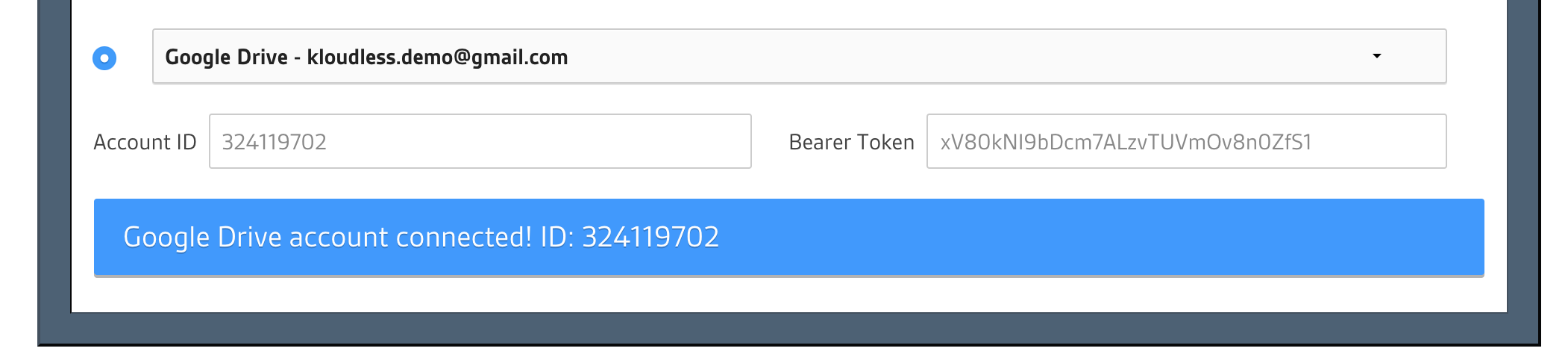
After the account has been connected, copy the Bearer Token from the text box and use it to initialize an Account object:
from kloudless import Account
account = Account(token="YOUR_BEARER_TOKEN")
Full Documentation
Full documentation is hosted at Read the docs. A quick-start is included below.
Making API Requests
You can now make an API request with the account instance you've created.
If Connecting to a Storage Service
# retrieve folder contents
root_folder_contents = account.get('storage/folders/root/contents')
for resource in root_folder_contents.get_paging_iterator():
    print(resource.data)

# download the first file in root_folder
for resource in root_folder_contents:
    if resource.data['type'] == 'file':
        filename = resource.data['name']
        response = resource.get('contents')
        with open(filename, 'wb') as f:
            f.write(response.content)
        break

# upload a file to root_folder
file_name = 'FILE_NAME_TO_UPLOAD'
headers = {
    'X-Kloudless-Metadata': json.dumps(
        {'parent_id': 'root', 'name': file_name}
    )
}
with open(file_name, 'rb') as f:
    file_resource = account.post('storage/files', data=f, headers=headers)
If Connecting to a Calendar Service
# retrieve primary calendar
calendar = account.get('cal/calendars/primary')
print('Primary Calendar: {}'.format(calendar.data['name']))

# iterate through events in first page with page_size equals 5
events = calendar.get('events?page_size=5')
for e in events:
    data = e.data
    print('{}: {}~{}'.format(data['name'], data['start'], data['end']))

# iterate thorough events in second page
next_page_events = events.get_next_page()
for e in next_page_events:
    data = e.data
    print('{}: {}~{}'.format(data['name'], data['start'], data['end']))

# create a new event on primary calendar
event = events.post(json={
    'start': '2019-01-01T12:30:00Z',
    'end': '2019-01-01T13:30:00Z',
    'name': 'Event test'}
)
Integrating OAuth Flow
You can use the Authenticator JS library
to authenticate end-users via a pop-up and store the token server-side.
Be sure to verify the token once it is transferred to your
server. See kloudless.application.verify_token.
An alternate approach is to use the OAuth Authorization Code grant flow to redirect the end-user to Kloudless to connect their account to your app.
OAuth Integration Demo server
examples/demo_server.py provides the server-side logic of the 3-legged OAuth
flow using helper methods from the Kloudless Python SDK. See
examples/README.md for instructions on running the demo server.
Python Django Sample code
Insert the following code into Django views under views/ directory and
calling it via urls.py.
from django.http import HttpResponseRedirect, HttpResponse
from django.conf import settings

from kloudless import get_authorization_url, get_token_from_code


def start_authorization_flow(request):
    """
    Redirect the user to start authorization flow.
    """
    url, state = get_authorization_url(app_id=settings.KLOUDLESS_APP_ID,
                                       redirect_uri=settings.KLOUDLESS_REDIRECT_URL,
                                       scope='storage')

    request.session['authorization_state'] = state
    return HttpResponseRedirect(url)


def callback(request):
    """
    The endpoint for settings.KLOUDLESS_REDIRECT_URL.
    """
    params = request.GET.dict()
    token = get_token_from_code(app_id=settings.KLOUDLESS_APP_ID,
                                api_key=settings.KLOUDLESS_API_KEY,
                                orig_state=request.session['authorization_state'],
                                orig_redirect_uri=settings.KLOUDLESS_REDIRECT_URL,
                                **params)

    # store the token
    request.user.kloudless_token = token
    request.user.save()
    return HttpResponse('Account connects successfully.')
4 maintainers


Release files for kloudless 2.0.1
For a detailed explanation of source distributions (sdists) and built distributions (wheels), please see the package formats documentation.
Source distribution (sdist)
| File | Size | Uploaded | |
|---|---|---|---|
| kloudless-2.0.1.tar.gz | 13.9 kB | Details |
Built distribution (wheel)
| File | Interpreter | ABI | Platform | Reset |
|---|---|---|---|---|
| kloudless-2.0.1-py2.py3-none-any.whl | Python 2, Python 3 | none | any | Details |
Total release size:30.1 kB
Release files / kloudless-2.0.1.tar.gz
| Download URL | kloudless-2.0.1.tar.gz |
|---|---|
| Size | 13.9 kB |
| Tags | Source |
|
SHA-256 checksum How to use checksums |
a29da309b9a047590084b88b4ca7972ae4adeed3baa402764706a5e00c21b0a4
|
|
BLAKE2b-256 checksum How to use checksums |
878032b848dee0e7a2402e095d48326abf0225b916bba29f1002346592645e48
|
| Upload date | |
|
Uploaded using Trusted Publishing? What is trusted publishing? |
No |
| Uploaded via |
twine/3.2.0 pkginfo/1.6.1 requests/2.21.0 setuptools/40.6.3 requests-toolbelt/0.9.1 tqdm/4.54.1 CPython/3.7.2
|
Release files / kloudless-2.0.1-py2.py3-none-any.whl
| Download URL | kloudless-2.0.1-py2.py3-none-any.whl |
|---|---|
| Size | 16.2 kB |
| Tags | Python 2 Python 3 |
|
SHA-256 checksum How to use checksums |
8f8694dac90b60bfda2f7c5dfe4fd958b726c919721be38fc3a5f2a4f8d98836
|
|
BLAKE2b-256 checksum How to use checksums |
023438da5650b288a7beb623645a55189d25d82f9dfd847d3217314286b43e88
|
| Upload date | |
|
Uploaded using Trusted Publishing? What is trusted publishing? |
No |
| Uploaded via |
twine/3.2.0 pkginfo/1.6.1 requests/2.21.0 setuptools/40.6.3 requests-toolbelt/0.9.1 tqdm/4.54.1 CPython/3.7.2
|














