
km : a software for RNA-seq investigation using k-mer decomposition



Introduction:
This tool was developed to identify and quantify the occurence of single nucleotide variants, insertions, deletions and duplications in RNA-seq data. Contrary to most tools that try to report all variants in a complete genome, here we instead propose to focus the analysis on small regions of interest.
Given a reference sequence (typically a few hundred base pairs) around a known or suspected mutation in a gene of interest, all possible sequences that can be be created between the two end k-mers according to the sequenced reads will be reported. A ratio of variant allele vs WT will be computed for each possible sequence constructed.
Citing:
Targeted variant detection using unaligned RNA-Seq reads. Life science Alliance 2019 Aug 19;2(4); doi: https://doi.org/10.26508/lsa.201900336
Target variant detection in leukemia using unaligned RNA-Seq reads. bioRxiv 295808; doi: https://doi.org/10.1101/295808
Install:
Using pip (recommended)
python3 -m venv $HOME/.virtualenvs/km
source $HOME/.virtualenvs/km/bin/activate
pip install --upgrade pip setuptools wheel
pip install km-walk
Requirements:
Python 3.8.0 or later with pip installed.
Usage:
The virtual environment needs to be loaded each time you open a new terminal, with this command:
$ source $HOME/.virtualenvs/km/bin/activateTest:
4bp insertion in NPM1
$ cd [your_km_folder]
$ km find_mutation ./data/catalog/GRCh38/NPM1_4ins_exons_10-11utr.fa ./data/jf/02H025_NPM1.jf | km find_report -t ./data/catalog/GRCh38/NPM1_4ins_exons_10-11utr.fa
Sample        Region  Location        Type    Removed Added   Abnormal        Normal  Ratio   Min_coverage    Exclu_min_cov   Variant Target  InfoVariant_sequence    Reference_sequence
./data/jf/02H025_NPM1.jf      chr5:171410540-171410543        chr5:171410544  ITD     0       4 | 4   2870.6  3055.2  0.484   2428            /TCTG   NPM1_4ins_exons_10-11utr        vs_ref  AATTGCTTCCGGATGACTGACCAAGAGGCTATTCAAGATCTCTGTCTGGCAGTGGAGGAAGTCTCTTTAAGAAAATAGTTTAAA    AATTGCTTCCGGATGACTGACCAAGAGGCTATTCAAGATCTCTGGCAGTGGAGGAAGTCTCTTTAAGAAAATAGTTTAAA
./data/jf/02H025_NPM1.jf              -       Reference       0       0       0.0     2379.0  1.000   2379            -       NPM1_4ins_exons_10-11utr        vs_ref
# To display kmer coverage
$ km find_mutation ./data/catalog/GRCh38/NPM1_4ins_exons_10-11utr.fa ./data/jf/02H025_NPM1.jf -g
ITD of 75 bp
$ cd [your_km_folder]
$ km find_mutation ./data/catalog/GRCh38/FLT3-ITD_exons_13-15.fa ./data/jf/03H116_ITD.jf | km find_report -t ./data/catalog/GRCh38/FLT3-ITD_exons_13-15.fa
Sample        Region  Location        Type    Removed Added   Abnormal        Normal  Ratio   Min_coverage    Exclu_min_cov   Variant Target  Info    Variant_sequence        Reference_sequence
./data/jf/03H116_ITD.jf               -       Reference       0       0       0.0     443.0   1.000   912             -       FLT3-ITD_exons_13-15    vs_ref
./data/jf/03H116_ITD.jf       chr13:28034105-28034179 chr13:28034180  ITD     0       75 | 75 417.6   1096.7  0.276   443             /AACTCCCATTTGAGATCATATTCATATTCTCTGAAATCAACGTAGAAGTACTCATTATCTGAGGAGCCGGTCACC    FLT3-ITD_exons_13-15    vs_ref  CTTTCAGCATTTTGACGGCAACCTGGATTGAGACTCCTGTTTTGCTAATTCCATAAGCTGTTGCGTTCATCACTTTTCCAAAAGCACCTGATCCTAGTACCTTCCCAAACTCTAAATTTTCTCTTGGAAACTCCCATTTGAGATCATATTCATATTCTCTGAAATCAACGTAGAAGTACTCATTATCTGAGGAGCCGGTCACCAACTCCCATTTGAGATCATATTCATATTCTCTGAAATCAACGTAGAAGTACTCATTATCTGAGGAGCCGGTCACCTGTACCATCTGTAGCTGGCTTTCATACCTAAATTGCTTTTTGTACTTGTGACAAATTAGCAGGGTTAAAACGACAATGAAGAGGAGACAAACACCAATTGTTGCATAGAATGAGATGTTGTCTTGGATGAAAGGGAAGGGGC    CTTTCAGCATTTTGACGGCAACCTGGATTGAGACTCCTGTTTTGCTAATTCCATAAGCTGTTGCGTTCATCACTTTTCCAAAAGCACCTGATCCTAGTACCTTCCCAAACTCTAAATTTTCTCTTGGAAACTCCCATTTGAGATCATATTCATATTCTCTGAAATCAACGTAGAAGTACTCATTATCTGAGGAGCCGGTCACCTGTACCATCTGTAGCTGGCTTTCATACCTAAATTGCTTTTTGTACTTGTGACAAATTAGCAGGGTTAAAACGACAATGAAGAGGAGACAAACACCAATTGTTGCATAGAATGAGATGTTGTCTTGGATGAAAGGGAAGGGGC
Bootstrap:
Or you can run easy_install.sh which installs km in a virtual environement and test it as shown above. Running the script as is will install km in a virtual environment in: $HOME/.virtualenvs/km.
./easy_install.shFrom source code
km can be executed directly from source code.
Requirements:
Python 3.6.0 or later
Jellyfish 2.2 or later with Python bindings (or pyJellyfish module).
Usage:
$ cd [your_km_folder]
$ python -m km find_mutation ./data/catalog/GRCh38/NPM1_4ins_exons_10-11utr.fa ./data/jf/02H025_NPM1.jf | km find_report -t ./data/catalog/GRCh38/NPM1_4ins_exons_10-11utr.fa
Design your target sequence:
km is designed to make targeted analysis based on target sequences. These target sequences need to be designed and given to km as input.
A target sequence is a nucleotide sequence saved in a fasta file. Some target sequences are provided in catalog.
To fit your specific needs, you will have to create your own target sequences.
On generic cases, you can follow some good practices described below:
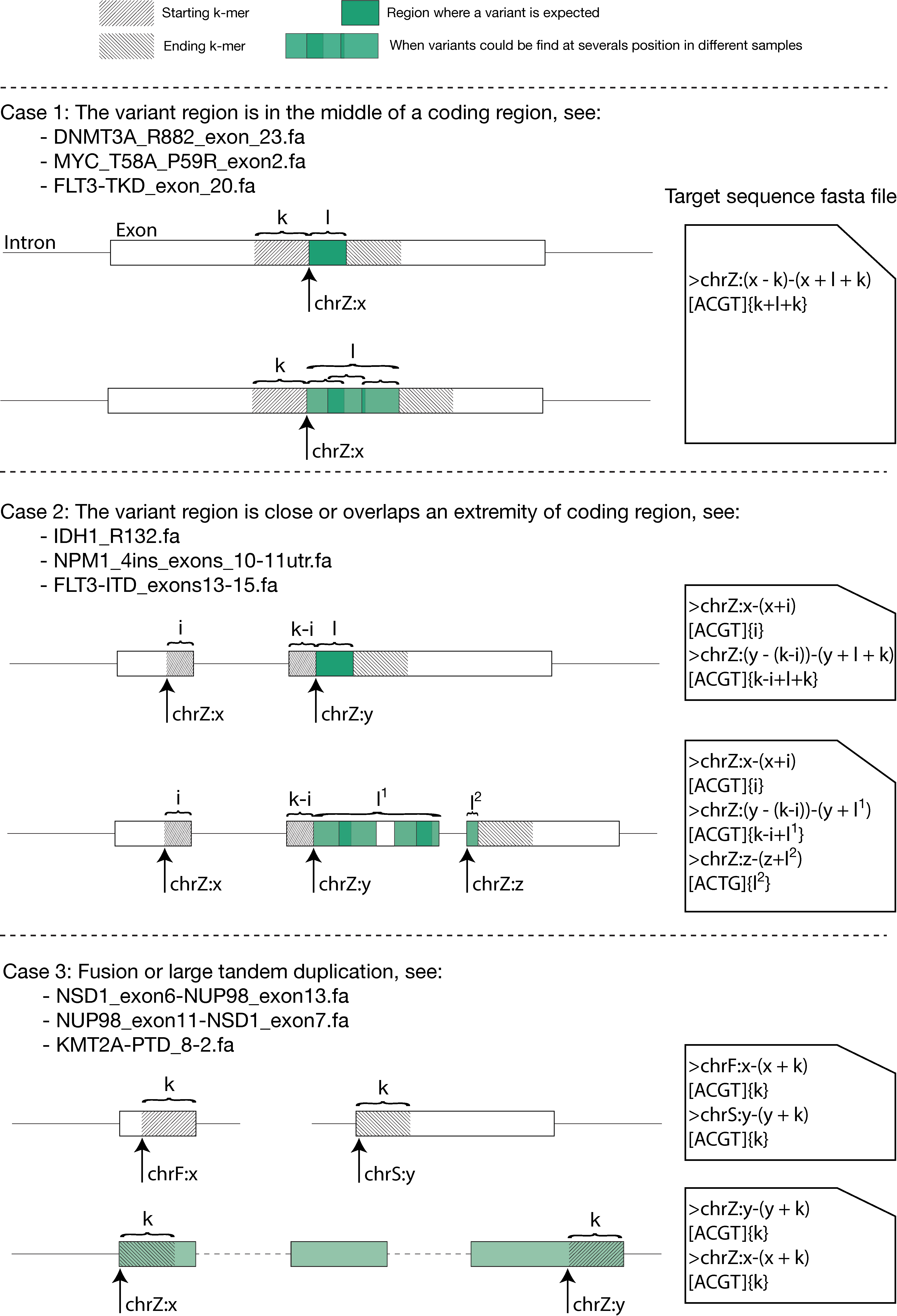
A web portal is available to assist you in the creation of your target sequences (for cases 1 and 2).
km-target: https://bioinfo.iric.ca/km-target/
You could also extract nucleotide sequences from genome using severals methods, two of them are discribe below:
Display help:
$ km -h
  usage: PROG [-h] {find_mutation,find_report,linear_kmin,min_cov} ...

  positional arguments:
    {find_mutation,find_report,linear_kmin,min_cov}
                          sub-command help
      find_mutation       Identify and quantify mutations from a target sequence
                          and a k-mer database.
      find_report         Parse find_mutation output to reformat it in tabulated
                          file more user friendly.
      linear_kmin         Find min k length to decompose a target sequence in a
                          linear graph.
      min_cov             Compute coverage of target sequences.

  optional arguments:
    -h, --help            show this help message and exit
km’s tools overview:
For more detailed documentation click here.
find_mutation:
This is the main tool of km, to identify and quantify mutations from a target sequence and a k-mer jellyfish database.
$ km find_mutation -h
$ km find_mutation [your_fasta_targetSeq] [your_jellyfish_count_table]
$ km find_mutation [your_catalog_directory] [your_jellyfish_count_table]
find_report:
This tool parse find_mutation output to reformat it in more user friendly tabulated file.
$ km find_report -h
$ km find_report -t [your_fasta_targetSeq] [find_mutation_output]
$ km find_mutation [your_fasta_targetSeq] [your_jellyfish_count_table] | km find_report -t [your_fasta_targetSeq]
min_cov:
This tools display some k-mer’s coverage stats of a target sequence and a list of jellyfish database.
$ km min_cov -h
$ km min_cov [your_fasta_targetSeq] [[your_jellyfish_count_table]...]
linear_kmin:
Length of k-mers is a central parameter:
To produce a linear directed graph from the target sequence.
To avoid false-positive. find_mutation shouldn’t be use on jellyfish count table build with k<21 bp (we recommand k=31 bp, by default)
linear_kmin tool is design to give you the minimun k length to allow a decomposition of a target sequence in a linear graph.
$ km linear_kmin -h
$ km linear_kmin [your_catalog_directory]
Runing km on a real sample from downloaded fastq:
In the example folder you can find a script to help you to run a km analysis on one Leucegene sample.
2 maintainers


Metadata
2 maintainers
Release files for km-walk 2.2.2
For a detailed explanation of source distributions (sdists) and built distributions (wheels), please see the package formats documentation.
Source distribution (sdist)
| File | Size | Uploaded | |
|---|---|---|---|
| km_walk-2.2.2.tar.gz | 32.0 kB | Details |
Built distribution (wheel)
| File | Interpreter | ABI | Platform | Reset |
|---|---|---|---|---|
| km_walk-2.2.2-py3-none-any.whl | Python 3 | none | any | Details |
Total release size: 65.4 kB
Release files / km_walk-2.2.2.tar.gz
| Download URL | km_walk-2.2.2.tar.gz |
|---|---|
| Size | 32.0 kB |
| Tags | Source |
|
SHA-256 checksum How to use checksums |
8fe2f4507a6f2a4491201a7aa5c786ca3bc50c9d6ac8ebbdc691592b7c44e80e
|
|
BLAKE2b-256 checksum How to use checksums |
9107224393dde359158ed0a29081347b3c8e0550bcc046d5fa20d726ca31923c
|
| Upload date | |
|
Uploaded using Trusted Publishing? What is trusted publishing? |
No |
| Uploaded via |
twine/5.1.0 CPython/3.12.2
|
Release files / km_walk-2.2.2-py3-none-any.whl
| Download URL | km_walk-2.2.2-py3-none-any.whl |
|---|---|
| Size | 33.5 kB |
| Tags | Python 3 |
|
SHA-256 checksum How to use checksums |
2d80999f3ffd5cd17fd330ca166cc2531ea09f6e08f5be06970765cb028d4cdd
|
|
BLAKE2b-256 checksum How to use checksums |
f6797e9ccf345abfe10c2f8daed772279c3fc089266c97d0078c160d427cc93d
|
| Upload date | |
|
Uploaded using Trusted Publishing? What is trusted publishing? |
No |
| Uploaded via |
twine/5.1.0 CPython/3.12.2
|














