
koalafolio



portfolio for cryptocoins with profit export for tax
Installation with Pip
(opt) install python > 3.7 (check with python –version or python3 –version or python3.x –version)
(opt) install pip (check with pip –version or pip3 –version)
(opt) install microsoft build tools https://visualstudio.microsoft.com/de/visual-cpp-build-tools/
install koalafolio for python 3!: (pip install koalafolio or pip3 install koalafolio or python3.x -m pip install koalafolio)
run koalafolio from terminal (koalafolio or python -m koalafolio)
(opt) update koalafolio (pip install koalafolio –upgrade)
Installation with PipEnv
clone repo
install python > 3.7
install microsoft build tools https://visualstudio.microsoft.com/de/visual-cpp-build-tools/
install pipenv
use pipenv to install dependencies
run gui_root.py
trade import
- import trades from exchanges using their export files
- supported exchanges:
binance (xls)
bitcoinde (csv)
bitfinex (csv)
bitstamp (csv)
bittrex (csv)
coinbase (buys, sells and merchant payouts)
hitbtc (csv)
idex (csv)
kraken (csv)
kuCoin (csv)
okex (csv)
poloniex (csv)
exodus (v1/txs/.json)
others could work as well but not tested
csv template can be created for manual import
- import trades from exchanges using their API:
- supported exchanges:
binance
bitmex
coinbase
coinbasepro
gemini
poloniex
kraken
100+ exchanges supported by ccxt (untested)
- import Rewards from Staking Address
- supported Chains
Cardano (Koios Api)
optional arguments
- -h, --help
show this help message and exit
- -v, --version
show version of koalafolio
- -d DATADIR, --datadir DATADIR
directory where user data should be stored. make sure it is a valid and writable dir
- -u USERNAME, --username USERNAME
username can be used to switch between different portfolios. username will be added to Datafolder (Data_username), so every user has its own settings, trades, styles and so on
portfolio
load all historical prices from CryptoCompare for profit calculation
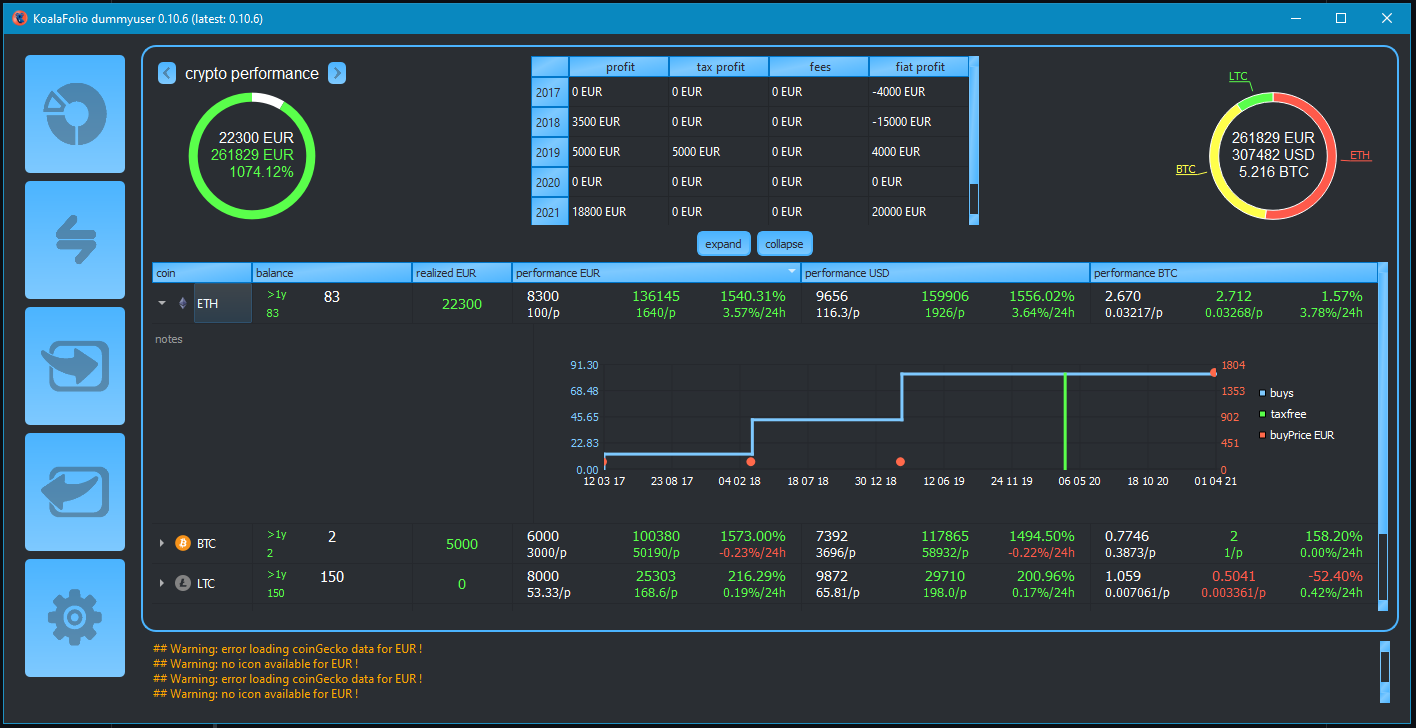
display balance, … of all bought cryptocoins
export
- export profit made in a specific timeframe using FIFO-method (excel)
trades can be splitted in wallets to seperate them for tax calculation. (FIFO for each wallet)
language of export english and german (others can be added in translation.txt)
Credits
Powered by CryptoCompare API
Powered by CoinGecko API
Gui based on Qt
Thanks to ccxt
Checkout Rotki
1 maintainer

Metadata
1 maintainer
Release files for koalafolio 0.13.0
For a detailed explanation of source distributions (sdists) and built distributions (wheels), please see the package formats documentation.
Source distribution (sdist)
| File | Size | Uploaded | Provenance | Actions |
|---|---|---|---|---|
| koalafolio-0.13.0.tar.gz | 379.7 kB | Without provenance | Details for koalafolio-0.13.0.tar.gz |
Built distribution (wheel)
| File | Interpreter | ABI | Platform | Actions Reset |
|---|---|---|---|---|
| koalafolio-0.13.0-py3-none-any.whl | Python 3 | none | any | Details for koalafolio-0.13.0-py3-none-any.whl |
Total release size: 769.2 kB
Release files / koalafolio-0.13.0.tar.gz
| Download URL | koalafolio-0.13.0.tar.gz |
|---|---|
| Size | 379.7 kB |
| Tags | Source |
|
SHA-256 checksum How to use checksums |
dfb0cfa212162a9d92319474f5a2f929c04dd9f7d578d6429eaaac24721f9c32
|
|
BLAKE2b-256 checksum How to use checksums |
ca3ccfeb6ae0659822307d7abe56d3415e6dc36491785dd80367bb640c2f3de9
|
| Upload date | |
|
Uploaded using Trusted Publishing? What is trusted publishing? |
No |
| Uploaded via |
twine/6.2.0 CPython/3.14.4
|
Release files / koalafolio-0.13.0-py3-none-any.whl
| Download URL | koalafolio-0.13.0-py3-none-any.whl |
|---|---|
| Size | 389.5 kB |
| Tags | Python 3 |
|
SHA-256 checksum How to use checksums |
88b0d655c9cc4b5b42553aa3d94a393cdd95d92ca71b5c0a07de57dca4ac7184
|
|
BLAKE2b-256 checksum How to use checksums |
0254c7065b2d93e2f02c10a9ecabe8146a6455997f4dc2566cf7e2f0ccc95a68
|
| Upload date | |
|
Uploaded using Trusted Publishing? What is trusted publishing? |
No |
| Uploaded via |
twine/6.2.0 CPython/3.14.4
|
Security for koalafolio 0.13.0
Provenance
Provenance describes where a file came from. On PyPI, provenance is shared via attestations, which provide a verifiable record of the build or publishing details. View details, limitations and caveats.
No provenance found
None of the files in this release were uploaded with provenance metadata.
A note on package security
PyPI is a repository for distributing packages, not a service for auditing them. While third-party security researchers and our staff do their best to detect and remove malicious packages, PyPI cannot guarantee the quality, security or suitability of any given package.
To learn more about protecting yourself from malicious actors, visit our package security documentation.














